Z-fighting
The flickering stripes you see when two surfaces sit at (almost) the same depth; why depth precision runs out with distance, worked numbers, and the fixes artists actually use in kits, decals and engines.
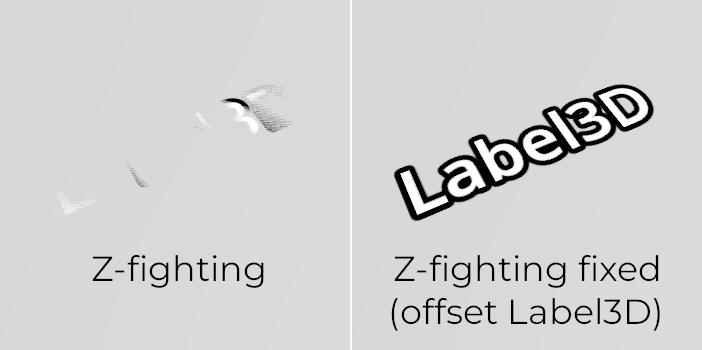
Z-fighting is the flicker of stripes or blotches you see when two surfaces sit at the same, or almost the same, distance from the camera. The depth buffer cannot tell which is in front, so pixels flip between them as the camera moves. Wikipedia notes it is "particularly prevalent with coplanar polygons", two faces lying in the same plane (Wikipedia: Z-fighting).
For environment artists it shows up with overlapping kit pieces, decal geometry such as mesh decals and geodecals, and paper-thin floors.
#Why it happens
Every pixel stores a depth value, and a new surface is drawn only if it is nearer. That value has limited precision, so two surfaces closer than one precision step compare as equal, or swap.
The steps are not evenly spaced. Nathan Reed explains that hardware depth buffers usually store a value "proportional to the reciprocal of world-space depth" (reedbeta.com: Depth Precision Visualized). Depth values bunch up near the camera and spread out far away. Moving the near plane closer makes this much worse, while pushing the far plane further out has little effect (reedbeta.com: Depth Precision Visualized).

#Worked numbers
For a standard 1/z buffer, the smallest depth difference it can resolve at distance z is roughly z² ÷ (near × 2^bits). This follows directly from the 1/z mapping Reed describes (reedbeta.com: Depth Precision Visualized). With a 24-bit buffer and a 10 cm near plane:
| Distance | Smallest resolvable gap |
|---|---|
| 10 m | about 0.06 mm |
| 100 m | about 6 mm |
| 1,000 m | about 60 cm |
Move the near plane in to 1 cm and every value gets ten times worse. For this reason a decal offset that works up close can fail at the far side of a valley. Epic names "long view distances when there is limited depth buffer precision" as a typical failure case for mesh decals (Unreal Engine documentation: Using Mesh Decals in Unreal Engine).
Reed's simulation (near 0.1, far 10,000) found that a floating-point depth buffer with reversed Z, where the near plane maps to 1 and the far plane to 0, produced no indistinguishable or swapped depth pairs at all, against 45% indistinguishable for a standard float buffer, and he concludes it is the best choice for perspective projection (reedbeta.com: Depth Precision Visualized). He also warns it is not a fix for every problem, especially in open worlds with extreme depth ranges (reedbeta.com: Depth Precision Visualized).
#Fixes
In rough order of preference:
- Don't make coplanar faces. Delete hidden duplicates, give floors thickness, and let intersecting pieces cross rather than share a plane.
- Offset the geometry. Push decals and overlays out by a small distance. Epic says decal geometry "needs only to stay in front of the surface you want to affect"; when it is too close, a "small negative offset value pushes the geometry out just enough", which you can do in the mesh or with World Position Offset in the material (Unreal Engine documentation: Using Mesh Decals in Unreal Engine).
- Depth bias in the shader. Unity's ShaderLab
Offset factor, units"Sets the depth bias on the GPU"; factor scales with the polygon's depth slope and units adds a constant offset, and negative values move the surface towards the camera (Unity Manual: ShaderLab command: Offset). Epic notes there is "no easily adjustable DepthBias" for mesh decals in Unreal, which is why they recommend the offset methods above (Unreal Engine documentation: Using Mesh Decals in Unreal Engine). - Raise the near clip plane if the game never puts the camera very close to surfaces. On the Unreal forums, DigitalMage explains that "Your Z resolution is going to be divided between your near clip plane" and the far range, and suggested trying 20 or 30 in Project Settings; the original poster reported that it worked (Epic Developer Community Forums: How do i increase depth buffer precision or…). It affects the whole project, so agree it with your engineers.
- Engine-level remedies. Wikipedia lists higher-precision buffers, reversed or logarithmic Z, screen-space depth offsets and the stencil buffer (Wikipedia: Z-fighting).
#Related terms
mesh decals · geodecals · decals · modular kits · level of detail · grids and metrics
#Further reading and watching
References
- · Z-fighting · Wikipedia · web · accessed 2026-10-21
- · Depth Precision Visualized · reedbeta.com, 2015 · article · accessed 2026-10-21
- · Using Mesh Decals in Unreal Engine · Unreal Engine documentation · docs · accessed 2026-10-21
- · ShaderLab command: Offset · Unity Manual · docs · accessed 2026-10-21
- · How do i increase depth buffer precision or improve zfighting issues? · Epic Developer Community Forums, 2017 · forum · accessed 2026-10-21
Also consulted
- · 3D rendering limitations · Godot Engine documentation · docs · accessed 2026-10-22
Pages that link here
- Modular kits Topic
- Grids and metrics Topic
- Kitbashing Topic
- Mesh decals Topic
- Geodecals Key term
- Pixel depth offset Key term
- Set dressing and art passes Topic
Last updated 2026-10-22