Vertex colours
A colour value stored on each vertex (or face corner) of a mesh; rarely shown as colour in games, mostly used as masks for blending materials, wear, wind and tint.
A vertex colour is a colour value stored directly on a mesh's vertices instead of in a texture. Blender's manual: "Color data can be applied directly to an object's vertices rather than using a texture or a material" (Blender 3.6 Manual: Object Data Properties). Unity lists it among the optional data a mesh can carry per vertex (Unity Manual 2022.2: Anatomy of a mesh).
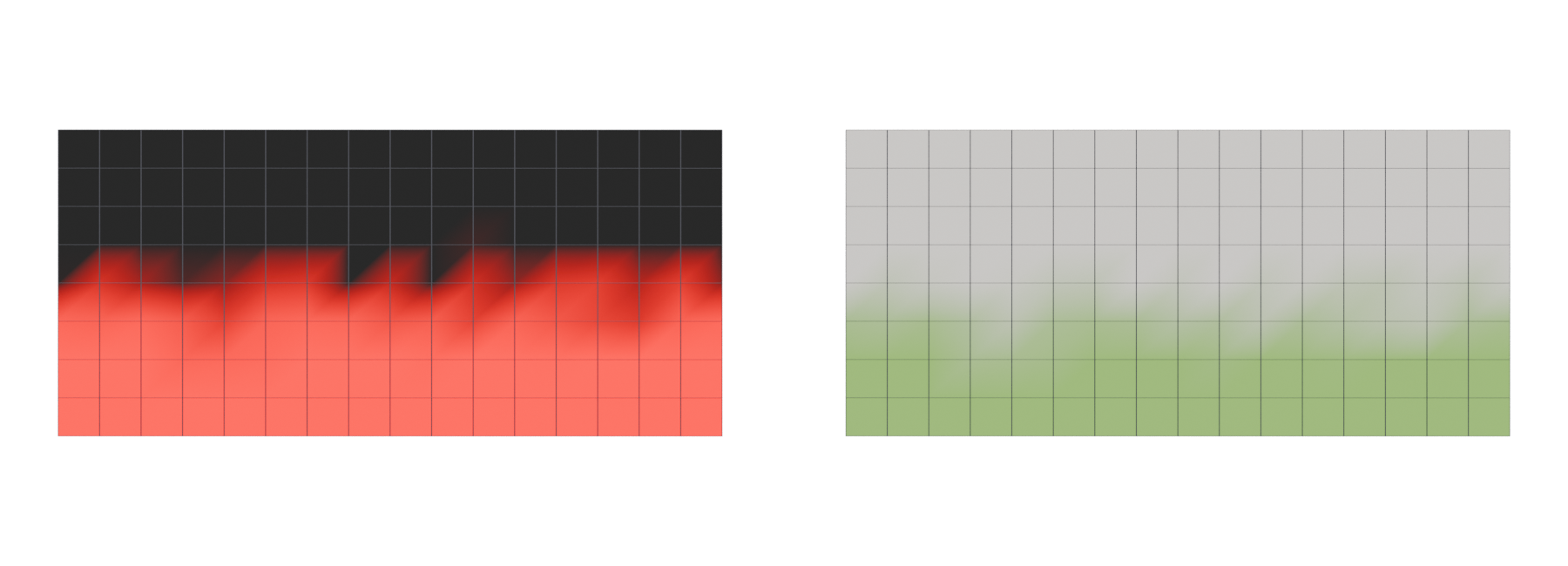
In games, vertex colour is mostly not seen as colour. It is a cheap per-vertex mask that a shader reads to decide where moss grows, where paint is chipped, or which of two materials shows. See vertex painting and blending.
#How it is stored
Each vertex gets a red, green, blue and usually alpha value, and the GPU blends smoothly between vertices across each triangle. glTF says vertex colour values "are interpolated across topology primitives" (Khronos Group: glTF 2.0 Specification).
Blender stores colour as Color Attributes with two choices (Blender 3.6 Manual: Object Data Properties):
- Domain: Vertex (one colour per vertex) or Face Corner (one per corner of each face, so adjacent faces can differ).
- Data type: Color, "RGBA color with floating-point precision", or Byte Color, "RGBA color with 8-bit precision".
A real-time mesh can hold only one value per attribute per vertex. As one Polycount poster put it, "A single vert can only have one normal and one UV coordinate" (Polycount forum: Vertex Count vs Triangle Count), and per-face colour changes split vertices for the same reason (Polycount forum: Vertex Count vs Triangle Count). Hard colour edges cost extra vertices.
#Common uses
| Use | Example | Related page |
|---|---|---|
| Material blending | Up to four layers blended by vertex alpha on The Order: 1886 (Neubelt & Dawn) 2013) | vertex painting and blending, material layers and Substrate, height blending |
| Wear, moss and grime | Moss, damage, efflorescence and mould on Naughty Dog's dam walls (ArtStation) | edge wear, detail maps and macro variation |
| Visible colour or tint | Godot can use vertex colour as albedo (Godot Engine); glTF multiplies it with base colour (Khronos Group) | base colour (albedo) map |
| Baking IDs | Substance's bakers can use vertex colour to build ID maps (Substance 3D Bakers documentation) | baking |
#Colour space
Vertex colours raise the same question as textures: are the numbers sRGB or linear? See colour space: sRGB and linear.
- glTF:
COLOR_0values "are encoded with the linear transfer function, i.e., their values are used as-is", and they multiply the material's base colour (Khronos Group: glTF 2.0 Specification). Components must be in the 0 to 1 range (Khronos Group: glTF 2.0 Specification). - Godot: vertex colours are treated as linear by default; the
vertex_color_is_srgboption converts them from sRGB when needed (Godot Engine: BaseMaterial3D). To use them as colour at all, enablevertex_color_use_as_albedo(Godot Engine: BaseMaterial3D).
#Common mistakes
- Too few vertices to paint on. Add a few edge loops where blends should happen.
- Lost on export. Check that your exporter writes the colour set you painted. Blender 4.5 added a glTF export option for named vertex colours (Blender Developer Documentation: Blender 4.5 LTS: Pipeline & I/O).
- Wrong colour space. A mask that looks too strong or too weak may be read as sRGB in one tool and linear in another (Khronos Group: glTF 2.0 Specification; Godot Engine: BaseMaterial3D).
- Default white or black. An unpainted mesh may import with all channels at 1 or 0, so every blend is fully on or off.
Related: vertex, anatomy of a polygon mesh, vertex painting and blending, material layers and Substrate, channel packing.
#Further reading and watching
COLOR_0 is stored and used. Advanced, free.References
- · Object Data Properties (Color Attributes) · Blender 3.6 Manual, 2023 · docs · accessed 2026-10-21
- · Anatomy of a mesh · Unity Manual 2022.2, 2022 · docs · accessed 2026-10-20
- · glTF 2.0 Specification · Khronos Group (GitHub) · docs · accessed 2026-10-21
- Vertex Count vs Triangle Count · Polycount forum, 2014 · forum · accessed 2026-10-20
- · Brick and Concrete Generator · ArtStation, 2023 · article · accessed 2026-10-21
- · Crafting a Next-Gen Material Pipeline for The Order: 1886 · SIGGRAPH 2013 Physically Based Shading course notes, 2013 · paper · accessed 2026-10-21
- · BaseMaterial3D (class reference source) · Godot Engine (GitHub), 2026 · docs · accessed 2026-10-21
- · Color Map from Mesh · Substance 3D Bakers documentation · docs · accessed 2026-10-21
- · Blender 4.5 LTS: Pipeline & I/O · Blender Developer Documentation (release notes), 2025 · docs · accessed 2026-10-20
Pages that link here
- Real-time vs. offline rendering Topic
- Anatomy of a polygon mesh Topic
- Vertex Key term
- Edge Key term
- glTF Key term
- Bevel shaders Key term
- Weighted (custom) normals Topic
- Ways to texture an environment Overview
- Geodecals Key term
- Edge wear Key term
- Vertex painting and blending Topic
- Height blending Key term
- Breaking up tiling Topic
- Shaders for artists Topic
- Material layers and Substrate Topic
- Wind and world position offset Key term
Last updated 2026-10-22