Roughness map
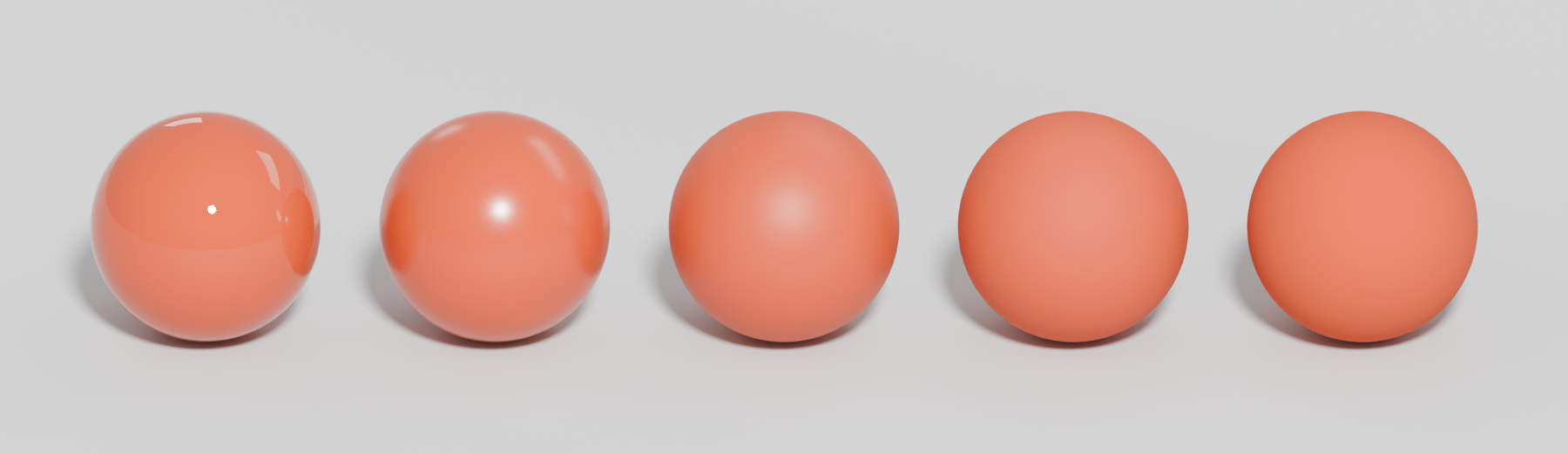
A greyscale texture that says how smooth or rough a surface is at a scale too small to model; black is mirror-smooth, white fully matte. It often carries most of the wear and surface variation in a PBR material.
A roughness map is a greyscale texture that tells the shader how rough or smooth each point of a surface is. Epic: "The Roughness input controls how rough or smooth a Material's surface is"; 0 gives a mirror-like reflection and 1 a matte, diffuse look (Unreal Engine documentation: Physically Based Materials in Unreal Engine). In the texture, black is smooth and white is rough (Adobe Substance 3D: The PBR Guide – Part 2).
#What it represents
Roughness describes microfacets, surface detail far smaller than a pixel. Adobe calls it "sub-texel geometric detail" (Adobe Substance 3D: The PBR Guide – Part 1). When the tiny facets are aligned, light reflects in one direction and the highlight is sharp; when they are scattered, the reflection spreads and blurs (Marmoset: Basic Theory of Physically-Based Rendering). Because of energy conservation, a wider highlight is also dimmer. See physically based rendering for the microfacet diagram.

#Why it matters
Adobe calls roughness "the most creative map" (Adobe Substance 3D: The PBR Guide – Part 2), and in environment art it often carries most of a surface's character. Fingerprints on glass, a worn path through a polished floor, oil on concrete, rain on a street: none of these change colour much, but all of them change roughness.
Epic chose roughness over gloss for Unreal 4 because it is "very clear in its meaning, whereas gloss always needs explaining" (Karis 2013).
#Roughness, gloss and smoothness
These are the same property with the scale flipped:
- Roughness: 0 smooth, 1 rough. Unreal, Godot, glTF, Substance.
- Glossiness: the inverse, white is smooth; used in the specular/gloss workflow (Adobe Substance 3D: The PBR Guide – Part 2).
- Smoothness: Unity's name for gloss. HDRP stores it in the mask map's alpha (High Definition Render Pipeline manual 17.0: Mask map and detail map); URP reads it from the alpha of the metallic or base map (Unity Manual: Lit shader material Inspector window…).
Converting between them is a simple invert (1 − value). Forgetting to invert is a common export mistake.
#Example
#Common mistakes
- A flat roughness value. A single number for the whole material looks like plastic. Even subtle noise helps.
- Painting roughness from the base colour. Dark paint is not automatically shinier; roughness and colour are separate properties.
- Imported as sRGB. Roughness is linear data (Adobe Substance 3D: The PBR Guide – Part 2); in sRGB every mid value shifts.
- Forgetting to invert between gloss/smoothness and roughness.
- Ignoring specular aliasing. Fine normal detail on a smooth surface sparkles at a distance. Godot can filter roughness from the normal map on import, which "can help decrease specular aliasing slightly" (Godot documentation: Importing images).
- Using Specular = 0 to get a matte look. Epic: use high roughness instead (Unreal Engine documentation: Physically Based Materials in Unreal Engine).
#In different tools
- Unreal Engine: Roughness input; usually the green channel of an ORM texture. See channel packing.
- Unity: Smoothness, not roughness. HDRP mask map alpha (High Definition Render Pipeline manual 17.0: Mask map and detail map); URP from the metallic or base map alpha (Unity Manual: Lit shader material Inspector window…).
- Godot: Roughness; 0 is "a perfect mirror", 1 "completely blurs the reflection" (Godot documentation: Standard Material 3D and ORM Material 3D). Can be read from any channel.
#Related terms
physically based rendering · texture maps explained · metallic map · base colour (albedo) map · channel packing · normal map
#Further reading and watching
References
- · Physically Based Materials in Unreal Engine · Unreal Engine documentation · docs · accessed 2026-10-21
- · The PBR Guide – Part 2 · Adobe Substance 3D (Adobe Learn) · article · accessed 2026-10-21
- · The PBR Guide – Part 1 · Adobe Substance 3D (Adobe Learn) · article · accessed 2026-10-21
- · Basic Theory of Physically-Based Rendering · Marmoset, 2015 · article · accessed 2026-10-21
- · Real Shading in Unreal Engine 4 (course notes) · SIGGRAPH 2013 course: Physically Based Shading in Theory and Practice, 2013 · paper · accessed 2026-10-21
- · Mask map and detail map (HDRP) · High Definition Render Pipeline manual 17.0 · docs · accessed 2026-10-21
- · Lit shader material Inspector window reference for URP · Unity Manual (6000.2) · docs · accessed 2026-10-21
- · Game environments – Part C: making wet environments · fxguide · article · accessed 2026-10-21
- · Importing images (documentation source) · Godot documentation (GitHub) · docs · accessed 2026-10-21
- · Standard Material 3D and ORM Material 3D (documentation source) · Godot documentation (GitHub) · docs · accessed 2026-10-21
Pages that link here
- The game asset pipeline Topic
- glTF Key term
- Texturing and material software Reference
- Game engines Reference
- Showcase (warehouse) map Key term
- Physically based rendering (PBR) Topic
- Colour space: sRGB and linear Key term
- Texture maps explained Reference
- Base colour (albedo) map Key term
- Metallic map Key term
- Channel packing (ORM) Key term
- Specular aliasing Key term
- Unique texturing (texture painting) Topic
- Cross-polarisation Key term
- Naming conventions Reference
- Making (and reading) an art breakdown Guide
- Exercise: your first game-ready prop Exercise
Last updated 2026-10-22