Topology
How a mesh's vertices, edges and faces are connected; "good" topology depends on whether the mesh will deform, be subdivided, be baked or be rendered as it is.
Topology is the way a mesh's vertices, edges and faces are connected: which vertex links to which, how faces are arranged, and where loops run. Two meshes can have the same shape and completely different topology.
There is no single "good topology". A layout that suits an animated face can be wasteful on a static crate, and a well-made low-poly crate would make a poor subdivision cage. Good topology is topology that suits the mesh's job.
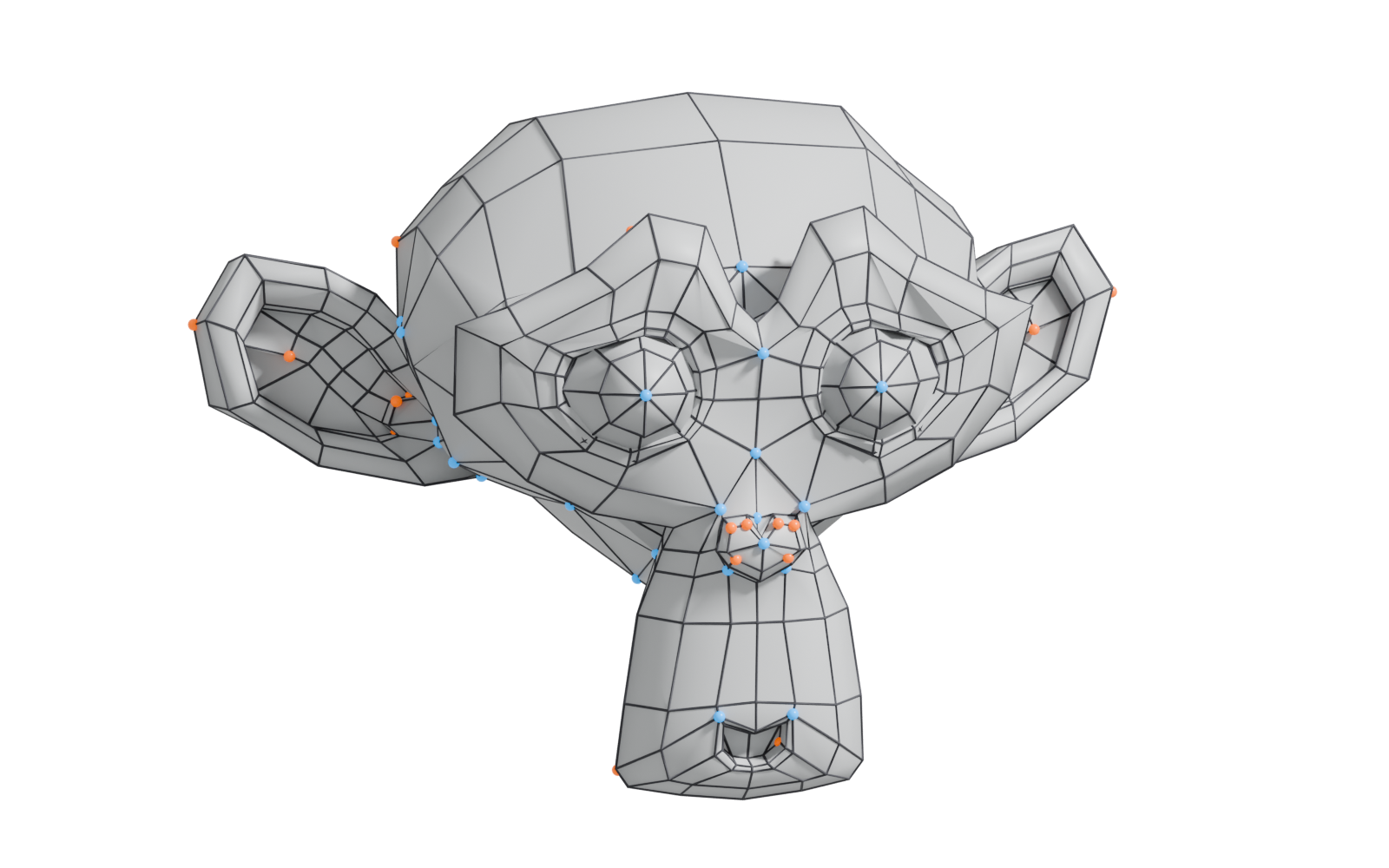
#Shape versus connectivity
Think of topology as the wiring diagram underneath the shape. Moving a vertex changes the shape but not the topology. Adding a loop cut, merging vertices or rotating an edge changes the topology.
That is why "fixing topology" is often a separate step. Retopology is defined as modifying or recreating a mesh "to obtain a cleaner layout" while keeping nearly the same shape (Wikipedia: Retopology).
Key topology concepts all have their own pages:
- Edge loops and edge rings: chains of edges that run through quads.
- Poles: vertices where three, five or more edges meet. Loops stop at poles "because there is no unique way to continue a loop from a pole" (Blender Manual: Structure).
- edge flow: how loops follow the form.
- Face types: triangles, quads and n-gons.
- Manifold versus non-manifold geometry.

#Topology requirements by mesh type
#Deforming meshes (characters, cloth, vehicles with moving parts)
This is where topology rules are strictest. Edge loops are described in the Blender Manual as "a prerequisite for organic character animation", following the contours and deformation lines of skin and muscle and becoming denser where the mesh bends more, such as shoulders and knees (Blender Manual: Structure). Pepribal's Blender reference says loops "should be placed following the deformation lines of the surfaces" (BlenderWiki: Mesh topology appendix).
On Polycount, musashidan describes a head's poles as "key to how the topology deforms", and notes that areas such as the back of the head "don't directly deform", so they matter less (Polycount: Head Topology question?). Even on characters, topology effort is spent where movement happens.
#Subdivision cages
Catmull–Clark subdivision behaves best on regular grids of quads. OpenSubdiv calls everything else "irregular" and says minimising irregularities is advantageous (OpenSubdiv documentation: Subdivision Surfaces). It warns that "an arbitrary polygonal mesh will often not make a good subdivision cage, regardless of how good that polygonal mesh appears" (OpenSubdiv documentation: Subdivision Surfaces). See subdivision surface modeling.
#High-poly bake sources
A high-poly mesh for baking only has to look right. FrankPolygon's view on Polycount: a high-poly that subdivides cleanly and bakes correctly is acceptable, and smoothing errors are fine if they stay where they do not affect the shape (Polycount: Need opinion on what a good topology is). Sculpts and boolean meshes with chaotic topology can bake well.
#Real-time static props
For a static low-poly, the priorities change to triangle count, vertex count, clean shading and good UVs.
- Use the fewest edges that hold the shape. FrankPolygon advises "the minimum amount of geometry required to accurately represent the shapes" and removing loops that do not add to the shape (Polycount: Need opinion on what a good topology is).
- Triangulate consistently. Engines draw triangles. Marmoset recommends triangulating before baking because "the internal edges of quads and n-gons may vary between applications" (Marmoset: The Toolbag Baking Tutorial); Simon Péloquin gives the same advice for baking and export (80 Level: Best Practices for Hard Surface Normal Map…).
- Count vertices, not just faces. Hard edges and UV seams split vertices on the GPU. Digital Extremes' Warframe guide shows an example where a mesh that looks like "a lot more geo" actually gives the GPU fewer triangles (Warframe Steam Workshop guide: Normal Map Baking). See smoothing, hard edges and smoothing groups.
#Nanite and other virtualised geometry
With Unreal's Nanite, meshes are still triangle meshes, but dense ones become practical: the documentation describes importing "ZBrush sculpts and photogrammetry scans" directly (Unreal Engine documentation: Nanite Virtualized Geometry). Here topology matters less for performance per triangle, though UVs, materials and memory still matter. The Nanite documentation itself makes no specific claims about topology beyond describing Nanite meshes as triangles (Unreal Engine documentation: Nanite Virtualized Geometry).
#Differing views on topology
#Examples
#Common mistakes
- Ignoring vertex splits. A mesh with few faces but many UV seams and hard edges can cost more vertices than a denser mesh with fewer splits (Warframe Steam Workshop guide: Normal Map Baking).
- Leaving triangulation to chance. Triangulate your low-poly before baking and keep that triangulation for export (Marmoset: The Toolbag Baking Tutorial).
- Poles on curved, shiny surfaces of a subdivision mesh. They cause visible artefacts (OpenSubdiv documentation: Subdivision Surfaces). See pole.
- Non-manifold geometry. Internal faces, zero-area faces and edges shared by more than two faces break many tools. See manifold and non-manifold geometry.
#Further reading and watching
References
- · Retopology · Wikipedia · web · accessed 2026-10-20
- · Structure · Blender Manual (2.93), 2021 · docs · accessed 2026-10-20
- · Mesh topology appendix (User:Pepribal/Ref/Appendices/MeshTopo) · BlenderWiki (archived user pages) · web · accessed 2026-10-20
- · Head Topology question? · Polycount, 2019 · forum · accessed 2026-10-20
- · Subdivision Surfaces · OpenSubdiv documentation (source file on GitHub) · docs · accessed 2026-10-20
- · Need opinion on what a good topology is · Polycount, 2020 · forum · accessed 2026-10-20
- · The Toolbag Baking Tutorial · Marmoset, 2017 · article · accessed 2026-10-20
- · Best Practices for Hard Surface Normal Map Baking · 80 Level, 2018 · article · accessed 2026-10-20
- · Normal Map Baking · Warframe Steam Workshop guide · docs · accessed 2026-10-20
- · Nanite Virtualized Geometry · Unreal Engine documentation · docs · accessed 2026-10-20
- · Super-handy primer on Edge Poles · CG Cookie, 2023 · forum · accessed 2026-10-20
- · Face Topology [Breakdown Guide] (page 2) · Polycount, 2013 · forum · accessed 2026-10-20
- · Why Does God of War's 3D Environment Art Looks Like This? · YouTube, 2024 · video · accessed 2026-10-21
- · Why Does Naughty Dog's 3D Environment Art Looks Like This? · YouTube, 2024 · video · accessed 2026-10-21
- · "The Last of Us: Part I" bill-town-building-wireframe · ArtStation · web · accessed 2026-10-21
- · God of War 3 - Environment Art · ArtStation · web · accessed 2026-10-21
Pages that link here
- How to use this handbook Guide
- Anatomy of a polygon mesh Topic
- Vertex Key term
- Quad Key term
- N-gon Key term
- Manifold and non-manifold geometry Key term
- Degenerate geometry Key term
- 3D file formats Reference
- Choosing tools: an overview Overview
- UV, retopology and baking tools Reference
- AI-assisted 3D generation Topic
- Ways to build a 3D model Overview
- Box modeling Topic
- Subdivision surface modeling Topic
- Control cage and limit surface Key term
- CAD and NURBS modeling for games Topic
- Pole Key term
- Edge loop Key term
- Edge ring Key term
- Face loop Key term
- Support loop (holding edge) Key term
- Booleans Topic
- The mid-poly workflow Topic
- Floaters Key term
- The high-to-low workflow Topic
- Retopology Topic
- Decimation Key term
- Digital sculpting Topic
- Multiresolution and subdivision levels Key term
- Base meshes for sculpting Key term
- Remeshing (DynaMesh, voxel remesh) Key term
- UV mapping Topic
- Vertex painting and blending Topic
- Making (and reading) an art breakdown Guide
- A 12-month learning roadmap Guide
- Essential talks and videos Reference
- Game art breakdowns: a curated library Reference
Last updated 2026-10-22