Metallic map
A greyscale mask that tells a PBR shader which pixels are metal (white) and which are not (black); it should be almost entirely pure black and white, with grey only for dirt, oxidation and filtered edges.
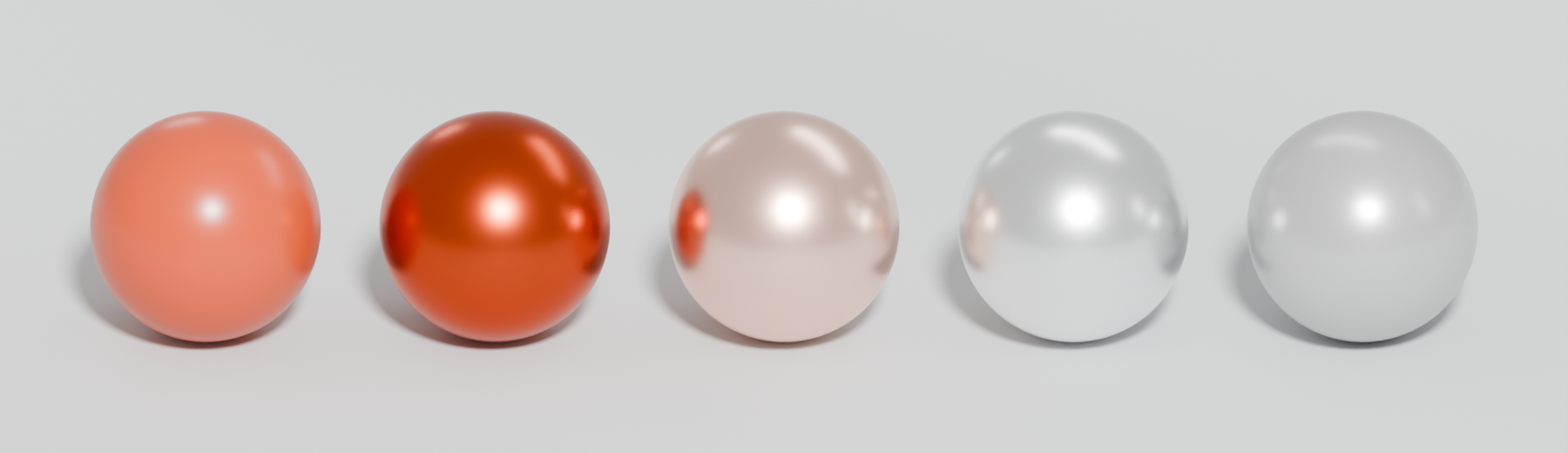
A metallic map (metalness map) is a greyscale texture that tells a physically based rendering shader whether each pixel is metal. Adobe: "0.0 (black – 0 sRGB) represents non-metal and 1.0 (white – 255 sRGB) represents raw metal" (Adobe Substance 3D: The PBR Guide – Part 2). It works more like a switch than a slider.
#Why it matters
Metals and non-metals reflect light in different ways. Non-metals show diffuse colour with a weak, uncoloured reflection; metals show no diffuse light and a strong, sometimes tinted reflection (Marmoset: Basic Theory of Physically-Based Rendering). Their reflectance straight on differs too: 2–5% for common dielectrics, 50–100% for conductors (Adobe Substance 3D: The PBR Guide – Part 1).
The metallic map switches between these two behaviours, and it also changes what the base colour (albedo) map means: diffuse colour where metallic is 0, reflection colour where it is 1. Epic adopted the parameter for Unreal 4 because it spares artists from needing to understand "dielectric and conductor reflectance, so less room for error" (Karis 2013).
#Black, white and grey values
Epic: "In most cases, you should treat Metallic as a binary property", and for "pure surfaces, such as pure metal, pure stone, pure plastic" use 0 or 1 (Unreal Engine documentation: Physically Based Materials in Unreal Engine). Adobe agrees the map is "often binary: black or white, metal or non-metal" (Adobe Substance 3D: The PBR Guide – Part 2).
Grey values have legitimate uses:
- Thin non-metal layers on metal: dust, dirt, grime or oxidation. Adobe notes the map "may not always be binary" when a thin dielectric layer such as dirt is present (Adobe Substance 3D: The PBR Guide – Part 2). Epic lists "corroded, dusty, or rusty metals" as the case for partial values (Unreal Engine documentation: Physically Based Materials in Unreal Engine).
- Filtered transitions: where a sharp black-white edge is scaled down by mipmaps or texture filtering, grey pixels appear automatically.
If you do use grey below about 235 sRGB, Adobe advises lowering the raw metal reflectance in the base colour to compensate (Adobe Substance 3D: The PBR Guide – Part 2).

#Example
#Common mistakes
- Dark base colour on metal. Metal pixels need bright base colour; dark values plus metallic = 1 read as black plastic (Adobe Substance 3D: The PBR Guide – Part 2).
- Painted, plastic-coated or rusted metal set to 1. What matters is the surface you see, not what is underneath.
- Edge fringes. Metal/roughness produces a white fringe where metal meets non-metal, and resolution affects how visible it is (Adobe Substance 3D: The PBR Guide – Part 2). On Polycount, PolyHertz flagged these "artifacts along the transition line between metals and non-metals" (Polycount: Is there a reason NOT to use a metalness…). Keep metal areas at a sensible texel density and avoid tiny metal specks.
- Imported as sRGB. Metallic is linear data (Adobe Substance 3D: The PBR Guide – Part 2).
#In different tools
- Unreal Engine: Metallic input; usually the blue channel of an ORM texture. See channel packing.
- Unity: HDRP mask map red channel (High Definition Render Pipeline manual 17.0: Mask map and detail map); URP Metallic Map, "available only if you set Workflow Mode to Metallic" (Unity Manual: Lit shader material Inspector window…).
- Godot: Metallic, which Godot uses "due to its simplicity" (Godot documentation: Standard Material 3D and ORM Material 3D); ORM blue channel in ORMMaterial3D.
#Related terms
physically based rendering · base colour (albedo) map · roughness map · texture maps explained · channel packing
#Further reading and watching
References
- · The PBR Guide – Part 2 · Adobe Substance 3D (Adobe Learn) · article · accessed 2026-10-21
- · Basic Theory of Physically-Based Rendering · Marmoset, 2015 · article · accessed 2026-10-21
- · The PBR Guide – Part 1 · Adobe Substance 3D (Adobe Learn) · article · accessed 2026-10-21
- · Real Shading in Unreal Engine 4 (course notes) · SIGGRAPH 2013 course: Physically Based Shading in Theory and Practice, 2013 · paper · accessed 2026-10-21
- · Physically Based Materials in Unreal Engine · Unreal Engine documentation · docs · accessed 2026-10-21
- · Is there a reason NOT to use a metalness workflow in PBR? · Polycount, 2015 · forum · accessed 2026-10-21
- · Mask map and detail map (HDRP) · High Definition Render Pipeline manual 17.0 · docs · accessed 2026-10-21
- · Lit shader material Inspector window reference for URP · Unity Manual (6000.2) · docs · accessed 2026-10-21
- · Standard Material 3D and ORM Material 3D (documentation source) · Godot documentation (GitHub) · docs · accessed 2026-10-21
Pages that link here
- The game asset pipeline Topic
- glTF Key term
- Texturing and material software Reference
- Physically based rendering (PBR) Topic
- Colour space: sRGB and linear Key term
- Texture maps explained Reference
- Base colour (albedo) map Key term
- Roughness map Key term
- Channel packing (ORM) Key term
- Unique texturing (texture painting) Topic
- Exercise: your first game-ready prop Exercise
Last updated 2026-10-22