Normals (face and vertex)
Directions perpendicular to a surface that tell the renderer which way it faces. Face normals decide front and back; vertex normals decide how light shades across the surface.
A normal is "a direction or line that is perpendicular to something" (Blender 3.1 Manual: Mesh Structure). In a mesh, normals tell the renderer which way the surface faces. Face normals decide which side of a face is the front. Vertex normals decide how light falls across the surface, which is what makes a low-poly model look smooth or faceted.
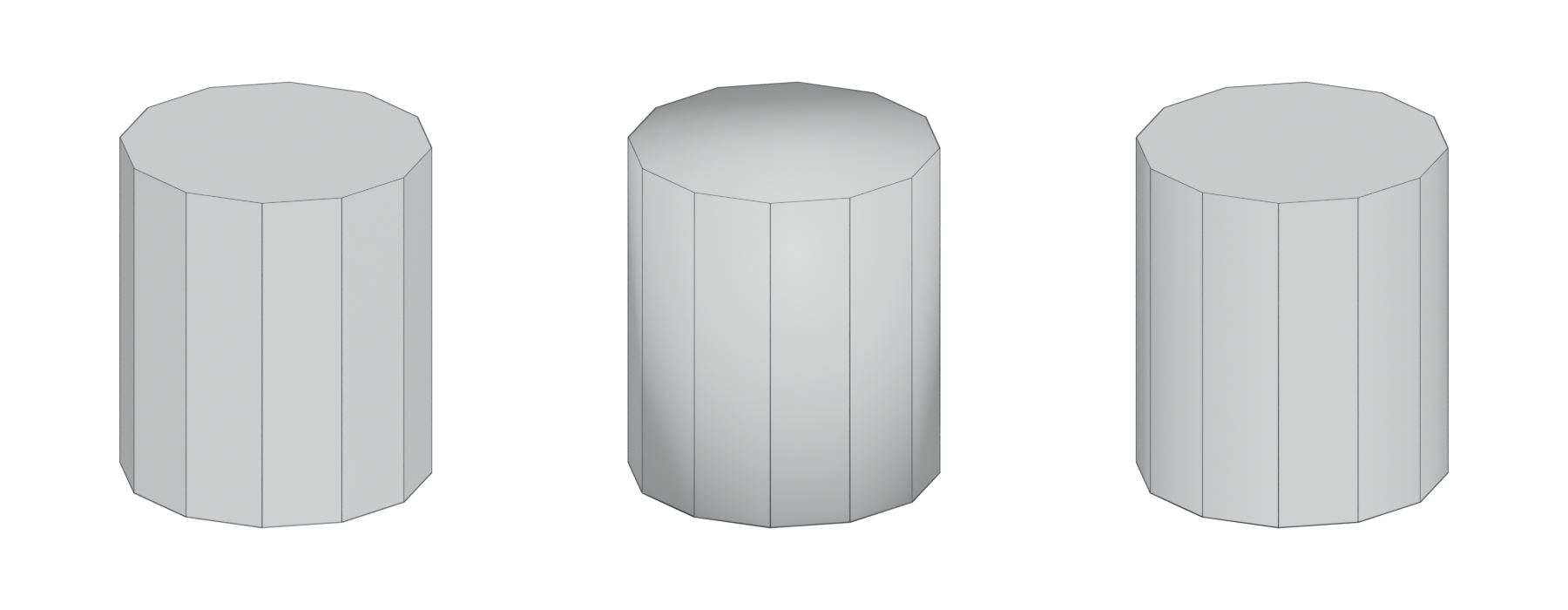
#Face normals: front and back
Every face has a front and a back. Which side is the front comes from the order of its vertices, its winding order (OpenGL Wiki: Face Culling). The face normal points out of the front.
Renderers use this to skip faces that point away from the camera. This back-face culling removes "non-visible triangles of closed surfaces" before shading (OpenGL Wiki: Face Culling). On a cube you can never see more than three faces at once, so culling can save "more than 50%" of the pixel-shading work (LearnOpenGL: Face culling).
A flipped normal is a face whose front points the wrong way, usually inwards. With culling on it disappears and you see through the model. Blender's Face Orientation overlay shows fronts "in blue" and backs "in red" (Blender 3.5 Manual: Viewport Overlays), so a correct closed model is blue all over. Blender's 3D Print Toolbox also flags "Bad Contiguous" edges, where a face's normal points against its neighbours, and its Make Manifold clean-up tries to fix bad normals (Blender 3.6 Manual: 3D Print Toolbox).
#Vertex normals and shading
Lighting is calculated using normals. Unity's importer only lets you drop normals if a mesh "is neither normal mapped nor affected by realtime lighting" (Unity Manual 2018.2: Model tab). The renderer reads the normal stored at each vertex and interpolates between them across each triangle; writing on Blender's developer mailing list, Morten Mikkelsen describes the same for tangents as the "interpolated tangent space" (bf-committers mailing list: [Bf-committers] Triangulate modifier). So the vertex normals, not the face shape, decide how smooth a surface looks.
There are two basic choices at every corner.
- Averaged (smooth) normals. The vertex has one normal, pointing roughly halfway between the faces around it. Light changes gradually across the edge, so the edge looks rounded. This is a soft edge.
- Split (hard) normals. The vertex is duplicated, and each copy gets the normal of its own face. Light changes abruptly at the edge, so it looks crisp. This is a hard edge.

Split normals cost vertices. A cube with all edges hard imported into Unreal as 24 vertices; smoothing the faces round one corner brought it to 22 (Unreal Engine Forums: Vertex Count & Light Map Vertex Count). Unity's Smoothing Angle setting likewise controls "whether vertices are split for hard edges" (Unity Manual 2018.2: Model tab). See smoothing, hard edges and smoothing groups for how to choose which edges to split.
#Custom normals
Normals do not have to follow the geometry. You can point them in other directions to fix shading. Blender's manual says such custom split normals are "mostly used in game development" and can be stored "per face corners, per a set of neighbor face corners, or per vertex" (Blender 3.1 Manual: Mesh Structure). When a mesh has custom normals, "they always supersede the default ones" calculated from smoothing settings (Blender 3.1 Manual: Mesh Structure).
Custom normals only reach the engine if you export and import them. Blender's FBX exporter suggests choosing "Normals Only" smoothing if the importer "understand[s] split normals" (Blender 3.3 Python API Documentation: Export Scene Operators). In Unreal, the Normal Import Method decides whether normals come from the file:
- Compute Normals: "Smoothing group and normal info is discarded from the FBX info" (Unreal Engine Documentation: FBX Import Options Reference).
- Import Normals: normals come from the file, tangents are computed by the engine (Unreal Engine Documentation: FBX Import Options Reference).
- Import Normals and Tangents: both come from the file and "nothing is computed by the engine" (Unreal Engine Documentation: FBX Import Options Reference).
Unity offers Import, Calculate (from a Smoothing Angle) or None (Unity Manual 2018.2: Model tab).
#Normals and normal maps
A normal map stores normal directions in a texture so a low-poly surface can light like a detailed one. It is applied on top of the vertex normals, using the tangent space and MikkTSpace built from them. If the vertex normals change after baking, the map no longer matches. On Polycount, the artist posting as EarthQuake warned that "if you triangulate your mesh in Maya after you bake, the mesh normals change", and stressed that "you've really got to make sure your entire pipeline is synced up" (Polycount forum: Official handplane support thread). See triangulation.
#Common mistakes
- Flipped faces. Check with a face-orientation view before every export (Blender 3.5 Manual: Viewport Overlays).
- Setting Compute Normals in the engine after painstakingly editing normals. Unreal will throw your smoothing and custom normals away (Unreal Engine Documentation: FBX Import Options Reference).
- Smoothing everything on a hard-surface prop without checking. Look at large flat faces under a moving light. If they shade unevenly, use hard edges, bevels or weighted (custom) normals.
- Changing normals after baking. Re-bake, or keep the bake mesh and the game mesh identical. See fixing baking artefacts.
#In different tools
- Blender. Overlays can draw vertex normals, split normals and face normals as lines, and Face Orientation colours fronts and backs (Blender 3.5 Manual: Viewport Overlays).
- Unreal Engine. The Static Mesh Editor's Show menu toggles "display of vertex normals" and of vertex tangents (Unreal Engine Documentation: Static Mesh Editor UI).
- Unity. Normals and tangents are chosen per model in the import settings (Unity Manual 2018.2: Model tab).
#Related terms
smoothing, hard edges and smoothing groups · weighted (custom) normals · normal map · tangent space and MikkTSpace · face · vertex · baking
#Further reading and watching
References
- · Mesh Structure · Blender 3.1 Manual, 2022 · docs · accessed 2026-10-20
- · Face Culling · OpenGL Wiki · docs · accessed 2026-10-20
- · Face culling · LearnOpenGL · web · accessed 2026-10-20
- · Viewport Overlays · Blender 3.5 Manual, 2023 · docs · accessed 2026-10-20
- · 3D Print Toolbox · Blender 3.6 Manual, 2023 · docs · accessed 2026-10-20
- · Model tab (FBX Importer settings) · Unity Manual 2018.2, 2018 · docs · accessed 2026-10-20
- · [Bf-committers] Triangulate modifier · bf-committers mailing list, 2012 · forum · accessed 2026-10-20
- Vertex Count & Light Map Vertex Count · Unreal Engine Forums, 2014 · forum · accessed 2026-10-20
- · Export Scene Operators (bpy.ops.export_scene.fbx) · Blender 3.3 Python API Documentation, 2022 · docs · accessed 2026-10-20
- · FBX Import Options Reference · Unreal Engine Documentation · docs · accessed 2026-10-20
- Official handplane support thread · Polycount forum, 2013 · forum · accessed 2026-10-20
- · Static Mesh Editor UI · Unreal Engine Documentation · docs · accessed 2026-10-20
Pages that link here
- Anatomy of a polygon mesh Topic
- Vertex Key term
- Edge Key term
- Face (polygon) Key term
- Triangle Key term
- Winding order and backface culling Key term
- Manifold and non-manifold geometry Key term
- Degenerate geometry Key term
- Triangulation Key term
- Topology Topic
- Smoothing, hard edges and smoothing groups Topic
- Hard-surface modeling Topic
- Booleans Topic
- Bevels and chamfers Topic
- Weighted (custom) normals Topic
- The mid-poly workflow Topic
- The high-to-low workflow Topic
- Bake cage Key term
- Tangent space and MikkTSpace Key term
- Fixing baking artefacts Guide
- Normal map Key term
- A 12-month learning roadmap Guide
- Essential talks and videos Reference
Last updated 2026-10-22