Multiresolution and subdivision levels
Storing a sculpt as a stack of subdivision levels, so you can make broad changes on a light version of the mesh and fine detail on a dense one, and step between them without losing either.
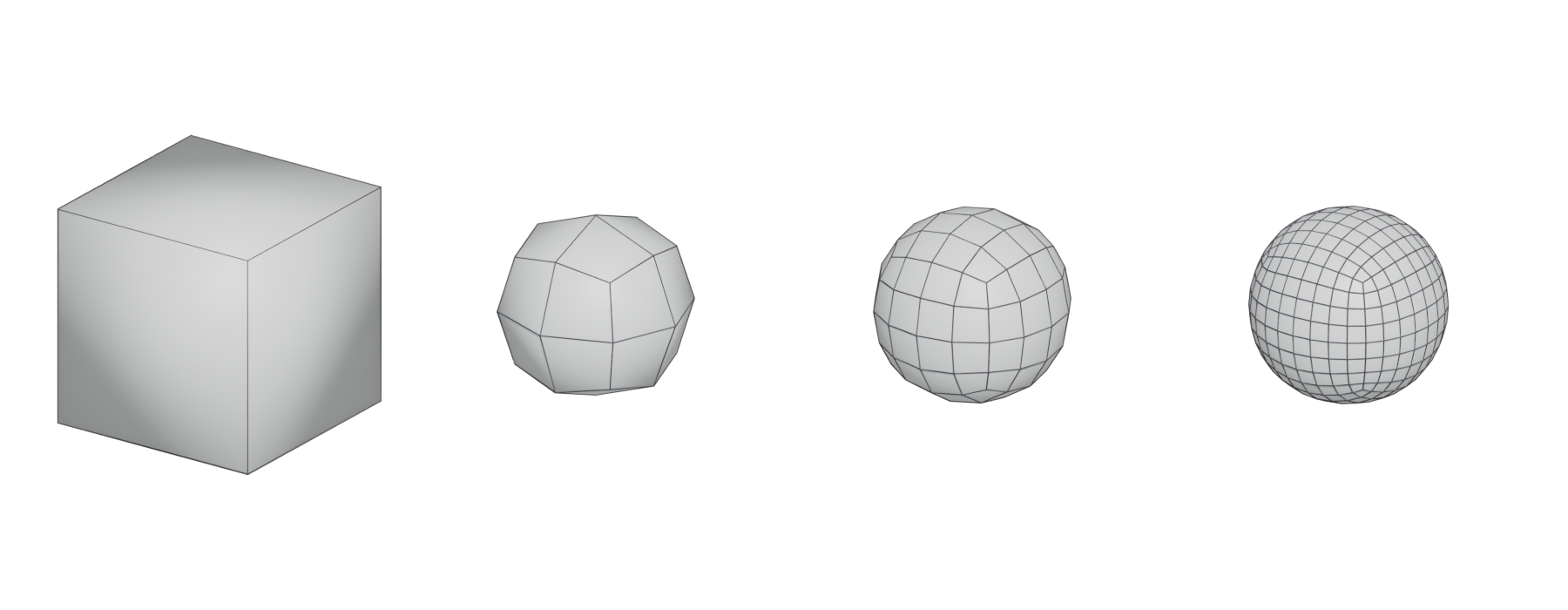
Multiresolution (in ZBrush, subdivision levels) stores a sculpt as a stack of versions of the same mesh, each one subdivided once more than the last. You can step down to a light level to change the big shape and step up to a dense level to add pores and cracks, and the tool keeps both kinds of change. Blender's Multiresolution modifier, ZBrush's subdivisions and Nomad Sculpt's multiresolution all work this way (Blender Manual: Multiresolution Modifier; Nomad Sculpt manual: Topology; ZBrush for iPad Help: DynaMesh Sculpting Essentials).
It is one of the ways to get enough polygons to sculpt with; digital sculpting compares it with remeshing and dynamic topology.
#How the levels work
Each subdivision splits every quad into four. Polygon counts therefore grow by four times per level, which is why Nomad's manual warns that the count "can increase very quickly!" (Nomad Sculpt manual: Topology).

The levels stay linked. In Nomad, when you edit a lower level, the higher-level detail is kept and projected back automatically (Nomad Sculpt manual: Topology). Blender goes a step further with Sculpt Base Mesh, which deforms the unsubdivided base mesh instead of the higher levels, so large changes do not create surface noise (Blender Manual: Multiresolution Modifier).
#Why use levels
- Speed. Big moves on a light mesh are fast and smooth; the same move on millions of polygons is slow and lumpy.
- Clean form hierarchy. Levels map onto primary, secondary and tertiary forms: mass on the lowest levels, planes and breaks in the middle, surface detail at the top.
- Reuse for baking. The lowest level can stay close to your game mesh, while the highest level is the bake source. See baking.
- Very high counts. Maxon's documentation gives up to 100 million polygons per SubTool with subdivision levels, against about eight million with DynaMesh (ZBrush for iPad Help: DynaMesh Sculpting Essentials).
#Multiresolution or dynamic topology?
#Common mistakes
- Subdividing too early. Adding level 5 before the silhouette works locks you into slow, heavy edits.
- Uneven base topology. Long thin faces stay long and thin at every level and cannot hold detail evenly. Remesh or retopologise first.
- Detailing at the wrong level. Pores added at level 2 look like lumps; broad changes made at level 5 create noise. Match the level to the size of the form, which is why Blender offers Sculpt Base Mesh for big changes (Blender Manual: Multiresolution Modifier).
#In different tools
- Blender: the Multiresolution modifier, which subdivides the whole mesh into levels and offers Sculpt Base Mesh for broad changes (Blender Manual: Multiresolution Modifier).
- ZBrush: subdivision levels per SubTool, up to 100 million polygons (ZBrush for iPad Help: DynaMesh Sculpting Essentials).
- Nomad Sculpt: multiresolution with automatic projection of higher detail (Nomad Sculpt manual: Topology).
#Related terms
digital sculpting · remeshing · base meshes for sculpting · subdivision surface modeling · primary, secondary and tertiary forms
#Further reading and watching
References
- · Multiresolution Modifier · Blender Manual · docs · accessed 2026-10-21
- · Topology · Nomad Sculpt manual · docs · accessed 2026-10-21
- · DynaMesh Sculpting Essentials · ZBrush for iPad Help · docs · accessed 2026-10-21
- · Rock Sculpting Workflow in ZBrush | 3-Step Guide & Essential Brushes · ArtStation, 2026 · web · accessed 2026-10-21
- · Rock Breakdown · ArtStation, 2023 · web · accessed 2026-10-21
Pages that link here
- A free and open-source pipeline Guide
- Digital sculpting Topic
- Base meshes for sculpting Key term
- Alphas and stamps Key term
- Primary, secondary and tertiary forms Topic
Last updated 2026-10-22