Hard-surface modeling
Modeling manufactured, engineered objects such as crates, machines, weapons and sci-fi panels, and the main workflows game artists use to make their edges, shading and detail work in real time.
Hard-surface modeling is modeling objects with "controlled, manufactured, or engineered forms": machines, crates, doors, vehicles, weapons, pipes and wall panels (GarageFarm blog: Hard Surface Modeling in Blender). An object counts as hard-surface because it looks built (cut, bent, cast, bolted together), whatever its material (GarageFarm blog: Hard Surface Modeling in Blender).
Hard-surface work is a large part of environment art. Sci-fi corridors, industrial props, vending machines and modular wall kits are all hard-surface assets. The craft is mostly about two things: clean, readable shapes, and edges that catch light the way real manufactured edges do (see bevels and chamfers).
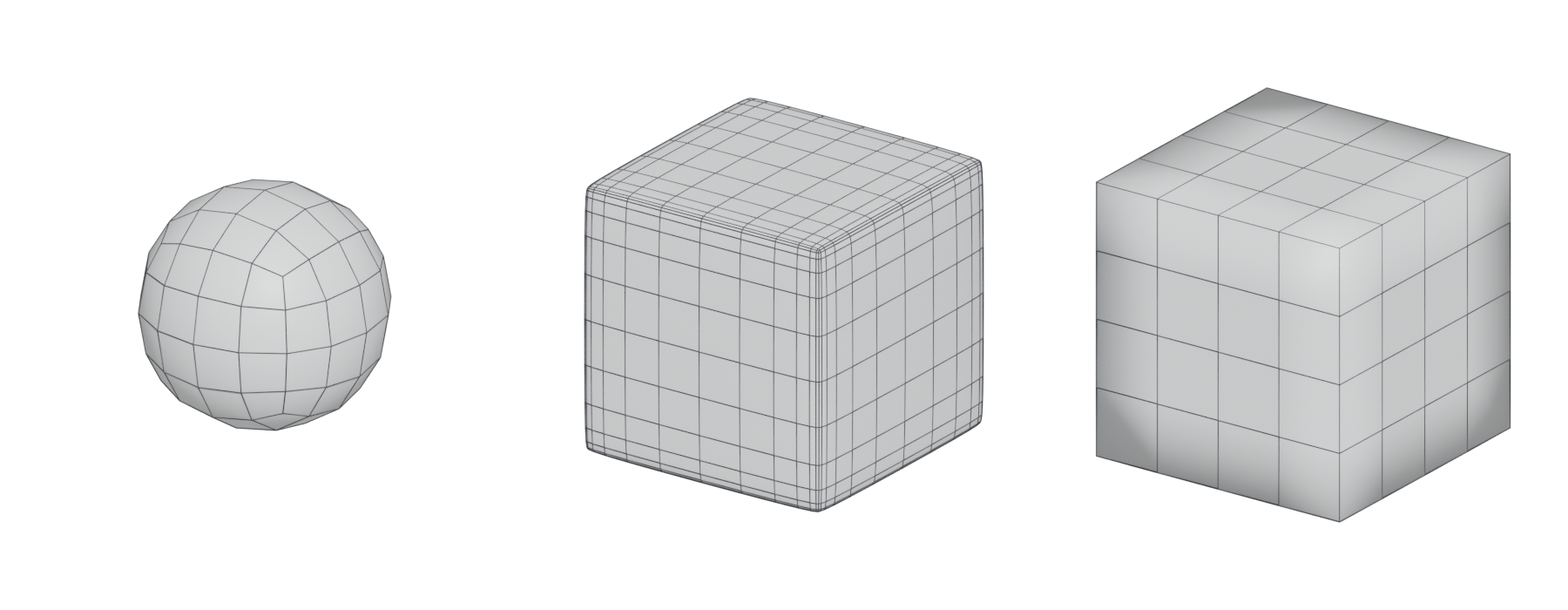
#What makes hard-surface different
Organic models (rocks, trees, characters) are usually sculpted and their surfaces flow. Hard-surface models are built from flat planes, precise curves and crisp transitions. That raises three technical problems you will meet on every asset:
- Edges. A perfectly sharp computer edge looks unnatural; real objects have small rounded edges that catch highlights (GarageFarm blog: Hard Surface Modeling in Blender). You need some way to fake or build those edges.
- Shading. Flat faces must shade flat. Big flat faces next to small bevels easily pick up smudgy gradients from averaged normals. Fixes include support loops, hard edges, weighted normals and baked normal maps.
- Detail density. Panels, vents, bolts and labels add up fast. You decide which detail is real geometry, which is baked, and which comes from shared textures such as trim sheets and mesh decals.
Each workflow below is a different answer to those three problems.
#The main workflows
#Subdivision with support loops
You model a low-density cage of quads and let a subdivision surface smooth it. To keep edges tight, you add support loops (also called holding edges) close to each edge. The smoothed result is usually used as a high poly for baking. FrankPolygon's long-running Polycount sketchbook is a detailed free study of this technique. He describes support loops as edges that "counter the uniform inward pull of the smoothing", so shapes hold when subdivided (Polycount forum: Sketchbook: Frank Polygon).
Manual support loops are slow. FrankPolygon notes that with manual edge extrusion "it can be difficult and time consuming to maintain consistent edge width", and recommends generating loops with bevel or chamfer modifiers controlled by edge weights instead (Polycount forum: Sketchbook: Frank Polygon).
#Boolean and bevel
You block out a base shape, then cut and add volumes with booleans: one object cuts into, combines with or isolates part of another (GarageFarm blog: Hard Surface Modeling in Blender). A bevel modifier then rounds the edges. Keeping cutters editable lets you move an opening late in the process (GarageFarm blog: Hard Surface Modeling in Blender). FrankPolygon describes models where "the basic shape is created with a series of boolean operations on a mirrored base mesh", applied and cleaned up only once the shape is approved (Polycount forum: Sketchbook: Frank Polygon).
#Mid-poly with weighted normals
You build one mesh with real, low-segment bevels on every visible edge. Face-weighted normals make the big faces shade flat and the bevels shade round. There is no separate high poly and usually no unique bake. Detail comes from tiling materials, trim sheets and decals. See the mid-poly workflow for the full picture.
On Star Citizen, a developer explained on Polycount that ships were "far too big to be custom baked", so the team used "edge loops and custom vertex normals" plus floating decals (Polycount forum: Star Citizen...The Gladiator...ART DUMP). A Polycount veteran later credited the Star Citizen environment team with popularising the approach that is now called mid-poly (Polycount forum: I need some advice).
#CAD and NURBS to mesh
You model with exact mathematical surfaces in a CAD-style tool such as Plasticity, MoI or Fusion, then convert (tessellate) to polygons. Fillets and booleans are reliable because the software works on exact surfaces, not polygons. The export becomes either a high poly for baking or the start of a game mesh. See CAD and NURBS modeling for games.
At the studio Angelic, the concept department supplies Fusion 360 meshes as reference for the hard-surface team (80 Level: Creating Assets Within the Mid-Poly Workflow…).
#High-to-low baking
The traditional approach. You build a detailed high poly (by sub-d, booleans, CAD or sculpting), a separate efficient low poly, then bake the difference into a normal map. Small floating details called floaters are common in the high poly. See the high-to-low workflow.
#Nanite-dense geometry
With virtualised geometry such as Unreal Engine's Nanite, very dense meshes become practical. Epic's documentation recommends you "use high-poly detailing rather than baking detail into normal map textures" (Unreal Engine documentation: Nanite Virtualized Geometry in Unreal Engine). The same page warns that "practical limits still remain" and that you should measure triangles, instances and performance on your target hardware (Unreal Engine documentation: Nanite Virtualized Geometry in Unreal Engine).

#Comparison
| Workflow | What you build | Strengths | Costs | Fits best |
|---|---|---|---|---|
| Sub-d + support loops | Quad cage, smoothed | Smooth curves, clean highlights | Slow; loops hard to keep even (Polycount forum) | High polys for baking; curvy shapes |
| Boolean + bevel | Base mesh, cutters, bevel modifier | Fast; non-destructive until applied (GarageFarm blog) | Messy topology; needs cleanup (Polycount forum) | Blockouts, panels, high polys, mid-poly |
| Mid-poly + weighted normals | One bevelled mesh | No duplicate mesh; iterate without rebuilding high and low poly (80 Level) | Higher triangle count; relies on shared textures | Machines, modular kits (ArtStation blog) |
| CAD/NURBS to mesh | Exact surfaces, tessellated | Reliable fillets and booleans | Export needs retopology or baking | Concept, precise mechanical parts |
| High-to-low | High poly + low poly + bake | Cheap runtime mesh; unique detail | Two meshes; re-bake on changes | Hero props, weapons, small props (ArtStation blog) |
| Nanite-dense | Dense final mesh | Detail in geometry, not textures (Unreal Engine documentation) | Disk size; engine-specific | UE5 projects with Nanite |
#Design principles
Technique only helps if the design reads well. These principles come up in nearly every hard-surface breakdown. Design is also iterative: Matthias Develtere's 380-page written breakdown of designing and modelling a mech in 3ds Max shows his rejected options for the head, arms and legs, and his mistakes, alongside the final design (ArtStation: Breakdown - design - modelling of a mech).

#Big, medium and small shapes
Start with primitives and the large masses that make the object recognisable, then add secondary forms. Leave "screws, panel lines, vents, or tiny surface details" until later (GarageFarm blog: Hard Surface Modeling in Blender). This is the same idea as primary, secondary and tertiary forms in sculpting. Joppe Stijf, a prop and weapon artist whose credits include Call of Duty: Vanguard, puts it this way: "The main thing to get good first is object size and general composition" (80 Level: Prop Art Tips: Creating a Realistic Radio…).
Check the silhouette at the big-shape stage, because added detail does not fix a weak silhouette.
#Rest areas
Not every surface needs detail. If a panel neither does a job nor improves the composition, "consider leaving the surface alone" (GarageFarm blog: Hard Surface Modeling in Blender). Plain areas give detailed areas contrast, the same way negative space works in composition.
#Functional logic
Hard-surface objects look believable when they look like they could be manufactured and assembled. "A panel needs a reason to exist," and fasteners "should be placed where components could logically connect" (GarageFarm blog: Hard Surface Modeling in Blender). Ask: how does this open, where does the cable go in, how was this part bolted on? Collect real reference of machinery to answer those questions.
#Panel lines
Panel lines show where parts meet. Use them to break large surfaces at believable seams, not as random decoration. On mid-poly and modular assets, panel lines, bolts and switches often come from a trim sheet applied as mesh decals rather than modeled geometry (80 Level: How to Create a Detailed Large-Scale Scene…).
#Consistent bevel width
Edges of similar parts should have similar bevel widths, scaled to the object's real size. Judge bevels "in relation to the object's real or intended scale and under lighting similar to the final presentation" (GarageFarm blog: Hard Surface Modeling in Blender). For bakes, high-poly bevels often need to be wider than feels natural: one Polycount reply on edge artefacts advised making them "over double the current size" (Polycount forum: Advice for solving various normal map/edge…). See bevels and chamfers.
#Tool landscape
Every major package can do hard-surface work. These are the tools and add-ons most often named in breakdowns. See modeling software for licensing.
- Blender. Native Boolean, Bevel and Weighted Normal modifiers cover the whole boolean, bevel and mid-poly workflow (Blender Manual: Bevel Modifier; Blender Manual: Weighted Normal Modifier). Paid add-ons speed it up. BoxCutter is "dedicated to making Boolean operations" easier: you draw cutters directly on the surface. Hard Ops is a modal toolkit built on Blender's own modifiers, with tools such as Sharpen, which "auto-marks an object's sharp edges" for bevelling. Both come from TeamC, led by Jerry Perkins (BlenderNation: Blender add-ons review — BoxCutter and Hard…). MESHmachine is "a Blender mesh modeling addon with a focus on hard surface work without subdivision surfaces"; it can change bevel widths, turn chamfers into fillets and back, and "unchamfer" an edge after the fact (machin3.io: MESHmachine documentation).
- 3ds Max. Autodesk added a Weighted Normals modifier in 3ds Max 2021 (Autodesk Community: Implement a new Vertex Normal Modifier), and 3ds Max 2022 improved chamfer editing in Edit Poly (Arkance Community: What's New in 3ds Max 2022? – New and…).
- Maya. Strong polygon tools; artists often use plug-ins for face-weighted normals. Jessica Canales used the GenTools plug-in for this on a mid-poly UE project (80 Level: How to Create a Detailed Large-Scale Scene…).
- Modo. Valued for fast polygon modeling. One Polycount artist said he simply bevels edges and can "edit vertex normals with one click in Modo 10", rather than adopting a complex trim workflow (Polycount forum: The 'ultimate trim' technique from Sunset…).
- Plasticity. A NURBS modeler that CG Channel calls "CAD for artists", positioned as an artist-friendly alternative to MoI and Fusion, sold as a perpetual Indie licence or a Studio licence (CG Channel news article on Plasticity 2026.1).
- MoI (Moment of Inspiration). A NURBS modeler by Michael Gibson; its native 3DM format is "OpenNURBS / Rhino 3D compatible" (moi3d.com: Moi3d Overview).
- Fusion. Autodesk's CAD tool; used by some concept departments to design hard-surface objects before game artists rebuild them (80 Level: Creating Assets Within the Mid-Poly Workflow…).
- ZBrush. Better known for sculpting, but ZModeler is a polygon-modeling brush whose actions "adapt to the element under the cursor" (ZBrush for iPad documentation: ZModeler Overview). Live Boolean previews subtractive and intersecting booleans between subtools in real time "without being applied as geometry changes" (ZBrush for iPad documentation: Live Boolean Essentials).
#Examples
#Walkthrough: a generator box for an environment
This walkthrough uses Blender terms but works in any package. The target is a mid-poly prop, about 1.2 × 0.8 × 0.9 m, that will appear many times in a level.
- Gather reference and decide function. Find real generators. Note the frame, the vent, the control panel, the fuel cap and where bolts actually hold panels on.
- Block out at real scale. Set your units first. Use boxes and cylinders only. Check the silhouette from your game camera height.
- Cut the medium shapes with booleans. Add the vent recess and control panel as Difference cutters. Keep them live so you can move them (GarageFarm blog: Hard Surface Modeling in Blender).
- Bevel. Add a Bevel modifier with Limit Method set to Angle, so only sharp edges are bevelled (Blender Manual: Bevel Modifier). Use 2–3 segments on edges the player sees up close, 1 elsewhere. Pick one width for all similar edges.
- Fix shading. Add a Weighted Normal modifier after the bevel, using Face Area weighting with Keep Sharp enabled (Blender Manual: Weighted Normal Modifier). Patscheider recommends Face Influence for hard-surface stacks (ArtStation blog: Quarry Bank Mill 3D #07 Modifiers and Wires /…).
- Clean up. Apply booleans only when the shape is approved. Then clean up stray geometry; FrankPolygon uses triangulation and limited dissolve for this (Polycount forum: Sketchbook: Frank Polygon).
- Small details. Add bolts, labels and panel lines as mesh decals or with a trim sheet. If the generator is a hero prop instead, model them as floaters on a high poly and bake.
- UV and texture. Lay out UVs for tiling materials and trims. Check texel density against the rest of the kit.
- Export. Export FBX with custom normals. In Unreal, set Normal Import Method to Import Normals, so "the normals are imported from the FBX file" rather than recomputed (Unreal Engine documentation: FBX Import Options Reference in Unreal Engine).
#Further reading and watching
References
- · Hard Surface Modeling in Blender · GarageFarm blog · article · accessed 2026-10-21
- · Sketchbook: Frank Polygon · Polycount forum, 2020 · forum · accessed 2026-10-21
- · Star Citizen...The Gladiator...ART DUMP · Polycount forum · forum · accessed 2026-10-21
- · I need some advice · Polycount forum, 2023 · forum · accessed 2026-10-21
- · Creating Assets Within the Mid-Poly Workflow in UE5 · 80 Level · article · accessed 2026-10-21
- · Nanite Virtualized Geometry in Unreal Engine · Unreal Engine documentation · docs · accessed 2026-10-21
- · Quarry Bank Mill 3D #07 Modifiers and Wires / #08 The mid-poly workflow · ArtStation blog, 2020 · article · accessed 2026-10-21
- · Leveraging Multiple Workflows · ArtStation blog, 2019 · article · accessed 2026-10-21
- · Breakdown - design - modelling of a mech · ArtStation · web · accessed 2026-10-21
- · Prop Art Tips: Creating a Realistic Radio Receiver in Blender & Marmoset Toolbag · 80 Level, 2025 · article · accessed 2026-10-21
- · How to Create a Detailed Large-Scale Scene with Rich Props & Assets in Unreal Engine · 80 Level · article · accessed 2026-10-21
- · Advice for solving various normal map/edge bake artifacts? · Polycount forum, 2020 · forum · accessed 2026-10-21
- · Bevel Modifier · Blender Manual (2.83), 2020 · docs · accessed 2026-10-21
- · Weighted Normal Modifier · Blender Manual (2.82), 2020 · docs · accessed 2026-10-21
- · Blender add-ons review — BoxCutter and Hard Ops · BlenderNation, 2020 · article · accessed 2026-10-21
- · MESHmachine documentation · machin3.io · docs · accessed 2026-10-21
- · Implement a new Vertex Normal Modifier (Weighted Normals, Merge, Transfer) · Autodesk Community, 3ds Max Ideas, 2020 · forum · accessed 2026-10-21
- · What's New in 3ds Max 2022? – New and Improved Object Modifiers · Arkance Community · article · accessed 2026-10-21
- · The 'ultimate trim' technique from Sunset Overdrive · Polycount forum, 2015 · forum · accessed 2026-10-21
- · CG Channel news article on Plasticity 2026.1 · CG Channel, 2026 · article · accessed 2026-10-21
- · Moi3d Overview · moi3d.com · docs · accessed 2026-10-21
- · ZModeler Overview · ZBrush for iPad documentation · docs · accessed 2026-10-21
- · Live Boolean Essentials · ZBrush for iPad documentation · docs · accessed 2026-10-21
- · Designing Environments for DOOM Eternal · 80 Level · article · accessed 2026-10-21
- · The Ultimate Trim: Texturing Techniques of Sunset Overdrive · GDC Vault, 2015 · talk · accessed 2026-10-21
- · The Last of Us: Part I...Trim Pipeline · ArtStation · web · accessed 2026-10-21
- · Working on Modular Sci-Fi Environments in Blender and UE4 · 80 Level, 2020 · article · accessed 2026-10-21
- · FBX Import Options Reference in Unreal Engine · Unreal Engine documentation · docs · accessed 2026-10-21
- · Hard Surface Modeling: Create a Sci-Fi Crate · BlenderNation, 2023 · video · accessed 2026-10-21
- · Remaking a M24 Stielhandgranate - Full Length · YouTube · video · accessed 2026-10-21
Pages that link here
- How to use this handbook Guide
- Roles in 3D game production Topic
- Modeling software Reference
- Ways to build a 3D model Overview
- Edge crease Key term
- CAD and NURBS modeling for games Topic
- Edge flow Topic
- Pole Key term
- Edge ring Key term
- Support loop (holding edge) Key term
- Smoothing, hard edges and smoothing groups Topic
- Booleans Topic
- Weighted (custom) normals Topic
- The mid-poly workflow Topic
- Greebles Key term
- The high-to-low workflow Topic
- Kitbashing Topic
- Retopology Topic
- Digital sculpting Topic
- Primary, secondary and tertiary forms Topic
- Remeshing (DynaMesh, voxel remesh) Key term
- UV mapping Topic
- Baking Topic
- Fixing baking artefacts Guide
- Trim sheets Topic
- Decals Topic
- Mesh decals Topic
- Geodecals Key term
- Exercise: your first game-ready prop Exercise
- A 12-month learning roadmap Guide
- Game art breakdowns: a curated library Reference
Last updated 2026-10-22