Edge loop
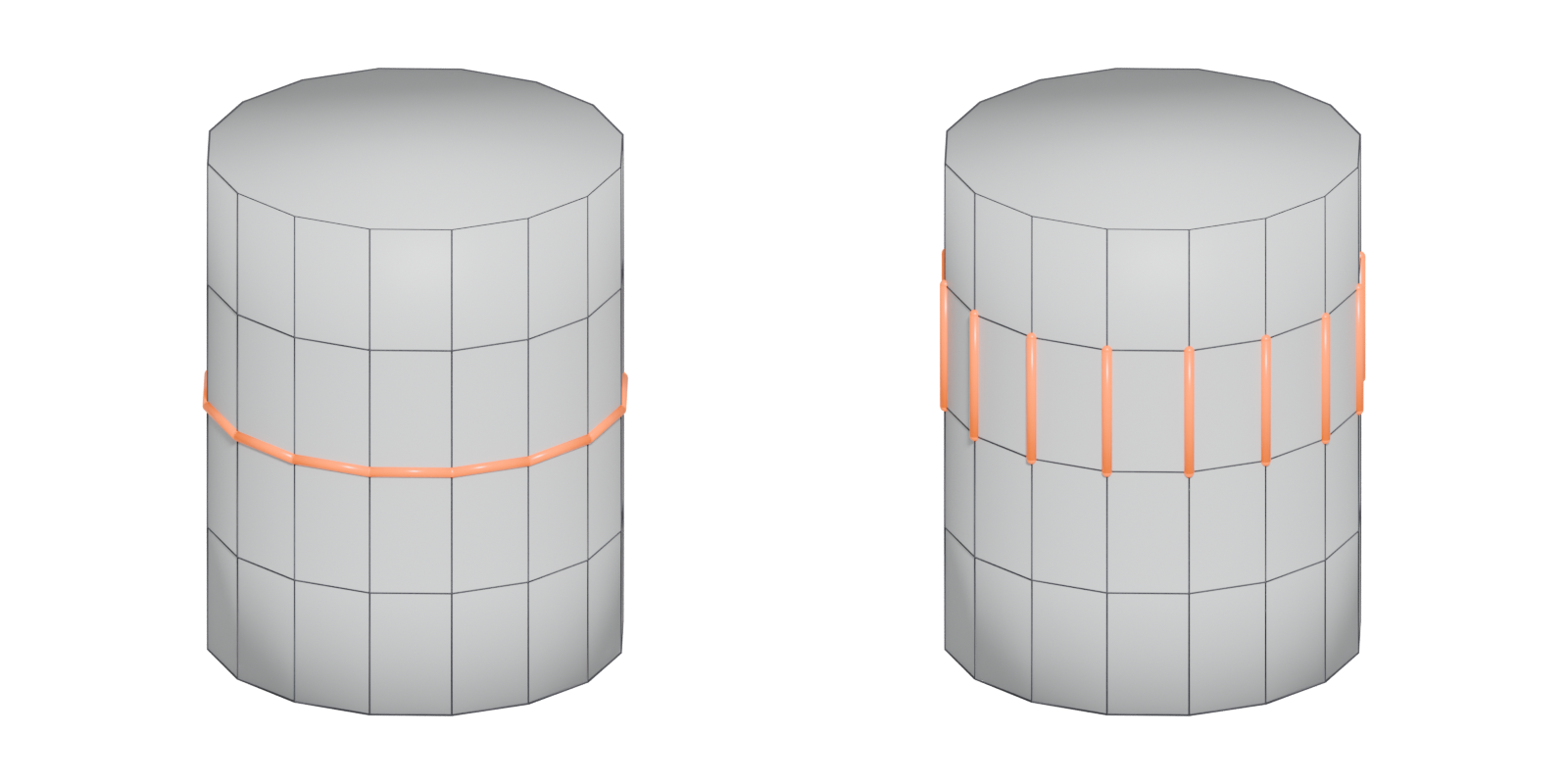
A chain of connected edges that runs straight through quads, vertex to vertex, until it closes on itself or hits a pole or border.
An edge loop is a chain of connected edges that passes straight through a run of quads. Pepribal's Blender reference defines it as "a set of connected edges which follows the middle edge in every 4-way junction" (BlenderWiki: Mesh topology appendix).
At each ordinary vertex, four edges meet. The loop enters on one edge and leaves by the opposite one. The Blender Manual describes the same idea: each vertex on the loop has exactly two neighbours that are not on the loop (Blender Manual: Structure).
#Where loops end
A loop keeps going until one of three things happens:
- it closes, arriving back at the edge it started from (a ring around a cylinder, or around an eye);
- it reaches a pole, where there is "no unique way to continue" (Blender Manual: Structure);
- it reaches a border of an open mesh.
Loops that do not end at poles are closed and split the model into two parts (Blender Manual: Structure).

#Why edge loops matter
- Adding resolution. A loop cut inserts a new edge loop along an edge ring, adding detail exactly along one band of the mesh.
- Controlling subdivision. Extra loops close to an edge keep it sharp under subdivision; removing them softens it (Blender Manual: Subdivision Surface Modifier). These are support loops.
- Deformation. Loops are "a prerequisite for organic character animation" and should follow the lines along which the surface bends (Blender Manual: Structure). See edge flow.
- Fast selection. One click selects a whole loop, which makes it easy to scale a band, bevel a rim or mark a UV seam.
#Edge loops in shipped game meshes
Static environment meshes use loops differently from characters. EMC3D's analysis of God of War environment art has chapters titled "Quad usage", "Dotted Edge Loops?" and "Using Triangles" (YouTube: Why Does God of War's 3D Environment Art…). The separate chapter on triangles indicates that AAA environment meshes do not follow the character-modeling ideal of unbroken loops. One of the artists the video names, Nate Stephens, posted wireframes of a God of War III level he built alone, doing "all modeling, sculpting, texturing, layout and lighting" (ArtStation: God of War 3 - Environment Art; YouTube: Why Does God of War's 3D Environment Art…).
#Selecting loops in different tools
- Blender: Select ‣ Select Loops ‣ Edge Loops, or Alt-click an edge (Shift-Alt-click to add to the selection). Works in vertex or edge select mode. The selection stops at poles, and a second loop-select on a border edge selects the whole boundary (Blender Manual: Select Loops).
- Maya and 3ds Max: both offer loop selection and loop-cut tools. Shortcuts and menu names differ between versions, so check your version's help.
#Common mistakes
- Expecting a loop to pass a pole. Loops stop at poles. If a loop selection stops early, look for a pole or a triangle in the way.
- Loops through triangles or n-gons. Loops only continue through quads, so n-gons and triangles break them.
- Too many loops. Every loop runs around the whole mesh. Add loops only where they change the shape or the shading.
#Related terms
edge ring · support loop · pole · edge flow · topology · quad
#Further reading and watching
References
- · Mesh topology appendix (User:Pepribal/Ref/Appendices/MeshTopo) · BlenderWiki (archived user pages) · web · accessed 2026-10-20
- · Structure · Blender Manual (2.93), 2021 · docs · accessed 2026-10-20
- · Subdivision Surface Modifier · Blender Manual (2.83), 2020 · docs · accessed 2026-10-20
- · Why Does God of War's 3D Environment Art Looks Like This? · YouTube, 2024 · video · accessed 2026-10-22
- · God of War 3 - Environment Art · ArtStation · web · accessed 2026-10-22
- · Maya Beginner Tutorial Series 12/17: Difference Between Triangles vs Quads vs NGons · World of Level Design, 2025 · article · accessed 2026-10-22
- N-Gons · CG Cookie forums, 2025 · forum · accessed 2026-10-22
- · Select Loops · Blender Manual (3.3, German edition), 2022 · docs · accessed 2026-10-20
Pages that link here
- Anatomy of a polygon mesh Topic
- Vertex Key term
- Edge Key term
- Quad Key term
- N-gon Key term
- Vertex colours Key term
- Box modeling Topic
- Extrude, inset and loop cut Key term
- Subdivision surface modeling Topic
- Topology Topic
- Edge flow Topic
- Pole Key term
- Edge ring Key term
- Face loop Key term
- Support loop (holding edge) Key term
- The mid-poly workflow Topic
- Retopology Topic
- UV seams and islands Key term
- Trim sheets Topic
- Vertex painting and blending Topic
- Shaders for artists Topic
- Exercise: a trim sheet Exercise
Last updated 2026-10-22