Edge flow
How a mesh's edge loops follow its form and the way it bends; vital for characters and subdivision, much less important on static props.
Edge flow is the way a mesh's edge loops run across its surface: whether they follow the form, wrap around features and line up with the directions the mesh will bend. Good edge flow makes a mesh deform, subdivide and edit predictably.
It matters a great deal on characters and subdivision cages. On static, non-subdivided props it matters much less.
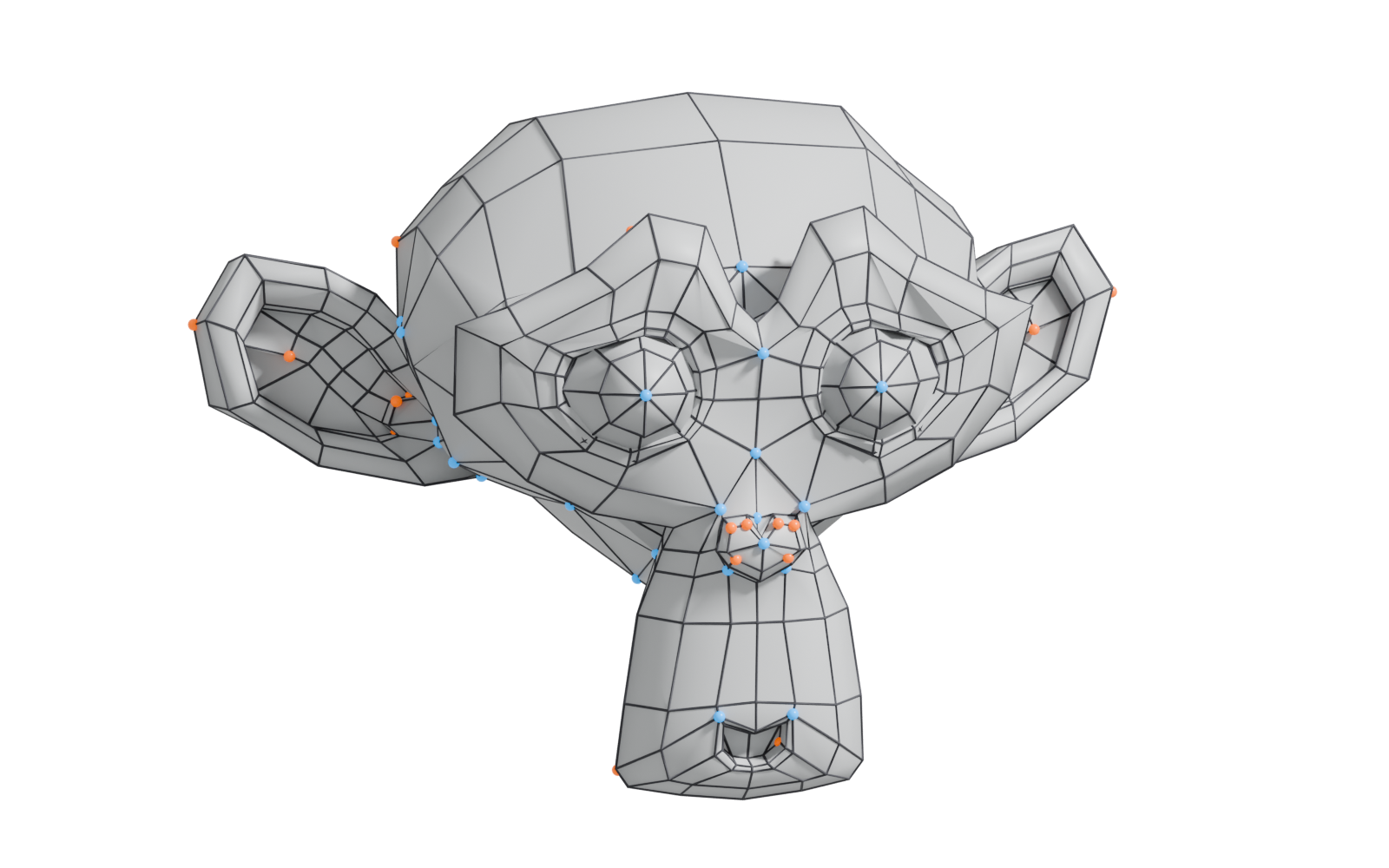
#What "flow" means
In a mesh made of quads, every edge belongs to a loop: a chain where each vertex has exactly two neighbours that are not on the loop (Blender Manual: Structure). Flow describes where those loops go.
A loop can run straight across a flat panel, curve around an eye, or spiral down an arm. Because loops continue until they hit a pole or a border (Blender Manual: Structure), every loop you add affects the mesh far from where you added it. Planning flow means deciding where those chains run and where they stop.

#Where edge flow matters
#Deforming meshes
The Blender Manual describes loops that follow "the natural contours and deformation lines" of skin and muscle, with more loops where the character deforms more, such as shoulders and knees (Blender Manual: Structure). Pepribal's reference puts it as a rule: loops "should be placed following the deformation lines of the surfaces", otherwise the surface shows visible strain (BlenderWiki: Mesh topology appendix).
Faces are the most common example. On Polycount, Gray says "you really do need some solid loops around the mouth", with extra loops gathering at the corners so it can open wide (Polycount: Face Topology [Breakdown Guide]). Vargatom describes neck loops aligned with the platysma muscle and flow "based on the character's facial features" (Polycount: Face Topology [Breakdown Guide]).
#Subdivision surfaces
Subdivision behaves best on regular quad grids (OpenSubdiv documentation: Subdivision Surfaces). Loops that follow the curvature of a shape keep the smoothed surface even. Loops that cut diagonally across a curve, or bunch up unevenly, create bumps and wobbles once subdivided. See subdivision surface modeling.
#Retopology
When you rebuild a sculpt or scan, edge flow is the main quality measure. The Wikipedia article on retopology notes that "for quadrilateral meshes, edge flow is also an important part of mesh quality" and that automatic tools can struggle with it (Wikipedia: Retopology). That is why character retopology is still often done by hand. See retopology.
#Where it matters less
A static, non-subdivided prop never bends, so loops do not need to follow any deformation lines. FrankPolygon's advice on Polycount is that game models should use the minimum geometry needed to represent the shapes, removing loops that add nothing (Polycount: Need opinion on what a good topology is). GlowingPotato agrees that flow matters most "if the asset will be animated" (Polycount: Need opinion on what a good topology is).
On static props, what still matters is:
- clean shading (no long thin faces causing smoothing errors across large curved areas);
- a sensible silhouette;
- easy UV unwrapping and editing.
Flow helps with the last one, so tidy loops are still easier to work with, but they are not a hard requirement.
#How poles redirect flow
You cannot change the direction of a loop without a pole, a vertex with three, five or more edges. Loops stop at poles because "there is no unique way to continue a loop from a pole" (Blender Manual: Structure). This is what makes poles useful: they are the junctions where flow turns or splits.
The two common types appear naturally while modeling (BlenderWiki: E and N poles):
- E-poles (five edges) appear when you extrude a face out of a surface, for example an arm from a torso.
- N-poles (three edges) appear in shapes like the nose, where flow wraps around a protrusion.
In practice you use them to:
- Turn a loop: a pole lets a loop around the mouth join loops running down the cheek.
- Reduce density: two loops become one, so detail around the eyes does not spread across the whole head.
- End a support loop on a hard-surface model so its density does not run around the entire mesh.
Placement matters. musashidan describes a head's poles as "key to how the topology deforms" (Polycount: Head Topology question?). On subdivision meshes, keep poles off highly curved, glossy areas, since irregular vertices are where artefacts appear (OpenSubdiv documentation: Subdivision Surfaces).
#Common mistakes
- Loops that spiral. A loop that never closes but winds round and round makes selection and editing painful.
- Resizing features without re-routing flow. RN warns on Polycount that changing facial proportions can leave loops "going on crazy curvy paths, instead of clean, short paths" (Polycount: Head Topology question?).
- Spreading detail. Adding a loop for one small detail runs density across the whole mesh. Use poles to contain it.
- Poles in the wrong place. A five-edge pole in the middle of a cheek or on a joint pinches when the mesh deforms or subdivides.
#Further reading and watching
References
- · Structure · Blender Manual (2.93), 2021 · docs · accessed 2026-10-20
- · Mesh topology appendix (User:Pepribal/Ref/Appendices/MeshTopo) · BlenderWiki (archived user pages) · web · accessed 2026-10-20
- · Face Topology [Breakdown Guide] (page 2) · Polycount, 2013 · forum · accessed 2026-10-20
- · Subdivision Surfaces · OpenSubdiv documentation (source file on GitHub) · docs · accessed 2026-10-20
- · Retopology · Wikipedia · web · accessed 2026-10-20
- · Need opinion on what a good topology is · Polycount, 2020 · forum · accessed 2026-10-20
- · E and N poles (User:Mindrones/Wiki/Subdivision modelling) · BlenderWiki (archived user pages) · web · accessed 2026-10-20
- · Head Topology question? · Polycount, 2019 · forum · accessed 2026-10-20
Pages that link here
- Vertex Key term
- Edge Key term
- Quad Key term
- Modeling software Reference
- UV, retopology and baking tools Reference
- Ways to build a 3D model Overview
- Extrude, inset and loop cut Key term
- Subdivision surface modeling Topic
- CAD and NURBS modeling for games Topic
- Topology Topic
- Pole Key term
- Edge loop Key term
- Face loop Key term
- Booleans Topic
- Retopology Topic
- Base meshes for sculpting Key term
- Remeshing (DynaMesh, voxel remesh) Key term
- A 12-month learning roadmap Guide
Last updated 2026-10-22