Baking
Transferring detail and information from a high-poly mesh (or the low poly itself) into textures; what each common map stores and is used for, the main bakers, a reliable workflow, naming, anti-aliasing and resolution.
Baking means calculating information about a mesh and saving it into a texture. Adobe's definition: "Baking is the name of the process about saving information related to a 3D mesh into a texture file" (Substance 3D Bakers documentation: What is baking?). In game art the most common case is the the high-to-low workflow: detail from a dense high-poly model is "transferred onto the second mesh UVs and then saved into a texture" (Substance 3D Bakers documentation: What is baking?).
The low poly stays cheap to render, while its normal map makes it shade as if it had all the high-poly bevels, bolts and panel lines. Other baked maps feed the texturing stage: Adobe notes that "many filters and materials can adapt to the specific geometry of a 3D mesh by looking at the baked textures" (Substance 3D Bakers documentation: What is baking?).
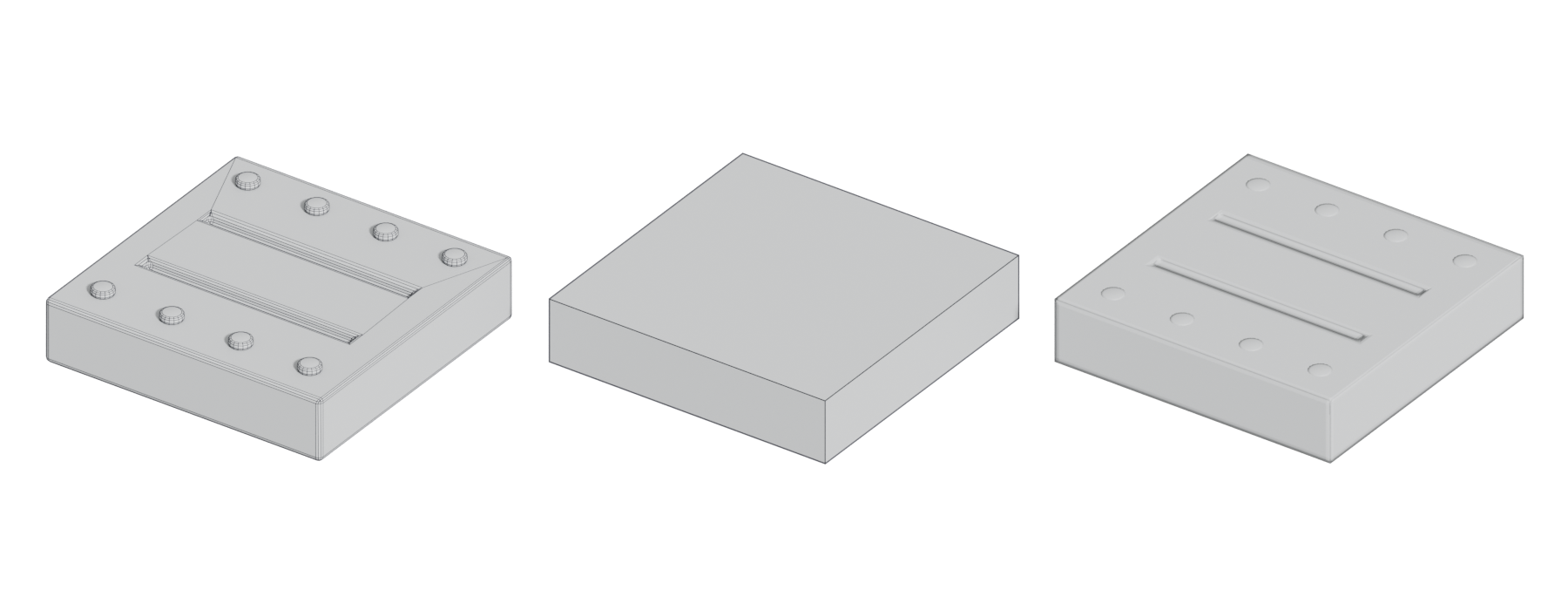
#How a bake works

For each pixel in the low poly's UV layout, the baker finds the matching point on the low poly and casts a ray. Substance's settings describe the search range: the frontal distance "controls how far above the low-poly surface the ray should start", and the rear distance how far below it should stop (Substance 3D Bakers documentation: Common parameters). Instead of distances you can use a cage, "essentially a copy of your low poly that expands outward to enclose the high poly" (Marmoset: The Toolbag Baking Tutorial). See bake cage.
This only works if the low poly has unique, non-overlapping UVs for the baked maps. See UV mapping and UV packing and padding.
#The maps and what they are for
| Map | What it stores | Used for |
|---|---|---|
| Normal (tangent space) | Surface direction of the high poly relative to the low poly | Real-time shading detail on the low poly. See normal map and tangent space and MikkTSpace |
| Ambient occlusion (AO) | How much ambient light reaches each point | Contact shadows and dirt masks. Substance offers a Cosine distribution "more suited for shading and lighting" and a Uniform one "more suited for layer masking" (Substance 3D Bakers documentation). See ambient occlusion |
| Curvature | Convex edges and concave cavities | "Generating masks for scratches, recessed dirt, and other effects" (Marmoset) |
| Thickness | How thick the mesh is at each point, by casting rays inward (Substance 3D Bakers documentation) | "A Sub Surface Scattering (SSS) shader or for masking textures" |
| Position | Mesh position in RGB, "otherwise known as a gradient map" (Marmoset); Substance can also store one axis in greyscale (Substance 3D Bakers documentation) | Top-to-bottom gradients, such as dust on top or moss at the base |
| ID (material or colour ID) | "A unique color for each material assigned to your high poly objects" (Marmoset); Substance can also use vertex colour, mesh or polygroup IDs (Substance 3D Bakers documentation) | Quick selection masks in texturing: "to bake polypaint or material IDs to create selection masks" |
| Height | Distance between high and low poly, within inner and outer limits in scene units (Marmoset) | Parallax, tessellation, or blending. See height and displacement maps |
| Bent normals | "The average direction of ambient lighting" (Substance 3D Bakers documentation) | Simulating complex lighting "with certain shaders" (Marmoset) |
In texturing software, maps such as AO, curvature and position mainly feed filters, generators and smart materials that adapt to the mesh's shape (Substance 3D Bakers documentation: What is baking?). Only ship the maps your engine's shader actually reads; often that is the normal map plus an AO channel in a packed texture.
#Bakers
| Baker | Notes |
|---|---|
| Substance 3D Painter | Bakes inside the texturing app. Cage options: distance based, automatic (experimental) or a custom cage file (Substance 3D Painter documentation) |
| Marmoset Toolbag | Bake groups, painted cage offset and skew, outputs up to 8192 × 8192 (Marmoset); Toolbag 5 added interactive baking previews and UDIM baking (CG Channel) |
| Blender (Cycles) | Free. Bakes Normal, AO, Roughness, Emit and other passes; Selected to Active with an optional cage and extrusion (Blender Manual) |
| xNormal | "A free app to bake texture maps like normal maps and ambient occlusion", for Windows (xnormal.net) |
| Knald | Bakes normal, bent normal, height, occlusion, curvature, transmission, vertex colour and material ID maps (knaldtech.com) |
| Houdini | Labs Maps Baker transfers and generates maps such as AO, thickness, curvature and position, but is being replaced by the Bake Geometry Textures COP and the Karma Texture Baker (Houdini documentation; Houdini documentation) |
For platforms and licence models, see UV, retopology and baking tools.
#A reliable workflow
- Finish the low poly and its UVs. Hard edges must sit on UV seams; Marmoset: "break apart your UV islands along all hard edge borders" (Marmoset: The Toolbag Baking Tutorial). See smoothing, hard edges and smoothing groups.
- Triangulate the low poly before baking and export. Adobe explains that there is "no standard" way to split quads and n-gons, so a different triangulation in the engine causes artefacts (Substance 3D Bakers documentation: Triangulating before baking). See triangulation.
- Line up high and low. Both meshes in the same place, same scale, transforms reset.
- Name the parts. Use matching
_lowand_highsuffixes. See naming below and bake groups and exploded bakes. - Set up the cage or ray distances so the cage encloses the high poly. See bake cage.
- Match the tangent space to the target engine. See tangent space and MikkTSpace.
- Bake a quick, low-resolution test, check it on the model in a viewer, fix problems, then bake final quality.
- Check in the engine with the final material, under lighting similar to the game's.
#Naming conventions
Name-based matching pairs each low-poly part with its high-poly part, so parts only bake onto themselves. Substance uses the default suffixes _high and _low; the feature is "off by default" and "case sensitive" (Substance 3D Bakers documentation: Matching by Name). Marmoset's quick loader sorts objects into bake groups from their names and is not case sensitive, so "object_HIGH" and "object_low" can be mixed (Marmoset: The Toolbag Baking Tutorial).
A safe habit that works in both: crate_lid_low, crate_lid_high, crate_body_low, crate_body_high. Keep names lowercase and unique. See also naming conventions.
#Anti-aliasing and resolution
Anti-aliasing. Without it, edges in the bake come out jagged. Substance offers subsampling at 2 × 2, 4 × 4 or 8 × 8, noting it "can significantly increase baking time" (Substance 3D Bakers documentation: Common parameters). In Marmoset, "Samples determines the quality of the anti-aliasing" (Marmoset: The Toolbag Baking Tutorial).
Resolution. Substance defaults to 2048 px (Substance 3D Bakers documentation: Common parameters). Bake at least at the final texture size; many artists bake larger and scale down. Detail size matters: Marmoset warns "Details smaller than 1 pixel will not be recorded properly" (Marmoset Toolbag documentation: Baking Tips & Tricks). The 80 Level hard-surface guide advises you to "exaggerate your chamfers" so they read at your normal map resolution, and to bake "as large as possible" (80 Level: Best Practices for Hard Surface Normal Map…). Aliasing along UV borders also drops with higher resolution and UVs aligned to the pixel grid (Substance 3D Bakers documentation: Aliasing on UV seams).
Bit depth. Bake normal maps in 16-bit. The Warframe guide warns that "Upressing from 8bit to 16bit won't help if you've accidentally done it in 8bit" (Warframe Steam Workshop guide: Normal Map Baking). Marmoset notes many renderers still require an 8-bit normal map in the end, but some artists keep 16-bit sources "in order to defer dithering to the final stage" (Marmoset: The Toolbag Baking Tutorial).
#Common mistakes
- Hard edges without UV splits: seam artefacts along the edge (Marmoset: The Toolbag Baking Tutorial).
- Not triangulating: black or X-shaped shading errors in the engine (Substance 3D Bakers documentation: Triangulating before baking; Marmoset Toolbag documentation: Baking Tips & Tricks).
- Wrong green channel or tangent space for the engine. See tangent space and MikkTSpace.
- Overlapping UVs in the baked area.
- Details too small for the texture: they disappear or alias (Marmoset Toolbag documentation: Baking Tips & Tricks).
For diagnosing specific errors, see fixing baking artefacts.
#Further reading and watching
References
- · What is baking? · Substance 3D Bakers documentation · docs · accessed 2026-10-21
- · Common parameters (Substance bakers) · Substance 3D Bakers documentation · docs · accessed 2026-10-21
- · The Toolbag Baking Tutorial · Marmoset, 2017 · article · accessed 2026-10-21
- · Ambient Occlusion from Mesh · Substance 3D Bakers documentation · docs · accessed 2026-10-21
- · Thickness Map from Mesh · Substance 3D Bakers documentation · docs · accessed 2026-10-21
- · Position Map from Mesh · Substance 3D Bakers documentation · docs · accessed 2026-10-21
- · Color Map from Mesh · Substance 3D Bakers documentation · docs · accessed 2026-10-21
- · Bent Normals from Mesh · Substance 3D Bakers documentation · docs · accessed 2026-10-21
- · How to bake mesh maps · Substance 3D Painter documentation · docs · accessed 2026-10-21
- · Marmoset releases Toolbag 5.0 in free public beta · CG Channel, 2024 · article · accessed 2026-10-21
- · Render Baking (Cycles) · Blender Manual (2.93), 2021 · docs · accessed 2026-10-21
- · xNormal · xnormal.net · tool · accessed 2026-10-21
- · Knald · knaldtech.com · tool · accessed 2026-10-21
- · Labs Maps Baker 5.0 geometry node · Houdini documentation · docs · accessed 2026-10-21
- · Karma Texture Baker LOP · Houdini documentation · docs · accessed 2026-10-21
- · Triangulating before baking · Substance 3D Bakers documentation · docs · accessed 2026-10-21
- · Matching by Name · Substance 3D Bakers documentation · docs · accessed 2026-10-21
- · Baking Tips & Tricks · Marmoset Toolbag documentation, 2025 · docs · accessed 2026-10-21
- · Best Practices for Hard Surface Normal Map Baking · 80 Level, 2018 · article · accessed 2026-10-21
- · Aliasing on UV seams · Substance 3D Bakers documentation · docs · accessed 2026-10-21
- · Normal Map Baking · Warframe Steam Workshop guide · docs · accessed 2026-10-21
- · Recommended software for baking normals/ambient occlusion maps? · Polycount, 2018 · forum · accessed 2026-10-21
Also consulted
- · Curvature from Mesh · Substance 3D Bakers documentation · docs · accessed 2026-10-21
- · Baking in Marmoset Toolbag · YouTube, 2026 · video · accessed 2026-10-21
Pages that link here
- How to use this handbook Guide
- Real-time vs. offline rendering Topic
- The game asset pipeline Topic
- Roles in 3D game production Topic
- Anatomy of a polygon mesh Topic
- Edge Key term
- Quad Key term
- N-gon Key term
- Normals (face and vertex) Key term
- Vertex colours Key term
- Manifold and non-manifold geometry Key term
- Degenerate geometry Key term
- Triangulation Key term
- Units, scale and axes Topic
- Coordinate systems and handedness Key term
- Pivot point (origin) Key term
- glTF Key term
- Texture file formats Reference
- Export checklist Guide
- Choosing tools: an overview Overview
- A free and open-source pipeline Guide
- Modeling software Reference
- Sculpting software Reference
- UV, retopology and baking tools Reference
- Texturing and material software Reference
- Photogrammetry and scanning tools Reference
- Value Topic
- Light and shadow Topic
- Ways to build a 3D model Overview
- Box modeling Topic
- Extrude, inset and loop cut Key term
- Subdivision surface modeling Topic
- Control cage and limit surface Key term
- Edge crease Key term
- CAD and NURBS modeling for games Topic
- Topology Topic
- Edge flow Topic
- Edge ring Key term
- Support loop (holding edge) Key term
- Smoothing, hard edges and smoothing groups Topic
- Hard-surface modeling Topic
- Booleans Topic
- Bevels and chamfers Topic
- Bevel shaders Key term
- Weighted (custom) normals Topic
- The mid-poly workflow Topic
- Floaters Key term
- Greebles Key term
- The high-to-low workflow Topic
- Modular kits Topic
- Hero assets, props and filler Topic
- Modeling rocks, trees and terrain pieces Topic
- Collision meshes Topic
- Polygon and triangle budgets Topic
- Impostors and billboards Key term
- Hierarchical LOD (HLOD) Key term
- Retopology Topic
- Decimation Key term
- Digital sculpting Topic
- Multiresolution and subdivision levels Key term
- Base meshes for sculpting Key term
- Alphas and stamps Key term
- Primary, secondary and tertiary forms Topic
- Macro normals Key term
- Sculpting rocks and cliffs Guide
- Sculpting damage and wear Guide
- Tileable sculpts Guide
- UV mapping Topic
- UV seams and islands Key term
- UV packing and padding Topic
- Lightmap UVs Key term
- UDIMs Key term
- Bake cage Key term
- Bake groups and exploded bakes Key term
- Tangent space and MikkTSpace Key term
- Fixing baking artefacts Guide
- Physically based rendering (PBR) Topic
- Texture maps explained Reference
- Normal map Key term
- Ambient occlusion Key term
- Height and displacement maps Key term
- Bit depth and banding Key term
- Emissive materials Key term
- Specular aliasing Key term
- Ways to texture an environment Overview
- Unique texturing (texture painting) Topic
- Smart materials Key term
- Tileable materials Topic
- Procedural materials (node-based) Topic
- Photo-sourced and scanned materials Topic
- De-lighting Key term
- Hand-painted and stylised texturing Topic
- Trim sheets Topic
- Decals Topic
- Mesh decals Topic
- Geodecals Key term
- Edge wear Key term
- Triplanar and world-aligned mapping Topic
- Normal map blending Key term
- Material layers and Substrate Topic
- Real-time lighting Topic
- Light probes and reflection probes Key term
- Baked vs. dynamic lighting Topic
- Global illumination Key term
- Ray tracing Key term
- Mesh distance fields Key term
- Light leaking Key term
- Shadows and virtual shadow maps Key term
- Time of day Key term
- Terrain and landscapes Topic
- Foliage and vegetation Topic
- Wind and world position offset Key term
- Virtualised geometry (Nanite) Topic
- Gaussian splatting Topic
- The technical artist Topic
- Photogrammetry Topic
- Exercise: your first game-ready prop Exercise
- Exercise: a modular room Exercise
- Exercise: a trim sheet Exercise
- Exercise: lighting one scene four ways Exercise
- A 12-month learning roadmap Guide
- Game art breakdowns: a curated library Reference
Last updated 2026-10-22