UV seams and islands
Seams are the cuts that let a 3D surface lie flat; islands are the flat pieces they create. Where you put seams decides how visible they are, how much the texture stretches and how well the islands pack.
A UV seam is an edge where the UV map is cut, so the faces on either side can lie flat separately. Blender's manual: "the UV map is discontinuous at the seams" (Blender Manual: Seams). A UV island (called a shell in Maya and some other tools) is one connected piece of the flattened surface; the seams are its borders.
#Why seams matter
A closed 3D surface cannot be flattened without cuts. Seams are where you choose to make them, and each choice has three effects.
- Visibility. The texture may not line up perfectly across a seam, especially on a hand-painted or baked texture. Blender's manual simply says: "Try to hide seams where they will not be seen" (Blender Manual: Seams).
- Distortion. Too few seams force the flattening to stretch the surface. Blender's advice is "as few seams as possible while having the least amount of stretching" (Blender Manual: Seams).
- Vertex count. At a seam, one vertex position has two UV coordinates, so the engine stores it twice. See smoothing, hard edges and smoothing groups.
Houdini makes the link explicit: seams "specify where the algorithm will cut the geometry", and without them the model is simply projected, which causes distortion and overlap (Houdini documentation: UV Flatten geometry node).

#Where to hide seams
- Along hard edges and sharp corners. A hard edge needs a UV split for clean baking: Marmoset says to "break apart your UV islands along all hard edge borders" (Marmoset: The Toolbag Baking Tutorial). The Warframe guide suggests corners "sharper than 90 degrees" are good candidates for a cut (Warframe Steam Workshop guide: Normal Map Baking).
- On hidden sides: bottoms, backs, the inside of a pipe joint, behind a strap.
- Along material or colour changes, where the texture changes anyway.
- Along the mirror axis of symmetrical meshes (Blender Manual: Seams).
- On flat areas rather than across bevels. Makkon notes on Polycount that "hard-edges are much more noticeable than a texture seam on a flush surface" (Polycount: The 'ultimate trim' technique from Sunset…).
For organic shapes the manual gives examples such as seaming a head "at the hairline" so the scalp is hidden under hair (Blender Manual: Seams).
#Distortion and checker maps
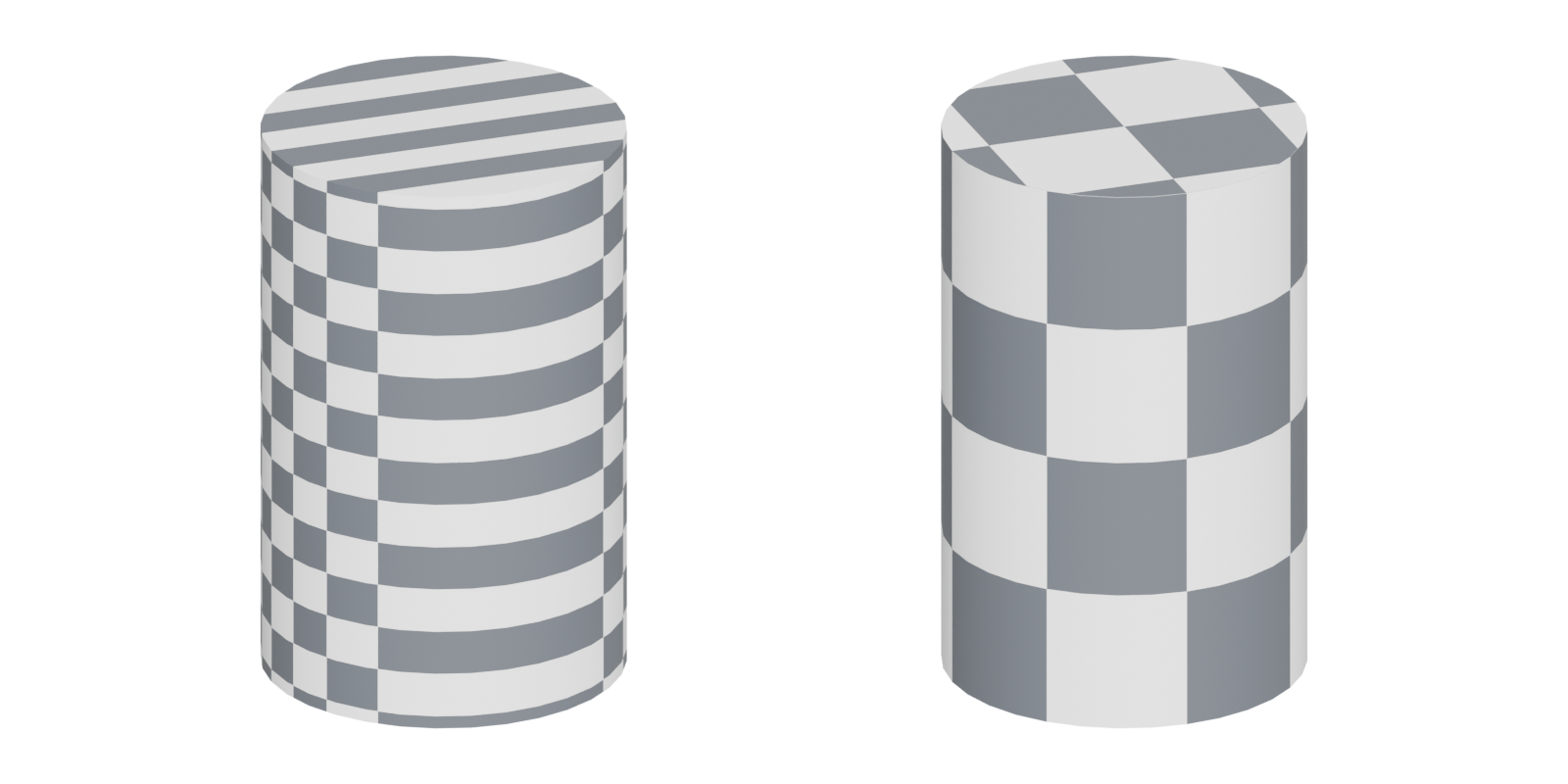
Apply a checker texture before you texture anything. Squares that turn into rectangles or diamonds mean the island is stretched; squares of different sizes on one asset mean uneven texel density. Mark Dygert recommends a checker "that shows pixel density" so you can judge how small islands will hold up (Polycount: Reducing UV Waste Need Help).
Most unwrap tools reduce distortion for you. Blender's Minimize Stretch "reduces UV stretch by minimizing the difference between the angles in 3D and the angles in UV space" (Blender Manual: Editing).
#Straightening islands
Straight, rectangular islands pack tightly and line up with the pixel grid, which reduces jagged edges on baked maps. Joost on Polycount advises straightening islands "as much as possible without causing too many distortions" (Polycount: Are these UVs good?). Tools for it:
- Blender: Follow Active Quads lays faces out along face loops (Blender Manual: UV tools); Straighten and Align move UVs onto a line (Blender Manual: Editing).
- 3ds Max: Unwrap UVW's peel tools and seams, shown as blue peel seams versus green map seams (3ds Max 2024 Help: Unwrap UVW Modifier).
#Common mistakes
- A hard edge without a UV seam. This causes baking artefacts along the edge (Marmoset: The Toolbag Baking Tutorial; Polycount forum: Making sense of hard edges, uvs, normal maps…).
- Seams across the most visible face, such as the front of a sign or the top of a table.
- Scaling connected islands separately. cookedpeanut warns that normal maps can look wrong where neighbouring islands get different pixel density, and suggests scaling all islands of one piece together (Polycount: Are these UVs good?).
- Too many tiny islands. Each needs padding, so fragmentation wastes space. See UV packing and padding.
#Related terms
UV mapping · texel density · UV packing and padding · smoothing, hard edges and smoothing groups · baking · edge loop
#Further reading and watching
References
- · Seams · Blender Manual (3.6), 2023 · docs · accessed 2026-10-21
- · UV Flatten geometry node · Houdini documentation · docs · accessed 2026-10-21
- · The Toolbag Baking Tutorial · Marmoset, 2017 · article · accessed 2026-10-21
- · Normal Map Baking · Warframe Steam Workshop guide · docs · accessed 2026-10-21
- · The 'ultimate trim' technique from Sunset Overdrive · Polycount, 2015 · forum · accessed 2026-10-21
- · Reducing UV Waste Need Help · Polycount, 2014 · forum · accessed 2026-10-21
- · Editing (UV Editor tools) · Blender Manual (3.6), 2023 · docs · accessed 2026-10-21
- · Are these UVs good? · Polycount, 2015 · forum · accessed 2026-10-21
- · UV tools (Unwrap, Follow Active Quads) · Blender Manual (3.6), 2023 · docs · accessed 2026-10-21
- · Unwrap UVW Modifier · 3ds Max 2024 Help · docs · accessed 2026-10-21
- · Making sense of hard edges, uvs, normal maps and vertex counts · Polycount forum, 2012 · forum · accessed 2026-10-21
Pages that link here
- Real-time vs. offline rendering Topic
- Anatomy of a polygon mesh Topic
- Vertex Key term
- Edge Key term
- Normals (face and vertex) Key term
- UV, retopology and baking tools Reference
- Topology Topic
- Edge loop Key term
- Smoothing, hard edges and smoothing groups Topic
- Retopology Topic
- UV mapping Topic
- Checker maps Key term
- UV packing and padding Topic
- Lightmap UVs Key term
- Baking Topic
- Tangent space and MikkTSpace Key term
- Normal map Key term
- Edge wear Key term
- A 12-month learning roadmap Guide
Last updated 2026-10-22