Edge crease
A sharpness value stored on edges (or vertices) that tells subdivision to keep them sharp for some or all levels, instead of adding support loops.
An edge crease is a sharpness value stored on an edge that changes how subdivision treats it. A creased edge resists smoothing, so a corner can stay tight without extra support loops. Maya describes the benefit as shapes "that transition between hard and smooth, without increasing the resolution of the base mesh" (Maya 2022 Help: Crease polygonal edges and vertices).
Creases can also be set on vertices, which keeps a single point sharp, such as the tip of a cone (Maya 2022 Help: Crease polygonal edges and vertices; OpenSubdiv documentation: Subdivision Surfaces).
#How crease values work
The idea comes from semi-sharp creases. OpenSubdiv stores "sharpness values or 'weights' associated with edges and vertices" that modify the subdivision rules (OpenSubdiv documentation: Subdivision Surfaces):
- 0 has no effect: the edge smooths normally.
- 10 (OpenSubdiv's maximum, "a number chosen for historical reasons") makes the edge infinitely sharp (OpenSubdiv documentation: Subdivision Surfaces).
- Values in between keep the edge sharp for the first few subdivision levels and then let it smooth, which produces a small rounded edge.
Maya's help explains the number: a crease value "indicates the amount that each level of a subdivision is creased", so "a crease value of 2 means that the base level and first level edges are fully creased, but finer level edges are not creased at all" (Maya 2022 Help: Crease polygonal edges and vertices). The higher the value, the sharper the result (Maya 2022 Help: Crease polygonal edges and vertices).

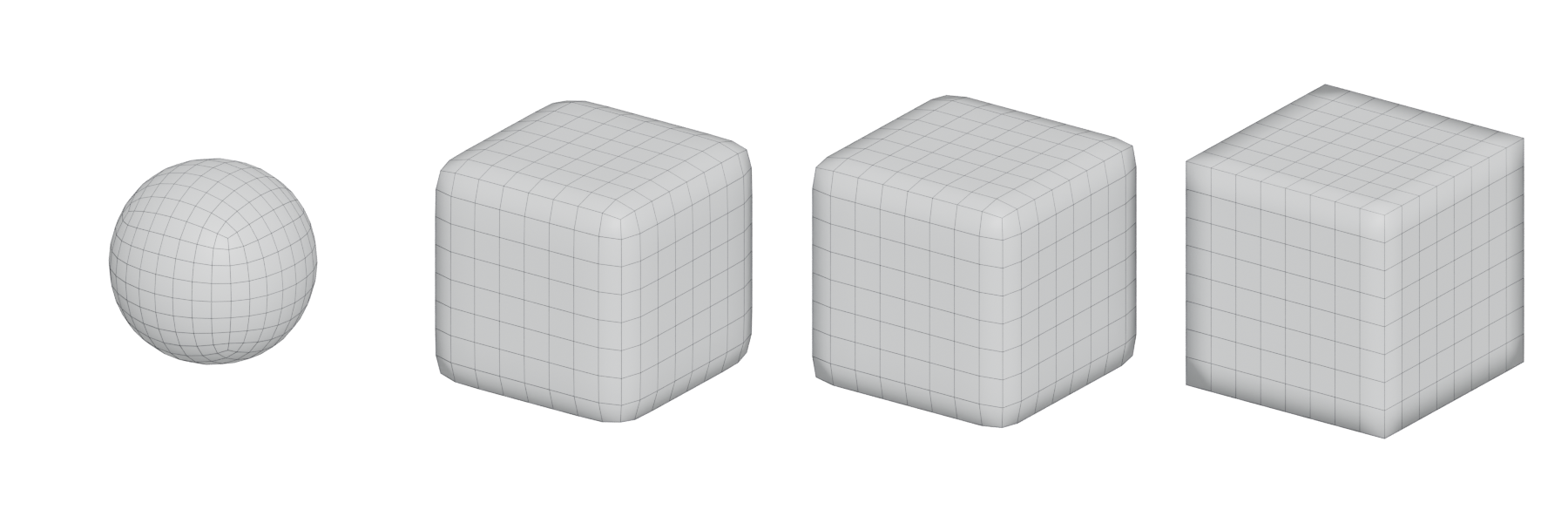
#Semi-sharp and fully sharp creases
OpenSubdiv's reasoning is about realism: "real world surfaces never really have infinitely sharp edges, especially when viewed sufficiently close", so it "is often preferable" to set the sharpness lower than the maximum (OpenSubdiv documentation: Subdivision Surfaces). A constant semi-sharp value along a chain of edges makes something like a fillet "without adding extra rows of vertices" (OpenSubdiv documentation: Subdivision Surfaces).
There is a technical reason too. An infinitely sharp crease is a break in the surface's tangent, so its normals are discontinuous: "displacing along the normal will likely tear apart the surface along the crease" (OpenSubdiv documentation: Subdivision Surfaces). If you plan to displace a creased model, use semi-sharp values.
#In different tools
- Blender: set the crease with Shift-E or in the Sidebar's Transform panel; the Subdivision Surface modifier's Use Creases option reads the stored values, and a higher value makes the edge "more resistant to the smoothing effect" (Blender Manual: Subdivision Surface Modifier; Blender Manual: Edge Data).
- Maya: the Crease Tool sets values on edges and vertices by middle-dragging; creased edges show as heavier lines and creased vertices get a small circle (Maya 2022 Help: Crease polygonal edges and vertices). Absolute mode gives every selected component the same value; Relative mode keeps existing differences (Maya 2012 Help: Edit Mesh > Crease Tool).
- OpenSubdiv-based tools: a "Chaikin" creasing option exists to smooth out chains of edges whose sharpness values differ, but OpenSubdiv advises using such less-recognised options "with caution" (OpenSubdiv documentation: Subdivision Surfaces).
#Related terms
subdivision surface modeling · control cage and limit surface · support loop · bevels and chamfers · hard-surface modeling
#Further reading and watching
References
- · Crease polygonal edges and vertices · Maya 2022 Help, 2022 · docs · accessed 2026-10-21
- · Subdivision Surfaces · OpenSubdiv documentation (source file on GitHub) · docs · accessed 2026-10-21
- · Edit Mesh > Crease Tool · Maya 2012 Help, 2011 · docs · accessed 2026-10-21
- · Edge Data · Blender Manual (source file, main branch), 2026 · docs · accessed 2026-10-21
- · Subdivision Surface Modifier · Blender Manual (source file, main branch), 2026 · docs · accessed 2026-10-21
Pages that link here
- Control cage and limit surface Key term
- Bevels and chamfers Topic
Last updated 2026-10-22