Winding order and backface culling
The order of a triangle's vertices decides which side is its front; renderers skip back faces to save work, which is why flipped faces, mirrored meshes and single-sided planes can vanish in the engine.
Winding order is "the relative order in which vertices are defined within a triangle" (Khronos Group: glTF 2.0 Specification). Seen from the camera, the three corners run either clockwise or counter-clockwise, and that direction decides whether the triangle is front-facing or back-facing (Khronos Group: glTF 2.0 Specification; OpenGL Wiki: Face Culling).
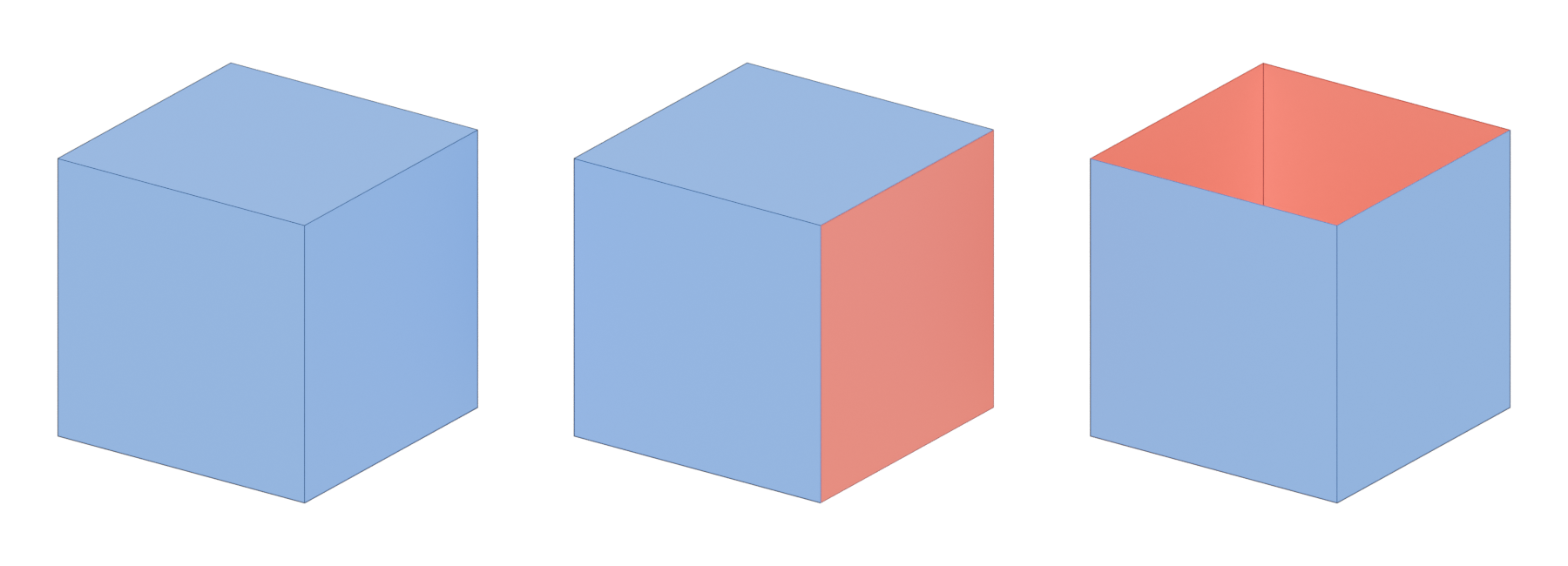
Backface culling is the renderer skipping triangles that face away from the camera. On a closed, solid object those triangles are always hidden behind the front ones, so drawing them would be wasted work.
#How the front is decided
In OpenGL, "Counter-clockwise means that the three vertices, in order, rotate counter-clockwise around the triangle's center", and "the default front face is GL_CCW" (OpenGL Wiki: Face Culling). The glTF format uses the same rule: with a normal transform, "the front-facing triangles use the counterclockwise order, and the back-facing triangles use the clockwise order" (Khronos Group: glTF 2.0 Specification).
The face normal follows from the same order: it points out of the front side. In your modeling tool, flipping a face's normal reverses its winding.

#Culling and rendering cost
Face culling lets "non-visible triangles of closed surfaces to be removed before expensive Rasterization" (OpenGL Wiki: Face Culling). The OpenGL wiki's example is a cube: unless it is transparent, "6 of the triangles will always be covered up by the other 6" (OpenGL Wiki: Face Culling). By default, OpenGL culls the back: "GL_BACK is the face to be culled" (OpenGL Wiki: Face Culling).
Engines expose the same choice per material. Godot's default Cull Back means "only the front side of triangles being drawn. For closed-surface meshes, this means that only the exterior of the mesh will be visible" (Godot Engine: BaseMaterial3D). Cull Front draws only back sides, and Cull Disabled means "both the front face and back face will be visible" (Godot Engine: BaseMaterial3D).
In glTF the switch is doubleSided. When false, "back-face culling is enabled, i.e., only front-facing triangles are rendered"; when true, "triangles are rendered from both sides, and the normal vectors of the back-facing triangles are negated" (Khronos Group: glTF 2.0 Specification).
#Mirroring and winding order
Scaling an object by −1 on one axis mirrors it, and mirroring reverses the winding. glTF handles this explicitly: if the transform's determinant is negative, "the front-facing triangles use the clockwise order" (Khronos Group: glTF 2.0 Specification), and the spec notes that this "enables mirroring geometry via negative scale transforms" (Khronos Group: glTF 2.0 Specification). Not every tool or exporter is this careful, which is why mirrored props sometimes arrive inside out.
#Common mistakes
- Ignoring Face Orientation. Turn it on before every export; a correct closed model is blue all over (Blender 3.5 Manual: Viewport Overlays).
- Turning off culling to hide a bug. If a mesh looks wrong only from inside, fix the normals rather than making every material double-sided.
- Applying negative scale without checking normals. Mirroring flips winding (Khronos Group: glTF 2.0 Specification).
- Single-sided interior walls. A wall seen from both sides needs either thickness or two faces.
Related: face, normals, triangle, manifold and non-manifold geometry, opacity, masked and translucent materials, export checklist.
#Further reading and watching
doubleSided. Advanced, free.References
- · glTF 2.0 Specification · Khronos Group (GitHub) · docs · accessed 2026-10-21
- · Face Culling · OpenGL Wiki · docs · accessed 2026-10-20
- · BaseMaterial3D (class reference source) · Godot Engine (GitHub), 2026 · docs · accessed 2026-10-21
- · Viewport Overlays · Blender 3.5 Manual, 2023 · docs · accessed 2026-10-20
Pages that link here
- Face (polygon) Key term
- Triangle Key term
- Normals (face and vertex) Key term
- Coordinate systems and handedness Key term
- Export checklist Guide
- Frustum and occlusion culling Key term
- Overdraw Key term
Last updated 2026-10-22