Subsurface scattering
Light that enters a material, scatters inside it and leaves at another point, as in skin, wax, leaves, snow and marble; how Unreal's Subsurface, Subsurface Profile and Two Sided Foliage models, Unity HDRP diffusion profiles and thickness maps approximate it in real time.
Subsurface scattering (SSS) is what happens when light "penetrates a surface and then diffuses throughout it" before leaving again, often at a different point and with a different colour (Unreal Engine documentation: Shading Models in Unreal Engine). It gives skin its soft, warm look, makes wax and marble glow at the edges, and lets light shine through leaves and ears.
Standard PBR shading treats light as bouncing off the point it hit. That works for metal or concrete, but makes skin, wax, snow and leaves look hard and dry.
#Scattering and transmission
Two related effects are usually grouped under the term.
- Scattering under the surface. Light enters, bounces around inside and exits nearby. Shadows and small details are softened, and the colour of the inner material (red for skin, which has blood under it) shows at shadow edges. Unreal's Subsurface Color input "defines the color of the matter just beneath the surface of the object" (Unreal Engine documentation: Shading Models in Unreal Engine).
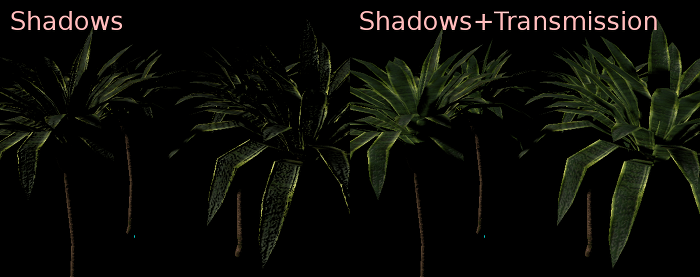
- Transmission through thin parts. Light from behind passes right through a thin object and lights it from the back: a leaf against the sun, an ear, a curtain. Unreal's Two Sided Foliage model "allows light transmission through the surface of the Material" (Unreal Engine documentation: Shading Models in Unreal Engine).

#Real-time approximations
Screen-space profiles blur the lighting of SSS pixels on screen using a falloff profile. Unreal's Subsurface Profile model "is based in screen space" and is "geared towards higher-end skin rendering" (Unreal Engine documentation: Subsurface Profile Shading Model in Unreal…; Unreal Engine documentation: Shading Models in Unreal Engine). Epic credits the technique to "work from Jorge Jimenez" (Unreal Engine documentation: Subsurface Profile Shading Model in Unreal…). HDRP stores the same kind of settings in a Diffusion Profile asset (Unity documentation: Diffusion Profile reference).
Cheaper per-material models wrap light further around the surface and add a subsurface colour. Unreal's Subsurface model works this way, and Preintegrated Skin "prioritizes lower performance cost while sacrificing some accuracy" (Unreal Engine documentation: Shading Models in Unreal Engine).
Thickness-based translucency fakes light coming through from behind. Colin Barré-Brisebois's GDC 2011 talk for Frostbite presented "a fast and scalable approximation of translucency for a convincing subsurface scattering look" as an alternative to "complex and expensive techniques" (Frostbite: Approximating Translucency for a Fast, Cheap…). A thickness map controls where more light gets through; Substance 3D Painter bakes one alongside the other mesh maps, and thin parts come out bright (Substance 3D Painter documentation: Bake Mesh Maps; Marmoset: The Toolbag Baking Tutorial).
| Material | Typical real-time setup |
|---|---|
| Skin | Screen-space profile (Subsurface Profile, HDRP diffusion profile) (Unreal Engine documentation; Unity documentation) |
| Leaves, grass, paper | Two Sided Foliage or HDRP Thin Object transmission (Unreal Engine documentation; Unity documentation) |
| Wax, marble, jade | Subsurface Profile is documented for "skin or wax surfaces" (Unreal Engine documentation); Subsurface model for cheaper cases (Unreal Engine documentation) |
| Ice, snow, thick bodies | Subsurface model; HDRP Thick Object transmission, which "uses shadow maps" (Unity documentation) |
#How to set one up
The steps use Unreal Engine 5 for skin and foliage, with the Unity HDRP equivalent after them.
- Pick the shading model. For a character head, set the material's Shading Model to Subsurface Profile; for leaves, use Two Sided Foliage (Unreal Engine documentation: Shading Models in Unreal Engine).
- Create a Subsurface Profile asset and assign it to the material. Set Surface Albedo to "match the base color of the corresponding material as closely as possible", and use Mean Free Path Color to control "how far light goes into the subsurface" per colour channel (Unreal Engine documentation: Subsurface Profile Shading Model in Unreal…).
- Check the scale. World Unit Scale "Controls the scale of world/Unreal Units in centimeters" (Unreal Engine documentation: Subsurface Profile Shading Model in Unreal…). A head imported at the wrong scale scatters far too much or too little.
- Mask it. "The Opacity input channel is used to mask the Subsurface scattering contribution": 0 for none, 1 for full (Unreal Engine documentation: Subsurface Profile Shading Model in Unreal…). Use a texture to reduce scattering on areas such as eyebrows or stubble.
- For foliage, drive transmission with a mask. In Two Sided Foliage, Subsurface Color sets the amount of transmitted light and can mask "stems and veins of the leaves" (Unreal Engine documentation: Shading Models in Unreal Engine). A baked thickness map is a good starting mask (Substance 3D Painter documentation: Bake Mesh Maps).
- Test on the target platform. Subsurface Profile "does not work in the non-deferred (mobile) rendering mode", and "there is no backscatter of light" (Unreal Engine documentation: Subsurface Profile Shading Model in Unreal…).
Unity HDRP: create a Diffusion Profile asset and add it to the Diffusion Profile List in an active Volume, or HDRP will not detect it (Unity documentation: Diffusion Profile reference). Set Scattering Color close to the diffuse colour, and choose Thin Object for thin, double-sided geometry or Thick Object for solid objects (Unity documentation: Diffusion Profile reference). A Thickness Map is remapped to a range in millimetres with Thickness Remap (Unity documentation: Diffusion Profile reference). HDRP assumes 1 Unity unit is 1 metre (Unity documentation: Diffusion Profile reference).
#Video tutorials
#Use in recent games
- Assassin's Creed Shadows (Ubisoft, 2025). Théophile Lebeau's foliage breakdown describes high-poly plants baked in Substance Designer to masks that control roughness, normals and translucency (ArtStation: Assassin's Creed Shadows: Foliage).
- The Callisto Protocol (Striking Distance Studios, 2022). Jorge Jimenez, whose screen-space work Unreal's Subsurface Profile is based on, presented the game's rendering at SIGGRAPH 2023. Skin was a main use case of the game's custom BRDF: retroreflection "allows to render the green hues visible in the silhouette of human skin", and the material workflow included deciding "How much subsurface we need" (SIGGRAPH 2023: The Rendering of The Callisto Protocol). Translucent tissue on creatures used a separate texture-space refraction technique (SIGGRAPH 2023: The Rendering of The Callisto Protocol).
- Sea of Thieves (Rare, 2018). The ocean blends "between a deep water colour and a sub-surface water colour", driven by view angle, sun direction and a mask of wave peaks, because light travels a shorter distance through a thin crest (SIGGRAPH 2018 Talks: The Technical Art of Sea of Thieves). See water surfaces.
- Paragon (Epic Games, 2016). Skin SSS tuned for a 60 Hz game, with scatter radius, subsurface colour and falloff colour as artist controls (GamersNexus: Paragon Rendering Technology: Subsurface…).
#In different tools
| Tool | What it offers |
|---|---|
| Unreal Engine 5 | Subsurface, Preintegrated Skin, Subsurface Profile and Two Sided Foliage shading models (Unreal Engine documentation); Subsurface Profile asset with Surface Albedo, Mean Free Path and World Unit Scale (Unreal Engine documentation) |
| Unity HDRP | Diffusion Profile assets in a Volume list; Thick and Thin Object transmission; thickness map with remap in millimetres; dual specular lobes for lips (Unity documentation) |
| Substance 3D Painter | Bakes a Thickness map with the other mesh maps (Substance 3D Painter documentation) |
| Marmoset Toolbag | Thickness output in the baker (Marmoset) |
#Further reading and watching
Related pages: curvature, thickness and ID maps, physically based rendering, foliage and vegetation, opacity, masked and translucent materials, shaders for artists, water surfaces, real-time lighting.
References
- · Shading Models in Unreal Engine · Unreal Engine documentation · docs · accessed 2026-10-22
- · Subsurface Profile Shading Model in Unreal Engine · Unreal Engine documentation · docs · accessed 2026-10-22
- · Diffusion Profile reference (HDRP 17) · Unity documentation · docs · accessed 2026-10-22
- · Approximating Translucency for a Fast, Cheap and Convincing Subsurface-Scattering Look · Frostbite (EA), GDC 2011, 2011 · talk · accessed 2026-10-22
- · Bake Mesh Maps · Substance 3D Painter documentation · docs · accessed 2026-10-22
- · The Toolbag Baking Tutorial · Marmoset, 2017 · article · accessed 2026-10-22
- · Paragon Rendering Technology: Subsurface Scattering (ECGC) · GamersNexus, 2016 · article · accessed 2026-10-22
- · Subsurface Scattering - Advanced Materials - Episode 8 · YouTube · video · accessed 2026-10-22
- · Metahuman Skin - SSS, Transmission and Subsurface Profiles in Unreal Engine 5 · YouTube · video · accessed 2026-10-22
- · Assassin's Creed Shadows: Foliage · ArtStation · web · accessed 2026-10-22
- · The Rendering of The Callisto Protocol · SIGGRAPH 2023, Advances in Real-Time Rendering in Games, 2023 · talk · accessed 2026-10-22
- · The Technical Art of Sea of Thieves · SIGGRAPH 2018 Talks, 2018 · talk · accessed 2026-10-22
- · Real-Time Subsurface Scattering via Hybrid ReSTIR-Path-Tracing and Diffusion · SIGGRAPH 2025, Advances in Real-Time Rendering in Games, 2025 · talk · accessed 2026-10-22
Also consulted
- · Standard Material 3D and ORM Material 3D · Godot Engine documentation · docs · accessed 2026-10-22
Pages that link here
Last updated 2026-10-22