Shaders for artists
What a shader is, how node-based material graphs in Unreal, Unity, Godot and Blender turn into shader code, the nodes environment artists use every day, how to judge instruction cost, what shader permutations are, and when to ask a technical artist.
A shader is a small program that runs on the graphics card and decides where each vertex goes and what colour each pixel ends up. Godot's manual defines them as "a special kind of program that runs on Graphics Processing Units" (Godot Engine documentation: Introduction to shaders). Every material you see in a game is a shader with some textures and values plugged in.
Environment artists rarely write shader code, but they build shaders all the time in node graphs. Knowing what happens underneath helps you make materials that look right, run fast, and do not surprise the programmers.
#What a shader does
A GPU runs the same small program on thousands of vertices or pixels at once. Godot notes that "graphics cards can run thousands of instructions in parallel", which is why shader code runs on each vertex or pixel separately and cannot remember anything between frames (Godot Engine documentation: Introduction to shaders).
For a 3D surface there are two stages that matter to artists (Godot Engine documentation: Introduction to shaders):
- Vertex stage ("runs over all the vertices in the mesh"): moves vertices. Wind on foliage, vertex colour pass-through and world position offset happen in this stage.
- Fragment (pixel) stage ("runs for every pixel covered by the mesh"): works out base colour, roughness, normal and the other surface values. Most material work happens here.
Lighting is calculated after (or inside) the fragment stage, using the values your material outputs. In a PBR engine you usually just provide base colour, metallic, roughness, normal and so on, and the engine does the lighting for you.

#Material graphs in each tool
Node graphs are a visual way to write shader code. You connect boxes; the editor generates code and compiles it.
- Unreal Engine: Material Editor. "The Material Editor allows you to create and edit Materials in Unreal Engine" (Unreal Engine documentation: Unreal Engine Material Editor UI). Its Stats panel shows "the number of shader instructions used in the Material as well as any Compiler Errors" (Unreal Engine documentation: Unreal Engine Material Editor UI). Reusable chunks become Material Functions, which you can share in a library (Unreal Engine documentation: Material Functions in Unreal Engine).
- Unity: Shader Graph. "Shader Graph enables you to build shaders visually": "Instead of writing code, you create and connect nodes in a graph framework" (Unity documentation: About Shader Graph). It is available for URP and HDRP (Unity documentation: About Shader Graph).
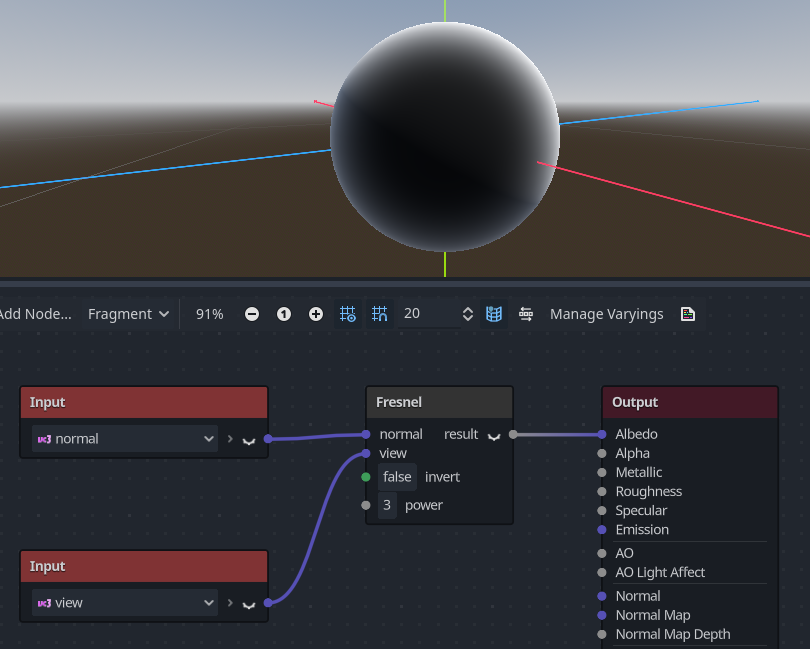
- Godot: Visual Shaders. "VisualShaders are the visual alternative for creating shaders" (Godot Engine documentation: Using VisualShaders). "The visual shader graph is converted to a script shader behind the scene", and you can view the generated code (Godot Engine documentation: Using VisualShaders). An Expression node lets you type shader code inside the graph (Godot Engine documentation: Using VisualShaders).
- Blender: Shader Editor. "Materials, lights and backgrounds are all defined using a network of shading nodes" (Blender Manual: Shader Nodes: Introduction). These graphs are for Blender's renderers. Exporters only understand a subset: the glTF exporter "will construct a glTF material based on the nodes it recognizes", mainly a Principled BSDF (Blender Manual: glTF 2.0). Rebuild anything custom in the engine.
#Nodes you will use every day
The names differ slightly between tools, but the same dozen nodes make up most environment materials:
| Node | What it does | Typical use |
|---|---|---|
| Texture Sample | Reads a texture at given UVs | Every texture map |
| Texture Coordinate (UV) | Gives the mesh's UVs | Tiling, offset, second UV set |
| Multiply | Multiplies values | Tiling scale, tint, strength |
| Add / Subtract | Adds or subtracts | Offsets, combining masks |
| Lerp (Linear Interpolate / Mix) | Blends A to B by an alpha | Material blends, vertex painting and blending |
| Vertex Color | Reads painted vertex colours | Blend masks |
| Clamp / Saturate | Limits to a range | Keeping masks in 0 to 1 |
| Power / Contrast | Sharpens or softens a mask | height blending, edge masks |
| One Minus | 1 − x, inverts | Flipping masks |
| Parameter (scalar, vector, texture) | A value artists can change per instance | Everything you want to tweak in instances |
| World Position / Normal | Pixel position or facing direction | triplanar and world-aligned mapping, dust on top surfaces |
| Fresnel | Brighter at grazing angles | Rim effects, wet sheen, dust |
Most complex-looking materials are combinations of these nodes, for example a world-space normal mask, multiplied by a noise texture, sharpened with a power, used as a Lerp alpha.
#Instruction cost
Every node adds work. The total is often shown as an instruction count, a rough measure of how much work each pixel or vertex needs. Pixel instructions matter most, because they run for every pixel the material covers.
Ways to judge cost:
- Stats panels. Unreal shows instruction counts and compile errors in the Material Editor's Stats panel, and the Platform Stats view shows cost on several platforms (Unreal Engine documentation: Unreal Engine Material Editor UI).
- Shader Complexity view. In Unreal, green to red runs from "very inexpensive" to "expensive", and pink and white indicate "a large jump to 'very expensive' pixels" (Unreal Engine documentation: Viewport Modes in Unreal Engine). Epic notes that instruction count is only an approximation of real cost (Unreal Engine documentation: Viewport Modes in Unreal Engine).
- Texture samples. Each sample costs memory bandwidth. A material that reads twelve textures is usually more expensive than its instruction count suggests.
Rules of thumb:
- Do work once, early. Compute a mask once and reuse it for colour, roughness and normal.
- Bake what never changes into textures. Matthew Trevelyan Johns at Naughty Dog described moving shader adjustments into the textures themselves to remove shader controls, "reducing the shader cost once more" (80 Level: Building Environments for Uncharted: The Lost…).
- Watch the screen area. A heavy material on a small prop matters less than a slightly heavy one on the floor that fills half the screen.
- Layered transparency adds up. Translucent surfaces and stacked decals shade the same pixels several times; see overdraw.
#Shader permutations
A single material can compile into many shaders. Every combination of on/off features, mesh types and lighting setups the engine needs gets its own compiled version, called a permutation (Unreal) or variant (Unity).
Unity explains that variants multiply: with ten sets of on/off keywords, "this results in 1024 variants" (Unity Manual: Shader variants). More variants mean longer builds, bigger files, more memory and longer loading (Unity Manual: Shader variants). In Unreal, static switch parameters are applied at compile time, and "a new Material is compiled for every combination of static parameters" used by instances (Unreal Engine documentation: Instanced Materials in Unreal Engine).
Permutations also have benefits. They let a material switch features off with no runtime cost: Unity notes they work "without the GPU performance impact of dynamic branching" (Unity Manual: Shader variants). In Epic's knowledge base thread, a reply argues that permutations often make individual shaders simpler and faster, and that the main costs are compile time, memory and switching between many shaders in one frame (Epic Developer Community Forums: Knowledge Base: Understanding Shader…). How to use them well is covered in master materials and instances.
#When to ask a technical artist
A technical artist (TA) sits between art and engineering; see roles in 3D game production. You do not need permission to build materials, but some situations deserve a conversation:
- Before building a new master material that other artists will use. It is cheaper to agree on features up front than to rebuild later; see master materials and instances.
- When the frame budget is tight and your area shows red or white in shader complexity.
- When you need custom code, such as a Custom node in Unreal, an HLSL node in Unity or a hand-written Godot shader.
- When compile times or shader counts grow sharply.
- When something should work on every platform (consoles, mobile, VR), since each has different limits; Godot, for example, limits total uniform size per shader and per-instance uniforms to 16 per shader (Godot Engine documentation: Shading language).
#In different tools
| Tool | Graph editor | Reusable pieces | Where to see cost |
|---|---|---|---|
| Unreal Engine | Material Editor | Material Functions, Material Instances (Unreal Engine documentation; Unreal Engine documentation) | Stats panel, Platform Stats, Shader Complexity view (Unreal Engine documentation; Unreal Engine documentation) |
| Unity (URP/HDRP) | Shader Graph (Unity documentation) | Material Variants (Unity Manual) | Variant counts after adding keywords (Unity Manual) |
| Godot 4 | Visual Shader editor or text shaders (Godot Engine documentation) | ShaderMaterial with uniforms (Godot Engine documentation) | Generated code view |
| Blender | Shader Editor (Blender Manual) | Node groups | Not meaningful for games; rebuild in engine |
#Further reading and watching
References
- · Introduction to shaders · Godot Engine documentation (source on GitHub) · docs · accessed 2026-10-21
- · Unreal Engine Material Editor UI · Unreal Engine documentation · docs · accessed 2026-10-21
- · Material Functions in Unreal Engine · Unreal Engine documentation · docs · accessed 2026-10-21
- · About Shader Graph (17) · Unity documentation · docs · accessed 2026-10-21
- · Using VisualShaders · Godot Engine documentation (source on GitHub) · docs · accessed 2026-10-21
- · Shader Nodes: Introduction · Blender Manual (2.93), 2021 · docs · accessed 2026-10-21
- · glTF 2.0 (import/export add-on) · Blender Manual (2.93), 2021 · docs · accessed 2026-10-21
- · Flowmap Water Shader – Houdini to Unreal Engine 5 · ArtStation, 2025 · web · accessed 2026-10-22
- · Viewport Modes in Unreal Engine · Unreal Engine documentation · docs · accessed 2026-10-21
- · Building Environments for Uncharted: The Lost Legacy · 80 Level, 2017 · article · accessed 2026-10-21
- · Shader variants · Unity Manual (Unity 6) · docs · accessed 2026-10-21
- · Instanced Materials in Unreal Engine · Unreal Engine documentation · docs · accessed 2026-10-21
- · Knowledge Base: Understanding Shader Permutations · Epic Developer Community Forums, 2021 · forum · accessed 2026-10-21
- · Shading language · Godot Engine documentation (source on GitHub) · docs · accessed 2026-10-21
- · Zombie Horde with Vertex Animated Textures and HLSL in Niagara · ArtStation, 2025 · web · accessed 2026-10-22
- · Material Variants · Unity Manual (Unity 6) · docs · accessed 2026-10-21
Also consulted
- · The Graphics Pipeline - Shader Graph Basics - Episode 2 · YouTube · video · accessed 2026-10-21
Pages that link here
- Real-time vs. offline rendering Topic
- The game asset pipeline Topic
- Roles in 3D game production Topic
- Quad Key term
- Vertex colours Key term
- glTF Key term
- Reference, review and presentation tools Reference
- Hard-surface modeling Topic
- Bevels and chamfers Topic
- Bevel shaders Key term
- The high-to-low workflow Topic
- Polygon and triangle budgets Topic
- Impostors and billboards Key term
- Instancing Key term
- Macro normals Key term
- Sculpting rocks and cliffs Guide
- Tileable sculpts Guide
- Baking Topic
- Physically based rendering (PBR) Topic
- Colour space: sRGB and linear Key term
- Texture maps explained Reference
- Base colour (albedo) map Key term
- Roughness map Key term
- Metallic map Key term
- Normal map Key term
- Ambient occlusion Key term
- Parallax occlusion mapping Key term
- Interior mapping (fake interiors) Key term
- Channel packing (ORM) Key term
- Texture formats, compression and mipmaps Topic
- Subsurface scattering Key term
- Opacity, masked and translucent materials Key term
- Specular aliasing Key term
- Ways to texture an environment Overview
- Tileable materials Topic
- Procedural materials (node-based) Topic
- Photo-sourced and scanned materials Topic
- Trim sheets Topic
- Texture atlases Topic
- Decals Topic
- Mesh decals Topic
- Edge wear Key term
- Z-fighting Key term
- Vertex painting and blending Topic
- Triplanar and world-aligned mapping Topic
- Detail maps and macro variation Topic
- Breaking up tiling Topic
- Master materials and instances Topic
- Material layers and Substrate Topic
- Texture arrays Key term
- Ray tracing Key term
- Terrain and landscapes Topic
- Terrain layers and splat maps Key term
- Wind and world position offset Key term
- Vertex animation textures (VAT) Key term
- Water surfaces Topic
- Virtualised geometry (Nanite) Topic
- Matte painting for games Key term
- The technical artist Topic
- Draw calls Key term
- Overdraw Key term
- Portfolios Topic
- Planning a portfolio piece Guide
- Learning platforms and courses Reference
- Essential talks and videos Reference
- Books Reference
Last updated 2026-10-22