Real-time lighting
How game engines light a scene every frame, the four light types, physical light units and falloff, how many lights you can afford in Unreal, Unity and Godot, and when to bend physics for gameplay.
Real-time lighting is lighting that the engine calculates while the game runs, every frame, instead of storing it in textures ahead of time. Unity's manual describes the trade-off: real-time lights are "not baked into lightmaps", and "their runtime cost can be high, depending on the complexity of the scene" (Unity Manual: Light Modes).
The same trade-off applies throughout this chapter. Real-time light can move, change colour and react to a player who knocks down a wall. Baked light is cheap to draw but frozen. Most games mix the two; see baked vs. dynamic lighting. This page covers the parts every engine shares: light types, units, falloff, light budgets and when to depart from physical accuracy. For the art side of light, read light and shadow first.
#Direct and indirect light
Every lit pixel gets light in two ways.
- Direct light travels straight from a light to the surface. Shadows are places where direct light is blocked.
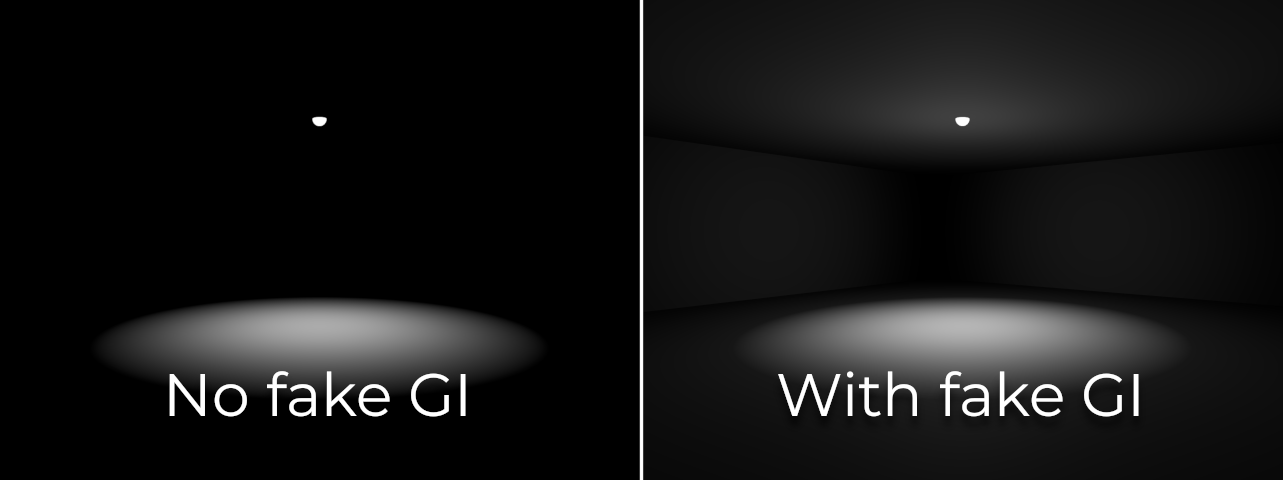
- Indirect light has bounced off other surfaces first. Godot's documentation explains that indirect diffuse light comes from light bouncing off surfaces and from emissive materials (Godot Engine documentation: Introduction to global illumination).
Direct light is cheap to compute in real time. Indirect light is harder, and the techniques that handle it are called global illumination. When people say a game has "fully dynamic lighting" in 2026, they usually mean the indirect light is real-time too, as with Unreal's Lumen.
#The four light types
Engines offer the same small set of light types under different names. Godot 4 has DirectionalLight3D, OmniLight3D, SpotLight3D and AreaLight3D (Godot Engine documentation: 3D lights and shadows). Unreal's Lumen supports Directional, Sky, Point, Spot and Rect lights (Unreal Engine Documentation: Lumen Global Illumination and Reflections).

- Directional: parallel rays from an infinitely distant source. Use it for the sun and moon. Position does not matter, only angle.
- Point (Godot: omni): light in all directions from one spot. Bulbs, candles, fires.
- Spot: a cone. Torches, street lamps, stage lights.
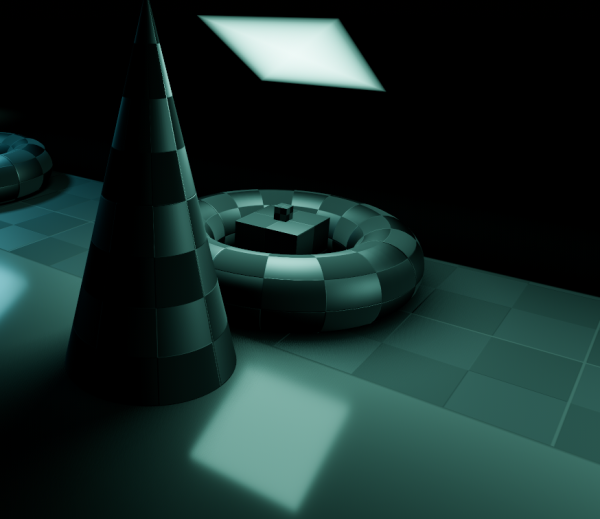
- Rect or area: light from a surface. Windows, light panels, TV screens. Softer and more expensive.
#Units and falloff
Older engines used "unitless" brightness numbers that only meant something relative to each other. Modern engines can use physical units, which makes it easier to match real places and to share values between scenes.
Unreal's documentation lists the units (Unreal Engine Documentation: Using Physical Lighting Units):
| Light | Unit | What it measures |
|---|---|---|
| Directional | Lux | Illuminance: "one lumen per squared meter" |
| Point, Spot, Rect | Candela or Lumen (or Unitless) | Intensity in a direction, or total light output |
| Sky light, emissive materials | cd/m² | Luminance of a surface |
Epic also gives conversions for old scenes: "1 cd = 625 unitless" (Unreal Engine Documentation: Using Physical Lighting Units).
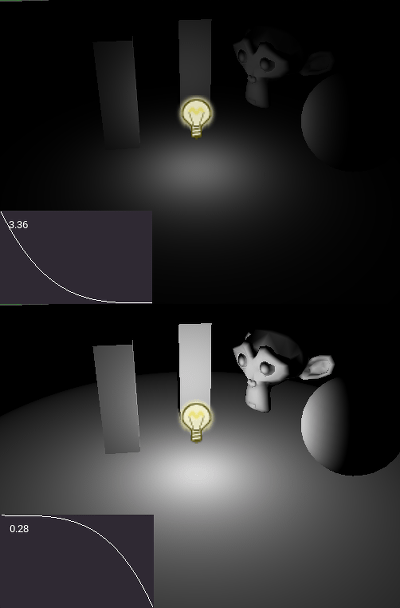
Falloff. Light from a point source spreads over a growing sphere, so it weakens with the square of the distance. Unreal calls its option "Inverse Squared Falloff", described as "physically based distance falloff" (Unreal Engine Documentation: Using Physical Lighting Units).

Physical units only work with sensible exposure. Real light levels differ enormously: full sun is about EV 15, a home interior EV 5 to 7 (Wikipedia: Exposure value). If you place a physically bright light and the image goes white, Epic's advice is that "the auto exposure range may be too limited" (Unreal Engine Documentation: Using Physical Lighting Units). See exposure and post-processing.
For the shape of a light's beam (the scallops of a wall washer, a window pattern on the floor), see IES profiles and light functions.
#How many lights can you afford?
Every engine has hard and soft limits. Knowing them early avoids a clean-up pass later.
| Engine and renderer | Limit | Source |
|---|---|---|
| Godot 4, Forward+ | Default of 512 "clustered elements" in the camera view | (Godot Engine documentation) |
| Godot 4, Mobile | 8 omni + 8 spot lights per mesh; 256 + 256 in view | (Godot Engine documentation) |
| Godot 4, Compatibility | 8 omni + 8 spot lights per mesh | (Godot Engine documentation) |
| Godot 4, all renderers | Up to 8 directional lights visible; up to 88 shadowed lights in view with the default atlas layout | (Godot Engine documentation) |
| Unity URP | A per-object limit for additional lights, ignored on the Forward+ path | (Universal RP 17 documentation) |
| Unreal, Stationary lights | "Only four or fewer" may overlap; beyond that, a light falls back to costly dynamic shadows | (Unreal Engine Documentation) |
Shadows usually cost more than the lights themselves. A point light without shadows is cheap; the same light casting shadows renders the scene again into a shadow map. Godot's default shadow map size is 4096, which it suggests keeping "in most cases" (Godot Engine documentation: 3D lights and shadows). For how shadows are stored and why Unreal moved to virtual shadow maps, see shadows and virtual shadow maps.
#Departing from physical accuracy
Physically based lighting gives a correct starting point. Games also have to be readable: players need to see enemies, doors and paths.
#In different engines
| Unreal Engine 5 | Unity 6 (URP/HDRP) | Godot 4 | |
|---|---|---|---|
| Light types | Directional, Sky, Point, Spot, Rect (Unreal Engine Documentation) | Each light is set to Realtime, Mixed or Baked mode (Unity Manual) | DirectionalLight3D, OmniLight3D, SpotLight3D, AreaLight3D (Godot Engine documentation) |
| Units | Lux, candela, lumen, cd/m², or unitless (Unreal Engine Documentation) | Exposure handled in EV100 in HDRP (see exposure and post-processing) | Physical camera attributes optional (see exposure and post-processing) |
| Real-time indirect light | Lumen, the default GI and reflections system (Unreal Engine Documentation) | Enlighten realtime GI, plus probe systems (see global illumination) | SDFGI, VoxelGI, SSIL (Forward+ only) (Godot Engine documentation) |
| Light limits | Stationary overlap of four (Unreal Engine Documentation) | Per-object limit outside Forward+ (Universal RP 17 documentation) | 512 clustered elements in Forward+ (Godot Engine documentation) |
#Common mistakes
- Lighting with exposure locked wrong. If you raise lights to fight an exposure setting, every later scene inherits the problem. Fix exposure first (Unreal Engine Documentation: Using Physical Lighting Units).
- Shadows on every small light. Keep shadow casting for lights that need it; count shadowed lights against your engine's budget (Godot Engine documentation: 3D lights and shadows).
- Thin walls under Lumen. Epic says walls "should be no thinner than 10 centimeters (cm) to avoid light leaking" (Unreal Engine Documentation: Lumen Technical Details).
- More than four overlapping Stationary lights in Unreal. The editor marks the extra light with a red X (Unreal Engine Documentation: Stationary Light Mobility).
- Fill lights hiding a missing bounce. Check your global illumination settings before adding lights.
This page pairs with exercise: lighting one scene four ways, which asks you to light one scene four ways.
#Further reading and watching
References
- · Light Modes (introduction) · Unity Manual, 2026 · docs · accessed 2026-10-21
- · Introduction to global illumination · Godot Engine documentation (source on GitHub), 2026 · docs · accessed 2026-10-21
- · 3D lights and shadows · Godot Engine documentation (source on GitHub), 2026 · docs · accessed 2026-10-21
- · Lumen Global Illumination and Reflections · Unreal Engine Documentation, 2026 · docs · accessed 2026-10-21
- · Using Physical Lighting Units · Unreal Engine Documentation, 2026 · docs · accessed 2026-10-21
- · Exposure value · Wikipedia, 2026 · web · accessed 2026-10-21
- · Universal Render Pipeline Asset · Universal RP 17 documentation, 2026 · docs · accessed 2026-10-21
- · Stationary Light Mobility · Unreal Engine Documentation, 2026 · docs · accessed 2026-10-21
- · Lumen brings real-time global illumination to Fortnite Battle Royale Chapter 4 · Unreal Engine tech blog, 2022 · article · accessed 2026-10-21
- · Lumen Technical Details · Unreal Engine Documentation, 2026 · docs · accessed 2026-10-21
Also consulted
- · Faking global illumination · Godot Engine documentation · docs · accessed 2026-10-22
Pages that link here
- Welcome Overview
- How to use this handbook Guide
- Roles in 3D game production Topic
- Game engines Reference
- Value Topic
- Light and shadow Topic
- Three-point lighting Key term
- Motivated lighting Key term
- Ambient occlusion Key term
- Emissive materials Key term
- Subsurface scattering Key term
- Physical light units Key term
- IES profiles and light functions Key term
- Light probes and reflection probes Key term
- Baked vs. dynamic lighting Topic
- Global illumination Key term
- Ray tracing Key term
- Mesh distance fields Key term
- Light leaking Key term
- Shadows and virtual shadow maps Key term
- Cascaded shadow maps Key term
- Shadow bias and shadow acne Key term
- Colour grading and LUTs Key term
- Fog and atmosphere Topic
- Sky, clouds and volumetrics Key term
- Time of day Key term
- Level design and environment art Overview
- Blockout (greyboxing) Topic
- Wayfinding Topic
- Set dressing and art passes Topic
- Frame budgets Key term
- Planning a portfolio piece Guide
- Making (and reading) an art breakdown Guide
- Art tests Guide
- Exercise: your first game-ready prop Exercise
- Exercise: lighting one scene four ways Exercise
- A 12-month learning roadmap Guide
- Essential talks and videos Reference
Last updated 2026-10-22