Parallax occlusion mapping
A pixel-shader technique that marches the view ray through a height map to fake deep surface relief on flat polygons; how the ray march works, step counts and their cost, self-shadowing and depth offset, the flat silhouette, and how POM compares with tessellation and Nanite displacement.
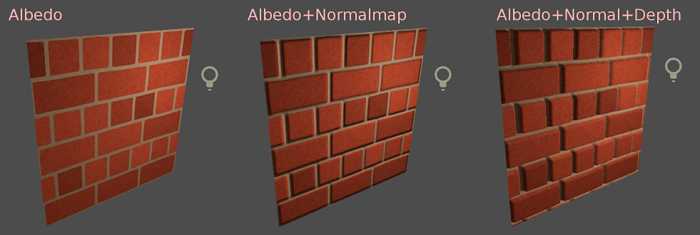
Parallax occlusion mapping (POM) makes a flat surface look deep. For every pixel, the shader follows the view ray down into a height and displacement maps until it hits the stored surface, then shades the pixel with the texture coordinates of that hit point. Bricks appear to stand proud of the mortar and hide it behind them as you walk past, while the polygon underneath stays flat.
Natalya Tatarchuk's 2006 paper, which popularised the technique for games, describes it as "per-pixel ray tracing for inverse displacement mapping with an easy-to-implement, efficient algorithm" (Research) 2006). The height and displacement maps page compares POM with plain parallax and real displacement; this page explains how POM works and what it costs.
#How the ray march works

- The shader takes the view direction in tangent space and MikkTSpace and splits the depth range into layers.
- It steps along the ray, one layer at a time, reading the height map at each step. Tatarchuk samples "using a linear search and approximating the height profile as a piecewise linear curve" (Research) 2006).
- When a sample falls below the stored height, the ray has entered the surface. The shader refines the hit between the last two samples.
- The hit point's UVs are used to read the base colour, normal and other maps. The visible result is that tall features hide what is behind them.
Steep viewing angles need more steps, because the ray travels further across the texture. Tatarchuk varies the sampling rate "as a linear function of the angle between the geometric normal and the view direction ray" (Research) 2006). Godot does the same: its shader mixes between a maximum and a minimum layer count by view angle, with defaults of 32 and 8 layers (Godot Engine: scene/resources/material.cpp).
#What it costs
Each step is a texture read, in the pixel shader, for every pixel the surface covers.
Common ways to keep it affordable:
- Fade it out with distance. Tatarchuk's shader runs "only a simple bump mapping shader" for mip levels beyond a threshold (Research) 2006). HDRP's equivalent is Fading Mip Level Start, "The mip level at which the pixel displacement effect begins to fade out" (High Definition Render Pipeline manual 17.0: Lit material Inspector reference).
- Cap the steps. HDRP exposes Minimum Steps and Maximum Steps for its pixel displacement (High Definition Render Pipeline manual 17.0: Lit material Inspector reference); Unreal's POM material function has Min Steps and Max Steps inputs (Unreal Community Wiki: Parallax Occlusion Mapping).
- Use it where the eye goes. Floors, cobbles and brick walls near the player; not ceilings or distant facades.
#Self-shadowing and depth
Two additions make the relief more believable, both at extra cost:
- Self-shadowing. A second march towards the light finds whether a point is hidden by taller features. Tatarchuk "heuristically approximate[s] the size of penumbra" to get soft shadows (Research) 2006).
- Depth offset. Writing the marched depth lets other objects and decals intersect the fake relief correctly. HDRP's Depth Offset "modifies the depth buffer according to the displacement" (High Definition Render Pipeline manual 17.0: Lit material Inspector reference), and Unreal's POM function outputs Pixel Depth Offset (Unreal Community Wiki: Parallax Occlusion Mapping).
#Limits
- The silhouette stays flat. POM never changes geometry, so edges and the line where a POM floor meets a wall stay straight. Tatarchuk notes that silhouettes remain low-resolution, and that artists sometimes add border geometry to hide this (Research) 2006).
- Stair-stepping and swimming. "Parallax occlusion mapping is a sampling-based algorithm at its core, and as such, it can exhibit aliasing" (Research) 2006). Too few layers show as slices at grazing angles; too much height scale makes the surface swim. Godot's height scale defaults to 5 cm between black and white and warns that higher values may produce artefacts (Godot Engine: BaseMaterial3D class reference).
- Shadows from other objects ignore the relief. Cast shadows use the flat polygon, so the community tutorial suggests you may need to turn off shadow casting on the mesh (Unreal Community Wiki: Parallax Occlusion Mapping).
- UV layout matters. Godot's heightmap needs normalised heights and correct tangents; if it "looks strange when the camera moves", try flipping the tangent or binormal (Godot Engine: BaseMaterial3D class reference).
#How to set one up
These steps set up POM on a cobblestone floor material in Unreal Engine, with the Unity HDRP and Godot equivalents at the end. The worked numbers assume a 2 × 2 m tiling material with a height map.
- Prepare the height map. Use a greyscale height map that uses the full black-to-white range; a map that uses only part of its range makes parallax "look strange, especially when the camera moves" (Godot Engine: BaseMaterial3D class reference). Import it with sRGB off.
- Add the POM function. In the material, add the ParallaxOcclusionMapping material function and connect the height map to Heightmap Texture (Unreal Community Wiki: Parallax Occlusion Mapping).
- Set the depth. Set Height Ratio to a small value, such as 0.03–0.05 for cobbles, and raise it slowly; too much height makes the surface swim at grazing angles (Godot Engine: BaseMaterial3D class reference).
- Set the steps. Start with Min Steps 8 and Max Steps 32, the same range as Godot's defaults (Godot Engine: scene/resources/material.cpp; Unreal Community Wiki: Parallax Occlusion Mapping). Lower Max Steps until slicing just starts to show at a low viewing angle, then go back one step.
- Use the new UVs. Connect the function's Parallax UVs output to the UV input of every other texture in the material (base colour, normal, roughness), so they all shift together (Unreal Community Wiki: Parallax Occlusion Mapping).
- Add depth offset if objects sit on it. Connect Pixel Depth Offset so props and decals intersect the relief rather than the flat polygon (Unreal Community Wiki: Parallax Occlusion Mapping).
- Fade it out with distance. Blend to the plain normal-mapped version beyond about 10 m, or at a chosen mip level as Tatarchuk's shader does (Research) 2006).
- Measure. Compare frame time with POM on and off with the floor filling the screen.
In Unity HDRP, set the Lit material's Displacement Mode to Pixel Displacement, then set Minimum Steps, Maximum Steps, Fading Mip Level Start and Depth Offset (High Definition Render Pipeline manual 17.0: Lit material Inspector reference). In Godot, enable Height and Deep Parallax and set Min Layers and Max Layers (Godot Engine: BaseMaterial3D class reference).
#Video tutorials
#Use in recent games
- The Last of Us Part I (2022), Naughty Dog. Matthew Trevelyan Johns built the ice in the deer-hunt section to look thick, with the riverbed visible below. His caption: "The illusion of depth was created using multiple parallax occlusion effects to simulate varying crack thicknesses"; because the cracks were broken up, few layers were needed, which reduced the render cost (ArtStation: The Last of Us: Part I...snow and ice shaders).
- Star Citizen (Cloud Imperium Games, in open development). Thomas Carter improved the game's shared sheets of POM decals, modelling over "tiny 32 pixel textures" to match their heights and rebuilding the maps so they lined up with the old layout (ArtStation: Star Citizen - Utilitarian Decal Sheet).
- CryEngine 2 (2007), Crytek. An older, historically important case: the engine listed parallax occlusion mapping among its features (Wikipedia: Parallax occlusion mapping).
A related shader trick also fakes depth on a flat surface, but traces view rays against the walls of a virtual room instead of a height field: interior mapping shows rooms behind flat windows.
#In different tools
- Unreal Engine: the ParallaxOcclusionMapping material function, with Heightmap Texture, Height Ratio, Min Steps and Max Steps inputs and Parallax UVs and Pixel Depth Offset outputs (Unreal Community Wiki: Parallax Occlusion Mapping).
- Unity HDRP: Lit material, Displacement Mode Pixel Displacement, which "Displaces the pixels on the mesh surface according to the Height Map" (High Definition Render Pipeline manual 17.0: Lit material Inspector reference).
- Godot: enable Height with Deep Parallax, then set Min Layers and Max Layers (Godot Engine: BaseMaterial3D class reference).
#Further reading and watching
Related: height and displacement maps, normal map, height blending, shaders for artists, virtualised geometry.
References
- · Practical Parallax Occlusion Mapping with Approximate Soft Shadows for Detailed Surface Rendering · SIGGRAPH 2006 course: Advanced Real-Time Rendering in 3D Graphics and Games, 2006 · paper · accessed 2026-10-21
- · scene/resources/material.cpp (BaseMaterial3D shader code) · Godot Engine (GitHub) · docs · accessed 2026-10-21
- · BaseMaterial3D class reference (source) · Godot Engine (GitHub) · docs · accessed 2026-10-21
- · Parallax Occlusion Mapping (legacy community tutorial) · Unreal Community Wiki · web · accessed 2026-10-21
- · Lit material Inspector reference (HDRP) · High Definition Render Pipeline manual 17.0 · docs · accessed 2026-10-21
- · The Last of Us: Part I...snow and ice shaders · ArtStation · web · accessed 2026-10-22
- · Star Citizen - Utilitarian Decal Sheet · ArtStation, 2018 · web · accessed 2026-10-22
- · Parallax occlusion mapping · Wikipedia · web · accessed 2026-10-22
Also consulted
- · Standard Material 3D and ORM Material 3D · Godot Engine documentation · docs · accessed 2026-10-22
Pages that link here
- Height and displacement maps Key term
- Interior mapping (fake interiors) Key term
- Decals Topic
- Pixel depth offset Key term
- Making (and reading) an art breakdown Guide
Last updated 2026-10-22