Anatomy of a polygon mesh
What a polygon mesh is made of, how a game engine stores it, and why the vertex count in the engine is higher than in your modeling tool.
A polygon mesh is a 3D surface built from three kinds of element: points called vertices, straight lines between them called edges, and flat areas between those lines called faces (Blender 3.1 Manual: Mesh Structure). Every model you put in a real-time game, from a pebble to a cathedral, reaches the graphics card in this form.
The mesh in your modeling tool and the mesh the engine draws are not quite the same thing. Knowing the difference explains a lot of puzzling numbers, shading problems and export settings.

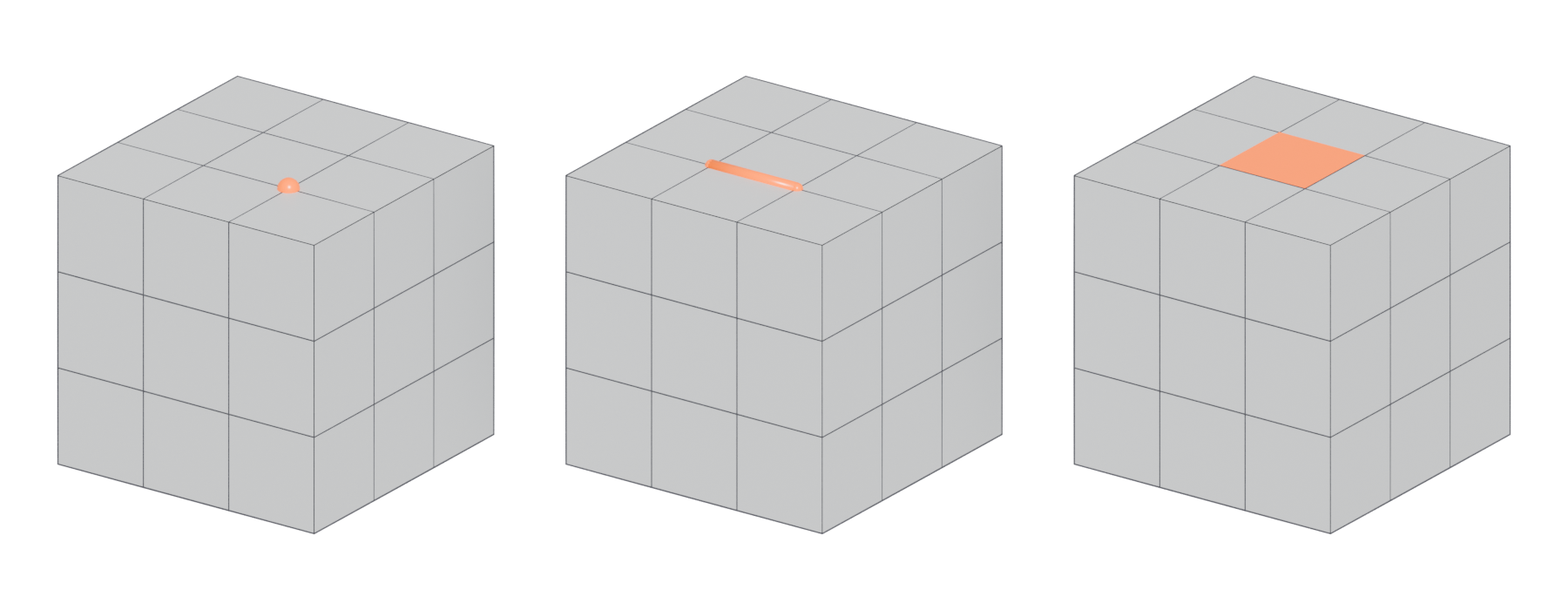
#The three building blocks
A vertex is "a single point or position in 3D space" (Blender 3.1 Manual: Mesh Structure). On its own it is a coordinate, with no size or surface.
An edge "always connects two vertices by a straight line" (Blender 3.1 Manual: Mesh Structure). Edges are the wires you see in wireframe view. There are no curved edges in a polygon mesh; a curve is only ever an approximation made of many short straight edges.
A face is the area enclosed by three or more vertices. Blender's manual names the three cases: three vertices make a triangle, four make a quad, and more than four make an N-gon (Blender 3.1 Manual: Mesh Structure). Faces are what actually render. A mesh of only vertices and edges is invisible in a game.
These three elements describe the shape. The way they are connected is called topology: which vertices are joined, how edge loops run, and where poles interrupt them (Blender 3.1 Manual: Mesh Structure).
#Vertex attributes
To a game engine, a vertex is much more than a position. Unity describes vertex data as "a collection of positions in 3D space, with optional additional attributes" (Unity Manual 2022.2: Anatomy of a mesh). The common attributes are:
- Position. Required for every mesh (Unity Manual 2022.2: Anatomy of a mesh).
- Normal. A direction that tells the renderer which way the surface faces. Unity's importer notes that you can drop normals only if the mesh "is neither normal mapped nor affected by realtime lighting" (Unity Manual 2018.2: Model tab). In other words, lighting depends on them. See normals.
- Tangent. Needed for normal maps; without tangents a mesh "doesn't work with normal-mapped shaders" (Unity Manual 2018.2: Model tab). See tangent space and MikkTSpace.
- Texture coordinates (UVs). A 2D position on a texture for each vertex. A Unity mesh can hold up to eight sets (Unity Manual 2022.2: Anatomy of a mesh). See UV mapping.
- Vertex colour. An optional colour per vertex (Unity Manual 2022.2: Anatomy of a mesh), often used for vertex painting and blending and material blending rather than visible colour.
- Bone weights. Only needed for skinned (animated) meshes (Unity Manual 2022.2: Anatomy of a mesh).
Unreal's static mesh editor shows how many UV channels a mesh has and notes that "unique, non-overlapping UVs are required for shadow mapping" (Unreal Engine Documentation: Static Mesh Editor UI). That second UV set is the lightmap UV channel, and it is another attribute every vertex must carry.

#Triangles on the graphics card
Modeling tools let you work with quads and n-gons, but the GPU draws only triangles. Epic's import documentation states that meshes "must be triangulated as the graphics hardware only deals with triangles" (Unreal Engine Documentation: FBX Static Mesh Pipeline). Direct3D, for example, lists only points, lines and triangles (as lists or strips) as its basic primitive types; there is no quad (Microsoft Learn: Primitive Topologies).
Triangles have a useful property: three points always lie on one plane. As Blender's manual puts it, "Triangles are always flat and therefore easy to calculate" (Blender 3.1 Manual: Mesh Structure). A quad's four corners can be bent out of plane, and then there are two different ways to split it. That choice is the subject of triangulation.
#How the engine stores a mesh
You do not need to write graphics code to follow this. A mesh is stored as two lists.
- The vertex buffer is a list of vertices. Each entry holds all the attributes above. Unity keeps them in parallel arrays of equal length, so a mesh with 10 positions also has 10 normals, 10 UVs and so on (Unity Manual 2022.2: Anatomy of a mesh).
- The index buffer is a list of whole numbers that point into the vertex list, three at a time, one triangle per three numbers. Unity's example: indices 0, 1, 2, 1, 2, 3 form two triangles that share two vertices (Unity Manual 2022.2: Anatomy of a mesh).
The index buffer exists so that shared corners are stored once. A rectangle drawn as two separate triangles needs six vertices, but with indices it "only needs four vertices" (OpenTK Learn: Element Buffer Objects).
#Split vertices
A vertex in the vertex buffer can hold only one value per attribute. As one Polycount poster summed it up, "A single vert can only have one normal and one UV coordinate" (Polycount forum: Vertex Count vs Triangle Count). Unity's manual says the same: "a vertex must be split if it has multiple normals, UV coordinates or vertex colors" (Unity Manual: Modeling characters for optimal performance).
So wherever faces that meet at a corner need different values, the engine stores extra copies of that corner. The usual causes are:
- Hard edges. On a hard edge each face needs its own normal, so the vertices along it split. Unity's Smoothing Angle setting "control[s] whether vertices are split for hard edges" (Unity Manual 2018.2: Model tab).
- UV seams. Along a UV seam the same corner sits in two places on the texture, so it needs two UV values. In a Unity forum answer, every UV seam means "a unique vertex per shared position" (Unity Discussions: Vertex count and smoothing groups).
- Vertex colour changes. Painting per-face colours splits vertices for the same reason (Polycount forum: Vertex Count vs Triangle Count).
The result is that "the vertex count in Unity is usually higher than the count given by the 3D application," because modeling tools count "distinct corner points" (Unity Manual: Modeling characters for optimal performance).

This is why smoothing splits and UV seams are often placed on the same edges. If a vertex is already split for a seam, also making the edge hard costs nothing extra. Polycount posters recommended exactly this, placing hard edges along UV borders (Polycount forum: Vertex Count vs Triangle Count). The baking and smoothing, hard edges and smoothing groups pages explain why this also helps normal maps.
#Counting in different tools
Every tool shows counts, but they count different things.
- Blender. Turn on the Statistics overlay. It shows "information about the amount of objects and geometry" for the current mode, such as vertices, faces and triangles (Blender 3.5 Manual: Viewport Overlays). These are modeling-tool counts: corner points and faces before splitting.
- Maya. Display > Heads Up Display > Poly Count lists "Vertices, Edges, Faces, Triangles, and UVs", in three columns for the whole scene, the selected objects and the selected components (Maya 2026 Help: Heads Up Display (HUD) Options).
- Unreal Engine. The Static Mesh Editor shows Triangles, Vertices and UV channels for the imported asset (Unreal Engine Documentation: Static Mesh Editor UI). This vertex count is after splitting, so it is the number that reaches the GPU.
#Common mistakes
- Thinking the modeling-tool vertex count is the real one. The engine's number is higher wherever you have hard edges, seams or colour changes (Unity Manual: Modeling characters for optimal performance).
- Scattering hard edges that do not sit on UV seams. Each one splits vertices and can cause seams in baked normal maps. Line them up with UV borders (Polycount forum: Vertex Count vs Triangle Count).
- Leaving loose vertices and stray edges. They do not render, but they confuse tools and can break exports. See manifold and non-manifold geometry.
- Assuming quads reach the engine. They are always split into triangles, and the split can change shading. See triangulation.
#Further reading and watching
References
- · Mesh Structure · Blender 3.1 Manual, 2022 · docs · accessed 2026-10-20
- Manifold (3D glossary) · Meshy · web · accessed 2026-10-20
- · Anatomy of a mesh · Unity Manual 2022.2, 2022 · docs · accessed 2026-10-20
- · Model tab (FBX Importer settings) · Unity Manual 2018.2, 2018 · docs · accessed 2026-10-20
- · Static Mesh Editor UI · Unreal Engine Documentation · docs · accessed 2026-10-20
- · FBX Static Mesh Pipeline · Unreal Engine Documentation · docs · accessed 2026-10-20
- · Primitive Topologies · Microsoft Learn (Direct3D 11) · docs · accessed 2026-10-20
- · Element Buffer Objects · OpenTK Learn · web · accessed 2026-10-20
- Vertex Count vs Triangle Count · Polycount forum, 2014 · forum · accessed 2026-10-20
- · Modeling characters for optimal performance · Unity Manual · docs · accessed 2026-10-20
- Vertex count and smoothing groups · Unity Discussions, 2021 · forum · accessed 2026-10-20
- Vertex Count & Light Map Vertex Count · Unreal Engine Forums, 2014 · forum · accessed 2026-10-20
- · Viewport Overlays · Blender 3.5 Manual, 2023 · docs · accessed 2026-10-20
- · Heads Up Display (HUD) Options · Maya 2026 Help, 2025 · docs · accessed 2026-10-20
Pages that link here
- How to use this handbook Guide
- Vertex Key term
- Vertex colours Key term
- Ways to build a 3D model Overview
- Subdivision surface modeling Topic
- CAD and NURBS modeling for games Topic
- A 12-month learning roadmap Guide
Last updated 2026-10-22