IES profiles and light functions
Measured photometric profiles that give lights a real fixture's shape and falloff, and light functions or cookies that project patterns through a light; setup in UE5, Unity and Godot and what each costs.
An IES profile is a data file that describes how bright a real light fixture is in every direction. Epic calls IES profiles "a lighting industry standard method of diagramming the brightness and falloff of light" (Unreal Engine documentation: IES Light Profiles). A light function (Unreal) or cookie (Unity) is a mask projected through a light, such as the shadow of a window frame. Both shape a light without extra geometry, and both work as multipliers on the light's output (Unreal Engine documentation: IES Light Profiles; Unity documentation: Understand IES light profiles).
These are tools of real-time lighting. They matter most in interiors and night scenes, where the shape of each lamp's light on walls and floors tells the eye what kind of fixture it is.
#IES photometric profiles
Manufacturers measure their lamps and publish the results as IES files. Frostbite's move to physically based lighting at EA describes it simply: "An IES profile can be attached to our punctual lights", and profiles "have different intensity depending on the direction"; they can come from manufacturers' websites or be authored by artists (SIGGRAPH 2014 Physically Based Shading course: Moving Frostbite to Physically Based Rendering).
In practice an IES profile gives a downlight its characteristic scallop on a nearby wall, a sharp cut-off at the edge of its beam, and brighter or darker rings. A plain spot light gives a smooth cone.

Unreal stores the profile as a 1D gradient that multiplies the light's brightness rather than as an ordinary texture, and it works on Point, Spot and Rect lights (Unreal Engine documentation: IES Light Profiles). Unity HDRP supports IES on Point, Spot (Cone, Pyramid, Box) and rectangular Area lights (Unity documentation: Understand IES light profiles).
#Light functions and cookies
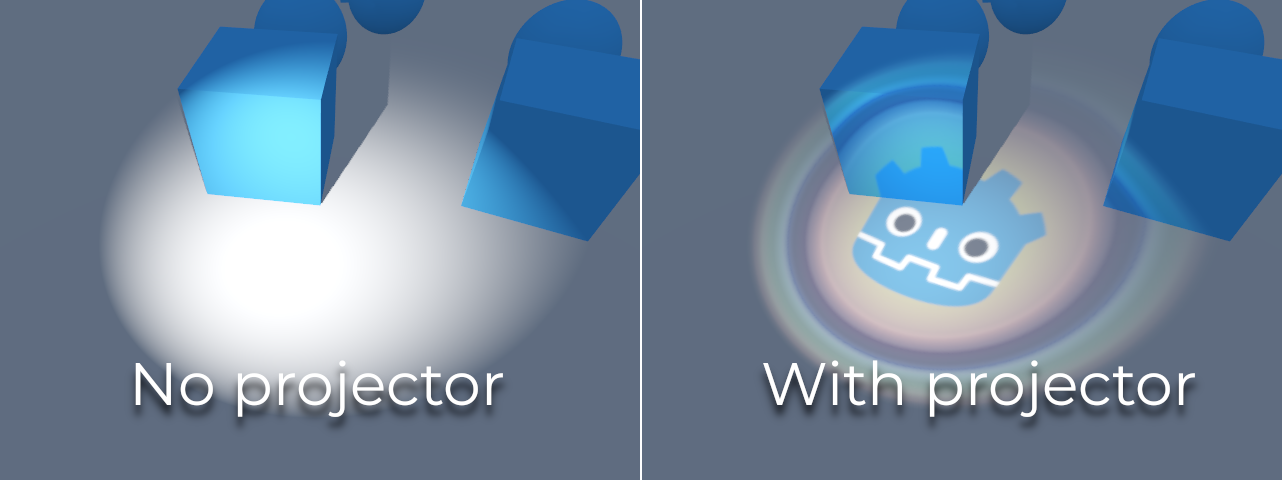
A light function is a material that masks or filters a light's intensity (Unreal Engine documentation: Light Functions). Unity's cookies do the same with a texture; Unity lists effects such as "caustics, soft shadows, and light shapes", including "light entering from a window" (Unity Manual: Cookies). Godot calls the same idea a projector texture, which multiplies the light's colour by the texture at each point (Godot Engine documentation: 3D lights and shadows).

Typical uses:
- Window and blind patterns in interiors, where the window itself is off screen (Unity Manual: Cookies).
- Caustics and soft shadows, such as light rippling under water (Unity Manual: Cookies).
- Animated masks. Because a light function is a material, it can animate like any other material, for example a flicker or a slow pan (Unreal Engine documentation: Light Functions).
#What they cost
The two techniques have very different costs.
- IES profiles are cheap. Epic: "IES Profiles render very fast and do not have a significant effect on performance", and it recommends them over a light function for shaping a light (Unreal Engine documentation: IES Light Profiles).
- Light functions are expensive. "Light functions follow the same expensive rendering passes as lights that cast dynamic shadows" (Unreal Engine documentation: Light Functions). They only work on Movable or Stationary lights, never on fully baked ones (Unreal Engine documentation: Light Functions).
- The Light Function Atlas in Unreal bakes light functions into shared tiles. Epic reports a GPU time reduction of more than 2 ms in the Talisman environment template for UEFN (Unreal Engine documentation: Light Functions). Atlas light functions cannot sample the depth buffer, world position or GBuffer, and directional lights currently skip the atlas (Unreal Engine documentation: Light Functions).
- Projector filtering in Godot. Under Rendering > Textures > Light Projectors > Filter, Nearest and Linear are fastest but grainy at a distance; anisotropic mipmaps look best and cost most (Godot Engine documentation: 3D lights and shadows).
- Cookies with baking. Unity HDRP can mix an IES profile with a cookie and "even use the profile and cookie mix for light map baking" (Unity documentation: Understand IES light profiles), which removes the runtime cost for static lights.
#How to set one up
#Unreal Engine 5
- Import the IES file with Add, drag-and-drop or the context menu (Unreal Engine documentation: IES Light Profiles).
- Assign it. Select a Point, Spot or Rect Light and set the profile in the IES Texture slot under Light Profiles (Unreal Engine documentation: IES Light Profiles).
- Choose intensity. Enable Use IES Intensity for the profile's brightness, then adjust IES Intensity Scale if needed (Unreal Engine documentation: IES Light Profiles).
- Make a light function. Create a material, set Material Domain to Light Function, and connect your mask to Emissive Color (Unreal Engine documentation: Light Functions).
- Apply it to a Movable or Stationary light. Set Light Function Scale, a Fade Distance to hide distant aliasing, and a Disabled Brightness that matches the mask's average brightness (Unreal Engine documentation: Light Functions).
- For coloured light functions with the atlas, switch the atlas format to 8 bits RGB and enable Deferred Lighting Uses Light Function Atlas; coloured functions then work with volumetric fog and Lumen GI and reflections (Unreal Engine documentation: Light Functions).
#Unity HDRP
- Import the
.iesfile. The importer "automatically creates a Light Prefab" with the profile and the correct intensity (Unity documentation: Understand IES light profiles). - Drag the prefab into the Scene view or Hierarchy and adjust the colour temperature (Unity documentation: Understand IES light profiles).
- Add a cookie texture to the light if you also need a pattern; the profile and cookie can be combined and baked (Unity documentation: Understand IES light profiles; Unity Manual: Cookies).
#Godot 4
- Enable shadows on the OmniLight3D or SpotLight3D; projectors need them (Godot Engine documentation: 3D lights and shadows).
- Assign a projector texture. Spot projectors use a normal texture, mapped much like a decal; omni projectors need "a special 360° panorama mapping" (Godot Engine documentation: 3D lights and shadows).
- Raise Energy, because lights usually look darker once a projector is assigned (Godot Engine documentation: 3D lights and shadows).
- The Godot lights documentation does not mention IES profiles, so approximate a fixture's shape with a projector texture instead (Godot Engine documentation: 3D lights and shadows).
#Video tutorials
#In different tools
| Engine | IES profiles | Projected patterns | Notes |
|---|---|---|---|
| Unreal Engine 5 | Point, Spot, Rect lights; IES Texture slot (Unreal Engine documentation) | Light Function materials, Light Function Atlas (Unreal Engine documentation) | Light functions need Movable or Stationary lights |
| Unity HDRP | Point, Spot, rectangular Area; importer creates a prefab (Unity documentation) | Cookies (Unity Manual) | Profile and cookie can be baked into lightmaps |
| Godot 4 | Not mentioned in the docs (Godot Engine documentation) | Projector textures on omni and spot lights with shadows | Omni projectors need panorama textures |
#Further reading and watching
References
- · IES Light Profiles · Unreal Engine documentation · docs · accessed 2026-10-22
- · Understand IES light profiles (HDRP 17) · Unity documentation · docs · accessed 2026-10-22
- · Moving Frostbite to Physically Based Rendering (slides) · SIGGRAPH 2014 Physically Based Shading course, 2014 · talk · accessed 2026-10-22
- · Procedural IES Light Profile Generator for Artists · 80 Level (seen in search results) · article · accessed 2026-10-22
- · Light Functions · Unreal Engine documentation · docs · accessed 2026-10-22
- · Cookies · Unity Manual (Unity 6) · docs · accessed 2026-10-22
- · 3D lights and shadows · Godot Engine documentation (source on GitHub) · docs · accessed 2026-10-22
- · Unreal Engine 5 IES Lights Tutorial | Create Realistic Light Falloff · YouTube · video · accessed 2026-10-22
Pages that link here
- Real-time lighting Topic
- Physical light units Key term
Last updated 2026-10-22