The high-to-low workflow
Building a detailed high-poly model and a separate efficient low-poly model, then baking the high poly's surface detail into texture maps for the low poly.
In the high-to-low workflow you build two versions of an asset: a detailed high poly that can be as dense as you like, and an efficient low poly that goes into the game. You then bake the high poly's surface into texture maps, above all a normal map, so the low poly looks far more detailed than its geometry. Matthew Murchison summarises the pairing as a low poly with a good silhouette plus a high poly baked to a normal map (ArtStation blog: Leveraging Multiple Workflows).
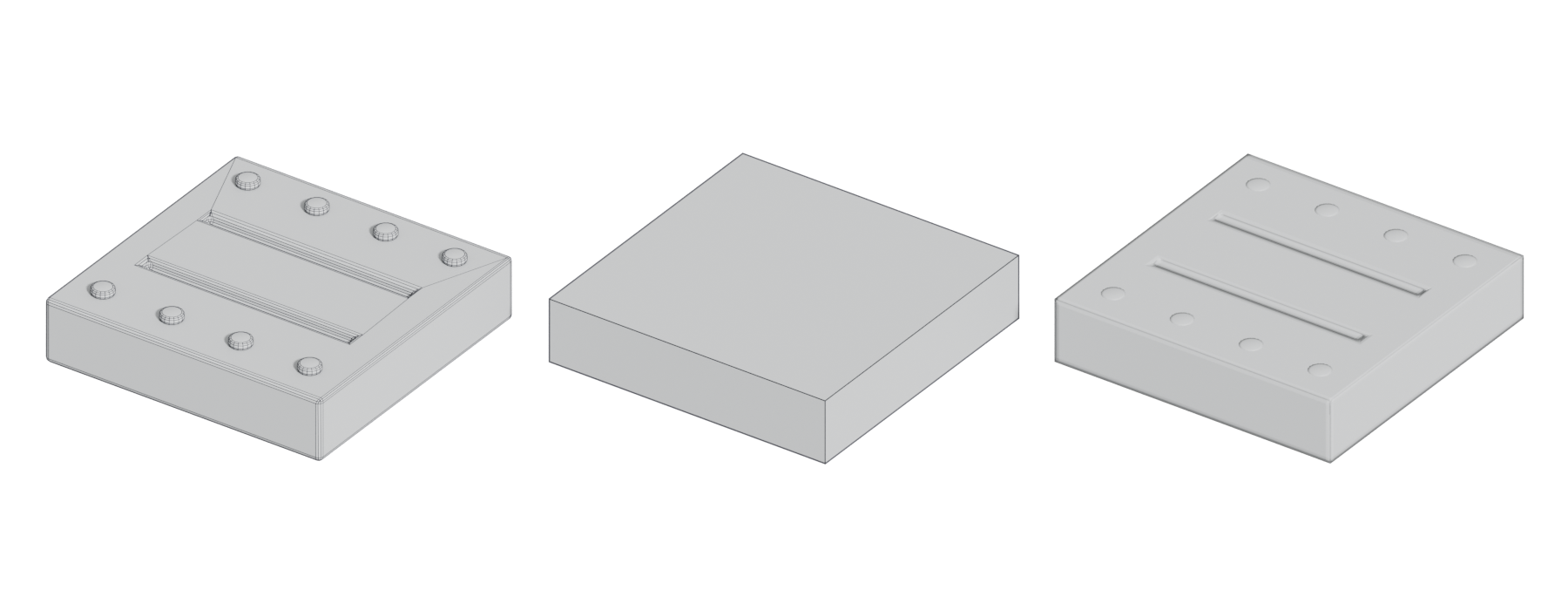
#The pieces

- High poly. The source of detail. It can be built with subdivision, booleans and bevels, CAD, or sculpting. Topology barely matters: in one Polycount reply, "it doesn't need to have great topology, it's going to be used to bake down onto a low poly and that's it" (Polycount forum: Advice for solving various normal map/edge…). Small details are often floaters.
- Low poly. The game mesh. It owns the silhouette and needs clean UVs. Silhouette-defining detail belongs here; detail that does not affect the silhouette can go into the bake (Polycount forum: I need some advice).
- Cage. An inflated copy of the low poly that tells the baker where rays start and how far they search. See bake cage.
- Bake. Usually normal, ambient occlusion and curvature, plus ID masks for texturing. See baking and fixing baking artefacts.
#Naming conventions for matching
Bakers need to know which high-poly pieces belong to which low-poly pieces, especially on assets with many parts. Matching by name is the usual solution. Marmoset Toolbag's Quick Loader uses suffixes: a community SmartBaker plug-in lists "_High - for High polygon meshes" and "_Low - for Low polygon meshes" (Polycount forum: Marmoset Toolbag 3 - SmartBaker). Marmoset's EarthQuake describes variant naming such as "Object_High/Low_Variant" for several pieces sharing a group (Polycount forum: Marmoset Toolbag 3 - SmartBaker). A Blender bridge add-on follows "naming rules as for Marmoset Toolbag's QuickLoader" and creates bake groups from objects with a "_low" suffix (Superhive Market: Blender <-> Marmoset Toolbag - Baker Bridge).
A simple, reliable scheme for any baker:
| Part | High poly | Low poly | Cage (optional) |
|---|---|---|---|
| Crate body | crate_body_high |
crate_body_low |
crate_body_cage |
| Lid | crate_lid_high |
crate_lid_low |
crate_lid_cage |
Name parts once, early, and keep names identical across files. Mismatches usually come from renaming at bake time. See naming conventions.
#Exploded bakes
When separate parts sit close together, rays meant for one part can hit its neighbour. That produces projected bits of the wrong part and dark AO where parts touch. The usual fix is an exploded bake: move each matched high and low pair apart by the same offset before baking, then put them back. Some bakers, such as Marmoset Toolbag, instead organise matched high and low pairs into bake groups by name (Polycount forum: Marmoset Toolbag 3 - SmartBaker); check your baker's documentation for how groups affect projection. Either way, decide on purpose which contact shadows you want in the AO. See fixing baking artefacts.
#How to make one
These steps take a small prop, such as a 40 cm fuel can, from blockout to a baked low poly, with modeling in Blender (or Maya, 3ds Max) and baking in Marmoset Toolbag, Substance Painter or Blender.
- Block out the shape at real scale (see blockout and units, scale and axes). The blockout often becomes the start of both meshes.
- Build the high poly. Use subdivision, booleans with bevels, or sculpting. Make bevels wider than looks natural; one Polycount reply advised bevels "over double the current size/strength" to bake cleanly (Polycount forum: Advice for solving various normal map/edge…). Model small parts such as screws as floaters.
- Build the low poly from the blockout or by retopology. Spend triangles on the silhouette. On cylinders, Boy Sichterman's advice is to "give the highpoly the same, or double the amount of divisions as you would give the lowpoly" (80 Level: Boy Sichterman: Getting Hard-Surface Right), so the bake does not wobble. For the fuel can, 600–800 triangles is a reasonable target.
- UV the low poly. Split UVs at hard edges and keep padding (see UV packing and padding).5. Name and group high, low and cage meshes, for example
can_body_highandcan_body_low(see the table above). - Bake. In Toolbag or Substance Painter, load the low and high files and bake normal, ambient occlusion and curvature by matching names (Polycount forum: Marmoset Toolbag 3 - SmartBaker). In Blender, use Cycles with Selected to Active, which bakes "shading on the surface of selected objects to the active object", with a cage or ray distance set, and an active Image Texture node as the target (Blender Manual: Render Baking).
- Inspect and fix. Check every map on the low poly under a moving light. Fix artefacts with cage edits, skew painting, exploded bakes or by moving floaters (see fixing baking artefacts).
- Texture using the baked maps as masks, then export with the same normals and triangulation you baked with.
If you make the high poly in a CAD tool, export it dense: Plasticity's OBJ export recommends a face plane tolerance of 0.0001 for high polys versus 0.01 for low polys (Plasticity documentation: Export OBJ).
#Video tutorials
#Use in recent games
High-to-low is the default for unique props, so studios mostly write about it when they move away from it or combine it with something else.
- The Last of Us Part I: unique bakes as the baseline. Matthew Trevelyan Johns describes texture memory being consumed by many small props with their own bakes, and set out to build "a functional replacement pipeline for the many uniquely baked 1-to-1 assets" using baked-bevel trims (ArtStation: The Last of Us: Part I...Trim Pipeline). The trims themselves come from measured high-poly panels baked once (ArtStation: The Last of Us: Part I...Trim Pipeline).
- The Last of Us Part I: one bake, many materials on organic assets. Jared Sobotta's erosion breakdown uses a 1-to-1 bake "multiplied down the material layers": a unique bake carries the shape of each embankment, while tiling materials carry the surface (ArtStation: Erosion Breakdown). See modeling rocks, trees and terrain pieces.
#When high-to-low is the better choice
- Small props and hero assets with lots of unique detail. Patscheider keeps conventional high-low for small hero props, heavily varied materials and organic shapes (ArtStation blog: Quarry Bank Mill 3D #08 The mid-poly workflow).
- Mid-distance assets. Murchison uses baked meshes where the camera stays at a distance, such as facades, because the approach is familiar to teams and well supported by tools such as Substance Painter (ArtStation blog: Leveraging Multiple Workflows).
- Tight triangle budgets. A baked low poly is the cheapest way to show bevelled edges at runtime.
- Unique wear and damage. Sculpted dents and chips are captured directly in a bake.
It is less suitable where assets are huge (the bake spreads too thin), change often (every change means a re-bake), or are reused in many configurations. Angelic switched to mid-poly so feedback and geometry changes would not mean re-rolling low and high polys (80 Level: Creating Assets Within the Mid-Poly Workflow…). With Unreal's Nanite, Epic recommends "high-poly detailing rather than baking detail into normal map textures" (Unreal Engine documentation: Nanite Virtualized Geometry in Unreal Engine). See the mid-poly workflow and virtualised geometry.
#Further reading and watching
References
- · Leveraging Multiple Workflows · ArtStation blog, 2019 · article · accessed 2026-10-21
- · Advice for solving various normal map/edge bake artifacts? · Polycount forum, 2020 · forum · accessed 2026-10-21
- · I need some advice · Polycount forum, 2023 · forum · accessed 2026-10-21
- · Marmoset Toolbag 3 - SmartBaker · Polycount forum · forum · accessed 2026-10-21
- · Blender <-> Marmoset Toolbag - Baker Bridge (documentation) · Superhive Market · docs · accessed 2026-10-21
- · Boy Sichterman: Getting Hard-Surface Right · 80 Level, 2017 · article · accessed 2026-10-22
- · Render Baking · Blender Manual (2.83), 2020 · docs · accessed 2026-10-22
- · Export OBJ · Plasticity documentation · docs · accessed 2026-10-21
- · Baking in Marmoset Toolbag · YouTube · video · accessed 2026-10-21
- · Substance Painter: Baking High to Low Poly Workflow · YouTube · video · accessed 2026-10-22
- · Remaking a M24 Stielhandgranate - Full Length · YouTube · video · accessed 2026-10-21
- · The Last of Us: Part I...Trim Pipeline · ArtStation · web · accessed 2026-10-22
- · Erosion Breakdown · ArtStation · web · accessed 2026-10-21
- · Quarry Bank Mill 3D #08 The mid-poly workflow · ArtStation blog, 2020 · article · accessed 2026-10-21
- · Creating Assets Within the Mid-Poly Workflow in UE5 · 80 Level · article · accessed 2026-10-21
- · Nanite Virtualized Geometry in Unreal Engine · Unreal Engine documentation · docs · accessed 2026-10-21
- · Prop Art Tips: Creating a Realistic Radio Receiver in Blender & Marmoset Toolbag · 80 Level, 2025 · article · accessed 2026-10-21
- · Revolutionize Your 3D Workflow with Toolbag's Bevel Shader · Marmoset, 2025 · article · accessed 2026-10-21
- · Maya and it's Weighted Vertex Normals · Polycount forum · forum · accessed 2026-10-21
- · Discuss face weighted normals · Polycount forum, 2011 · forum · accessed 2026-10-21
- · Baking Normal maps in maya using floating geometry · Polycount forum, 2006 · forum · accessed 2026-10-21
Pages that link here
- How to use this handbook Guide
- Real-time vs. offline rendering Topic
- The game asset pipeline Topic
- UV, retopology and baking tools Reference
- Ways to build a 3D model Overview
- Box modeling Topic
- Subdivision surface modeling Topic
- Control cage and limit surface Key term
- CAD and NURBS modeling for games Topic
- Support loop (holding edge) Key term
- Hard-surface modeling Topic
- Bevels and chamfers Topic
- Bevel shaders Key term
- Weighted (custom) normals Topic
- The mid-poly workflow Topic
- Floaters Key term
- Greebles Key term
- Hero assets, props and filler Topic
- Retopology Topic
- Digital sculpting Topic
- Sculpting rocks and cliffs Guide
- Sculpting damage and wear Guide
- Baking Topic
- Bake cage Key term
- Bake groups and exploded bakes Key term
- Curvature, thickness and ID maps Key term
- Normal map Key term
- Unique texturing (texture painting) Topic
- Mesh decals Topic
- Photogrammetry Topic
- Exercise: your first game-ready prop Exercise
Last updated 2026-10-22