Glue pieces
Kit pieces whose job is to join other pieces, cover gaps at odd angles and bridge different kits. Bethesda built whole "glue kits" for this.
Glue pieces are kit pieces whose job is to join other pieces: they cover gaps where modules meet at odd angles, hide seams, and make transitions between different kits. The Level Design Book lists "glue" among the common module types, next to floors, walls, doorways and corners (The Level Design Book: Modular kit design).
A kit of only straight walls and 90-degree corners builds boxes. Glue pieces let the same kit build caves, ruins and anything that leaves the grid.
#Glue in a kit
The Level Design Book's gap test for a new kit asks: "do you have enough glue for interior kits with off-angle construction? essential for tunnel or cave kits" (The Level Design Book: Modular kit design). For cave kits it also lists "flanges and arches" and "shells" as module types (The Level Design Book: Modular kit design), which are glue in all but name.
Typical glue pieces, gathered from the examples in Burgess's talk and The Level Design Book (Game Developer: Skyrim's Modular Approach to Level Design; The Level Design Book: Modular kit design; The Level Design Book: Environment Art):
| Piece | What it hides or joins |
|---|---|
| Flange or arch | The gap between two tunnel pieces rotated at different angles |
| Pillar or column | A vertical seam where two walls meet off-grid |
| Platform, ledge | A height change between two kits or sub-kits |
| Rubble, rock, debris | Intersections on the floor or against walls |
| Transition piece | The join between two different kits, such as a cave and a built corridor |
#Bethesda's glue kits
Joel Burgess and Nate Purkeypile's GDC 2013 talk, written up by Burgess, describes the most developed version. In Skyrim's Ratway, hallway pieces were rotated at arbitrary angles to create organic flow, and "there is a gap created between each hallway piece" (Game Developer: Skyrim's Modular Approach to Level Design). The team "covered up this gap using an archway that follows the full curvature of the walls, ceiling and floor" (Game Developer: Skyrim's Modular Approach to Level Design). Burgess calls this the Pivot and Flange system (Game Developer: Skyrim's Modular Approach to Level Design).
Later, Bethesda generalised the idea. Burgess writes that platform kits "are a specific example of what we've started to call 'Glue' kits", which "are essentially made with kit-bashing in mind" and "exist primarily to create transitions between multiple kinds of kits and sub-kits" (Game Developer: Skyrim's Modular Approach to Level Design). Glue becomes a kit of its own, shared across many others. See kitbashing.
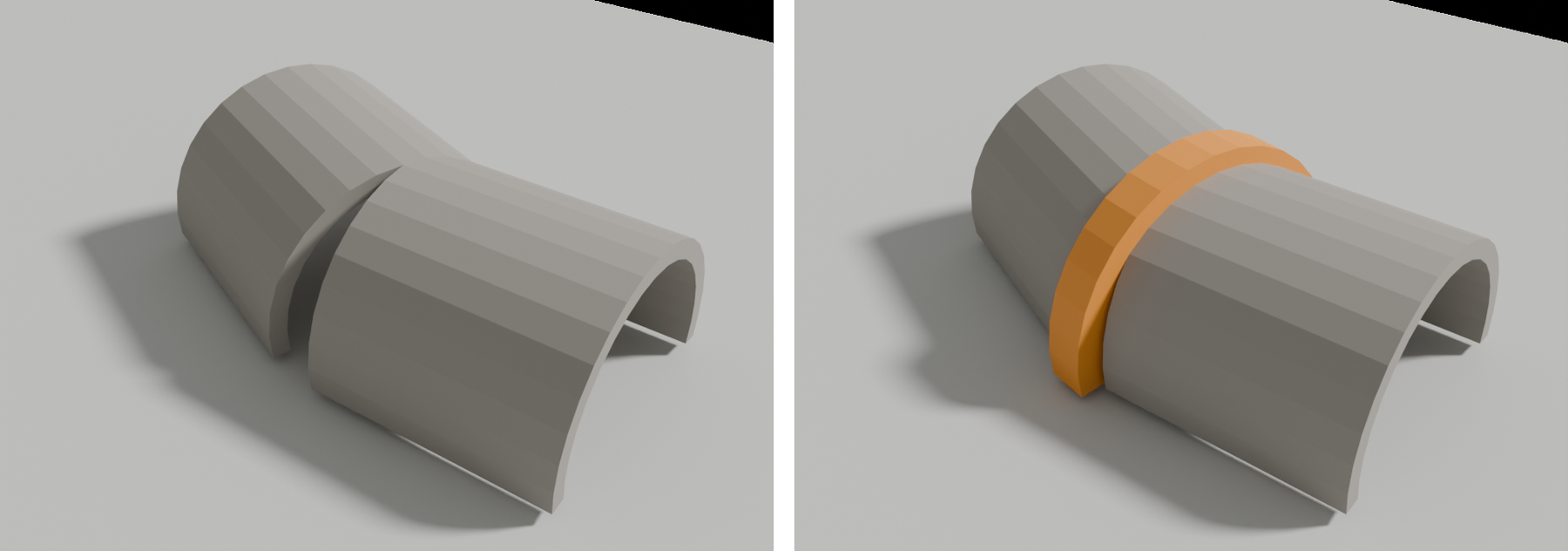
#How to make one
These steps make a flange (arch) glue piece for a tunnel kit in Blender and test it in Unreal Engine 5, following the Ratway approach (Game Developer: Skyrim's Modular Approach to Level Design) and The Level Design Book's gap test (The Level Design Book: Modular kit design). The example tunnel is 4 m wide and 4 m tall.
- Start from the tunnel's profile. Copy the end loop of the straight tunnel piece, so the flange follows the full curvature of walls, ceiling and floor, as the Ratway archway did (Game Developer: Skyrim's Modular Approach to Level Design).
- Make it bigger than the gap. Scale the profile up by 10–15% (about 40–60 cm wider and taller than the tunnel) and give it a depth of 50–80 cm. Burgess notes that such an archway "can't snap to both halls" (Game Developer: Skyrim's Modular Approach to Level Design), so generous overlap hides small placement errors.
- Set the pivot at the joint. Put the pivot on the tunnel's centre line at floor level, where two tunnel pieces meet, so designers can snap it to one piece and rotate it to split the angle.
- Model the detail to suit repetition. Keep the arch plain or add one or two variants; a distinctive arch at every joint becomes the thing players notice. See art fatigue.
- Add a floor glue piece. Make a rubble or rock cluster about 1–2 m across to hide floor intersections where the flange does not reach, as The Level Design Book suggests for messy joins (The Level Design Book: Environment Art).
- Test at odd angles. In the engine, lay out five tunnel pieces rotated 10–25 degrees from each other, place the flange at each joint, and check from eye height that no gap shows.
- Check collision. Give the flange simple collision that stays out of the walkable path, and walk the tunnel with the player character. See collision meshes.
#Video tutorials
No verified video tutorial focuses on glue pieces alone. These cover them as part of kit design:
#Use in recent games
Glue pieces are rarely named in breakdowns; they show up as arches, pillars and rubble between kit pieces. The documented cases come from Bethesda:
- The Elder Scrolls V: Skyrim: the Ratway flanges. Hallway pieces were rotated at arbitrary angles, and the team "covered up this gap using an archway that follows the full curvature of the walls, ceiling and floor" (Game Developer: Skyrim's Modular Approach to Level Design).
- Skyrim and later Bethesda games: glue kits. Burgess describes platform kits as "a specific example of what we've started to call 'Glue' kits", which "exist primarily to create transitions between multiple kinds of kits and sub-kits" (Game Developer: Skyrim's Modular Approach to Level Design). The GDC 2016 talk on Fallout 4 continues the same kit system (YouTube: Fallout 4's Modular Level Design).
The image below, from a recent game, shows the same problem solved at the scale of whole buildings: prefabs placed side by side, with the joins between them broken up.
#Related terms
modular kits · kitbashing · grids and metrics · set dressing and art passes · showcase (warehouse) map
#Further reading and watching
References
- · Modular kit design · The Level Design Book · web · accessed 2026-10-21
- · Skyrim's Modular Approach to Level Design · Game Developer (from GDC 2013 Level Design in a Day), 2013 · article · accessed 2026-10-21
- · Environment Art · The Level Design Book · web · accessed 2026-10-21
- · Building Huge Open Worlds: Modularity, Kits & Art Fatigue · 80 Level, 2018 · article · accessed 2026-10-21
- · Fallout 4's Modular Level Design · YouTube (GDC Festival of Gaming), 2016 · talk · accessed 2026-10-21
- · The easiest Way to Create Modular 3D Kits Without Stress · YouTube · video · accessed 2026-10-21
- · Ultimate Guide to Modular Assets | Sony Santa Monica & Naughty Dog Artists Break Down the Workflow · YouTube, 2025 · video · accessed 2026-10-21
Also consulted
- · Indiana Jones and The Great Circle - Shanghai Environment Breakdowns · ArtStation · web · accessed 2026-10-21
Pages that link here
- Modular kits Topic
- Showcase (warehouse) map Key term
- Modeling rocks, trees and terrain pieces Topic
- Skirts (terrain and blend skirts) Key term
- Art fatigue Key term
- Planning a portfolio piece Guide
- Exercise: a modular room Exercise
- A 12-month learning roadmap Guide
- Game art breakdowns: a curated library Reference
Last updated 2026-10-22