Emissive materials
Materials that give off light of their own, from screens and neon to lava; HDR values, bloom and exposure, physical units (nits, EV100), when emissive surfaces light the scene (Lumen, baked lighting, Godot GI) and when you still need real lights, with settings in Unreal, Unity, Godot and glTF.
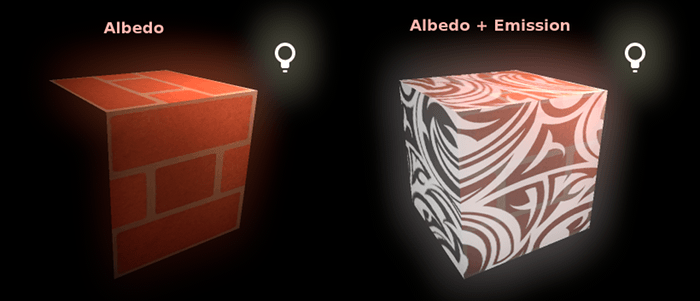
An emissive material gives off light of its own: a screen, a neon tube, a warning lamp, glowing lava, a sci-fi panel. glTF describes the emissive parameter as controlling "the color and intensity of the light being emitted by the material" (Khronos Group: glTF 2.0 Specification). It does not depend on the lights in the scene. glTF's own illustration of what is lost when a viewer ignores emission: "the headlights of a car model will be off instead of on" (Khronos Group: glTF 2.0 Specification).
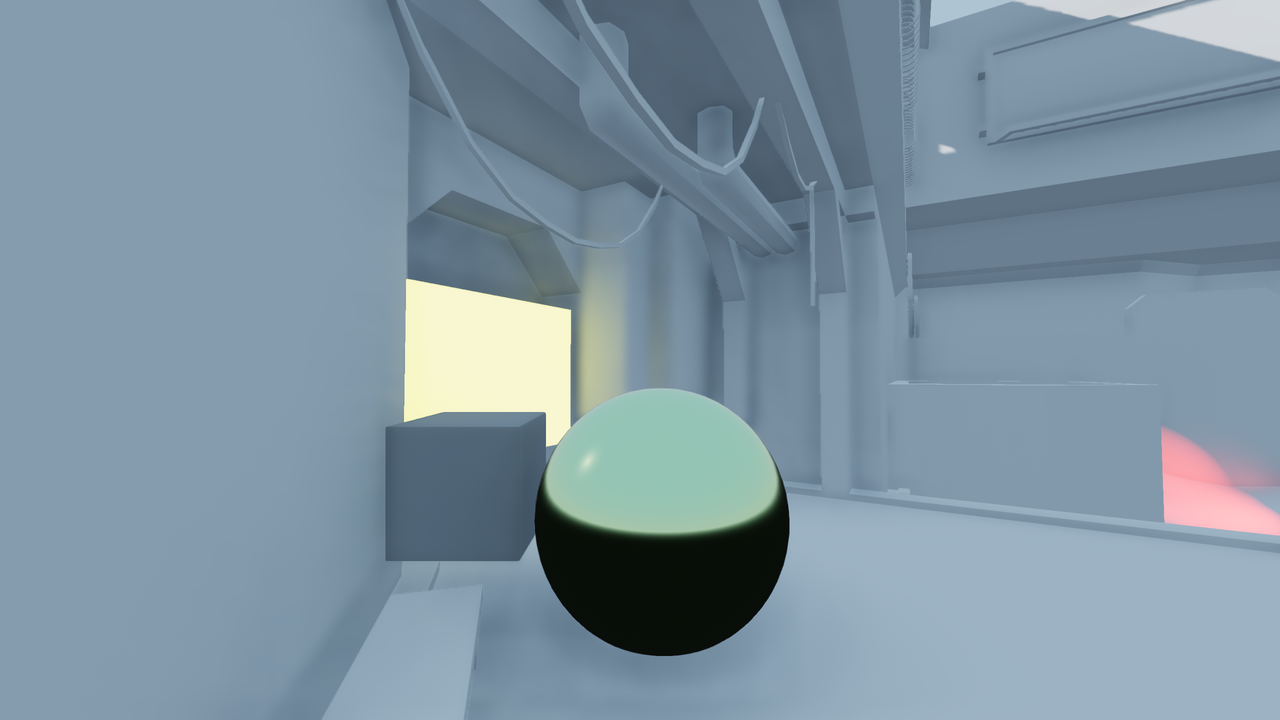
Whether that glow also lights the world around it depends on the engine and its lighting setup. This decides whether a sign only looks lit or also lights the street.
#HDR values and bloom
Emissive values are not limited to 0–1. In Unreal, "inputting values higher than 1.0 into the Emissive Color input" pushes the material "into the HDR range, producing a bloom effect" (Unreal Engine documentation: Using the Emissive Material Input). Bloom is a post-process that spreads very bright pixels into a soft halo; see exposure and post-processing.
The usual setup is a texture or colour for the pattern and a scalar for the strength. Epic's own examples multiply colour parameters against a texture mask and expose colour and intensity as parameters for material instances (Unreal Engine documentation: Using the Emissive Material Input). The emissive texture itself is a colour map: glTF requires it to be sRGB encoded (Khronos Group: glTF 2.0 Specification). See colour space: sRGB and linear.
#Physical units
Some engines let you set emissive brightness in real units, so it sits correctly next to physically based lights (see physical light units).
- glTF: the product of emissive texture and factor is in "candela per square meter (cd/m²), sometimes called nits" (Khronos Group: glTF 2.0 Specification). It adds that some renderers simply treat an emissive factor of 1.0 as "a fully exposed pixel", which "may not match the authoring intent" (Khronos Group: glTF 2.0 Specification).
- Unity HDRP: emission intensity can be set in Nits or EV100, and Exposure Weight controls "how much effect the exposure has on the emission power" (High Definition Render Pipeline manual 17.0: Lit material Inspector reference). Lowering exposure weight is how you keep a UI-like screen readable regardless of the camera's exposure.
- Godot: with physical light units enabled, Emission Intensity is the "Luminance of emitted light, measured in nits", with a default "roughly equivalent to an indoor lightbulb" (Godot Engine: BaseMaterial3D class reference).
#Emissive surfaces as light sources
Engines differ most on this point.
- Unreal with Lumen: "light from emissive Materials propagates through the scene automatically with no additional performance cost" (Unreal Engine documentation: Using the Emissive Material Input). But Lumen warns that "there's a limit to how small and bright emissive areas can be before they begin to cause noise artifacts", and that emissive light "is inherently much more difficult to solve than manually placed light sources" (Unreal Engine documentation: Lumen Global Illumination and Reflections).
- Unreal with baked lighting: emissive surfaces only cast light into the lightmaps if you tick Use Emissive for Static Lighting; without it they "do not illuminate any of the objects around it" (Unreal Engine documentation: Using the Emissive Material Input). GPU Lightmass picks up emissive light automatically (Unreal Engine documentation: Using the Emissive Material Input).
- Unity HDRP: a per-material toggle "Toggles whether emission affects global illumination" (High Definition Render Pipeline manual 17.0: Lit material Inspector reference).
- Godot: emissive objects can light others "if a VoxelGI, SDFGI, or LightmapGI is used and this object is used in baked lighting" (Godot Engine: BaseMaterial3D class reference).
See global illumination for how each GI system gathers this light.
#How to set one up
The steps below make a neon sign material in Unreal Engine 5 that glows, blooms and, where the lighting setup allows, lights the wall behind it. The Unity HDRP equivalents follow.
Unreal Engine 5
- Make a mask texture. Paint the letters white on black. If the texture also carries colour, treat it as a colour map; glTF, for example, requires emissive textures to be sRGB encoded (Khronos Group: glTF 2.0 Specification). See colour space: sRGB and linear.
- Build the material. Multiply the mask by a colour parameter and an intensity scalar, and connect the result to Emissive Color. Epic's own examples multiply colour parameters against a texture mask and expose colour and intensity as parameters (Unreal Engine documentation: Using the Emissive Material Input).
- Make an instance and tune the intensity. In a material instance, raise the intensity above 1; values higher than 1.0 push the material "into the HDR range, producing a bloom effect" (Unreal Engine documentation: Using the Emissive Material Input). Start around 10–20 for a night scene and adjust (see the worked example above).
- Decide how the glow lights the scene. With Lumen, emissive light "propagates through the scene automatically" (Unreal Engine documentation: Using the Emissive Material Input). With baked lighting, tick Use Emissive for Static Lighting, or the sign will "not illuminate any of the objects around it" (Unreal Engine documentation: Using the Emissive Material Input).
- Back small sources with a real light. For thin tubes and small bright details, Lumen warns of noise from small, bright emissive areas (Unreal Engine documentation: Lumen Global Illumination and Reflections). Add a rect light matching the sign's size and colour, and lower the emissive until it only provides the look, as in the cyberpunk scene where "The big neon lights complimented the rect lights" (80 Level: Setting Up Cyberpunk Lighting in Unreal…).
- Test under every exposure. Check the sign at night and in daylight, with auto-exposure on, and adjust intensity per lighting state if needed. See exposure and post-processing.
Unity HDRP
- In the Lit material, assign the Emission Map and colour and set the intensity in Nits or EV100 (High Definition Render Pipeline manual 17.0: Lit material Inspector reference).
- Lower Exposure Weight for screens and signs that should stay readable regardless of camera exposure (High Definition Render Pipeline manual 17.0: Lit material Inspector reference).
- Enable the toggle that controls "whether emission affects global illumination" if the sign should light its surroundings through GI (High Definition Render Pipeline manual 17.0: Lit material Inspector reference).
#Tutorials and guides
#Use in recent games
- Fortnite Battle Royale, Chapter 4 (Epic Games, 2022). Epic's write-up on bringing Lumen to Fortnite credits the switch with "giving much more accurate emissive lighting and sharper water reflections" (Unreal Engine tech blog: Lumen brings real-time global illumination to…).
Few studios document their emissive setups in public; the 80 Level cyberpunk breakdown above is a portfolio scene rather than a shipped game, but it shows the same combination of emissive surfaces and placed lights.
#In different tools
- Unreal Engine: Emissive Color input on the material; values above 1 for bloom (Unreal Engine documentation: Using the Emissive Material Input); Use Emissive for Static Lighting for lightmaps (Unreal Engine documentation: Using the Emissive Material Input).
- Unity HDRP: Emission Map and colour, intensity in Nits or EV100, Exposure Weight and the GI toggle (High Definition Render Pipeline manual 17.0: Lit material Inspector reference).
- Godot: Emission, Emission Energy Multiplier, an add or multiply operator for the emission texture, and an option to read it from UV2 (Godot Engine: BaseMaterial3D class reference).
- glTF:
emissiveFactorandemissiveTexture; the default factor is zero, so the factor must be set for the texture to show (Khronos Group: glTF 2.0 Specification).
#Further reading and watching
Related: real-time lighting, global illumination, exposure and post-processing, tonemapping, physical light units.
References
- · glTF 2.0 Specification · Khronos Group (GitHub) · docs · accessed 2026-10-21
- · Using the Emissive Material Input · Unreal Engine documentation · docs · accessed 2026-10-21
- · Game Ready Japanese Small Vertical Neon Sign · Sketchfab · web · accessed 2026-10-22
- · Color Grading and the Filmic Tonemapper in Unreal Engine · Epic Developer Community documentation · docs · accessed 2026-10-22
- · Lit material Inspector reference (HDRP) · High Definition Render Pipeline manual 17.0 · docs · accessed 2026-10-21
- · BaseMaterial3D class reference (source) · Godot Engine (GitHub) · docs · accessed 2026-10-21
- · Lumen Global Illumination and Reflections · Unreal Engine documentation · docs · accessed 2026-10-21
- · Lumen Technical Details in Unreal Engine · Epic Developer Community documentation · docs · accessed 2026-10-22
- · Setting Up Cyberpunk Lighting in Unreal Engine 5 · 80 Level, 2023 · article · accessed 2026-10-21
- · Lumen brings real-time global illumination to Fortnite Battle Royale Chapter 4 · Unreal Engine tech blog, 2022 · article · accessed 2026-10-22
- · Unreal Engine Material Properties · Unreal Engine documentation · docs · accessed 2026-10-21
Also consulted
- · Standard Material 3D and ORM Material 3D · Godot Engine documentation · docs · accessed 2026-10-22
- · Introduction to global illumination · Godot Engine documentation · docs · accessed 2026-10-22
Pages that link here
- glTF Key term
- Colour blindness and accessibility Key term
- Motivated lighting Key term
- Colour space: sRGB and linear Key term
- Texture maps explained Reference
- Bit depth and banding Key term
- Master materials and instances Topic
- Real-time lighting Topic
- Physical light units Key term
- Global illumination Key term
- Exposure and post-processing Topic
- Tonemapping Key term
- Time of day Key term
- Exercise: lighting one scene four ways Exercise
Last updated 2026-10-22