Colour grading and LUTs
Shifting the colours of the final image for mood and consistency, either with parametric controls or with a look-up table (LUT), a small 3D texture that maps every input colour to an output colour.
Colour grading changes the colours of the finished image: warmer, colder, more contrast, teal shadows, golden highlights. A LUT (look-up table) is the most common way to store a grade: a small 3D grid of colours in which each input colour finds its output colour. Godot's documentation notes: "A 3D look-up-texture (LUT) can also be used for color correction" (Godot Engine documentation: Environment and post-processing).
Grading is the stage where art direction is applied to the rendered image. It is the same job a film colourist does, done in real time on every frame. For choosing the colours themselves, see colour for environments and colour scripts.
#Parametric grading
Every engine offers sliders before you ever need a LUT.
- Unreal groups its controls into Global, Shadows, Midtones and Highlights, each with Saturation, Contrast, Gamma, Gain and Offset, plus a white balance (Temperature) section so that "whites appear truly white" (Unreal Engine Documentation: Color Grading and the Filmic Tonemapper).
- Unity URP offers two grading modes: High Dynamic Range, which "works best for high precision grading similar to movie production workflows", and Low Dynamic Range, which grades after tonemapping in a more classic way (Universal Render Pipeline manual: Universal Render Pipeline Asset reference).
- Godot has Brightness, Contrast and Saturation, plus colour correction with a 1D gradient or a 3D LUT; all of it is applied "after tonemapping" (Godot Engine documentation: Environment and post-processing).
#How a LUT works
A 3D LUT is a cube: red along one axis, green along another, blue along the third. Engines store it either as a real 3D texture or unwrapped into a strip of 2D slices. Godot lists typical resolutions of "17×17×17, 33×33×33, 51×51×51 or 65×65×65", imported as a Texture3D with the right number of slices (Godot Engine documentation: Environment and post-processing). Unity URP uses a LUT size of 32 by default, which "provides a good balance of speed and quality" (Universal Render Pipeline manual: Universal Render Pipeline Asset reference).

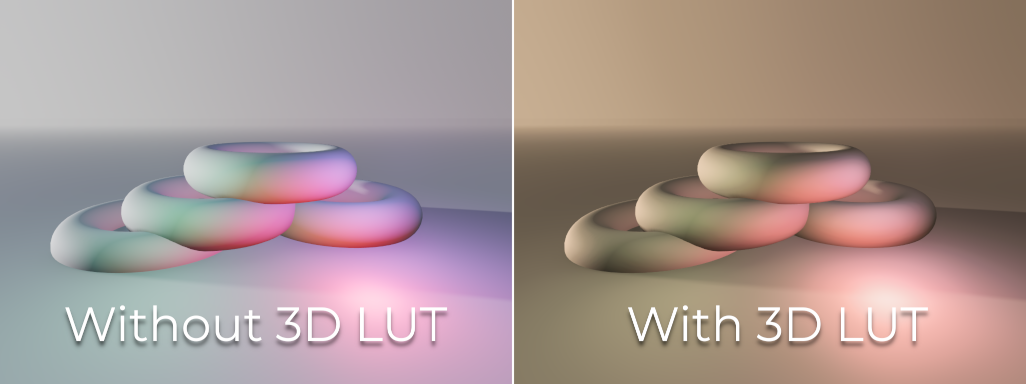
#The workflow
LUTs are usually authored outside the engine: you grade a screenshot of the game in an image editor or grading tool, apply exactly the same adjustment to an identity LUT like the one above, and import the result. Ghost of Tsushima's art team worked in "Photoshop + 32x32x32 sRGB LUTs", which the art director still favoured (SIGGRAPH 2021: Real-Time Samurai Cinema: Lighting…).
#Common mistakes
- Grading to fix lighting. A grade cannot add shadows or bounce light; fix lighting and exposure first.
- Grading with a non-neutral screenshot. If the screenshot already has a grade, your LUT stacks a second one.
- Forgetting the order. In Godot, adjustments and colour correction come after the tonemapper (Godot Engine documentation: Environment and post-processing); change the tonemapper and the grade looks different.
- One LUT for HDR and SDR. It is tuned for one display (Unreal Engine Documentation: Color Grading and the Filmic Tonemapper).
Related: colour space: sRGB and linear, colour for environments, art bibles and style guides.
#Further reading and watching
References
- · Environment and post-processing · Godot Engine documentation (source on GitHub), 2026 · docs · accessed 2026-10-21
- · Color Grading and the Filmic Tonemapper · Unreal Engine Documentation, 2026 · docs · accessed 2026-10-21
- · Universal Render Pipeline Asset reference (URP 17) · Universal Render Pipeline manual, 2026 · docs · accessed 2026-10-21
- · Using Look-up Tables for Color Grading in Unreal Engine · Epic Developer Community documentation · docs · accessed 2026-10-22
- · Real-Time Samurai Cinema: Lighting, Atmosphere, and Tonemapping in Ghost of Tsushima · SIGGRAPH 2021, Advances in Real-Time Rendering in Games, 2021 · talk · accessed 2026-10-21
- · God of War - Forest · ArtStation · web · accessed 2026-10-22
- · Assassin's Creed Shadows: Foliage · ArtStation, 2024 · web · accessed 2026-10-21
Pages that link here
- Colour for environments Topic
- Colour scripts Key term
- Exposure and post-processing Topic
- Tonemapping Key term
- Foliage and vegetation Topic
- The technical artist Topic
- Exercise: lighting one scene four ways Exercise
- Game art breakdowns: a curated library Reference
Last updated 2026-10-22