Cascaded shadow maps
Splitting the camera's view into distance bands, each with its own shadow map, so the sun's shadows stay sharp near the player without running out of resolution in the distance.
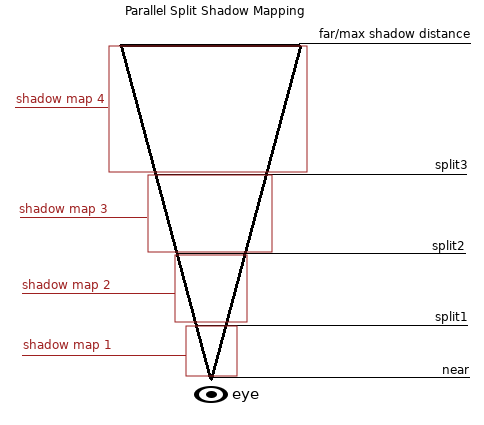
Cascaded shadow maps (CSM) split the camera's view into several distance bands, called cascades, and render a separate shadow map for each. The nearest cascade covers a small area at high detail; the farthest covers a large area at low detail. It is the standard way to draw sun and moon shadows in real time, and the technique that Unreal's shadows and virtual shadow maps replace when enabled (Unreal Engine Documentation: Virtual Shadow Maps).
#Shadow resolution over distance
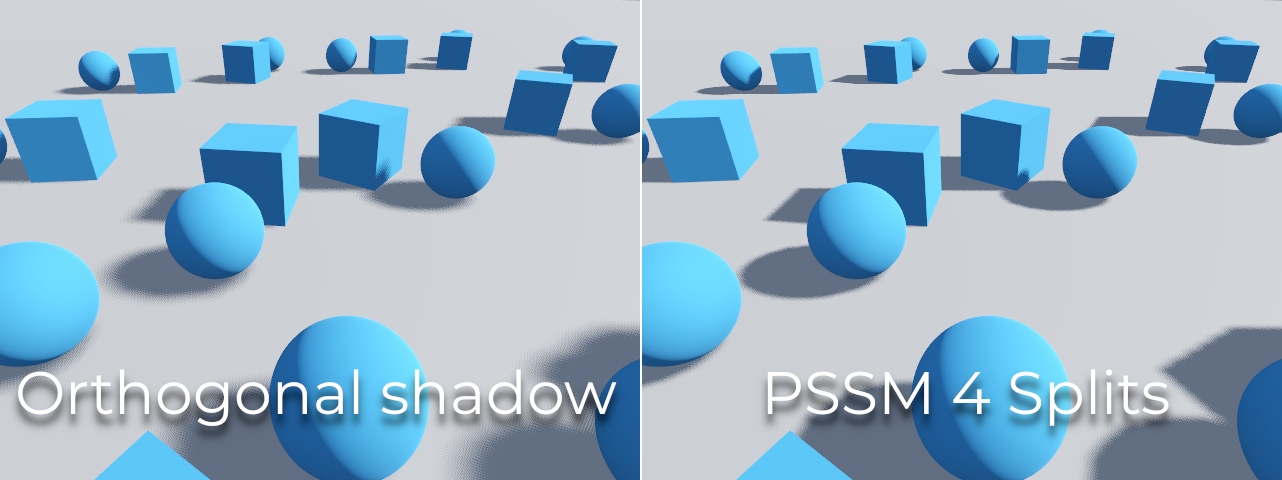
A shadow map is a depth image rendered from the light; see shadows and virtual shadow maps for the basics. A directional light has to shadow everything from the grass at the player's feet to hills hundreds of metres away. One map stretched over all of it gives the near ground almost no texels. Zhang, Sun and Nyman explain that this perspective aliasing "increases hyperbolically as the object moves near the view plane" (Zhang et al. 2007). Splitting the view lets each slice get its own map.
Godot's directional light defaults to "PSSM with 4 splits" (parallel-split shadow maps, another name for cascades), and its documentation describes it as splitting "the view frustum in 2 or 4 areas" (Godot Engine documentation: 3D lights and shadows). Unity URP exposes Max Distance, Cascade Count and the split distances in its pipeline asset, and notes that more cascades cost performance (Universal Render Pipeline manual: Universal Render Pipeline Asset reference).
#Choosing the splits
Where you put the split distances matters as much as how many cascades you use. GPU Gems 3 describes three schemes (Zhang et al. 2007):
- Uniform: equal-length slices. Simple, but wastes resolution near the camera.
- Logarithmic: slices that grow geometrically, "designed to produce optimal distribution of perspective aliasing". Its drawback: "the lengths of split parts near the viewer are too small" (Zhang et al. 2007).
- Practical: a blend of the two, with a weight the authors set to 0.5 by default (Zhang et al. 2007).

#Common artefacts
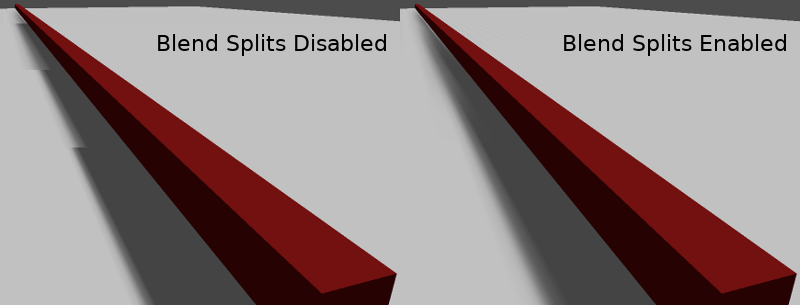
- Visible seams where one cascade hands over to the next. Godot's Blend Splits "sacrifices detail and performance in exchange for smoother transitions" (Godot Engine documentation: 3D lights and shadows).
- Shadow acne and peter-panning. With too little bias, shadows are "smeared" onto surfaces ("shadow acne"); with too much, "the shadow may appear to be disconnected from the object" (Godot Engine documentation: 3D lights and shadows). Godot recommends raising Normal Bias before Shadow Bias (Godot Engine documentation: 3D lights and shadows). Unity URP offers Depth Bias and Normal Bias for the same job (Universal Render Pipeline manual: Universal Render Pipeline Asset reference).
- A hard edge where shadows stop. Fade them out: Godot's Fade Start and URP's Last Border control the fade at the end of the range (Godot Engine documentation: 3D lights and shadows; Universal Render Pipeline manual: Universal Render Pipeline Asset reference).
- Missing shadows from large meshes. Godot's Pancake Size "can be adjusted to fix missing shadows" from large, unsubdivided meshes (Godot Engine documentation: 3D lights and shadows).
#Settings to tune first
- Max Distance. Godot says to "Always make sure to set a shadow Max Distance according to what the scene needs" (Godot Engine documentation: 3D lights and shadows). It has the largest effect of any single setting.
- The first split. "Default values generally work well, but tweaking the first split a bit is common" (Godot Engine documentation: 3D lights and shadows).
- Cascade count. Godot defaults to four (Godot Engine documentation: 3D lights and shadows); Unity notes that more cascades reduce performance (Universal Render Pipeline manual: Universal Render Pipeline Asset reference). Try fewer for small or top-down scenes.
- Bias, last, once the distances are right.
Related: real-time lighting, light and shadow, performance and profiling.
#Further reading and watching
References
- · Virtual Shadow Maps · Unreal Engine Documentation, 2026 · docs · accessed 2026-10-21
- · Chapter 10. Parallel-Split Shadow Maps on Programmable GPUs · GPU Gems 3 (NVIDIA Developer), 2007 · book · accessed 2026-10-21
- · Shadowing in Unreal Engine · Epic Developer Community documentation · docs · accessed 2026-10-22
- · 3D lights and shadows · Godot Engine documentation (source on GitHub), 2026 · docs · accessed 2026-10-21
- · Universal Render Pipeline Asset reference (URP 17) · Universal Render Pipeline manual, 2026 · docs · accessed 2026-10-21
Pages that link here
- Shadows and virtual shadow maps Key term
- Shadow bias and shadow acne Key term
Last updated 2026-10-22