Cameras, lenses and field of view
How field of view, focal length and camera height change what the player sees and how the world feels. Gameplay cameras and cinematic cameras want different settings, and engines even measure FOV differently.
Every image a player sees comes through a virtual camera. Its field of view (FOV), its height and its position decide how big the world feels, how fast movement seems and what fits in the frame. For environment artists, the camera matters from the start of a project, because a room that looks right in the editor can feel cramped or cavernous in the game's camera.
This page explains the terms, compares gameplay and cinematic settings, and shows where engines differ.
#Field of view and focal length
Field of view is the angle the camera sees, measured in degrees. A wider angle shows more of the scene; a narrower one shows less, and each object fills more of the screen.
Focal length is the photographer's way of describing the same thing. Unity defines it as "the distance, in millimeters, between the camera sensor and the camera lens" (Unity Manual: Camera component). The field of view depends on focal length and sensor size together: Unreal's Cine Camera calculates its horizontal FOV "based on a combination of the camera's Focal Length and Sensor Dimensions" (Unreal Engine Documentation: Cinematic Cameras in Unreal Engine), and in Unity, enabling Physical Camera means "Unity calculates the Field of View" from those settings (Unity Manual: Camera component).
For a full-frame sensor, 36 mm wide, the horizontal angle of view is 2 × atan(18 ÷ focal length):
| Focal length | Horizontal FOV (36 mm sensor) | Angle |
|---|---|---|
| 12 mm | 112.6° | Very wide |
| 18 mm | 90.0° | Wide |
| 24 mm | 73.7° | Wide |
| 35 mm | 54.4° | Moderate |
| 50 mm | 39.6° | Narrow |
| 85 mm | 23.9° | Very narrow |
The angles are calculated from the formula, not quoted; change the sensor width and the angles change too.

#Wide angles, distortion and speed
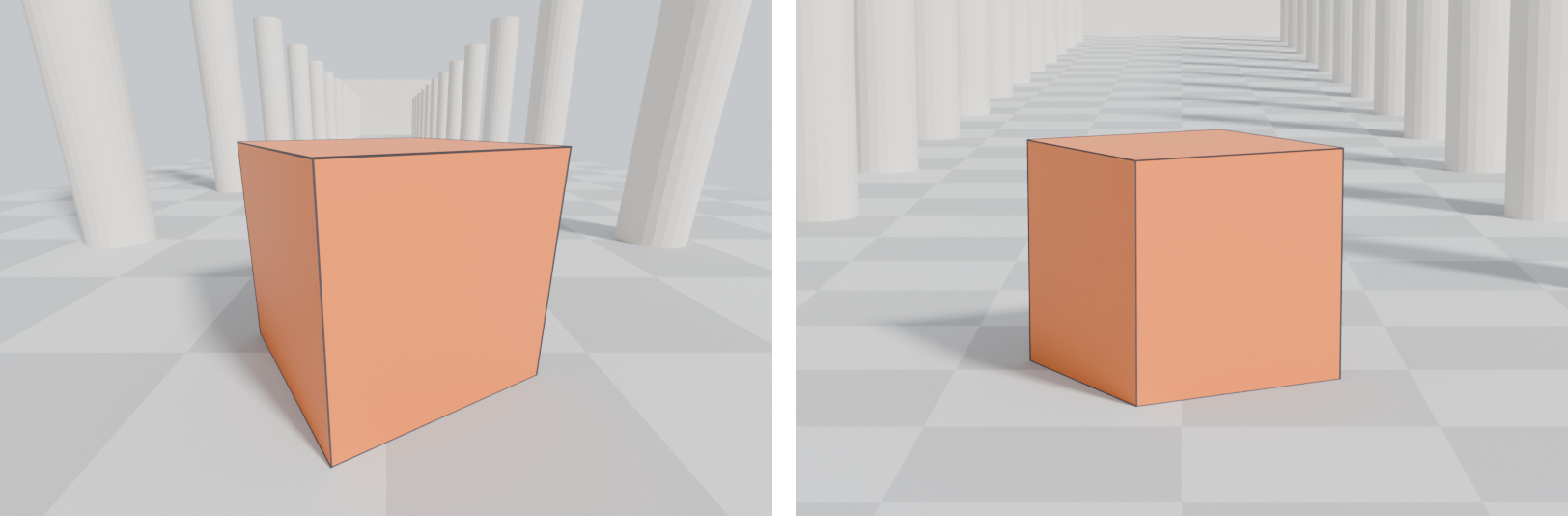
Wide FOVs stretch objects near the edge of the frame and make distances look greater. Valve's documentation notes that "Wider FOVs add more perspective distortion, while smaller FOVs flatten perspective", most noticeably in still images, and recommends a smaller FOV combined with a greater camera-to-object distance for cinematic screenshots (Valve Developer Community: Field of View).
The Level Design Book adds the effect on movement: a high FOV "will zoom-out to produce fisheye distortion that increases apparent speeds at the edge of the screen", while a lower FOV gives "a greater sense of closeness and intimacy with the game world" (The Level Design Book: Metrics). The same corridor feels longer and faster at 100° than at 70°.
Note that Valve's advice pairs the smaller FOV with more distance (Valve Developer Community: Field of View): moving the camera back changes the perspective, and the narrower FOV keeps the subject filling the frame.
#FOV and the player's comfort
FOV is also about the player's body. Gearbox UI programmer Kyle Pittman championed the FOV slider in Borderlands 2 after the first game's fixed 70-degree FOV drew complaints (PC Gamer: Gearbox blog reveals the delicate work of…). He explains that an FOV that suits a player sitting "several feet away from a TV" may not suit someone close to a monitor, and that "This discrepancy is what can cause motion sickness or a feeling of tunnel vision" (PC Gamer: Gearbox blog reveals the delicate work of…).
Valve's page on Source games suggests a higher FOV, fov_desired 90, if motion sickness is a problem in Half-Life 2 (Valve Developer Community: Field of View). If your game has an FOV slider, as Borderlands 2 does, your environment must work across a range of FOVs, not just the default.
#Horizontal and vertical FOV in different engines
The same number means different things in different engines:
- Unreal Engine: the camera component's field of view is "The horizontal field of view (in degrees) in perspective mode"; if the aspect ratio constraint is set to maintain vertical FOV, the engine converts it using the aspect ratio (Unreal Engine Documentation: CameraComponent).
- Unity:
Camera.fieldOfViewis "The vertical field of view of the Camera, in degrees", and the horizontal FOV depends on the viewport's aspect ratio (Unity Scripting API: Camera.fieldOfView). The Camera component also has an FOV Axis setting to switch between horizontal and vertical (Unity Manual: Camera component). - Source games: Valve's page says Source uses "Horizontal+" FOV, widening the horizontal view for widescreen rather than cropping the top and bottom (Valve Developer Community: Field of View).
#Camera height and position
Height changes perceived scale as much as FOV. The Level Design Book calls camera height "one of the key variables that affect the player's sense of a virtual body" (The Level Design Book: Metrics). A low camera makes doors and furniture loom; a high one makes the player feel large. Match your editor camera to the game's eye height before judging any space. See scale and proportion and grids and metrics.
Piaskiewicz describes how angle affects a scene's dominant element: in a low-angle view it is "seen from the bottom and is literally dominating the composition", and a half-side angle is where "perspective performs its best" (Game Developer: Composition in Level Design).
#Gameplay cameras and cinematic cameras
#Third-person and scripted cameras
Third-person and scripted cameras add their own problems. John Nesky, who worked out the camera for thatgamecompany's Journey as he went along, gave a GDC 2014 talk touring camera design decisions and how to fix them; his summary: "Cameras are most noticeable when they fail" (Game Developer: Video: 50 common game camera mistakes -- and…; YouTube: 50 Game Camera Mistakes). For environment artists, the practical lesson is to leave room for the camera: low ceilings, tight corridors and clutter close to walls all fight a third-person camera. See choreography and scripted sequences.
#Portfolio renders
Portfolio shots are fixed images, so composition rules apply directly. Set up a physical camera, choose a focal length deliberately, and keep the camera at a believable height unless you want a dramatic angle. Show at least one shot at gameplay FOV and eye height so reviewers can judge the space as a player would. See composition, demo reels and flythroughs and planning a portfolio piece.
#Related pages
composition · scale and proportion · grids and metrics · sightlines and vistas · leading lines · choreography and scripted sequences · exposure and post-processing · demo reels and flythroughs · level of detail
#Further reading and watching
References
- · Camera component · Unity Manual · docs · accessed 2026-10-21
- · Cinematic Cameras in Unreal Engine · Unreal Engine Documentation · docs · accessed 2026-10-21
- · Field of View · Valve Developer Community · docs · accessed 2026-10-21
- · Metrics · The Level Design Book · web · accessed 2026-10-21
- · Gearbox blog reveals the delicate work of adjusting FOV in first-person games · PC Gamer, 2013 · article · accessed 2026-10-21
- · CameraComponent (Python API) · Unreal Engine Documentation · docs · accessed 2026-10-21
- · Camera.fieldOfView · Unity Scripting API (6000.0) · docs · accessed 2026-10-21
- · Composition in Level Design · Game Developer, 2014 · article · accessed 2026-10-21
- · Learn to do game environment design the Rockstar way at GDC 2019 · gdconf.com, 2019 · web · accessed 2026-10-21
- · Environment Design as Spatial Cinematography: Theory and Practice · YouTube (GDC), 2019 · talk · accessed 2026-10-21
- · Three point lighting · The Level Design Book · web · accessed 2026-10-21
- · Video: 50 common game camera mistakes -- and how to fix them · Game Developer, 2015 · article · accessed 2026-10-21
- · 50 Game Camera Mistakes · YouTube (GDC), 2014 · talk · accessed 2026-10-21
Pages that link here
- Composition Topic
- Focal point Key term
- Leading lines Key term
- Value Topic
- Three-point lighting Key term
- Scale and proportion Topic
- Forced perspective Key term
- Field of view Key term
- Polygon and triangle budgets Topic
- Exposure and post-processing Topic
- Level design and environment art Overview
- Planning a portfolio piece Guide
- Demo reels and flythroughs Guide
- Capturing a showreel in the engine Guide
- Exercise: lighting one scene four ways Exercise
Last updated 2026-10-22