Booleans
Combining, subtracting or intersecting meshes as if they were solid volumes; a fast way to cut hard-surface shapes, and a common source of messy topology and shading errors.
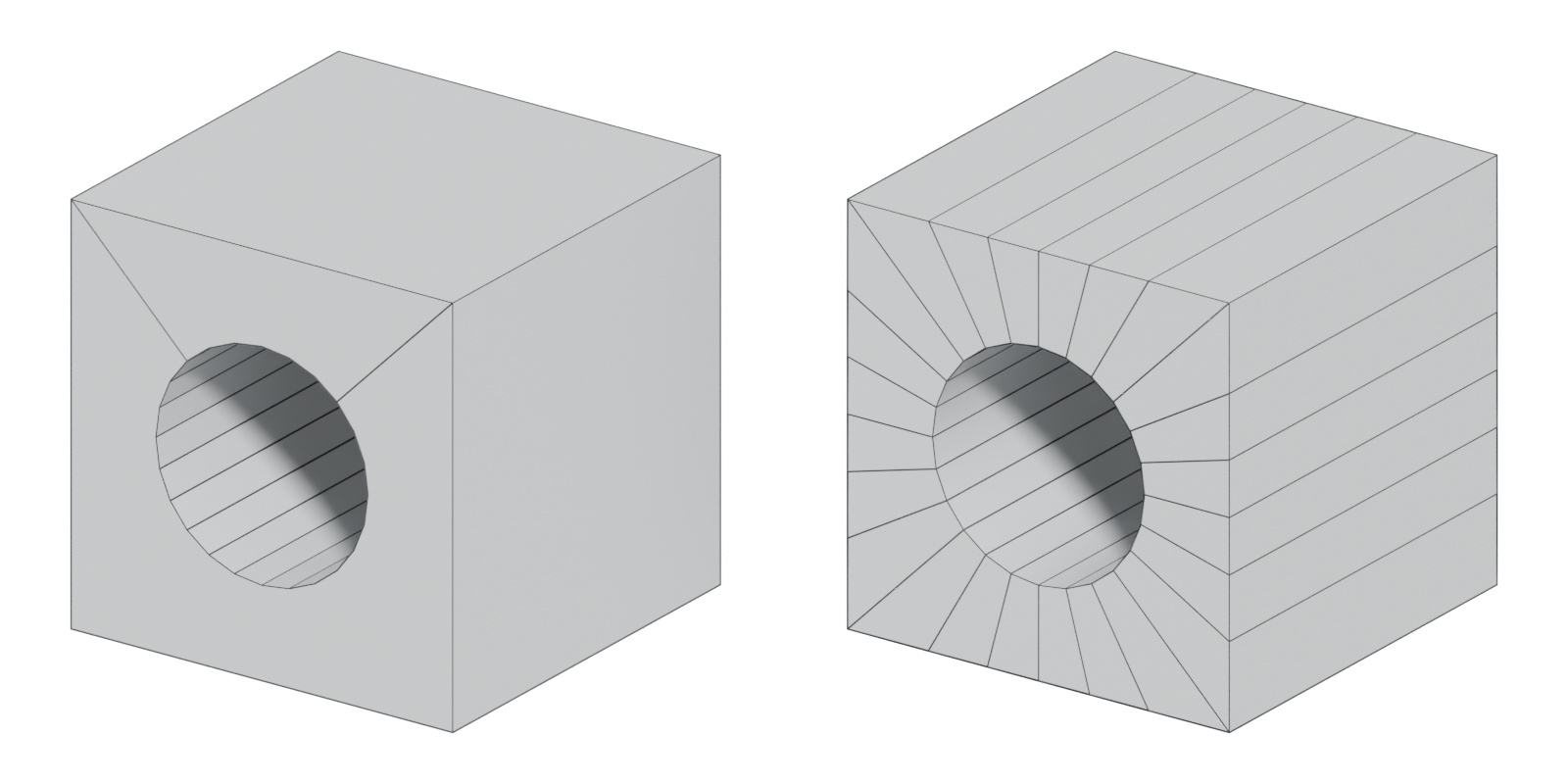
A boolean combines two meshes as if they were solid volumes: one object can "cut into, combine with, or isolate part of another object" (GarageFarm blog: Hard Surface Modeling in Blender). It is the quickest way to make holes, recesses, slots and merged parts in hard-surface modeling, and the main reason hard-surface meshes end up with messy topology.
#The three operations
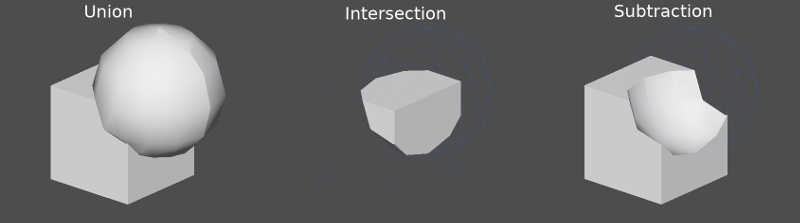
Blender's Boolean modifier names the three operations clearly (Blender Manual: Boolean Modifier):
- Union adds the target to the modified mesh, "removing any interior faces".
- Difference subtracts the target, keeping everything outside it. This is the one you use most: a cylinder becomes a bolt hole, a box becomes a vent recess.
- Intersect keeps only what is "inside both the target mesh and the modified mesh".
The object doing the cutting is usually called the cutter (Blender calls it the target or operand). It can be a single object or a whole collection (Blender Manual: Boolean Modifier).

#Topology produced by booleans
A boolean finds where two surfaces cross and rebuilds faces along that line, without regard for edge flow. The result usually has n-gons, long thin triangles and vertices where the cut met an existing edge.
On a flat face with hard edges, that is mostly fine: the face is flat, so its normals all point the same way. The problems start when you:
- smooth-shade across the cut, so vertex normals get averaged over thin faces and you see smears and gradients;
- subdivide, because n-gons and triangles subdivide unpredictably;
- bevel the result, because thin faces and stray vertices give the bevel tool bad geometry to work with.
FrankPolygon notes: "Most boolean operations will leave behind some unnecessary geometry" (Polycount forum: Sketchbook: Frank Polygon).
#Solvers: exact, fast and manifold
A solver is the algorithm that computes the cut. Blender has offered several:
- Exact "uses a mathematically complex solver which offers the best results" and handles overlapping geometry, but is much slower (Blender Manual: Boolean Modifier).
- Fast "uses a mathematically simple solver which offers the best performance" but "lacks support for overlapping geometry" (Blender Manual: Boolean Modifier). In Blender 4.5 it was renamed Float (All3DP: New Blender 4.5 LTS Adds Point Cloud Object…).
- Manifold, added in Blender 4.5 and based on the Manifold library, is described as "as fast as, and sometimes faster" than Float (CG Channel: Blender 4.5 LTS is out: check out its 5 key…; All3DP: New Blender 4.5 LTS Adds Point Cloud Object…). It "only works on manifold geometry, where each edge is adjacent to exactly two faces" (CG Channel: Blender 4.5 LTS is out: check out its 5 key…).
Whatever the solver, inputs matter. Blender's manual warns that only manifold meshes are guaranteed to give proper results; open meshes usually work but can produce glitches (Blender Manual: Boolean Modifier). Keep cutters closed and watertight, with normals facing out.
#Cleanup strategies
You have three broad options, from least to most effort.
- Leave it. If the result is flat, shaded with hard edges or weighted (custom) normals, and will not be subdivided, the n-gons may be harmless. Check the shading under a moving light before you touch anything.
- Triangulate and dissolve. Apply the boolean, then remove unnecessary vertices and edges. FrankPolygon applies booleans only after approval, then cleans up with triangulation and limited dissolve (Polycount forum: Sketchbook: Frank Polygon).
- Rebuild locally. Add a few manual cuts to route edges from the hole to nearby corners so faces are closer to quads. Do this only where a bevel or subdivision needs it.
Add-ons can help. MESHmachine includes a Boolean Cleanup tool that merges vertices along the transitional edge between two boolean operands (machin3.io: MESHmachine documentation).
#Bevel after boolean
Booleans give you sharp edges along the cut; real objects have rounded ones (see bevels and chamfers). The usual modifier stack in Blender is: base mesh → Boolean (one or more) → Bevel → Weighted Normal. The bevel then runs on the live boolean result.
This only works if the boolean result is clean enough for the bevel. Stray vertices on the cut edge give uneven bevel width; very thin faces can make the bevel overlap itself. For this reason, tools such as Hard Ops combine booleans and bevels in one system: it advertises a "Non-Destructive / Destructive boolean cutting system" and multi-level bevel control (Read the Docs: Hard Ops official manual).
#Live booleans
A live (non-destructive) boolean keeps the cutter as a separate, editable object. You can move a hole at any time until you apply it.
- Blender modifier stack. The Boolean modifier is live by default. BoxCutter draws cutters directly on a surface, and they stay editable "until you apply the modifiers" (BlenderNation: Blender add-ons review — BoxCutter and Hard…).
- ZBrush Live Boolean. Each subtool gets an additive, subtractive or intersecting Boolean Process setting, and the result is shown as a render preview "without being applied as geometry changes" (ZBrush for iPad documentation: Live Boolean Essentials). To make it real, use Make Boolean Mesh, which creates a new tool prefixed "UMesh_" (ZBrushCentral: ZBrush Live Boolean).
- Plasticity. Works on exact NURBS solids rather than polygons. Its Boolean command can "combine, subtract, or intersect multiple objects", and a Keep Tools option leaves the cutters intact (Plasticity documentation: Boolean). See CAD and NURBS modeling for games.
- Game engines. Godot's CSG nodes support union, intersection and subtraction inside the editor. When you convert a result to a mesh, the documentation advises keeping the original CSG node in the scene "so that you can perform changes to the geometry later" (Godot Engine documentation: Prototyping levels with CSG).
#How to make one
These steps cut a vent and a bolt hole into a panel in Blender with live booleans, then bevel and shade the result. The example is a 1 × 0.5 m panel, 5 cm thick.
- Make the base mesh. A simple box at real scale. Add a few loop cuts near where holes will go, so the cuts have edges to connect to.
- Make closed cutters. Model each cutter as a closed, watertight mesh with outward normals; only manifold meshes are guaranteed to give proper results (Blender Manual: Boolean Modifier). Give a round cutter only as many sides as its size on screen needs, for example 16 for a 3 cm bolt hole.
- Push cutters through the surface. Let each cutter pass a few millimetres beyond the face it cuts, rather than sitting flush; the Fast (Float) solver "lacks support for overlapping geometry" (Blender Manual: Boolean Modifier).
- Add a Boolean modifier to the base mesh. Set the operation to Difference and pick the cutter, or a collection of cutters (Blender Manual: Boolean Modifier). Use Exact for difficult overlaps, or Manifold (Blender 4.5 and later) for speed on clean, manifold inputs (Blender Manual: Boolean Modifier; CG Channel: Blender 4.5 LTS is out: check out its 5 key…). Set the cutters to display as wire so you can still move them.
- Bevel and shade on top. Add a Bevel modifier (about 5 mm, 2 segments) and then a Weighted Normal modifier below the Boolean, the usual stack described above. Check under a moving light for gradients on the flat front face. See weighted (custom) normals.
- Move holes while it is live. Until you apply, every cutter stays editable (BlenderNation: Blender add-ons review — BoxCutter and Hard…). Use this for feedback rounds.
- Apply and clean once approved. Save a copy, apply the modifiers, then remove unneeded vertices with limited dissolve and triangulation, as FrankPolygon does (Polycount forum: Sketchbook: Frank Polygon). Rebuild by hand only where a bevel or subdivision misbehaves.
In ZBrush the equivalent is Live Boolean: set each subtool's Boolean Process to subtract, preview the result, and commit with Make Boolean Mesh (ZBrush for iPad documentation: Live Boolean Essentials; ZBrushCentral: ZBrush Live Boolean).
#Video tutorials
#Use in recent games
Booleans are a modeling step, and the cut topology is usually hidden by a bake or by weighted normals, so shipped-game breakdowns rarely say where they were used. No source opened for this page names a specific shipped asset made with booleans. Production artists do describe them as part of their working method:
- Weapons and props for AAA games. Boy Sichterman, a prop artist at outsourcing studio Elite3D whose first title there was Call of Duty: Infinite Warfare, advises that "Maya 2016 and 2017 handles Booleans a lot more stable, so don't be afraid to use them", and pairs them with floaters on high polys that are "baked down later on a low poly" (80 Level: Boy Sichterman: Getting Hard-Surface Right). The interview gives this as general workflow advice, not as a description of a specific game asset.
- Environment greebles. François Larrieu used Live Boolean on earlier Maya and ZBrush projects (see the example above) (80 Level: Working on Modular Sci-Fi Environments in…).
#In different tools
| Tool | Boolean feature | Live? |
|---|---|---|
| Blender | Boolean modifier: Exact, Float/Fast, Manifold solvers (Blender Manual; All3DP) | Yes, until applied |
| Blender + BoxCutter / Hard Ops | Draw-to-cut on top of native modifiers (BlenderNation) | Yes |
| ZBrush | Live Boolean per subtool; Make Boolean Mesh to commit (ZBrush for iPad documentation; ZBrushCentral) | Preview |
| Plasticity | Boolean on NURBS solids, Keep Tools option (Plasticity documentation) | Tools can be kept |
#Further reading and watching
References
- · Hard Surface Modeling in Blender · GarageFarm blog · article · accessed 2026-10-21
- · Boolean Modifier · Blender Manual (2.91), 2020 · docs · accessed 2026-10-21
- · Sketchbook: Frank Polygon · Polycount forum, 2020 · forum · accessed 2026-10-21
- · New Blender 4.5 LTS Adds Point Cloud Object, Improves Manifold Boolean Operations · All3DP, 2025 · article · accessed 2026-10-21
- · Blender 4.5 LTS is out: check out its 5 key features · CG Channel, 2025 · article · accessed 2026-10-21
- · MESHmachine documentation · machin3.io · docs · accessed 2026-10-21
- · Hard Ops official manual · Read the Docs · docs · accessed 2026-10-21
- · Blender add-ons review — BoxCutter and Hard Ops · BlenderNation, 2020 · article · accessed 2026-10-21
- · Live Boolean Essentials · ZBrush for iPad documentation · docs · accessed 2026-10-21
- · ZBrush Live Boolean · ZBrushCentral · forum · accessed 2026-10-21
- · Boolean · Plasticity documentation · docs · accessed 2026-10-21
- · Prototyping levels with CSG · Godot Engine documentation · docs · accessed 2026-10-22
- · Hard Surface Modeling: Create a Sci-Fi Crate · BlenderNation, 2023 · video · accessed 2026-10-21
- · Working on Modular Sci-Fi Environments in Blender and UE4 · 80 Level, 2020 · article · accessed 2026-10-21
- · Boolean CleanUp - Mastering Topology for Seamless Joins - Blender 4 · YouTube · video · accessed 2026-10-22
- · Boy Sichterman: Getting Hard-Surface Right · 80 Level, 2017 · article · accessed 2026-10-22
Pages that link here
- N-gon Key term
- Manifold and non-manifold geometry Key term
- Degenerate geometry Key term
- Modeling software Reference
- Ways to build a 3D model Overview
- Box modeling Topic
- CAD and NURBS modeling for games Topic
- Topology Topic
- Hard-surface modeling Topic
- Bevels and chamfers Topic
- Bevel shaders Key term
- The mid-poly workflow Topic
- Greebles Key term
- The high-to-low workflow Topic
- Digital sculpting Topic
- Sculpting rocks and cliffs Guide
- Sculpting damage and wear Guide
- Exercise: your first game-ready prop Exercise
- A 12-month learning roadmap Guide
Last updated 2026-10-22