Ambient occlusion
How much surrounding ambient light can reach each point of a surface; baked AO maps versus screen-space AO versus Lumen and other real-time GI, and the long-running debate about multiplying AO into the base colour.
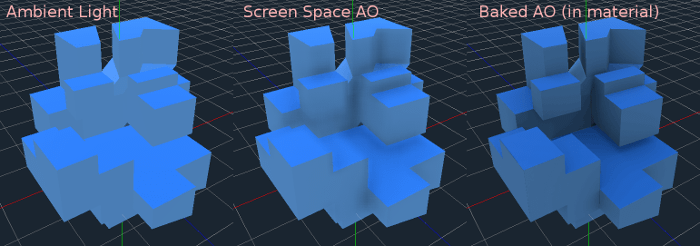
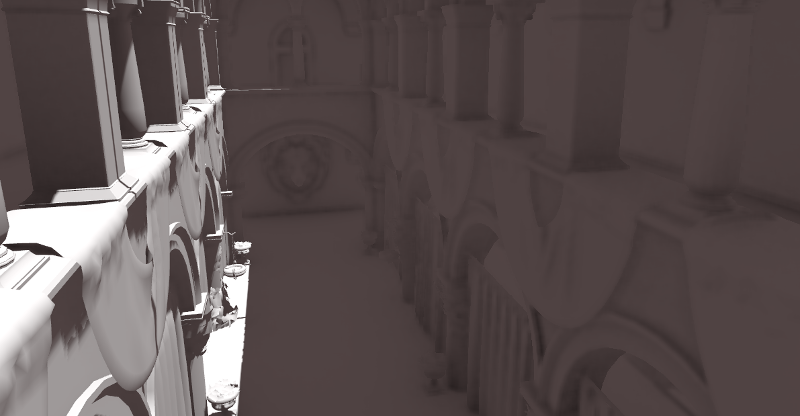
Ambient occlusion (AO) is the darkening of corners, cracks and contact areas where surrounding light cannot easily reach. Epic describes the effect as one that "approximates the attenuation of light due to occlusion" (Unreal Engine documentation: Ambient Occlusion). An AO map stores it per pixel: white where a point sees all of its surroundings, black where it sees none (Unity Manual: Occlusion Map).
#What AO does and does not affect
AO only darkens ambient (indirect) light, the soft light that comes from the sky and from bouncing off other surfaces. glTF's definition: it "indicates areas that would receive less indirect lighting from ambient sources. Direct lighting is not affected" (Khronos Group: glTF 2.0 Specification). Unity and Godot describe their AO inputs the same way (Unity Manual: Occlusion Map; Godot documentation: Standard Material 3D and ORM Material 3D). Direct sunlight and lamps are handled by shadows instead.
Adobe adds that AO "only affects the diffuse contribution and should not occlude the specular contribution" (Adobe Substance 3D: The PBR Guide – Part 2), though engines differ in how they apply it.

#Three sources of AO
Baked AO maps. A baker casts rays from the low poly (or the high poly) and records how much of each point is blocked; Blender's AO bake "ignores all lights in the scene" because it only measures geometry (Blender Manual: Render Baking). Baked AO is detailed and costs nothing at runtime. Godot: "nothing beats the quality of a well-baked AO map. It is recommended to bake ambient occlusion whenever possible" (Godot documentation: Standard Material 3D and ORM Material 3D). Its limitation is that it only knows about the asset itself, not the world around it. Marmoset's floor occlusion option adds downward darkening as if the object stood on a floor, "typically most useful for static objects" (Marmoset: The Toolbag Baking Tutorial).
Screen-space AO (SSAO). Calculated every frame from the depth buffer and normals, "in a deferred pass in screen space" (Unreal Engine documentation: Ambient Occlusion). It handles contact between objects and moving things, but it only sees what the camera sees and "cannot know about the thickness of objects", which can produce dark halos (Unreal Engine documentation: Ambient Occlusion). Material AO and SSAO combine, so the result can get darker than intended (Unreal Engine documentation: Ambient Occlusion).
Real-time global illumination. Systems such as Lumen calculate indirect light properly, which includes occlusion at larger scales. Epic: "Lumen Global Illumination replaces Distance Field Ambient Occlusion (DFAO)" (Unreal Engine documentation: Lumen Global Illumination and Reflections). Lumen still supports Material Ambient Occlusion for small-scale self-occlusion, when "Allow Static Lighting" is disabled in the project settings (Unreal Engine documentation: Lumen Global Illumination and Reflections). See global illumination.
| Baked AO map | SSAO | Lumen / real-time GI | |
|---|---|---|---|
| Scale | Small, within one asset | Medium, what is on screen | Large, whole scene |
| Cost | Texture memory only | Per frame, per pixel | Per frame, higher |
| Moves with objects | Yes (self-occlusion only) | Yes | Yes |
| Typical problem | Ignores the environment | Halos, only on-screen data | Misses fine detail, which material AO adds |
In practice, current engines use more than one: a baked AO channel for fine detail, plus screen-space or GI-based occlusion for the scene.
#AO in the base colour?
Before PBR, artists routinely multiplied AO into the diffuse texture. Whether you still should is one of the longest-running texturing debates.
#Example
#Common mistakes
- Strong AO multiplied into base colour, which shows up as dirty shadows under direct light (Adobe Substance 3D: The PBR Guide – Part 2).
- AO from a floating part baked onto the surface below it. Marmoset notes that an AO setting that captures object intersections "will cause shadows around floating geometry" (Marmoset: The Toolbag Baking Tutorial). See floaters.
- Double darkening from stacking material AO, SSAO and baked colour AO (Unreal Engine documentation: Ambient Occlusion).
- Imported as sRGB. AO is linear data (Khronos Group: glTF 2.0 Specification).
- Using AO as a dirt mask without thinking. AO is a good starting mask for grime, but grime follows gravity and use, not only occlusion.
#In different tools
- Unreal Engine: Ambient Occlusion input, usually the red channel of an ORM texture; Lumen replaces DFAO (Unreal Engine documentation: Lumen Global Illumination and Reflections).
- Unity: Occlusion Map (URP); green channel of the HDRP mask map (High Definition Render Pipeline manual 17.0: Mask map and detail map).
- Godot: Ambient Occlusion; red channel of the ORM texture in ORMMaterial3D (Godot documentation: Standard Material 3D and ORM Material 3D).
- Marmoset Toolbag, Substance, Blender: bake AO from the high poly; see baking.
#Related terms
baking · texture maps explained · channel packing · global illumination · real-time lighting · base colour (albedo) map
#Further reading and watching
References
- · Ambient Occlusion (Unreal Engine 4.27) · Unreal Engine documentation, 2021 · docs · accessed 2026-10-21
- · Occlusion Map (Standard Shader) · Unity Manual · docs · accessed 2026-10-21
- · glTF 2.0 Specification · Khronos Group (GitHub) · docs · accessed 2026-10-21
- · Standard Material 3D and ORM Material 3D (documentation source) · Godot documentation (GitHub) · docs · accessed 2026-10-21
- · The PBR Guide – Part 2 · Adobe Substance 3D (Adobe Learn) · article · accessed 2026-10-21
- · Render Baking (Cycles) · Blender Manual (2.93), 2021 · docs · accessed 2026-10-21
- · The Toolbag Baking Tutorial · Marmoset, 2017 · article · accessed 2026-10-21
- · Lumen Global Illumination and Reflections · Unreal Engine documentation · docs · accessed 2026-10-21
- · Hardware Ray Tracing in Unreal Engine · Epic Developer Community documentation · docs · accessed 2026-10-22
- · Material Inputs (Unreal Engine 4.27) · Unreal Engine documentation, 2021 · docs · accessed 2026-10-21
- · PBR - AO - Question · Polycount, 2015 · forum · accessed 2026-10-21
- · Physically Based Materials in Unreal Engine · Unreal Engine documentation · docs · accessed 2026-10-21
- · Mask map and detail map (HDRP) · High Definition Render Pipeline manual 17.0 · docs · accessed 2026-10-21
Also consulted
- · Environment and post-processing · Godot Engine documentation · docs · accessed 2026-10-22
Pages that link here
- The game asset pipeline Topic
- glTF Key term
- A free and open-source pipeline Guide
- UV, retopology and baking tools Reference
- Light and shadow Topic
- Bevels and chamfers Topic
- Floaters Key term
- The high-to-low workflow Topic
- Modeling rocks, trees and terrain pieces Topic
- Digital sculpting Topic
- Sculpting rocks and cliffs Guide
- Tileable sculpts Guide
- UV mapping Topic
- Baking Topic
- Bake groups and exploded bakes Key term
- Curvature, thickness and ID maps Key term
- Fixing baking artefacts Guide
- Physically based rendering (PBR) Topic
- Colour space: sRGB and linear Key term
- Texture maps explained Reference
- Base colour (albedo) map Key term
- Channel packing (ORM) Key term
- Unique texturing (texture painting) Topic
- Smart materials Key term
- Procedural materials (node-based) Topic
- De-lighting Key term
- Hand-painted and stylised texturing Topic
- Trim sheets Topic
- Decals Topic
- Edge wear Key term
- Baked vs. dynamic lighting Topic
- Global illumination Key term
- Mesh distance fields Key term
- Exposure and post-processing Topic
- Terrain layers and splat maps Key term
- Naming conventions Reference
- Exercise: your first game-ready prop Exercise
- Game art breakdowns: a curated library Reference
Last updated 2026-10-22