Opacity, masked and translucent materials
The three ways engines draw see-through surfaces, masked (alpha test), translucent (alpha blend) and dithered or hashed; what each costs, why foliage thins out at a distance and how coverage-preserving mips fix it, sorting and shadow problems, alpha to coverage, and the settings in Unreal, Unity, Godot and glTF.
Engines have three ways to draw a surface you can partly see through. Masked materials (alpha test, cutout) keep or discard each pixel. Translucent materials (alpha blend) mix each pixel with what is behind it. Dithered or hashed materials fake partial opacity with a pattern of kept and discarded pixels. glTF names the first two: in MASK mode the output "is either fully opaque or fully transparent", used for "tree leaves or wire fences", while BLEND is "combined with the background", used for "gauze cloth or animal fur" (Khronos Group: glTF 2.0 Specification).
Picking the right one is one of the most common performance and quality decisions in foliage, hair, fences, glass and effects.

#Masked (alpha test)
Each pixel compares its alpha against a threshold. glTF: "If the alpha value is greater than or equal to the alphaCutoff value then it is rendered as fully opaque, otherwise, it is rendered as fully transparent" (Khronos Group: glTF 2.0 Specification). Unreal calls this the Opacity Mask Clip Value: pixels above it are drawn and pixels below are discarded (Unreal Engine documentation: Unreal Engine Material Properties). Unreal adds that masked pixels "simply do not draw; you will not see any reflections in those areas" (Unreal Engine documentation: Material Blend Modes).
Because surviving pixels are opaque, masked materials write depth and need no sorting (Khronos Group: glTF 2.0 Specification), and they cast shadows. Godot's Alpha Scissor mode "supports casting shadows" and is "faster to render than alpha blending, but slower than opaque rendering" (Godot Engine: BaseMaterial3D class reference).
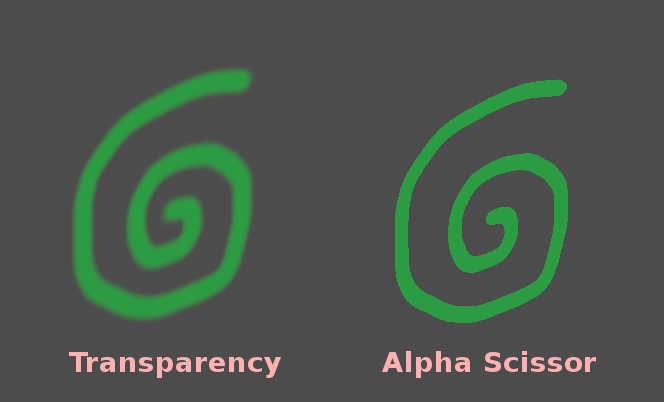
The downside is a hard, aliased edge. MSAA does not help, because shaders still run once per pixel, so it "does not reduce transparency aliasing for materials using the Alpha Scissor transparency mode" (Godot documentation: 3D antialiasing). Alpha to coverage fixes this by feeding alpha into the MSAA sample mask; Godot says it is "effective at reducing aliasing on transparent materials without introducing any blurriness", at a moderate cost (Godot documentation: 3D antialiasing).
#Why foliage disappears at a distance
Mipmaps average the alpha channel, so fewer pixels pass the cutoff in each smaller level. Ignacio Castaño saw this when building trees: "As the trees moved farther away from the camera, the leafs faded out becoming almost transparent" (Ludicon: Computing Alpha Mipmaps).
#Translucent (alpha blend)
Blending gives real partial opacity: smoke, glass, water surfaces, soft hair tips. It is also the most expensive and least reliable mode.
- Cost and shadows. Godot's Alpha mode "is the slowest to render, and disables shadow casting" (Godot Engine: BaseMaterial3D class reference).
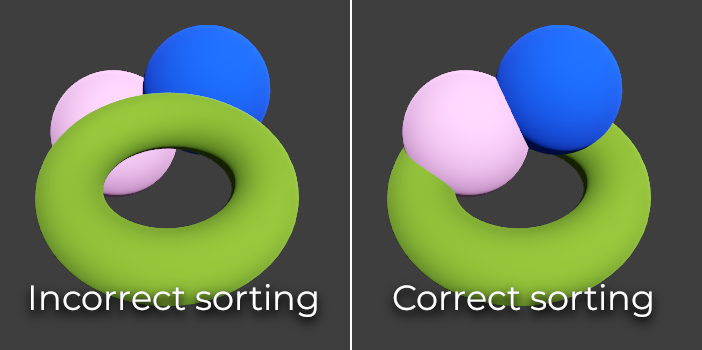
- Sorting. For blended surfaces, glTF notes "There is no perfect and fast solution that works for all cases" (Khronos Group: glTF 2.0 Specification). Overlapping translucent objects can draw in the wrong order. HDRP offers a Transparent Depth Prepass to "improve their sorting" and Back Then Front Rendering, which draws the material "in two separate draw calls" (High Definition Render Pipeline manual 17.0: Lit material Inspector reference).
- Lighting limits. Unreal's blend modes page says translucent materials "do not currently support specularity" in that mode and lists separate lighting modes, from the cheap Volumetric NonDirectional to the most expensive Surface Forward Shading (Unreal Engine documentation: Material Blend Modes; Unreal Engine documentation: Unreal Engine Material Properties).
- Overdraw. Every blended layer shades the pixel again; a stack of smoke cards or leaf cards multiplies the work. See overdraw.
Other blend modes are cheaper special cases: Additive adds to the background (fire, glows) and Modulate multiplies it (stains, tinted glass) (Unreal Engine documentation: Material Blend Modes).
#Dithered and hashed
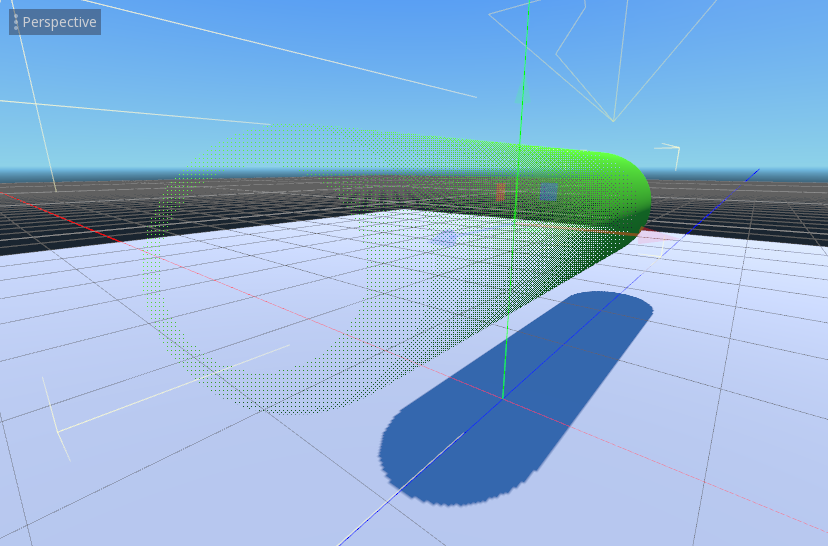
A dithered material is a masked material whose threshold changes from pixel to pixel in a pattern. Unreal's Dither Opacity Mask, combined with temporal antialiasing, gives a limited form of translucency that supports all lighting features (Unreal Engine documentation: Unreal Engine Material Properties). Godot's Alpha Hash uses "a spatially-deterministic threshold", supports shadows, and "is suited for hair rendering" (Godot Engine: BaseMaterial3D class reference).
Chris Wyman's GDC 2017 talk on hashed alpha testing explains why: ordinary "alpha-tested geom can disappear w/ distance", so hashing uses "stable, procedural noise" for the threshold (GDC 2017: Hashed Alpha Testing). The price is visible noise; the talk lists temporal antialiasing, which "integrates sub pixel noise samples", as one way to deal with it (GDC 2017: Hashed Alpha Testing). The same technique is used to fade LODs in and out; Unreal has a per-material Dithered LOD Transition option (Unreal Engine documentation: Unreal Engine Material Properties).
#In different tools
| Masked | Translucent | Dithered / hashed | |
|---|---|---|---|
| Unreal | Blend Mode Masked, Opacity Mask Clip Value (Unreal Engine documentation) | Translucent, Additive, Modulate, AlphaComposite (Unreal Engine documentation) | Dither Opacity Mask |
| Unity HDRP | Alpha Clipping ("acts like a Cutout Shader") (High Definition Render Pipeline manual 17.0) | Surface Type Transparent, Blending Mode Alpha | Custom shader |
| Godot | Alpha Scissor (Godot Engine) | Alpha, Alpha Depth Pre-Pass | Alpha Hash |
| glTF | alphaMode: MASK + alphaCutoff (Khronos Group) |
alphaMode: BLEND |
Not defined |
#Further reading and watching
Related: foliage and vegetation, overdraw, impostors and billboards, decals, mipmaps.
References
- · glTF 2.0 Specification · Khronos Group (GitHub) · docs · accessed 2026-10-21
- · Unreal Engine Material Properties · Unreal Engine documentation · docs · accessed 2026-10-21
- · Material Blend Modes · Unreal Engine documentation · docs · accessed 2026-10-21
- · BaseMaterial3D class reference (source) · Godot Engine (GitHub) · docs · accessed 2026-10-21
- · Project: Villa | Part 01b - Weeds Breakdown · ArtStation · web · accessed 2026-10-22
- · 3D antialiasing (documentation source) · Godot documentation (GitHub) · docs · accessed 2026-10-21
- · Stylized Pine Tree - Free PBR Game Asset · Sketchfab · web · accessed 2026-10-22
- · Computing Alpha Mipmaps · Ludicon (blog) · article · accessed 2026-10-21
- · Default texture import settings reference · Unity Manual (6000.2) · docs · accessed 2026-10-21
- · Importing images (documentation source) · Godot documentation (GitHub) · docs · accessed 2026-10-21
- · Assassin's Creed Shadows: Foliage · ArtStation, 2024 · web · accessed 2026-10-22
- · Lit material Inspector reference (HDRP) · High Definition Render Pipeline manual 17.0 · docs · accessed 2026-10-21
- · Hashed Alpha Testing (GDC 2017) · GDC 2017, Advances in Real-Time Rendering, 2017 · talk · accessed 2026-10-21
Also consulted
- · Standard Material 3D and ORM Material 3D · Godot Engine documentation · docs · accessed 2026-10-22
- · 3D rendering limitations · Godot Engine documentation · docs · accessed 2026-10-22
Pages that link here
- Real-time vs. offline rendering Topic
- The game asset pipeline Topic
- Winding order and backface culling Key term
- Polygon and triangle budgets Topic
- Level of detail (LOD) Topic
- Mipmaps Key term
- Subsurface scattering Key term
- Texture atlases Topic
- Mesh decals Topic
- Geodecals Key term
- Shaders for artists Topic
- Fog and atmosphere Topic
- Pixel depth offset Key term
- Foliage and vegetation Topic
- Virtualised geometry (Nanite) Topic
- Draw calls Key term
- Overdraw Key term
- Game art breakdowns: a curated library Reference
Last updated 2026-10-22