Vertex painting and blending
Painting vertex colours onto meshes to blend tileable materials (clean to dirty, brick to plaster, dry to wet) directly in the level; tools in Unreal, Unity, Godot and Blender, how vertex density limits the result, and per-instance painting.
Vertex painting stores colour values on a mesh's vertices and uses them as masks in a material, usually to blend between two or more tileable materials. You paint brick into plaster, clean metal into rust, or dry stone into wet stone, directly on the mesh in the level. The material does the blending; the vertex colours only say where.
It is one of the cheapest ways to make large, tiling surfaces look unique, and it is a core skill for anyone doing set dressing and art passes or terrain-like meshes.
#How it works
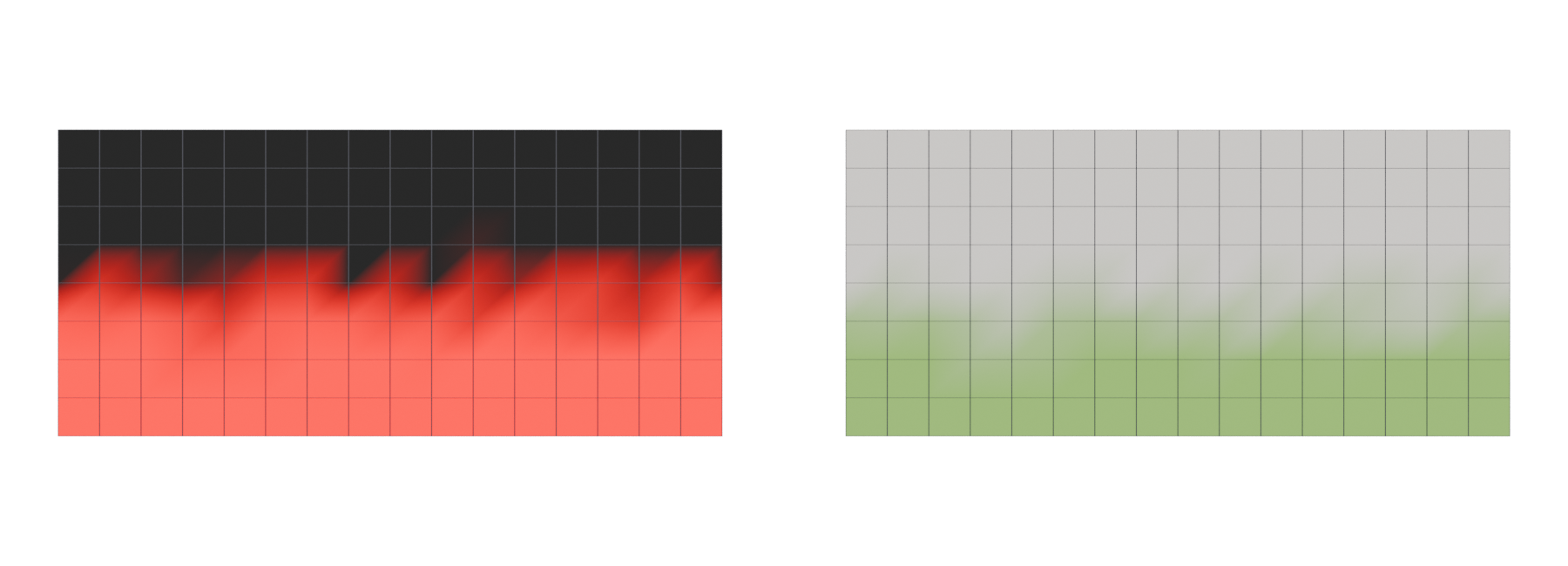
Every vertex can carry a colour with four channels, red, green, blue and alpha; see vertex colours. The GPU interpolates these values across each triangle, so a vertex painted fully red next to one with no red produces a smooth gradient between them.
A blend material reads those channels as weights. In Unreal you add a VertexColor node and feed its channels into the Alpha input of Lerp (linear interpolate) nodes, one Lerp per extra material (Unreal Engine documentation: Setting Up a Texture Blended Material for…). In Godot, the COLOR built-in carries "color from vertices", limited to 0 to 1 per channel with 8 bits of precision (256 levels) (Godot Engine documentation: Spatial shaders).
| Channels used | Materials blended | Unreal's Texture Weight Type |
|---|---|---|
| Alpha | 2 | Alpha (Two Textures) (Unreal Engine documentation) |
| R, G, B | 3 | RGB (Three Textures) (Unreal Engine documentation) |
| A, R, G, B | 4 | ARGB (Four Textures) (Unreal Engine documentation) |
| A, R, G, B, and 1 − A | 5 | ARGB − 1 (Five Textures), using a one-minus on alpha for the fifth (Unreal Engine documentation; Unreal Engine documentation) |
Each blended layer usually means another set of texture samples, so more layers cost more. Two or three layers per surface is common; five is the practical ceiling with one colour set.

#Vertex density
Vertex colours have exactly as much resolution as the mesh has vertices. A 4 m wall made of one quad can only fade from one corner to another. If you want a dirty strip along the base, you need an edge loop near the base.
Artists plan for this when they model. Matthew Trevelyan Johns, a texture and shader artist at Naughty Dog, described working with the layout artist's "vertex painting suggestions" and adding "additional edge loops to support my vertex blending" (80 Level: Building Environments for Uncharted: The Lost…).
Practical rules:
- Add loops where blends will happen: along the base of walls, around door frames, along the top of a wall where rain stains would start.
- Keep spacing even on surfaces you will paint freely, such as floors and large rock faces. Uneven spacing gives uneven brush response.
- Check the triangulation. The diagonal of each quad changes how a gradient interpolates, which can show as zigzags in the mask.
- Mind the budget. Extra loops are cheap on walls, but they still count; see polygon and triangle budgets.
Unreal's newer Texture Color mode avoids the problem by painting into a per-instance "mesh paint texture" instead of vertices (Unreal Engine documentation: Activating and Using Mesh Paint Mode in…). It requires virtual textures to be enabled, and Epic recommends it for Nanite meshes (Unreal Engine documentation: Activating and Using Mesh Paint Mode in…). Its default resolution is derived from a project-wide "texels per vertex" ratio (Unreal Engine documentation: Mesh Paint Tool Reference in Unreal Engine).
#Making blends look natural
A plain linear blend looks like one material fading through the other, like two photos cross-dissolved. Real materials do not mix that way: mud fills the gaps between stones first, and paint flakes off the high points last.
Height blending addresses this: it uses a height and displacement maps (or any greyscale mask) to decide which material wins as the vertex weight changes. In Unreal, the HeightLerp material function does this, with a Transition Phase and a Contrast input (Unreal Engine documentation: Texturing Material Functions in Unreal Engine). Ryan Manning's community series builds "a Height Blended Material with four distinct material variations" painted with vertex colours (Epic Developer Community: UE4 Height Blended Materials 3-Part Series).
Other techniques combine well with vertex masks:
- Multiply by a noise or grunge texture so the painted edge is broken up.
- World-aligned masks, for example dust only on upward-facing surfaces; see triplanar and world-aligned mapping.
- Use different channels for different jobs: red for a second material, green for wetness, blue for moss.
#Per-instance painting
Painting is most useful when each placed copy of a mesh can look different. A modular wall placed fifty times can have fifty different dirt patterns while still sharing one mesh asset.
- Unreal: Mesh Paint paints on an individual instance: "you are only painting on an individual instance of the mesh and not the actual mesh asset itself" (Unreal Engine documentation: Activating and Using Mesh Paint Mode in…). To Mesh pushes instance colours back to the source mesh, and Copy and Paste move paint between instances (Unreal Engine documentation: Mesh Paint Tool Reference in Unreal Engine). Vertex colour data cannot be viewed per instance on Nanite meshes unless Nanite is temporarily disabled (Unreal Engine documentation: Activating and Using Mesh Paint Mode in…).
- Unity Polybrush: since version 1.0, Polybrush stores its mesh data in a PolybrushMesh component instead of the older Additional Vertex Streams component (Unity documentation: Polybrush).
- Godot and Blender: paint in Blender and import. Godot's Blender importer has a Colors option that "imports vertex colors from Blender" (Godot Engine documentation: Import configuration). This paint is part of the mesh, so every copy shares it.
Per-instance paint is stored in the level rather than in the asset. If an artist changes the mesh's vertex count later, painted instances may break or need repainting. Agree on final topology before heavy painting, and use Unreal's Fix tool when it is needed (Unreal Engine documentation: Mesh Paint Tool Reference in Unreal Engine).
#In different tools
- Unreal Engine: Mesh Paint mode with Vertex Color, Vertex Weights (texture blend weights for 2 to 5 textures), Texture Color and Textures tools (Unreal Engine documentation: Mesh Paint Tool Reference in Unreal Engine). Shift + LMB erases; X swaps the paint and erase layers (Unreal Engine documentation: Setting Up a Texture Blended Material for…).
- Unity: Polybrush has Sculpt, Smooth, Color, Texture and Prefab modes, and ships sample shaders "compatible with vertex colors and Texture blending" for each render pipeline; it does not work on Terrain (Unity documentation: Polybrush). It is installed from the Package Manager (Unity documentation: Polybrush).
- Godot: materials can use vertex colour directly. Vertex Color > Use as Albedo is a checkbox on StandardMaterial3D (Godot Engine source on GitHub: BaseMaterial3D), and Is sRGB helps because most 3D software "will likely export vertex colors as sRGB" (Godot Engine documentation: Standard Material 3D and ORM Material 3D). For blends, read
COLORin a shader or visual shader (Godot Engine documentation: Spatial shaders). - Blender: Vertex Paint mode is "a simple way of painting color onto an object"; shaders read the colours through an Attribute node (Blender Manual: Vertex Paint: Introduction).
#Further reading and watching
References
- · Setting Up a Texture Blended Material for Vertex Weights Painting in Unreal Engine · Unreal Engine documentation · docs · accessed 2026-10-21
- · Spatial shaders · Godot Engine documentation (source on GitHub) · docs · accessed 2026-10-21
- · Mesh Paint Tool Reference in Unreal Engine · Unreal Engine documentation · docs · accessed 2026-10-21
- · Building Environments for Uncharted: The Lost Legacy · 80 Level, 2017 · article · accessed 2026-10-21
- · Activating and Using Mesh Paint Mode in Unreal Engine · Unreal Engine documentation · docs · accessed 2026-10-21
- · Texturing Material Functions in Unreal Engine · Unreal Engine documentation · docs · accessed 2026-10-21
- · UE4 Height Blended Materials 3-Part Series · Epic Developer Community, 2022 · video · accessed 2026-10-21
- · Technical Tips for Environment Artists: Part 2 · 80 Level, 2019 · article · accessed 2026-10-21
- · Brick and Concrete Generator · ArtStation, 2023 · web · accessed 2026-10-21
- · Polybrush (package manual 1.1) · Unity documentation · docs · accessed 2026-10-21
- · Import configuration (3D scenes) · Godot Engine documentation (source on GitHub) · docs · accessed 2026-10-21
- · BaseMaterial3D (class reference) · Godot Engine source on GitHub · docs · accessed 2026-10-21
- · Standard Material 3D and ORM Material 3D · Godot Engine documentation (source on GitHub) · docs · accessed 2026-10-21
- · Vertex Paint: Introduction · Blender Manual (2.93), 2021 · docs · accessed 2026-10-21
Also consulted
- · How To Setup Vertex Painting In Unreal Engine 5 · YouTube · video · accessed 2026-10-21
Pages that link here
- How to use this handbook Guide
- Anatomy of a polygon mesh Topic
- Vertex Key term
- Edge Key term
- Vertex colours Key term
- Visual hierarchy and readability Topic
- Leading lines Key term
- Modular kits Topic
- Modeling rocks, trees and terrain pieces Topic
- Sculpting rocks and cliffs Guide
- Sculpting damage and wear Guide
- UV mapping Topic
- Height and displacement maps Key term
- Ways to texture an environment Overview
- Tileable materials Topic
- Procedural materials (node-based) Topic
- Trim sheets Topic
- Decals Topic
- Mesh decals Topic
- Edge wear Key term
- Height blending Key term
- Breaking up tiling Topic
- Shaders for artists Topic
- Material layers and Substrate Topic
- Texture arrays Key term
- Terrain layers and splat maps Key term
- Wind and world position offset Key term
- Set dressing and art passes Topic
- Art fatigue Key term
- Making (and reading) an art breakdown Guide
- Exercise: a modular room Exercise
- Exercise: a trim sheet Exercise
- A 12-month learning roadmap Guide
- Game art breakdowns: a curated library Reference
Last updated 2026-10-22