UV mapping
How a 3D surface is flattened into 2D texture space; projections and unwrapping methods; unique, tiling, trim and overlapping layouts; UV channels; and the main tools, with a crate unwrapped step by step.
UV mapping is the step that tells a 3D surface which part of a 2D image it should show. Each vertex gets a 2D coordinate, and the renderer uses those coordinates to wrap a texture over the model. Wikipedia describes it as texture mapping a model "by projecting the model's surface coordinates onto a 2D image" (Wikipedia: UV mapping).
Almost every textured game asset needs UVs. Unreal's documentation defines a UV channel as data that "maps each of the mesh's vertices to coordinates in 2D space" (Unreal Engine documentation: Using UV Channels with Static Meshes in…).
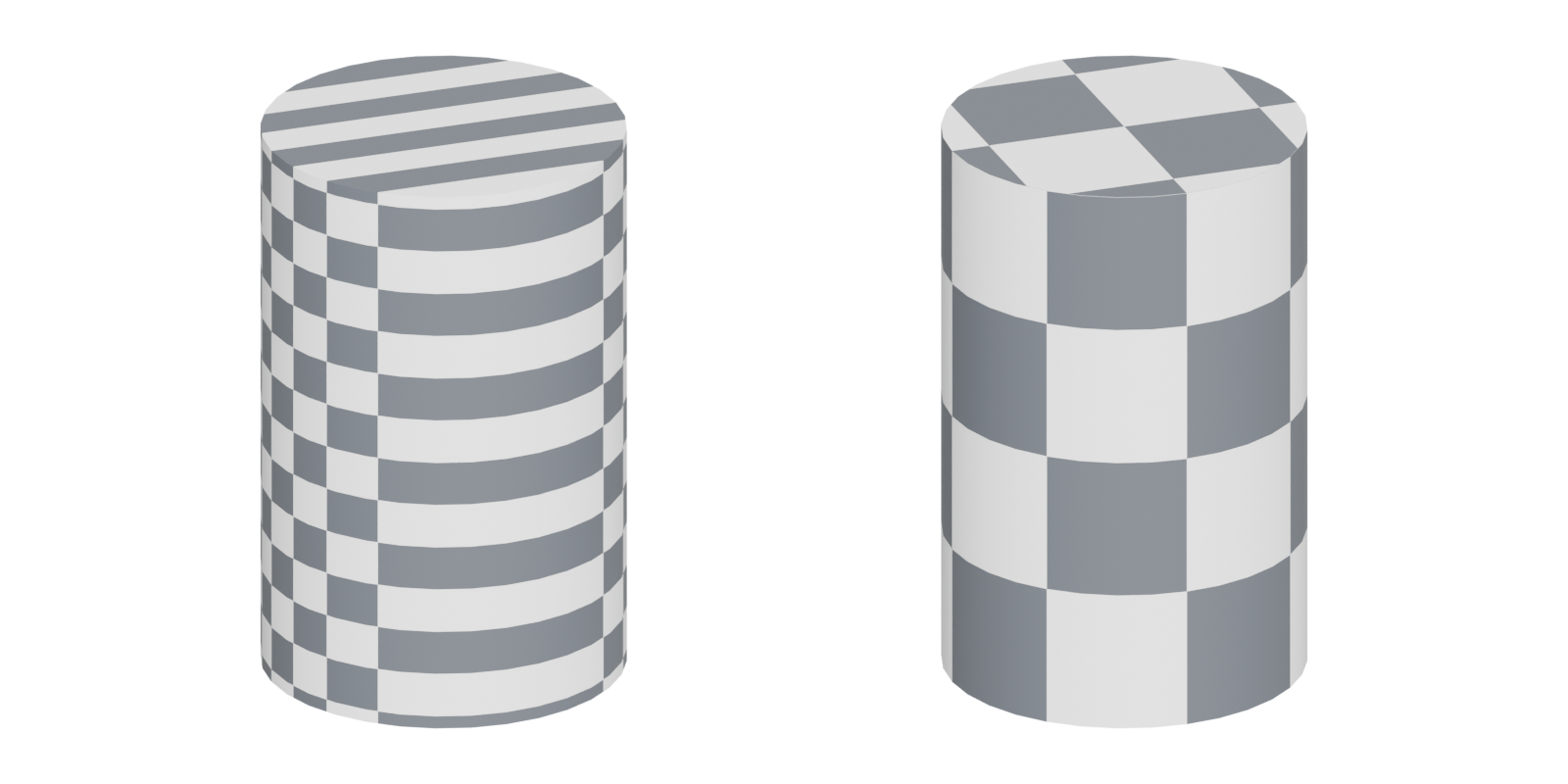
#What U and V mean
U and V are the two axes of the texture. The letters are used because X, Y and Z are already taken by the model's 3D axes (Wikipedia: UV mapping). U runs horizontally across the image, V vertically.
The region from 0 to 1 on both axes is the texture's area, often called 0–1 space or UV space. A UV of (0.5, 0.5) samples the centre of the image. Coordinates outside that square, such as U = 1.5, normally wrap around and show the texture again; this is how tiling works. Substance 3D Painter's documentation describes the default the same way: without its UV Tiles mode, a texture is repeated over each UV range (Substance 3D Painter documentation: UV Tiles). Lightmap UVs are stricter: Unreal requires all of their values to "fall between 0 and 1" (Unreal Engine documentation: Using UV Channels with Static Meshes in…). See lightmap UVs.
The flattened pieces are called islands (or shells), and the cuts between them are seams. Blender's manual uses a sewing comparison: "a seam is where the ends of the image/cloth are sewn together" (Blender Manual: Seams). See UV seams and islands.
#Projections and unwrapping
There are two broad ways to make UVs: project them from a simple shape, or unwrap the surface along seams.
#Projections
A projection pretends the texture is cast onto the model from a simple shape. Maya's documentation describes the common ones (Maya 2026 Help: UV mapping methods):
- Planar: projects "along one direction from an imaginary plane". Good for flat walls, floors and decals.
- Cylindrical: projects "inward from an imaginary cylinder". Good for pipes, columns and tree trunks.
- Spherical: projects "inward from an imaginary sphere". Blender suggests it for "eyes, planets, etc." (Blender Manual: UV tools).
- Automatic: projects "from multiple angles simultaneously" (Maya 2026 Help: UV mapping methods).
Box (cube) projection is a planar projection from six sides. In Blender, Cube Projection "maps the mesh onto the faces of a cube, which is then unfolded" (Blender Manual: UV tools). 3ds Max's Unwrap UVW offers planar, cylindrical, spherical and box mapping on selected polygons (3ds Max 2024 Help: Unwrap UVW Modifier). Projections are fast but usually leave stretching wherever the surface is not aligned with the projection.
#Unwrapping (LSCM and ABF)
Unwrapping cuts the mesh along seams and flattens each piece while trying to keep angles and areas similar to the 3D surface. Two classic algorithms are behind most unwrap buttons:
- LSCM (Least Squares Conformal Maps) "produces a 2D representation (conformal map) of a 3D surface" (Wikipedia: Least squares conformal map). It comes from a 2002 paper by Lévy, Petitjean, Ray and Maillot (Wikipedia: Least squares conformal map).
- ABF (Angle Based Flattening). Blender's Unwrap offers both: Angle Based "gives a good 2D representation of a mesh", and Conformal uses LSCM (Blender Manual: UV tools). Houdini describes its ABF option as "Slower, may not always solve, higher quality (less area distortion)" (Houdini documentation: UV Flatten geometry node).
Vendors also ship their own solvers. Maya's Unfold uses the Unfold3D algorithm by default, which it says "eliminates degeneracy and distortion, even at complex corners" (Maya 2026 Help: Unfold UVs options). 3ds Max's Peel tools use Unfold3D and also provide an LSCM implementation (3ds Max 2024 Help: Unwrap UVW Modifier).
#Semi-automatic tools
- Smart UV Project in Blender "cuts a mesh based on an angle threshold" (Blender Manual: UV tools). Useful for quick background props; rarely ideal for hero assets.
- Follow Active Quads "lays them out by following continuous face loops" (Blender Manual: UV tools). It gives perfectly straight strips on quad grids such as pipes, cables and trims.
- Lightmap Pack packs every face separately into the UV bounds (Blender Manual: UV tools), which suits lightmaps, not colour textures.
#Kinds of UV layout

Unique UVs. Every face has its own area of the texture, with no overlaps. Wikipedia notes that such an injective "unique" mapping is a prerequisite for baking (Wikipedia: UV mapping). This is the layout for uniquely textured props and for baking normal and AO maps.
Tiling UVs. Islands are scaled larger than 0–1 so a tileable material repeats across them. Walls, floors and terrain pieces mostly work this way. The texture's sharpness is set by how many repeats you allow per metre, which is texel density.
Trim-mapped UVs. Strips of geometry are laid onto horizontal bands of a trim sheet, usually stretched along U so they tile in one direction. Insomniac's GDC 2015 talk on Sunset Overdrive describes a trim layout plus "a UV mapping script for quick and precise UV layout" (GDC Vault: The Ultimate Trim: Texturing Techniques of…). In the Polycount thread on the technique, Clark Coots describes a script that "auto scales and layout the UVs to have equal texel density" (Polycount: The 'ultimate trim' technique from Sunset…).
Overlapping and mirrored UVs. Identical parts can share the same pixels. On Polycount, darkchief117 suggests overlapping identical shells such as repeated screws so only one needs baking, and Mark Dygert notes similar cap shells can be stacked (Polycount: Reducing UV Waste Need Help). Unreal confirms that overlapping is allowed for normal textures: "the same part of the texture gets applied to multiple parts" of the mesh (Unreal Engine documentation: Using UV Channels with Static Meshes in…). Mirroring has a visible cost, though: ZacD warns against mirroring top surfaces because "in an FPS view, you'd notice that easily" (Polycount: Are these UVs good?).
These layouts are hard to learn from tutorials that only teach unique unwraps. Dylan Abernethy made a free series on this gap, saying he "always found it tricky to understand some of the more advanced UV layout techniques" when he started; it covers stacking, breaking out of 0–1, mirroring, multiple UV sets, masks, trims and tiling textures (ArtStation: Better Understanding UV Layout Techniques for…).
#UV channels
A mesh can store more than one set of UVs. Unreal says each static mesh "can have up to seven different UV Channels", that "most Materials get texture coordinates from channel 0", and that channels "are also used to store and apply lightmaps" (Unreal Engine documentation: Using UV Channels with Static Meshes in…). Godot calls the second set UV2 and says it is "often useful for ambient occlusion or emission (baked light)" (Godot documentation: Standard Material 3D and ORM Material 3D).
A typical environment asset therefore has:
| Channel | Typical use | Layout |
|---|---|---|
| UV0 | Colour, roughness, normal textures | Tiling, trim or unique; overlaps allowed |
| UV1 | Lightmap, or a unique layout for baked AO or masks | Unique, inside 0–1, padded |
| UV2+ | Extra masks, detail maps and macro variation, blend data | Varies |
#Tools
| Tool | Key UV features |
|---|---|
| Blender | Unwrap (ABF or LSCM), Smart UV Project, Follow Active Quads, cube, cylinder and sphere projection (Blender Manual); Pack Islands and Average Islands Scale (Blender Manual) |
| Maya | Planar, cylindrical, spherical and automatic mapping (Maya 2026 Help); Unfold3D-based Unfold (Maya 2026 Help) |
| 3ds Max | Unwrap UVW with Peel (Unfold3D and LSCM), Pelt, projections and Pack tools (3ds Max 2024 Help) |
| RizomUV | Dedicated unwrapper with texel density and distortion histograms and reworked packing (80 Level) |
| Houdini | UV Flatten with spectral and angle-based methods; it "will not automatically add seams", so seams come from the Cut tool or UV Auto Seam (Houdini documentation) |
| Unreal Engine | Generates lightmap UVs on import; UV editing in Modeling Mode. See UV, retopology and baking tools |
For a fuller directory, see UV, retopology and baking tools.
#Worked example: unwrapping a crate

Take a 1 m wooden crate, a low-poly box with bevelled edges, textured with a unique 1024 px texture.
- Decide the texture strategy. A unique layout lets you bake edge wear from a high poly. A tiling plank texture would use overlapping or tiling UVs instead.
- Place seams. A box needs at least 7 seam edges to unfold into one island, as in the figure. Blender's manual advises you to "hide seams where they will not be seen" and use "as few seams as possible while having the least amount of stretching" (Blender Manual: Seams). Put them on the bottom and back edges, and at the sharp 90° corners where a hard edge needs a UV split anyway.
- Unwrap. Use Unwrap (ABF) in Blender or Unfold in Maya. Each face of a box flattens without distortion.
- Check with a checker texture. Squares should stay square and equal in size. See UV seams and islands.
- Straighten and orient. Line up the planks with U or V so the wood grain runs straight. Polycount artists recommend straightening islands "as much as possible without causing too many distortions" (Polycount: Are these UVs good?).
- Pack. The cross layout in the figure uses only 37.5% of the square (6 faces of 1/16 each). Splitting it into two or three islands and packing them tightly uses far more of the texture. See UV packing and padding.
- Set texel density. Scale all islands together so the crate matches the rest of the level. See texel density.
#Common mistakes
- Unwrapping before the model is final. Topology changes break the layout.
- Using Smart UV Project for hero assets. It cuts by angle, not by visibility, and leaves seams in prominent places (Blender Manual: UV tools).
- Forgetting a lightmap channel on a project with baked lighting. See lightmap UVs.
- Mirroring top surfaces in first-person games (Polycount: Are these UVs good?).
- Mixed island scales on one asset, which makes parts look blurry next to sharp parts. See texel density.
#Further reading and watching
References
- · UV mapping · Wikipedia · web · accessed 2026-10-21
- · Using UV Channels with Static Meshes in Unreal Engine · Unreal Engine documentation · docs · accessed 2026-10-21
- · UV Tiles · Substance 3D Painter documentation · docs · accessed 2026-10-21
- · Seams · Blender Manual (3.6), 2023 · docs · accessed 2026-10-21
- · UV mapping methods (Create UVs) · Maya 2026 Help · docs · accessed 2026-10-21
- · UV tools (Unwrap, Smart UV Project, projections) · Blender Manual (3.6), 2023 · docs · accessed 2026-10-21
- · Unwrap UVW Modifier · 3ds Max 2024 Help · docs · accessed 2026-10-21
- · Least squares conformal map · Wikipedia · web · accessed 2026-10-21
- · UV Flatten geometry node · Houdini documentation · docs · accessed 2026-10-21
- · Unfold UVs options · Maya 2026 Help · docs · accessed 2026-10-21
- · The Ultimate Trim: Texturing Techniques of Sunset Overdrive · GDC Vault (GDC 2015), 2015 · talk · accessed 2026-10-21
- · The 'ultimate trim' technique from Sunset Overdrive · Polycount, 2015 · forum · accessed 2026-10-21
- · Reducing UV Waste Need Help · Polycount, 2014 · forum · accessed 2026-10-21
- · Are these UVs good? · Polycount, 2015 · forum · accessed 2026-10-21
- · Better Understanding UV Layout Techniques for Games (Free Tutorial) · ArtStation · web · accessed 2026-10-21
- · Normal Map Baking · Warframe Steam Workshop guide · docs · accessed 2026-10-21
- · Standard Material 3D and ORM Material 3D (documentation source) · Godot documentation (GitHub) · docs · accessed 2026-10-21
- · Editing (UV Editor tools) · Blender Manual (3.6), 2023 · docs · accessed 2026-10-21
- · Meet RizomUV 2022 · 80 Level, 2021 · article · accessed 2026-10-21
Also consulted
- · How I UV Unwrap in Blender for Game Ready Models · YouTube, 2026 · video · accessed 2026-10-21
- · Tutorial: How to Create Complex Props for Games · 80 Level, 2020 · article · accessed 2026-10-21
Pages that link here
- Welcome Overview
- How to use this handbook Guide
- The game asset pipeline Topic
- Anatomy of a polygon mesh Topic
- Choosing tools: an overview Overview
- A free and open-source pipeline Guide
- Modeling software Reference
- UV, retopology and baking tools Reference
- AI-assisted 3D generation Topic
- Ways to build a 3D model Overview
- Procedural modeling Topic
- Edge flow Topic
- Smoothing, hard edges and smoothing groups Topic
- Hard-surface modeling Topic
- The high-to-low workflow Topic
- Grids and metrics Topic
- Retopology Topic
- Digital sculpting Topic
- UV seams and islands Key term
- Checker maps Key term
- UV packing and padding Topic
- Lightmap UVs Key term
- UDIMs Key term
- Baking Topic
- Ways to texture an environment Overview
- Unique texturing (texture painting) Topic
- Photo-sourced and scanned materials Topic
- Trim sheets Topic
- Triplanar and world-aligned mapping Topic
- Colour grading and LUTs Key term
- The technical artist Topic
- Photogrammetry Topic
- Exercise: your first game-ready prop Exercise
- Exercise: a trim sheet Exercise
- A 12-month learning roadmap Guide
- Essential talks and videos Reference
- Game art breakdowns: a curated library Reference
Last updated 2026-10-22