Triangle
A face with three vertices. The only polygon a GPU draws, always flat, and the unit game budgets are measured in.
A triangle (often shortened to tri) is a face with three vertices and three edges (Blender 3.1 Manual: Mesh Structure). It is the basic unit of real-time graphics: every other kind of face is cut into triangles before the GPU draws it.
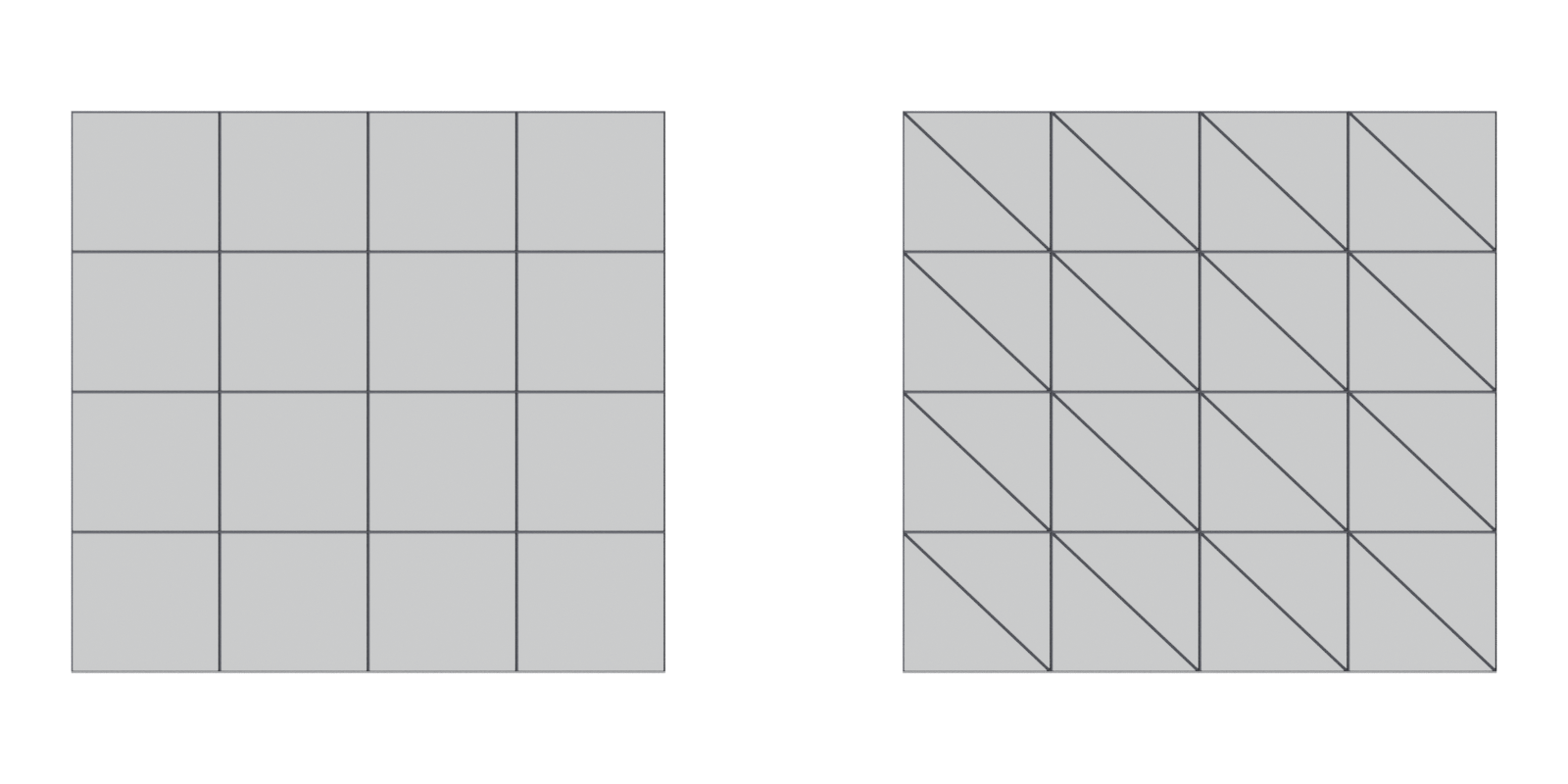
#Why triangles matter in games
The GPU only draws triangles. Epic's documentation says meshes "must be triangulated as the graphics hardware only deals with triangles" (Unreal Engine Documentation: FBX Static Mesh Pipeline). Direct3D's basic primitive types are points, lines and triangles; there is no quad type (Microsoft Learn: Primitive Topologies). A quad you model becomes two triangles, and an N-gon becomes several. See triangulation.
Triangles are always flat. Three points always define a single plane, so "Triangles are always flat and therefore easy to calculate" (Blender 3.1 Manual: Mesh Structure). A quad can be bent; a triangle cannot. That is why the engine, the baker and the renderer can only agree on a shape once it is in triangles.
Budgets are counted in triangles. Because triangles are what reach the GPU, polygon budgets are normally given as triangle counts. Unreal's Static Mesh Editor reports "the number of triangles in the Static Mesh" (Unreal Engine Documentation: Static Mesh Editor UI).
Triangles have a front. The order of a triangle's three vertices (its winding order) decides which side faces forward. LearnOpenGL explains that, by default, "triangles defined with counter-clockwise vertices are processed as front-facing" (LearnOpenGL: Face culling). Back-facing triangles can be culled, which on a closed cube can save "more than 50%" of the pixel-shading work (LearnOpenGL: Face culling). See normals.
#Common mistakes
- Comparing face counts with triangle budgets. A 1,000-face quad mesh is 2,000 triangles. Maya's HUD shows faces and triangles on separate lines, so read the right one (Maya 2026 Help: Heads Up Display (HUD) Options).
- Chasing triangle count alone. Vertex splits can matter as much. One Polycount artist found a version of a model with more triangles but fewer engine vertices (Polycount forum: Vertex Count vs Triangle Count). See vertex.
- Collapsed triangles. A triangle whose corners lie on one line or one point has no area and is called degenerate; Unreal's importer can remove degenerate triangles and Epic says "this option should be enabled" in general (Unreal Engine Documentation: FBX Import Options Reference).
- Triangulating a mesh you still plan to subdivide. Keep a quad version as your source file.
#In different tools
- Blender. The Statistics overlay shows a triangle count next to vertices and faces (Blender 3.5 Manual: Viewport Overlays).
- Maya. Display > Heads Up Display > Poly Count lists triangles separately from faces (Maya 2026 Help: Heads Up Display (HUD) Options).
- Unreal Engine. The Static Mesh Editor shows the triangle count of the imported mesh (Unreal Engine Documentation: Static Mesh Editor UI).
#Related terms
face · quad · N-gon · triangulation · polygon and triangle budgets · level of detail · decimation
#Further reading and watching
References
- · Mesh Structure · Blender 3.1 Manual, 2022 · docs · accessed 2026-10-20
- · FBX Static Mesh Pipeline · Unreal Engine Documentation · docs · accessed 2026-10-20
- · Primitive Topologies · Microsoft Learn (Direct3D 11) · docs · accessed 2026-10-20
- · Static Mesh Editor UI · Unreal Engine Documentation · docs · accessed 2026-10-20
- · Face culling · LearnOpenGL · web · accessed 2026-10-20
- · Maya Beginner Tutorial Series 12/17: Difference Between Triangles vs Quads vs NGons · World of Level Design, 2025 · article · accessed 2026-10-20
- Tris vs Quads for videogames · CG Cookie forums, 2019 · forum · accessed 2026-10-20
- · Heads Up Display (HUD) Options · Maya 2026 Help, 2025 · docs · accessed 2026-10-20
- Vertex Count vs Triangle Count · Polycount forum, 2014 · forum · accessed 2026-10-20
- · FBX Import Options Reference · Unreal Engine Documentation · docs · accessed 2026-10-20
- · Viewport Overlays · Blender 3.5 Manual, 2023 · docs · accessed 2026-10-20
Pages that link here
- Real-time vs. offline rendering Topic
- The game asset pipeline Topic
- Anatomy of a polygon mesh Topic
- Edge Key term
- Face (polygon) Key term
- Quad Key term
- N-gon Key term
- Normals (face and vertex) Key term
- Winding order and backface culling Key term
- Degenerate geometry Key term
- Triangulation Key term
- UV, retopology and baking tools Reference
- Shape language Topic
- Ways to build a 3D model Overview
- Box modeling Topic
- Extrude, inset and loop cut Key term
- Subdivision surface modeling Topic
- CAD and NURBS modeling for games Topic
- Procedural modeling Topic
- Topology Topic
- Edge flow Topic
- Edge loop Key term
- Edge ring Key term
- Face loop Key term
- Smoothing, hard edges and smoothing groups Topic
- Hard-surface modeling Topic
- Booleans Topic
- Bevels and chamfers Topic
- Weighted (custom) normals Topic
- The mid-poly workflow Topic
- Greebles Key term
- The high-to-low workflow Topic
- Modeling rocks, trees and terrain pieces Topic
- Collision meshes Topic
- Convex hull Key term
- Convex decomposition Key term
- Polygon and triangle budgets Topic
- Level of detail (LOD) Topic
- Impostors and billboards Key term
- Retopology Topic
- Decimation Key term
- Multiresolution and subdivision levels Key term
- Macro normals Key term
- Sculpting rocks and cliffs Guide
- Remeshing (DynaMesh, voxel remesh) Key term
- Baking Topic
- Parallax occlusion mapping Key term
- Vertex painting and blending Topic
- Ray tracing Key term
- Mesh distance fields Key term
- Foliage and vegetation Topic
- Virtualised geometry (Nanite) Topic
- Gaussian splatting Topic
- Wayfinding Topic
- Performance and profiling Topic
- Frame budgets Key term
- Draw calls Key term
- Overdraw Key term
- Photogrammetry Topic
- Exercise: your first game-ready prop Exercise
- A 12-month learning roadmap Guide
- Essential talks and videos Reference
- Communities and critique Reference
Last updated 2026-10-22