Smoothing, hard edges and smoothing groups
How vertex normals decide whether an edge shades smooth or sharp, how 3ds Max, Maya and Blender control it, how engines import it, and why hard edges must sit on UV seams for baking.
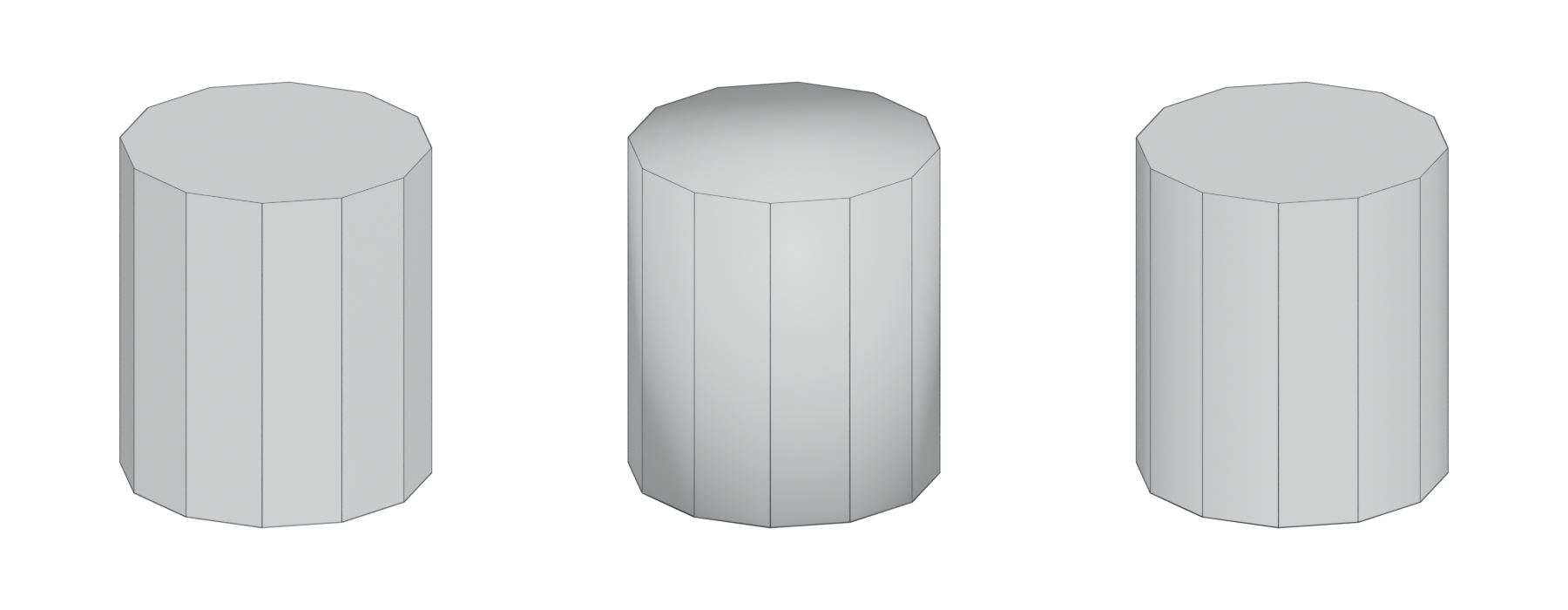
Whether an edge looks smooth or sharp in a game depends on the mesh's vertex normals, not on the edge's angle: one shared normal per vertex shades smooth, while separate normals on each side of an edge shade it hard.
Every 3D tool has its own controls for this: smoothing groups in 3ds Max, hard and soft edges in Maya, sharp edges and Smooth by Angle in Blender. They all produce the same thing in the exported file: split or unsplit normals.
#How smoothing works
A renderer shades a face by interpolating the normals stored at its vertices. If two faces share a vertex and that vertex has one averaged normal, the shading blends across the edge and the surface looks curved. In the words of 3ds Max's glossary, smoothing "blends the shading at the edges between faces to produce the appearance of a smooth, curved surface" (3ds Max 2015 Help: Smoothing Groups).
A hard edge gives each face its own normal at the shared vertices. The shading changes abruptly at the edge, which reads as a sharp corner.

#Vertex cost of hard edges
A vertex in the engine holds one normal. So wherever normals are split, the vertex is duplicated: Unreal's skeletal-mesh importer, for example, describes triangles with non-matching smoothing groups being "physically split, duplicating shared vertices" (Unreal Engine documentation: FBX Import Options Reference). The same happens at UV seams, where one position has two UV coordinates (Polycount forum: Making sense of hard edges, uvs, normal maps…).
This is why vertex count, not face count, is the better measure of cost. EarthQuake points out that hard edges placed along existing UV borders add no vertices, because those vertices are already split (Polycount forum: Making sense of hard edges, uvs, normal maps…; Polycount: Hard edges, uvs, vertex use, normals, etc). Digital Extremes' Warframe guide shows a mesh that looks like "a lot more geo" yet gives the GPU fewer triangles (Warframe Steam Workshop guide: Normal Map Baking).
#Hard edges and UV seams in baking
When you bake a normal map onto a low-poly, hard edges and UVs are linked.
- Every hard edge must be on a UV seam. Marmoset's tutorial says to "break apart your UV islands along all hard edge borders", otherwise "you will get seam artifacts as each face will try to bake onto the hard edge line" (Marmoset: The Toolbag Baking Tutorial). EarthQuake: "To avoid artifacts, you must split your uvs where you use hard edges" (Polycount forum: Making sense of hard edges, uvs, normal maps…).
- Not every UV seam needs a hard edge. EarthQuake notes this is a common misunderstanding (Polycount forum: Making sense of hard edges, uvs, normal maps…). Hardening seams usually adds no vertices, because seam vertices are already split.
Hard edges also help the bake. With a single smoothing group, the normal map has to correct strong shading gradients across large faces. Hard edges at UV seams reduce those gradients: Marmoset says hard edges at UV seams "can create less extreme smoothing on the low poly" (Marmoset: The Toolbag Baking Tutorial). EarthQuake adds that "there is simply no drawback to using hard edges along your uv seams with a synced workflow" (Polycount forum: Making sense of hard edges, uvs, normal maps…).
Two related rules from the same sources:
- Bake with a synced tangent space, the same one your engine uses. Marmoset recommends "Mikk / xNormal" because that is what Unity and Unreal use (Marmoset: The Toolbag Baking Tutorial). See tangent space and MikkTSpace.
- Use an averaged cage (projection mesh). With averaged projection, EarthQuake says "the use of hard edges is completely irrelevant to the baked end result", meaning hard edges no longer cause gaps in the bake (Polycount forum: Making sense of hard edges, uvs, normal maps…).
#The 90° rule of thumb
Where should the hard edges and seams go? Digital Extremes' Warframe guide: "If you have corners that are sharper than 90 degrees, they are good candidates for a UV cut and hard edges on the mesh" (Warframe Steam Workshop guide: Normal Map Baking). On Polycount, Bartalon gives similar advice: consider splitting UV shells "the closer their respective edges get to a 90 degree corner" (Polycount: Need Help on Normal map issues!).
Treat 90° as a starting point, not a law. A soft 120° bend can stay smooth; a 90° box corner is a natural seam.
#In different tools
#3ds Max: smoothing groups
Smoothing is controlled by numbered smoothing groups from 1 to 32. "If faces have at least one smoothing group in common, the edge between the faces is 'smoothed'"; otherwise it is sharp (3ds Max 2017 Help: Viewing and Changing Smoothing). Auto Smooth assigns groups from a threshold angle: faces whose normals differ by less than or equal to the threshold share a group (3ds Max 2017 Help: Viewing and Changing Smoothing).
#Maya: hard and soft edges
Maya works per edge. Mesh Display ‣ Harden Edge sets the normal angle to 0 degrees, and Soften Edge sets it to 180 (Maya 2018 Help: Mesh Display). Soften/Harden Edges lets you enter an angle: edges with angles greater than the value become hard, all others soft (Maya 2018 Help: Mesh Display). Maya also offers an option to harden edges "by angle or texture border", which matches the UV-seam rule above (Maya 2026 Help: Harden or soften polygon shading with vertex…).
#Blender: sharp edges and Smooth by Angle (4.1 and later)
Blender 4.1 removed the old Auto Smooth setting. "The 'Auto Smooth' option has been replaced by a modifier node group asset", and the base state of meshes now behaves as if Auto Smooth were on at 180 degrees (Blender Developer Documentation: Modeling — Blender 4.1 release notes). The new Smooth by Angle modifier "sets sharpness by the angle between faces"; in Edit Mode there is a Set Sharpness by Angle operator, and in other modes "Shade Smooth by Angle" (Blender Developer Documentation: Modeling — Blender 4.1 release notes).
Blender now calculates split normals automatically "when there is a mix of sharp and smooth elements", and "custom normals are used if available" (Blender Developer Documentation: Modeling — Blender 4.1 release notes). So in practice: shade the object smooth, mark sharp edges (by hand or by angle), and Blender writes split normals on export.
#Engines: importing normals
Engines can either use your normals or recompute their own. Unreal's FBX importer offers three choices: Compute Normals, where "smoothing group and normal info is discarded"; Import Normals, where normals come from the file and tangents are computed by the engine; and Import Normals and Tangents (Unreal Engine documentation: FBX Import Options Reference). It also lets you choose MikkTSpace as the tangent generation method (Unreal Engine documentation: FBX Import Options Reference).
If your hard edges vanish after import, the importer is probably recomputing normals, or the exporter did not write them.
#Common mistakes
- Everything smooth on a hard-surface low-poly. Large faces get strong gradients that the normal map struggles to correct, often leaving wobbly shading.
- Everything hard on an organic mesh. It looks faceted and adds vertices for no benefit (Polycount: Hard edges on UV seams for character models?).
- Recomputing normals on import. Your smoothing setup is discarded (Unreal Engine documentation: FBX Import Options Reference).
- Following a Blender tutorial for the wrong version. Auto Smooth no longer exists from 4.1 (Blender Developer Documentation: Modeling — Blender 4.1 release notes).
- Mismatched tangent space between baker and engine. See tangent space and MikkTSpace.
#Further reading and watching
References
- · Smoothing Groups (glossary) · 3ds Max 2015 Help · docs · accessed 2026-10-20
- · FBX Import Options Reference · Unreal Engine documentation · docs · accessed 2026-10-20
- · Making sense of hard edges, uvs, normal maps and vertex counts · Polycount forum, 2012 · forum · accessed 2026-10-20
- · Hard edges, uvs, vertex use, normals, etc · Polycount, 2012 · forum · accessed 2026-10-20
- · Normal Map Baking · Warframe Steam Workshop guide · docs · accessed 2026-10-20
- · The Toolbag Baking Tutorial · Marmoset, 2017 · article · accessed 2026-10-20
- · Need Help on Normal map issues! · Polycount, 2015 · forum · accessed 2026-10-20
- · Best Practices for Hard Surface Normal Map Baking · 80 Level, 2018 · article · accessed 2026-10-20
- · Hard edges on UV seams for character models? · Polycount, 2014 · forum · accessed 2026-10-20
- · Viewing and Changing Smoothing · 3ds Max 2017 Help · docs · accessed 2026-10-20
- · Mesh Display · Maya 2018 Help · docs · accessed 2026-10-20
- · Harden or soften polygon shading with vertex normals · Maya 2026 Help · docs · accessed 2026-10-20
- · Modeling — Blender 4.1 release notes · Blender Developer Documentation, 2024 · docs · accessed 2026-10-20
Pages that link here
- How to use this handbook Guide
- How this handbook uses sources Guide
- Real-time vs. offline rendering Topic
- Anatomy of a polygon mesh Topic
- Vertex Key term
- Edge Key term
- Normals (face and vertex) Key term
- Degenerate geometry Key term
- Modeling software Reference
- Subdivision surface modeling Topic
- Topology Topic
- Hard-surface modeling Topic
- Booleans Topic
- Bevels and chamfers Topic
- Weighted (custom) normals Topic
- The high-to-low workflow Topic
- Retopology Topic
- UV mapping Topic
- UV seams and islands Key term
- Baking Topic
- Bake cage Key term
- Tangent space and MikkTSpace Key term
- Fixing baking artefacts Guide
- Trim sheets Topic
- Geodecals Key term
- Exercise: your first game-ready prop Exercise
- A 12-month learning roadmap Guide
- Game art breakdowns: a curated library Reference
Last updated 2026-10-22