Sculpting rocks and cliffs
A step-by-step process for game rocks and cliffs, from reference and a planned rock set through blocking, planes and detail to baking, tiling materials and assembling cliffs from reusable chunks, with The Last of Us Part I as the worked example.
Game rocks are rarely one-off sculptures. They are a set: a small family of sculpted shapes, baked and covered with shared tiling materials, then rotated, scaled and combined into boulders, riverbeds and cliffs. This guide walks through that process. The running example is the rock set Jared Sobotta and Anthony Vaccaro made for the Tommy's Dam level of The Last of Us Part I at Naughty Dog, modeled, sculpted and textured in Maya, ZBrush and Substance 3D Designer (80 Level: A Closer Look at Rock Assets Made for TLOU…).
For the general craft, read digital sculpting and primary, secondary and tertiary forms first.
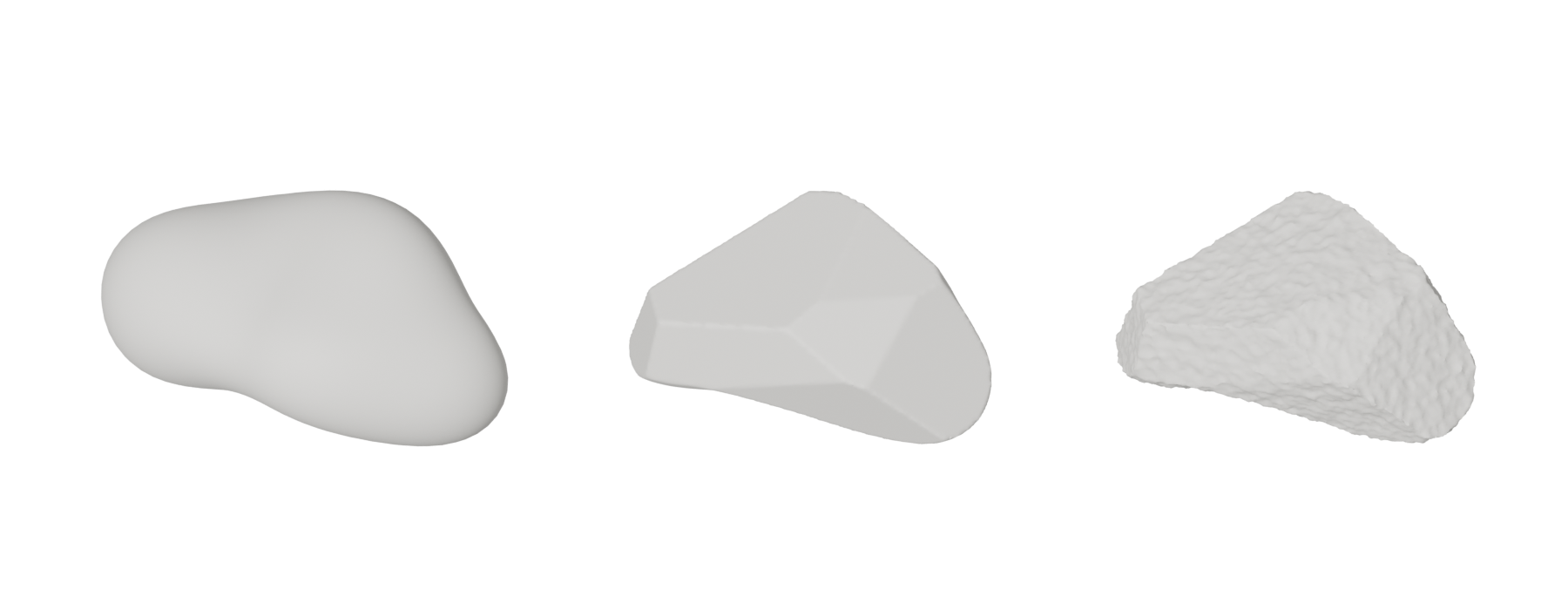
#1. Gather reference and decide the rock type
Pick one rock type per area and collect photos of it. Rounded river stones next to sharp, fractured granite rarely read as one place. The Witcher 3 team photographed "interesting rock formations" as part of their reference gathering (80 Level: World Building of Witcher 3). See gathering and using reference.
Note three things in your reference: how the rock breaks (sharp planes or rounded erosion), how big the main pieces are, and where moss, dirt and water collect.
#2. Plan a rock set
Decide which sizes the level needs before you sculpt. Sobotta's Tommy's Dam set runs from very large cliffs down to small river rocks (ArtStation: Rock Breakdown). A typical plan is three or four large forms, a few medium boulders, and small rocks made as an atlas or scatter set.
Plan for reuse from the start. Michał Janiszewski describes the Witcher 3 approach: "Imagine taking a rock and using it as a cliff, rotating it to use as a climbable platform, or ceiling of a big cave" (80 Level: World Building of Witcher 3). A rock that only looks good from one side cannot be reused this way.

#3. Block the primary form
Start with mass and silhouette only. JaviSkau, a senior environment artist at 31st Union (2K) with over ten years of rock sculpting, blocks out with DynaMesh and ClayTubes (ArtStation: Rock Sculpting Workflow in ZBrush | 3-Step…). Sobotta built the large river rocks from ZSpheres in ZBrush (ArtStation: River Rock Breakdown). Sergii Zlobin (FRAGLAB) starts stones as block meshes of different sizes and proportions (80 Level: Creating a Stone Wall Material in ZBrush…).
In Blender, Clay Strips is "a common standard for building rough volumes" and Grab is "an essential brush for building shapes and adjusting proportions" (Blender 3.6 Manual: Toolbar). Remesh often while the shape is changing (see remeshing).
Check the silhouette from several sides at this stage. Each side you intend to reuse needs its own interesting outline.
#4. Cut planes and breaks
Most rock types are defined by flat fracture planes meeting at edges. In this secondary pass, rocks begin to look like stone instead of clay.
- ZBrush: JaviSkau cuts medium planes and breakage with TrimSmoothBorder (ArtStation: Rock Sculpting Workflow in ZBrush | 3-Step…); Zlobin uses TrimSmoothBorder, Clay BuildUp, Planar and Trim brushes (80 Level: Creating a Stone Wall Material in ZBrush…).
- Blender: Scrape is "the most common brush for flattening meshes", Multi-plane Scrape produces "a sharp edge between" two planes, and Box Trim cuts with a Boolean box (Blender 3.6 Manual: Toolbar).
Vary plane sizes: a few large planes, more medium ones. Keep the main planes roughly consistent in direction, as layered or jointed rock would be in reference.
#5. Decide how much surface detail to sculpt
This is the main decision for a game rock. Sobotta's boulder sculpts focused on "the largest scale shapes" (ArtStation: Rock Breakdown), because every rock in the set uses "1-3 tiling rock materials, lichen, grunge, and moss inside of the shader" (ArtStation: Rock Breakdown). The small detail comes from the materials, which were themselves sculpted, combining hand sculpting and alphas (ArtStation: Rock Breakdown). See tileable sculpts.
For a hero rock with a unique bake, you would add tertiary detail in the sculpt instead. JaviSkau's third pass adds micro-detail and polish with Polish and hPolish (ArtStation: Rock Sculpting Workflow in ZBrush | 3-Step…).
#6. Low poly, UVs and bake
Make the game mesh by retopology or decimation. Decimation is quick for rocks, but Nomad notes that decimated meshes have uneven triangles and are poor for further sculpting, so decimate a copy as a final step (Nomad Sculpt manual: Topology). Keep extra polygons on the silhouette and fewer on flat planes; see polygon and triangle budgets.
Bake normal and cavity maps from the sculpt. Sobotta's high-poly sculpts were baked down and their normal and cavity data blended through the shader's layer stack (ArtStation: Rock Breakdown). See baking and the high-to-low workflow.
#7. Material and blending
A rock shader usually layers several materials:
- Base rock tiling material, often with a second variant. Sobotta's library used a smoother base rock material on most rocks (ArtStation: Rock Breakdown).
- Lichen, grunge and moss blended on top (ArtStation: Rock Breakdown).
- Vertex blending for hand-placed variation. Sobotta's video shows blending a rock in Maya with layers for another rock material, grunge, moss and wetness before export (ArtStation: Rock Breakdown). See vertex painting and blending and height blending.
- World-aligned moss or dust on top surfaces; see triplanar and world-aligned mapping.
The albedo of the rock materials was sampled from real-world reference (ArtStation: Rock Breakdown). See base colour (albedo) map.
#8. Build cliffs from the set
Large cliffs are assembled, not sculpted in one piece. Sobotta shows the same large cliff built around a different section of the level (ArtStation: Rock Breakdown), and Anthony Vaccaro blending the kit into the full environment (ArtStation: Rock Breakdown).
Embankments and eroded slopes combine more ingredients. Sobotta's erosion work used prototype meshes by Vaccaro, terrain geometry and instanced rocks; a height map displaced the terrain to create a new mesh for thicker erosion lines (ArtStation: Erosion Breakdown). See terrain and landscapes and instancing.
When you assemble, push pieces into each other and into the ground so seams disappear, and vary rotation so repeated chunks are hard to spot. The Witcher 3 team made their world more believable "by not using a grid for mesh placement and having everything slightly imperfect" (80 Level: World Building of Witcher 3).
#Further reading and watching
References
- · A Closer Look at Rock Assets Made for TLOU Part I · 80 Level · article · accessed 2026-10-21
- · World Building of Witcher 3 · 80 Level, 2016 · article · accessed 2026-10-21
- · Rock Breakdown · ArtStation, 2023 · web · accessed 2026-10-21
- · Rock Sculpting Workflow in ZBrush | 3-Step Guide & Essential Brushes · ArtStation, 2026 · web · accessed 2026-10-21
- · River Rock Breakdown · ArtStation, 2023 · web · accessed 2026-10-21
- · Creating a Stone Wall Material in ZBrush, Substance 3D Designer & Marmoset Toolbag · 80 Level · article · accessed 2026-10-21
- · Toolbar (Sculpt Mode) · Blender 3.6 Manual · docs · accessed 2026-10-21
- · Topology · Nomad Sculpt manual · docs · accessed 2026-10-21
- · Erosion Breakdown · ArtStation, 2023 · web · accessed 2026-10-21
- · The Material Art of The Last of Us | Substance Days at GDC 2023 | Adobe Substance 3D · YouTube, 2023 · talk · accessed 2026-10-21
Pages that link here
- Sculpting software Reference
- Modeling rocks, trees and terrain pieces Topic
- Digital sculpting Topic
- Base meshes for sculpting Key term
- Macro normals Key term
- Terrain and landscapes Topic
- Heightfield erosion Key term
- A 12-month learning roadmap Guide
Last updated 2026-10-22