Remeshing (DynaMesh, voxel remesh)
Rebuilding a sculpt's polygons so they are evenly sized again, either across the whole mesh (DynaMesh, voxel remesh) or locally under the brush (dynamic topology, Sculptris Pro). It frees you from topology while sculpting; it does not give you game-ready topology.
Remeshing rebuilds a mesh's polygons from its current shape so they are evenly sized again. Sculptors use it because pulling and stretching a surface spreads its polygons thin, and stretched polygons cannot hold detail. Maxon describes DynaMesh as redistributing "the model's polygons to be equally sized for a consistent brush stroke on command" (maxon.net: Base Mesh Creation).
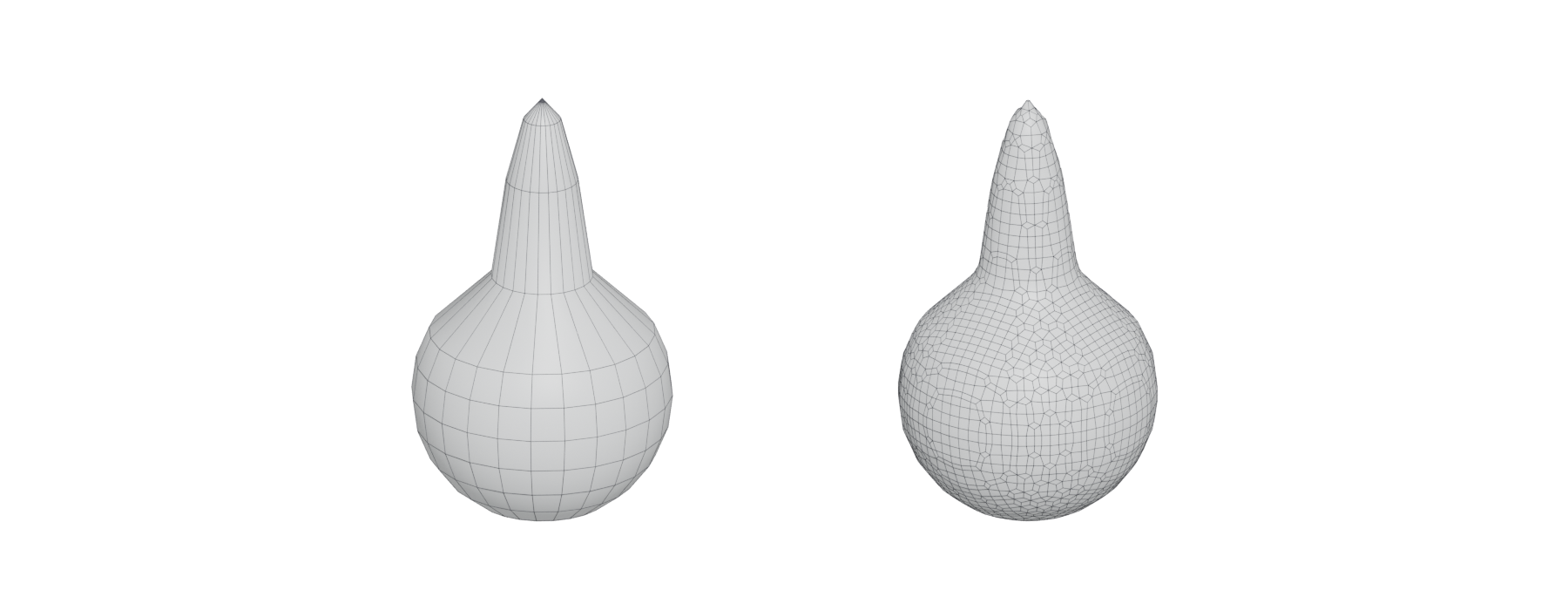
#Two families
There are two ways to keep a sculpt's resolution even, and every major tool offers both.
Whole-mesh remeshing throws away the old topology and rebuilds the entire surface at a chosen resolution. ZBrush calls this DynaMesh, Blender and Nomad call it voxel remesh, and 3DCoat's voxel mode works on a volume from the start (ZBrush for iPad Help: DynaMesh Sculpting Essentials; Blender Manual: Remesh; Nomad Sculpt manual: Topology; 3DCoat Documentation: Sculpt).
Local (dynamic) tessellation adds and removes triangles only where the brush touches. Blender calls this dynamic topology or Dyntopo; ZBrush calls it Sculptris Pro (Blender Manual: Dyntopo; ZBrush for iPad Help: SculptrisPro Essentials).

#How the main tools do it
| Tool | Whole-mesh | Local | Notes |
|---|---|---|---|
| ZBrush | DynaMesh; Resolution slider defaults to 128 (ZBrush for iPad Help) | Sculptris Pro; triangle size follows brush Draw Size (ZBrush for iPad Help) | DynaMesh reaches about eight million polygons per SubTool, against 100 million with subdivision levels |
| Blender | Voxel Remesh (Ctrl-R); Voxel Size sets the detail (Blender Manual) | Dyntopo; detail can be relative to the screen, constant, or follow the brush (Blender Manual) | Voxel remesh does not work with Multiresolution |
| Nomad Sculpt | Voxel remesher (Nomad Sculpt manual) | Dynamic topology | Voxel remesh closes holes and resolves self-intersections |
| 3DCoat | Voxel mode, "volumetric digital clay" (3DCoat Documentation) | Surface mode for fine detail | Voxels for blocking, surface for "pores, wrinkles, surface scratches" |
In ZBrush you trigger a remesh by Ctrl- or Cmd-dragging on empty canvas. If you keep the same resolution, only vertices changed since the last remesh are rebuilt (ZBrush for iPad Help: DynaMesh Sculpting Essentials). The Project option carries the old surface onto the new one, but Maxon warns that "some detail will always be lost" (ZBrush for iPad Help: Tool palette: Geometry > DynaMesh).
Blender's voxel remesh can preserve volume, the paint mask, Face Sets and colour attributes, but otherwise "will lose all mesh object data layers associated with the original mesh" (Blender Manual: Remesh). That includes UVs.
#Remeshing compared with retopology
A remeshed sculpt has even polygons, but it is not an efficient mesh. DynaMesh, voxel remesh and Dyntopo produce dense, uniform meshes with no regard for edge flow, and Nomad notes that the triangles dynamic topology produces "can look a little messy" in wireframe (Nomad Sculpt manual: Topology). To get a game mesh you still need retopology or decimation.
ZBrush's tool for that step is ZRemesher, an automatic retopology tool that Maxon updated in ZBrush 2019 for hard-surface models (ZBrush Help: ZRemesher). Kirill Khafizov's stylised ruins show the full sequence: DynaMesh for sculpting, then ZRemesher for automatic retopology and Decimation Master to prepare meshes for UVs (80 Level: How to Make Atmospheric Stylized Modular…). Nomad gives the same advice: sculpt first, then run a quad remesher for clean topology (Nomad Sculpt manual: Topology).
Related: digital sculpting, retopology, decimation, topology, sculpting software.
References
- · Base Mesh Creation · maxon.net · web · accessed 2026-10-21
- · DynaMesh Sculpting Essentials · ZBrush for iPad Help · docs · accessed 2026-10-21
- · Remesh (Sculpt Mode) · Blender Manual · docs · accessed 2026-10-21
- · Topology · Nomad Sculpt manual · docs · accessed 2026-10-21
- · Sculpt · 3DCoat Documentation · docs · accessed 2026-10-21
- · Dyntopo · Blender Manual · docs · accessed 2026-10-21
- · SculptrisPro Essentials · ZBrush for iPad Help · docs · accessed 2026-10-21
- · Tool palette: Geometry > DynaMesh · ZBrush for iPad Help · docs · accessed 2026-10-21
- · ZRemesher (User Guide) · ZBrush Help · docs · accessed 2026-10-21
- · How to Make Atmospheric Stylized Modular Ruins with ZBrush & Substance 3D · 80 Level · article · accessed 2026-10-21
- · Creating a Stone Wall Material in ZBrush, Substance 3D Designer & Marmoset Toolbag · 80 Level · article · accessed 2026-10-21
Pages that link here
- Manifold and non-manifold geometry Key term
- Sculpting software Reference
- UV, retopology and baking tools Reference
- AI-assisted 3D generation Topic
- Ways to build a 3D model Overview
- Decimation Key term
- Digital sculpting Topic
- Multiresolution and subdivision levels Key term
- Base meshes for sculpting Key term
- Sculpting rocks and cliffs Guide
- Sculpting damage and wear Guide
Last updated 2026-10-22