Quad
A face with four vertices. The preferred face for subdivision and deformation, and the centre of the long "all quads" debate.
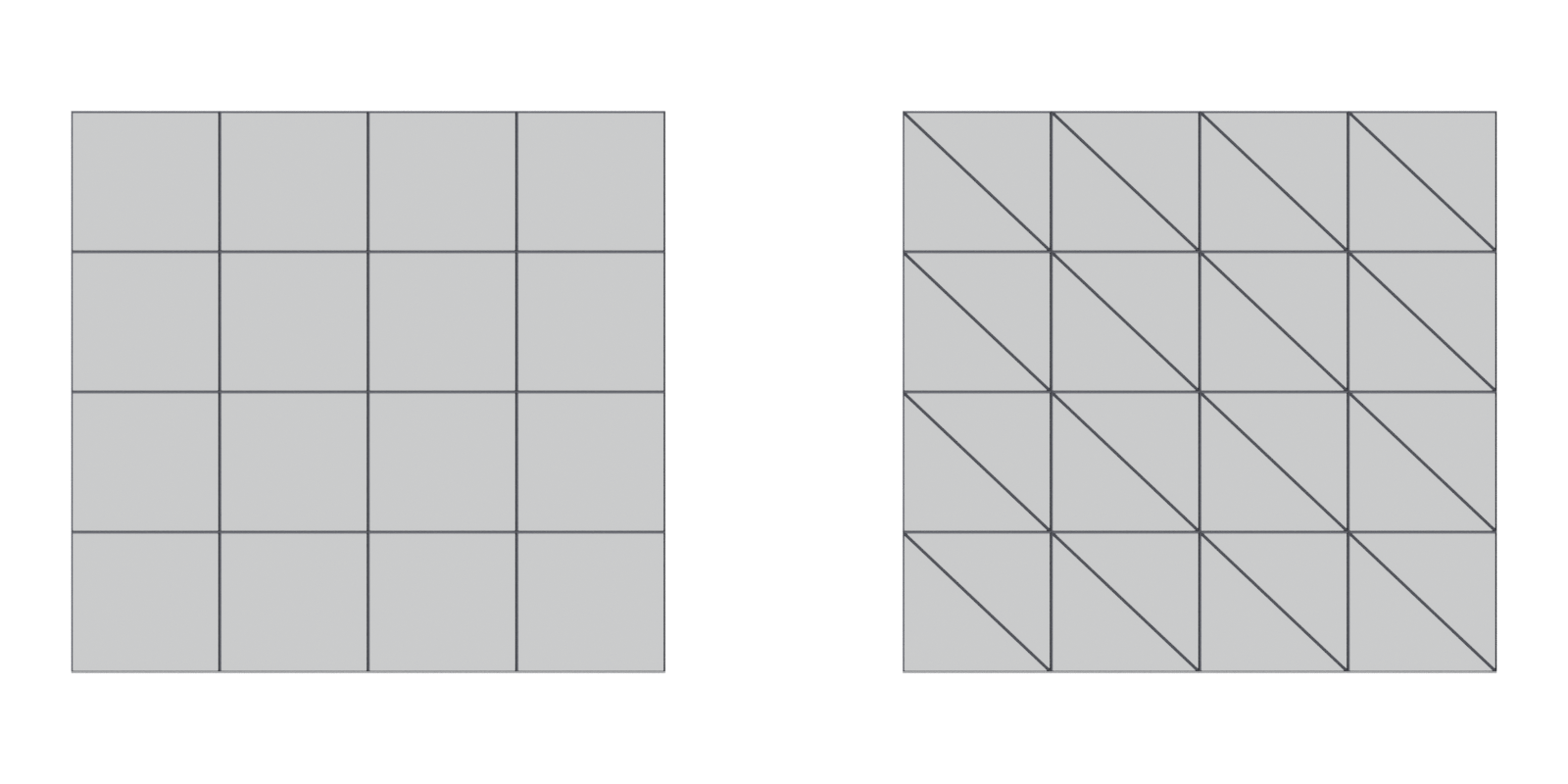
A quad (short for quadrangle or quadrilateral) is a face with four vertices and four edges. Blender's manual notes that quads "deform well" and "are therefore preferred for animation and subdivision modeling" (Blender 3.1 Manual: Mesh Structure). In the engine, every quad becomes two triangles.
#Why quads matter
Quads make loops. When every inner vertex of a quad grid has four edges, edges line up into continuous edge loops and edge rings. Loops only stop at poles, vertices with three, five or more edges (Blender 3.1 Manual: Mesh Structure). Loops make modeling faster: you can select, slide, bevel and cut along them in one click. See edge flow.
Quads subdivide predictably. The most common subdivision method, Catmull-Clark, is designed around quads. CG Channel describes it as the scheme that can be applied to meshes that are "mostly or entirely quads", whereas the Loop scheme for triangle meshes requires them to be "purely triangular" (CG Channel: Pixar releases OpenSubdiv 3.4). University lecture notes on subdivision describe Catmull-Clark as operating on quadrilateral meshes and treat vertices with other than four edges as special "extraordinary" cases (University of Cambridge: Further Graphics: 5. Subdivision surfaces). See subdivision surface modeling.
Quads still end up as triangles. The GPU "only deals with triangles", so every quad is split in two on import (Unreal Engine Documentation: FBX Static Mesh Pipeline). A quad has two possible diagonals, and on a bent quad they give different shapes. See triangulation.

#Common mistakes
- Treating "all quads" as a rule for every asset. It is a rule for subdivision and deformation, not for static game props (CG Cookie forums: N-Gons).
- Forgetting that quads have a diagonal. A non-planar quad shades differently depending on how it is split. See triangulation.
- Forcing quads with bad poles. Turning every triangle into quads can add awkward poles in visible places. Fricker warns that poles can cause subdivision errors and deformation problems (CG Cookie forums: Tris vs Quads for videogames). See pole.
- Leaving quads in a mesh you bake and then letting the engine triangulate differently. See triangulation.
#In different tools
- Blender. The Triangulate modifier splits quads with a choice of methods: Beauty, Fixed (1st to 3rd vertex), Fixed Alternate (2nd to 4th), Shortest Diagonal and Longest Diagonal (Blender 4.0 Manual: Triangulate Modifier). The Statistics overlay shows face and triangle counts, so a pure-quad mesh shows exactly twice as many triangles as faces (Blender 3.5 Manual: Viewport Overlays).
- Maya. The Poly Count HUD lists faces and triangles separately (Maya 2026 Help: Heads Up Display (HUD) Options).
- Unity. The model importer has a "Keep Quads" option that will "stop Unity from converting polygons that have four vertices to triangles" (Unity Manual 2018.2: Model tab). Leave it off unless a specific shader needs quads.
- Unreal Engine. Shows triangles only (Unreal Engine Documentation: Static Mesh Editor UI).
#Related terms
face · triangle · N-gon · edge loop · pole · topology · subdivision surface modeling · triangulation
#Further reading and watching
References
- · Mesh Structure · Blender 3.1 Manual, 2022 · docs · accessed 2026-10-20
- · Pixar releases OpenSubdiv 3.4 · CG Channel, 2019 · article · accessed 2026-10-20
- Further Graphics: 5. Subdivision surfaces (lecture slides) · University of Cambridge, Department of Computer Science and Technology, 2017 · paper · accessed 2026-10-20
- · FBX Static Mesh Pipeline · Unreal Engine Documentation · docs · accessed 2026-10-20
- · Maya Beginner Tutorial Series 12/17: Difference Between Triangles vs Quads vs NGons · World of Level Design, 2025 · article · accessed 2026-10-20
- Tris vs Quads for videogames · CG Cookie forums, 2019 · forum · accessed 2026-10-20
- N-Gons · CG Cookie forums, 2025 · forum · accessed 2026-10-20
- Max to Xnormal bake issue · Polycount forum, 2016 · forum · accessed 2026-10-20
- · Triangulate Modifier · Blender 4.0 Manual, 2023 · docs · accessed 2026-10-20
- · Viewport Overlays · Blender 3.5 Manual, 2023 · docs · accessed 2026-10-20
- · Heads Up Display (HUD) Options · Maya 2026 Help, 2025 · docs · accessed 2026-10-20
- · Model tab (FBX Importer settings) · Unity Manual 2018.2, 2018 · docs · accessed 2026-10-20
- · Static Mesh Editor UI · Unreal Engine Documentation · docs · accessed 2026-10-20
Pages that link here
- Anatomy of a polygon mesh Topic
- Face (polygon) Key term
- Triangle Key term
- N-gon Key term
- Vertex colours Key term
- Triangulation Key term
- glTF Key term
- Modding and user-generated content tools Reference
- Box modeling Topic
- Extrude, inset and loop cut Key term
- Subdivision surface modeling Topic
- Control cage and limit surface Key term
- CAD and NURBS modeling for games Topic
- Topology Topic
- Edge flow Topic
- Pole Key term
- Edge loop Key term
- Edge ring Key term
- Face loop Key term
- Hard-surface modeling Topic
- Booleans Topic
- Polygon and triangle budgets Topic
- Retopology Topic
- Decimation Key term
- Multiresolution and subdivision levels Key term
- Base meshes for sculpting Key term
- UV seams and islands Key term
- Baking Topic
- Fixing baking artefacts Guide
- Mesh decals Topic
- Terrain and landscapes Topic
- Foliage and vegetation Topic
- Overdraw Key term
- Exercise: your first game-ready prop Exercise
- Essential talks and videos Reference
Last updated 2026-10-22