Pole
A vertex where three, or five or more, edges meet; poles stop and redirect edge loops and affect how a surface subdivides.
A pole is a vertex where more or fewer than four edges meet. The Blender Manual defines poles as "vertices that are connected to either three, five, or more edges" (Blender Manual: Structure).
In a grid of quads, almost every vertex has four edges. Poles are the exceptions, and they are where edge loops stop, turn or merge.
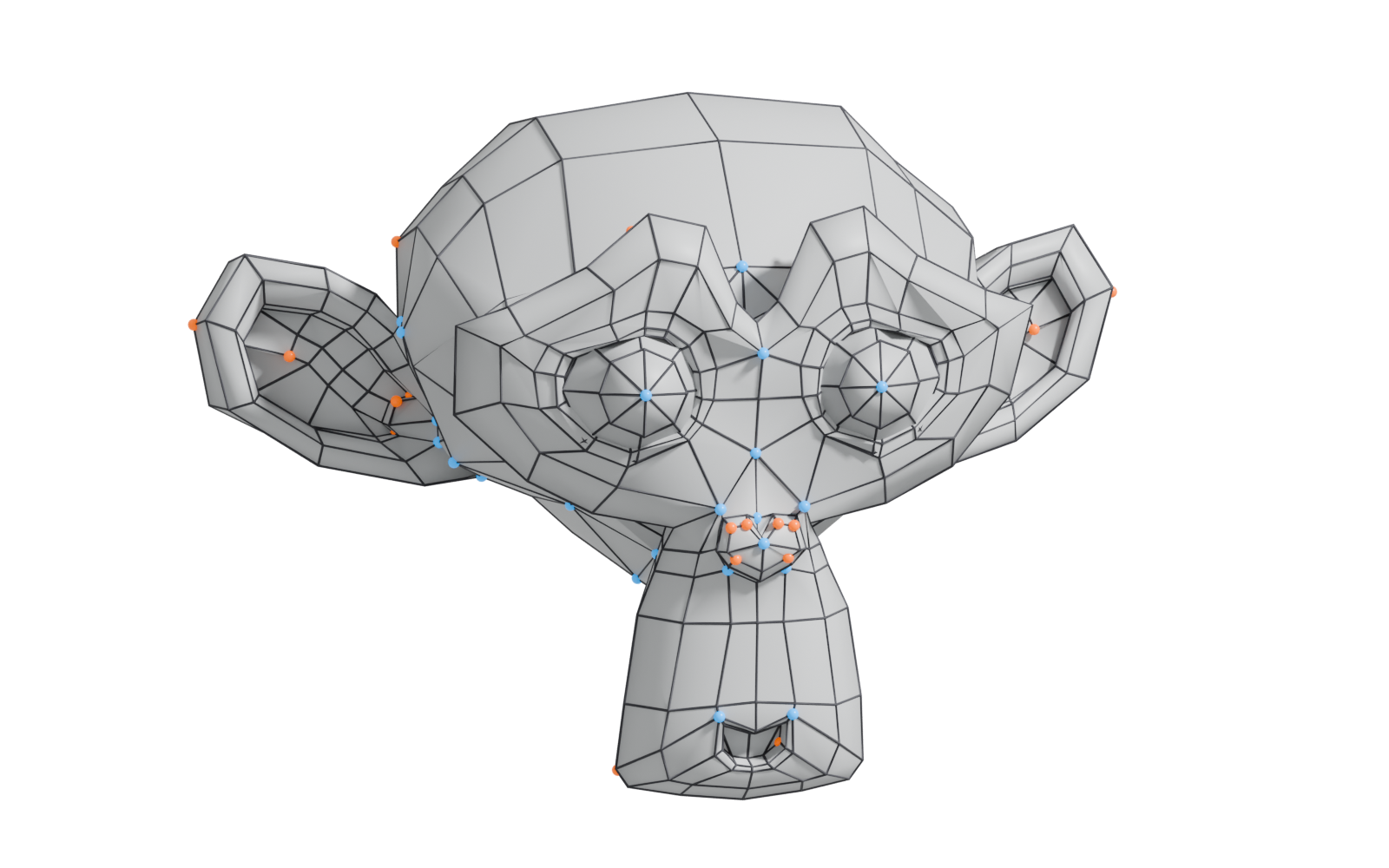
#Types of pole
- 3-edge pole, often called an N-pole. Pepribal's Blender reference calls "a 3-way junction vertex" an N-pole (BlenderWiki: Mesh topology appendix). The name comes from an informal guide that called it "the Nose-Pole", because it appears when modeling a nose (BlenderWiki: E and N poles).
- 5-edge pole, often called an E-pole. "A 5-way junction vertex is called an E-pole" (BlenderWiki: Mesh topology appendix); the E stands for "Extrude", since extruding a face out of a surface creates them (BlenderWiki: E and N poles).
- 6 or more edges. These have no common nickname; they are simply higher-valence poles.
In subdivision terminology, the same vertices are called extraordinary vertices: in Catmull–Clark, a vertex that "does not have four incident faces" (OpenSubdiv documentation: Subdivision Surfaces). Valence means the number of edges at a vertex (Wikipedia: Catmull–Clark subdivision surface).

#Why poles matter
They stop loops. "Loops stop at so-called poles because there is no unique way to continue a loop from a pole" (Blender Manual: Structure). Blender's loop selection ends at a pole for the same reason (Blender Manual: Select Loops). This is useful: poles are how you turn edge flow or contain density.
They change subdivision. Around extraordinary vertices the limit surface is more complex. OpenSubdiv notes that minimising irregularities is advantageous and that the surface near them can show "undesirable artefacts" (OpenSubdiv documentation: Subdivision Surfaces). On a curved, glossy surface this often shows as a small pinch or a wobble in the reflection.
They affect deformation. On a character, musashidan describes poles as "key to how the topology deforms" (Polycount: Head Topology question?).
#Where to place them
- On flat or gently curved areas, where any surface irregularity is not visible.
- Away from joints and areas that bend, such as eyelids, lips, elbows and knees.
- On hidden areas: the underside of a prop, inside a seam, behind a part.
- Not on a sharp edge or support loop on a hard-surface mesh, where they disturb the edge highlight.
A 6+ edge pole is usually best split into two lower-valence poles a face or two apart. This is a common habit rather than a hard rule; the higher the valence, the more irregular the surface around it.
#Common mistakes
- Trying to remove every pole. Most closed shapes need some. Move them to flat or hidden areas instead.
- Clustering poles. Several poles close together create a larger irregular area.
- Forgetting that triangles create poles too. A triangle in a quad mesh changes the edge count of its corner vertices.
#Related terms
edge loop · edge ring · edge flow · topology · subdivision surface modeling · vertex
#Further reading and watching
References
- · Structure · Blender Manual (2.93), 2021 · docs · accessed 2026-10-20
- · Mesh topology appendix (User:Pepribal/Ref/Appendices/MeshTopo) · BlenderWiki (archived user pages) · web · accessed 2026-10-20
- · E and N poles (User:Mindrones/Wiki/Subdivision modelling) · BlenderWiki (archived user pages) · web · accessed 2026-10-20
- · Subdivision Surfaces · OpenSubdiv documentation (source file on GitHub) · docs · accessed 2026-10-20
- · Catmull–Clark subdivision surface · Wikipedia · web · accessed 2026-10-20
- · Select Loops · Blender Manual (3.3, German edition), 2022 · docs · accessed 2026-10-20
- · Head Topology question? · Polycount, 2019 · forum · accessed 2026-10-20
- · Super-handy primer on Edge Poles · CG Cookie, 2023 · forum · accessed 2026-10-20
Pages that link here
- Anatomy of a polygon mesh Topic
- Vertex Key term
- Edge Key term
- Quad Key term
- Box modeling Topic
- Extrude, inset and loop cut Key term
- Subdivision surface modeling Topic
- Control cage and limit surface Key term
- Topology Topic
- Edge flow Topic
- Edge loop Key term
- Edge ring Key term
- Face loop Key term
- Support loop (holding edge) Key term
- Retopology Topic
- Shadow bias and shadow acne Key term
- A 12-month learning roadmap Guide
Last updated 2026-10-22