Physically based rendering (PBR)
What "physically based" means for a texture artist; energy conservation, Fresnel and microfacets in plain words; metal/roughness versus specular/gloss; safe value ranges; the classic mistakes; and the newer layered models (OpenPBR, Substrate).
Physically based rendering (PBR) is a way of shading surfaces that follows how light really behaves, so one material looks right under any lighting. Adobe's PBR Guide describes it as rendering built on models grounded in the physics of light (Adobe Substance 3D: The PBR Guide – Part 1). For you as an artist, it means painting what a surface is (its colour, how rough it is, whether it is metal) rather than how it looks under one particular light.
This is the main reason game studios moved to PBR. Epic's 2013 notes on the Unreal Engine 4 renderer put the goal plainly: "materials shouldn't need to be modified when used in a different lighting environment from where they were created" (Karis 2013). A rusty barrel should look right in a sunny courtyard and a dark cellar without a second texture set.
#Three core ideas
Texturing for PBR does not require the maths. Three ideas explain almost every rule in the rest of this chapter.
#Energy conservation
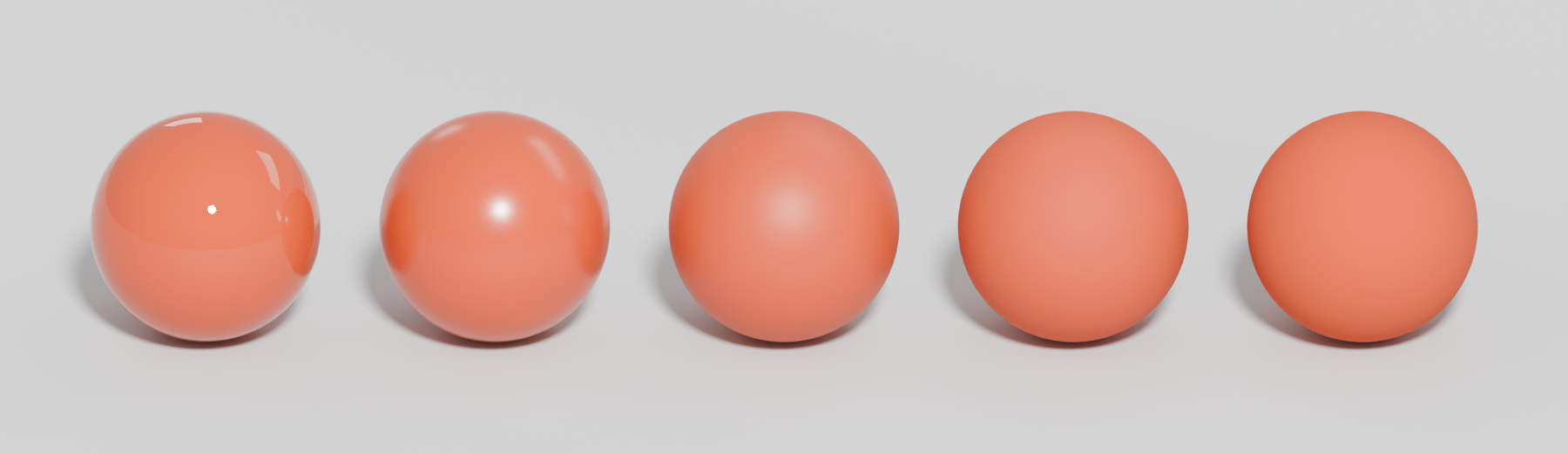
A surface cannot reflect more light than it receives. Marmoset's primer: "the light leaving a surface is never any brighter than that which fell upon it originally" (Marmoset: Basic Theory of Physically-Based Rendering). In practice this ties two things together: when a surface reflects more as a mirror-like highlight, it has less light left over for its diffuse colour, and a rough surface spreads its highlight wider but dimmer (Marmoset: Basic Theory of Physically-Based Rendering). Godot's docs make the same link for metals: "The more reflective, the less diffuse/ambient light affects the material" (Godot documentation: Standard Material 3D and ORM Material 3D).
For texturing, energy conservation is why you no longer paint a bright highlight into the colour map. The shader already makes the highlight, at the right strength, for whatever light is in the scene.
#Fresnel
Every surface reflects more light when you look at it at a grazing angle. Adobe's guide: "the amount of light reflected from a surface depends on the viewing angle" (Adobe Substance 3D: The PBR Guide – Part 1). Marmoset goes further: "for all materials, reflectivity becomes total for grazing angles" (Marmoset: Basic Theory of Physically-Based Rendering). Look across a wooden table towards a window and you will see a reflection you cannot see from directly above.
The reflectance looking straight on is called F0. For most non-metals (dielectrics) it is low, "from 0.02-0.05 (linear values)", while for metals it is "0.5-1.0" (Adobe Substance 3D: The PBR Guide – Part 1). Because dielectrics cluster so tightly, the metal/roughness workflow simply "hardcodes the F0 value for dielectrics to be 4% reflective" (Adobe Substance 3D: The PBR Guide – Part 1). Unreal's default Specular of 0.5 "represents approximately 4% specular reflection" (Unreal Engine documentation: Physically Based Materials in Unreal Engine), and Godot sets "minimum internal reflectivity" to 0.04 (Godot documentation: Standard Material 3D and ORM Material 3D).

You never paint Fresnel; the shader adds it. What you control is roughness, because rough surfaces show a weaker Fresnel effect (Marmoset: Basic Theory of Physically-Based Rendering).
#Microfacets and roughness
At a scale too small to see, every surface is made of tiny flat facets. Adobe calls them "small-scaled planar detail surfaces of varying orientation called microfacets" (Adobe Substance 3D: The PBR Guide – Part 1). When the facets all face the same way, light bounces off in one direction and you see a sharp highlight. When they face many ways, the light spreads: "the rougher the surface gets, the more the reflected light will diverge or appear 'blurry'" (Marmoset: Basic Theory of Physically-Based Rendering).
You do not model these facets. You describe them statistically with one greyscale value per pixel, the roughness map, which Adobe describes as "sub-texel geometric detail" (Adobe Substance 3D: The PBR Guide – Part 1).

#Metals and non-metals
PBR sorts every surface into two families, and the difference changes what the colour map means.
- Non-metals (dielectrics, insulators): wood, stone, plastic, paint, skin, fabric. Light enters, scatters and comes back out as diffuse colour, plus a weak, uncoloured reflection on top (Adobe Substance 3D: The PBR Guide – Part 1). Marmoset: insulators' "reflections are uncolored" (Marmoset: Basic Theory of Physically-Based Rendering).
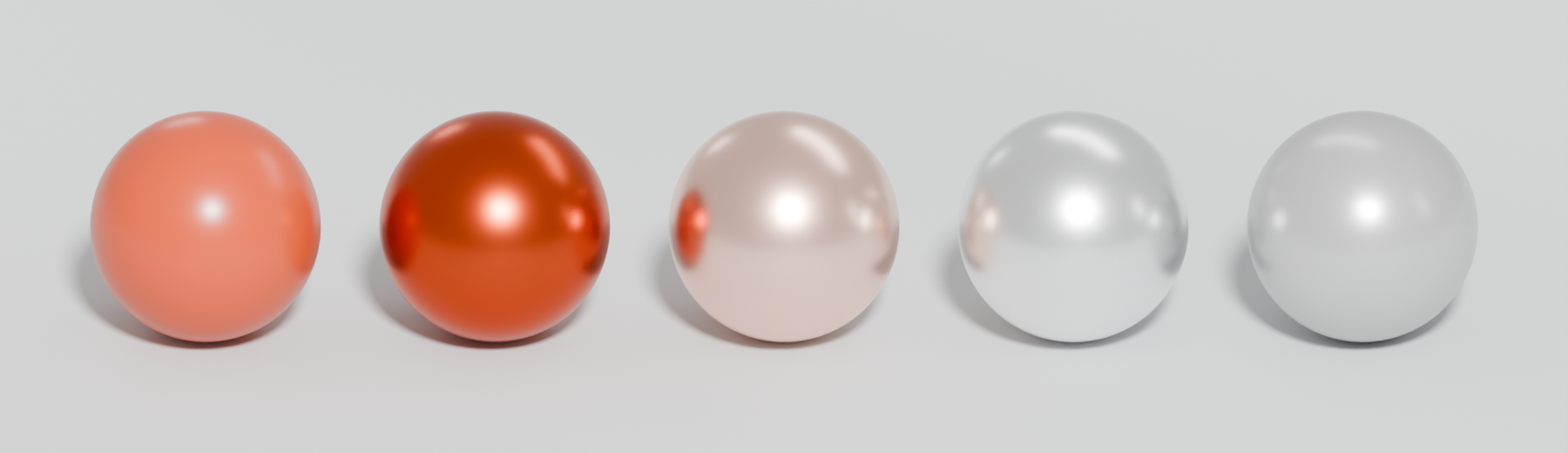
- Metals (conductors): iron, gold, copper, aluminium. Light that enters is absorbed, so "in theory conductors will not show any evidence of diffuse light" (Marmoset: Basic Theory of Physically-Based Rendering). All their colour comes from the reflection itself, which can be tinted, as with gold or copper (Marmoset: Basic Theory of Physically-Based Rendering).
This is why one texture slot can hold two meanings. On a non-metal pixel, the base colour (albedo) map is the diffuse colour. On a metal pixel, it is the colour of the reflection. The metallic map tells the shader which reading to use.
#Two workflows: metal/roughness and specular/gloss
There are two common ways to feed a PBR shader. Both describe the same physics (Adobe Substance 3D: The PBR Guide – Part 2).
| Metal/roughness | Specular/gloss | |
|---|---|---|
| Maps | Base colour, metallic, roughness | Diffuse (albedo), specular, glossiness |
| Dielectric F0 | Fixed at about 4%, with an optional specular-level override | Painted per pixel in the specular map |
| Smooth to rough | Roughness: black smooth, white rough | Glossiness: the inverse (white smooth) |
| Edge artefact | White fringe where metal meets non-metal | Black fringe |
| Memory | Less | More |
Sources: Adobe's PBR Guide part 2 for maps, artefacts and trade-offs (Adobe Substance 3D: The PBR Guide – Part 2).
Unreal and Godot are built around metal/roughness inputs, and Unity's URP Lit shader offers a metallic workflow alongside a specular one (Unity Manual: Lit shader material Inspector window…). Godot says it chose the metallic model "due to its simplicity" (Godot documentation: Standard Material 3D and ORM Material 3D). Epic's 2013 notes explain why they picked it for Unreal 4: metallic avoids the need to understand "dielectric and conductor reflectance, so less room for error", and roughness is "very clear in its meaning, whereas gloss always needs explaining" (Karis 2013). Unity's HDRP mask map stores smoothness rather than roughness, which is the same idea as gloss (see channel packing).
#Plausible value ranges
PBR materials need plausible values to work. Adobe's guide gives working limits for the base colour of non-metals, in 8-bit sRGB: "For dark values, you should not go under 30-50 sRGB" and "you should not have any values that are higher than 240 sRGB" (Adobe Substance 3D: The PBR Guide – Part 2). Raw metals are bright: their reflectance should be 70–100%, which Adobe maps to 180–255 sRGB (Adobe Substance 3D: The PBR Guide – Part 2).
Epic publishes measured values too: charcoal 0.02, fresh asphalt 0.02, bare soil 0.13, fresh concrete 0.51, fresh snow 0.81 for non-metals, and iron (0.560, 0.570, 0.580) or gold (1.000, 0.766, 0.336) for metals (Unreal Engine documentation: Physically Based Materials in Unreal Engine). See base colour (albedo) map for a chart that puts both sources on one scale.
#Common mistakes
- Grey metallic everywhere. Epic: "In most cases, you should treat Metallic as a binary property", and "resist the impulse to use partial values unless you have a good reason" (Unreal Engine documentation: Physically Based Materials in Unreal Engine). See metallic map.
- Dark metals. A metal pixel's colour is its reflection, so it must be bright (about 180–255 sRGB) (Adobe Substance 3D: The PBR Guide – Part 2). Dark grey with metallic = 1 reads as black plastic.
- Pure black or pure white base colour. Nothing in nature is that dark or that bright; stay inside the 30–240 window (Adobe Substance 3D: The PBR Guide – Part 2).
- Setting Specular to 0 to make something matte. Epic advises a high roughness instead (Unreal Engine documentation: Physically Based Materials in Unreal Engine).
- Wrong colour space. Base colour is sRGB; roughness and metallic are linear data (Adobe Substance 3D: The PBR Guide – Part 2). See texture maps explained.
#Examples
#Newer models: OpenPBR and Substrate
The classic metal/roughness model covers most props, but not layered surfaces such as car paint with a clear coat, oiled leather or skin. Two newer systems are spreading.
OpenPBR Surface is "a surface shading model intended as a standard for computer graphics", developed by Autodesk and Adobe and hosted by the Academy Software Foundation; version 1.1.1 is dated April 2026 (Academy Software Foundation: OpenPBR Surface specification, v1.1.1). It describes a metal or dielectric base with optional coat, fuzz and thin-film layers (Academy Software Foundation: OpenPBR Surface specification, v1.1.1). In June 2026, Substance 3D Painter 12.1 made it "the default workflow" for new projects without a template (Substance 3D Painter documentation: Version 12.1), and Adobe announced in July 2026 that OpenPBR is "supported right across the Substance 3D ecosystem" (Adobe Community: Substance 3D at SIGGRAPH 2026: faster…). For game work, check that your export preset still targets your engine; Painter's export naming defaults to OpenPBR when a project uses that shader (Substance 3D Painter documentation: Version 12.1).
Substrate is "Unreal Engine 5's approach to authoring materials": a modular framework that replaces the fixed list of shading models such as Default Lit and Clear Coat (Unreal Engine documentation: Substrate Materials). Epic announced it as "reaching Production-Ready status" with Unreal Engine 5.7 in November 2025, supporting layered and blended materials like multi-layered car paint and oiled leather (Unreal Engine news: Unreal Engine 5.7 is now available). The core inputs you paint (colour, roughness, metalness, normal) stay the same.
#In different tools
- Unreal Engine: Base Color, Metallic, Specular (leave at 0.5), Roughness (Unreal Engine documentation: Physically Based Materials in Unreal Engine). Substrate in UE 5.7 and later for layered materials (Unreal Engine news: Unreal Engine 5.7 is now available).
- Unity: URP and HDRP Lit shaders use a metallic workflow with smoothness instead of roughness; see channel packing.
- Godot: StandardMaterial3D uses albedo, metallic, roughness and a specular value best left at 0.5 (Godot documentation: Standard Material 3D and ORM Material 3D).
- Substance 3D Painter: OpenPBR by default from 12.1, with engine export presets (Substance 3D Painter documentation: Version 12.1).
- Marmoset Toolbag and Blender: both preview metal/roughness materials; match your engine's settings when judging a texture. See texturing and material software.
#Further reading and watching
References
- · The PBR Guide – Part 1 · Adobe Substance 3D (Adobe Learn) · article · accessed 2026-10-21
- · Real Shading in Unreal Engine 4 (course notes) · SIGGRAPH 2013 course: Physically Based Shading in Theory and Practice, 2013 · paper · accessed 2026-10-21
- · Basic Theory of Physically-Based Rendering · Marmoset, 2015 · article · accessed 2026-10-21
- · Standard Material 3D and ORM Material 3D (documentation source) · Godot documentation (GitHub) · docs · accessed 2026-10-21
- · Physically Based Materials in Unreal Engine · Unreal Engine documentation · docs · accessed 2026-10-21
- · The PBR Guide – Part 2 · Adobe Substance 3D (Adobe Learn) · article · accessed 2026-10-21
- · Lit shader material Inspector window reference for URP · Unity Manual (6000.2) · docs · accessed 2026-10-21
- · Is there a reason NOT to use a metalness workflow in PBR? · Polycount, 2015 · forum · accessed 2026-10-21
- · Flintlock Pistol (critique thread) · Polycount, 2014 · forum · accessed 2026-10-21
- · Game environments – Part C: making wet environments · fxguide · article · accessed 2026-10-21
- · OpenPBR Surface specification, v1.1.1 · Academy Software Foundation, 2026 · docs · accessed 2026-10-21
- · Version 12.1 (release notes) · Substance 3D Painter documentation, 2026 · docs · accessed 2026-10-21
- · Substance 3D at SIGGRAPH 2026: faster workflows, OpenPBR everywhere and digital twins at scale · Adobe Community, 2026 · article · accessed 2026-10-21
- · Substrate Materials · Unreal Engine documentation · docs · accessed 2026-10-21
- · Unreal Engine 5.7 is now available · Unreal Engine news, 2025 · article · accessed 2026-10-21
- · SIGGRAPH 2013 Course: Physically Based Shading in Theory and Practice · Self Shadow, 2013 · talk · accessed 2026-10-21
Also consulted
- · PBR Explained for 3D Artists – Physically Based Rendering · YouTube, 2019 · video · accessed 2026-10-21
Pages that link here
- Welcome Overview
- How to use this handbook Guide
- Real-time vs. offline rendering Topic
- The game asset pipeline Topic
- glTF Key term
- Choosing tools: an overview Overview
- Texturing and material software Reference
- Photogrammetry and scanning tools Reference
- Colour for environments Topic
- Light and shadow Topic
- Showcase (warehouse) map Key term
- Colour space: sRGB and linear Key term
- Texture maps explained Reference
- Base colour (albedo) map Key term
- Roughness map Key term
- Metallic map Key term
- Ambient occlusion Key term
- Channel packing (ORM) Key term
- Emissive materials Key term
- Specular aliasing Key term
- Unique texturing (texture painting) Topic
- Smart materials Key term
- Procedural materials (node-based) Topic
- Photo-sourced and scanned materials Topic
- De-lighting Key term
- Cross-polarisation Key term
- Hand-painted and stylised texturing Topic
- Triplanar and world-aligned mapping Topic
- Shaders for artists Topic
- Material layers and Substrate Topic
- Physical light units Key term
- Light probes and reflection probes Key term
- Global illumination Key term
- Fog and atmosphere Topic
- Sky, clouds and volumetrics Key term
- The technical artist Topic
- Planning a portfolio piece Guide
- Exercise: your first game-ready prop Exercise
- Exercise: a trim sheet Exercise
- Exercise: lighting one scene four ways Exercise
- A 12-month learning roadmap Guide
- Essential talks and videos Reference
- Books Reference
Last updated 2026-10-22