Normal map
A texture that stores a surface direction in every pixel, so a low-poly mesh shades as if it had more detail. Covers how the colours encode directions, tangent versus object space, the OpenGL/DirectX green channel, compression, and blending detail normals.
A normal map is a texture in which every pixel stores a direction instead of a colour. The shader uses that direction in place of the mesh's own normal, so light and shadow behave as if the surface had grooves, bolts or bricks that are not really there. Epic: it "alters the facing direction of each pixel, adding surface detail without extra geometry" (Unreal Engine documentation: Material Inputs).
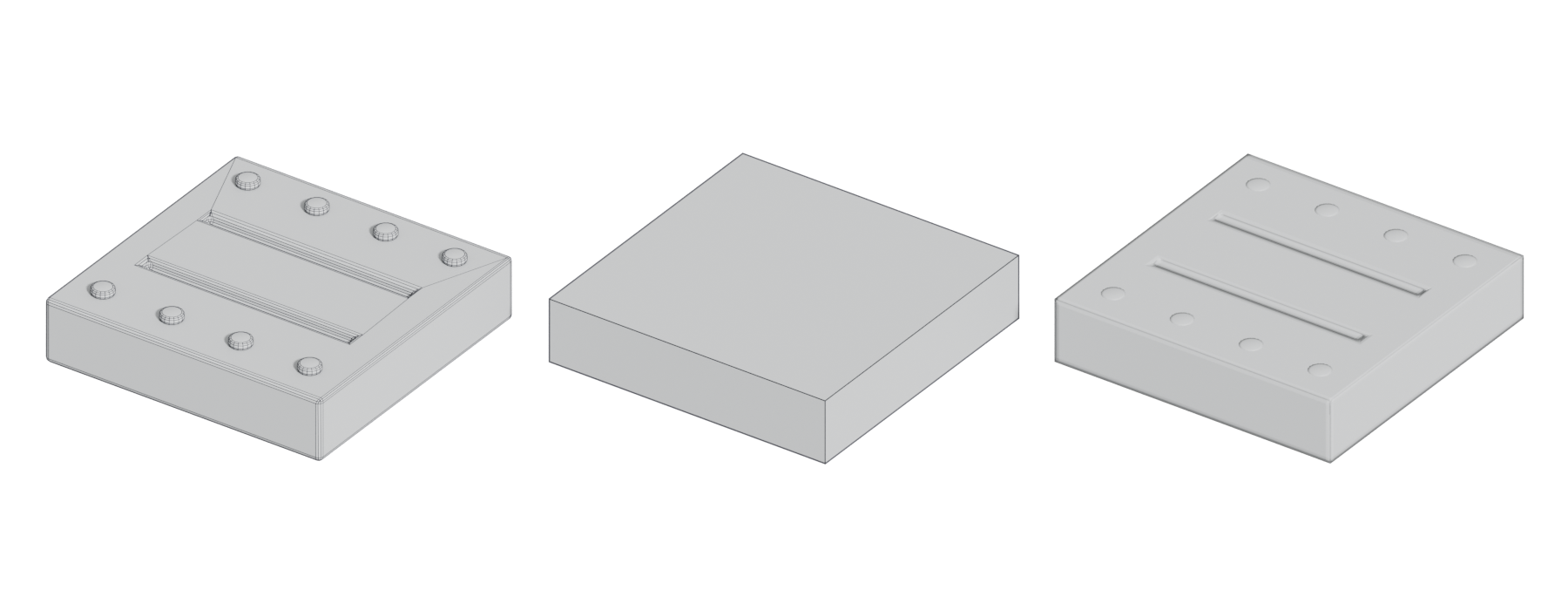
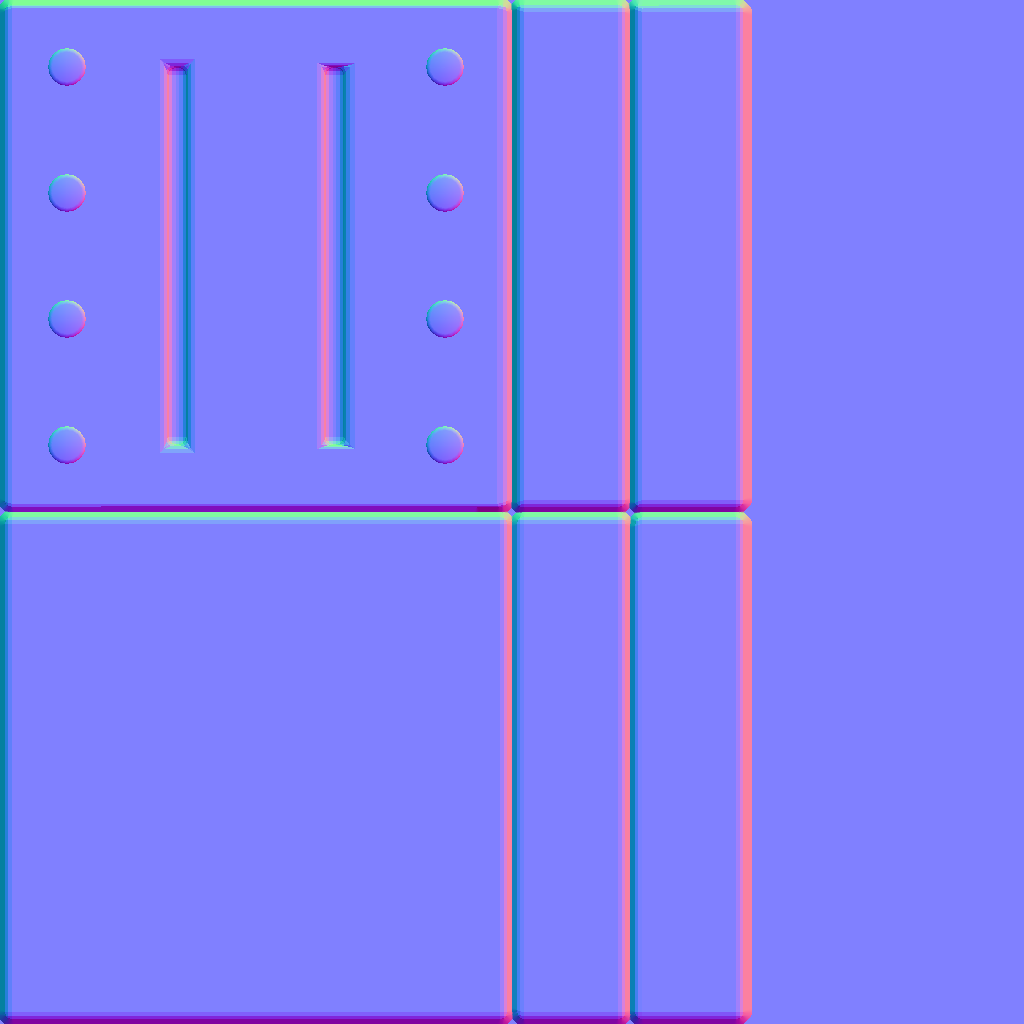
#How colours become directions
A direction has three parts, X, Y and Z, each between −1 and +1. The normal map puts them in the red, green and blue channels. glTF's specification spells out the mapping: red 0…1 to X −1…+1, green to Y, and blue 0.5…1 to Z 0…+1 (Khronos Group: glTF 2.0 Specification). A flat, unchanged surface is therefore (0.5, 0.5, 1.0), the familiar lavender.

Because these are numbers, not colours, a normal map must be read as linear data; glTF says it "MUST be encoded with the linear transfer function" (Khronos Group: glTF 2.0 Specification).
#Tangent space and object space
The directions have to be measured relative to something.
- Tangent space measures them relative to the surface itself, using the mesh's normals and UVs. Blender describes it as "independent of object transformation and deformation" and makes it the default (Blender Manual: Render Baking). "Most systems that render with normal maps make use of a tangent space", says Marmoset (Marmoset: The Toolbag Baking Tutorial). It works on moving, bending and tiling surfaces, which is why it is the standard for games. See tangent space and MikkTSpace.
- Object space measures directions relative to the whole object: "independent of object transformation, but dependent on deformation" (Blender Manual: Render Baking). The maps are rainbow-coloured and cannot tile or deform. Marmoset: "Object space normal maps are not commonly used in game or film assets", though they make useful masks (Marmoset: The Toolbag Baking Tutorial). Unity HDRP still offers an Object Space option, suggesting it for planar-mapped objects such as terrain (High Definition Render Pipeline manual 17.0: Lit material Inspector reference).
For tangent-space maps, the baker and the engine must calculate the tangent frame identically, or you get seams and smudges. Marmoset: "If different tangent spaces are used in each step, the orientation of the normals in the map will no longer match" (Marmoset: The Toolbag Baking Tutorial).
#The green channel: OpenGL or DirectX
Programs disagree on which way Y points. Adobe: "OpenGL expects the first pixel to be at the bottom while DirectX expects it to be at the top" (Substance 3D Bakers documentation: What is the difference between the OpenGL and…). In practice:
- Unreal Engine expects DirectX (Y−) (World of Level Design: DirectX vs OpenGL: Understanding, Using…).
- Unity and Blender expect OpenGL (Y+) (World of Level Design: DirectX vs OpenGL: Understanding, Using…).
- Godot "requires the normal map to use the X+, Y+ and Z+ coordinates, this is known as OpenGL style" (Godot documentation: Standard Material 3D and ORM Material 3D).
A wrong green channel makes bumps look like dents when lit from above or below. The fix is to invert green, either at export or on import: Godot's Normal Map Invert Y (Godot documentation: Importing images), Unity's flip-green option (Unity Scripting Reference: TextureImporter.flipGreenChannel). The tangent space and MikkTSpace page has the full table.
#Compression and bit depth
Normal maps break easily under colour compression, so engines treat them specially:
- BC5 stores only two channels with separate precision for each, and the shader rebuilds Z from X and Y (Nathan Reed's coding blog: Understanding BCn Texture Compression Formats). Unreal's Normalmap setting uses BC5 (Unreal Engine documentation: Texture Compression Settings); Godot uses the equivalent RGTC format and says built-in shaders "already ignore the blue channel" (Godot documentation: Importing images).
- HDRP tangent-space normal maps must be BC7, BC5 or DXT5nm (High Definition Render Pipeline manual 17.0: Lit material Inspector reference).
- When baking, 16-bit avoids banding: "Banding artifacts are caused by a lack of precision with 8-bit normal maps", although "many renderers require an 8-bit normal map" (Marmoset: The Toolbag Baking Tutorial). Bake at 16-bit, let the engine compress.
See texture formats, compression and mipmaps.
#Detail normals
A detail normal map is a small tiling normal map (wood grain, fabric weave, pores) layered over the main normal map, often at a higher tiling rate. Both Unity URP and Godot have dedicated detail slots (Unity Manual: Lit shader material Inspector window…; Godot documentation: Standard Material 3D and ORM Material 3D), and HDRP's detail map packs detail normal X and Y into its alpha and green channels (High Definition Render Pipeline manual 17.0: Mask map and detail map). See detail maps and macro variation.
Combining two normal maps is not like layering colours. Barré-Brisebois and Hill explain: "Since the data represents directions, we can't simply treat the channels independently as we do for colours" (Self Shadow: Blending in Detail). Simply averaging them ends up "'flattening' both the base orientations and the details" (Self Shadow: Blending in Detail). Use your engine's normal-blend node (whiteout, UDN or reoriented normal mapping) instead of a Photoshop overlay (Self Shadow: Blending in Detail).
#Example
#Common mistakes
- Wrong green channel for the engine (Substance 3D Bakers documentation: What is the difference between the OpenGL and…).
- Imported as a colour texture (sRGB): normals tilt and shading looks washed out (Khronos Group: glTF 2.0 Specification).
- Mismatched tangent space between baker and engine (Marmoset: The Toolbag Baking Tutorial).
- Overlay-blending detail normals in an image editor, which flattens them (Self Shadow: Blending in Detail).
- Missing tangents on the mesh. Godot warns the map "will only appear to darken the whole surface" without them (Godot Engine: BaseMaterial3D).
- Expecting a silhouette change. Normal maps change lighting only; for real depth see height and displacement maps.
#In different tools
- Unreal Engine: Normal input, DirectX green, Normalmap compression (BC5) (Unreal Engine documentation: Texture Compression Settings; World of Level Design: DirectX vs OpenGL: Understanding, Using…).
- Unity: Texture Type Normal map; OpenGL green; HDRP offers tangent or object space (High Definition Render Pipeline manual 17.0: Lit material Inspector reference).
- Godot: Normal Map slot; only red and green are used (Godot Engine: BaseMaterial3D); RGTC compression on import (Godot documentation: Importing images).
- Blender: tangent space is the default bake space, and the space you bake in must match the one set in the Normal Map node (Blender Manual: Render Baking).
#Related terms
tangent space and MikkTSpace · baking · normals · height and displacement maps · detail maps and macro variation · fixing baking artefacts · texture formats, compression and mipmaps
#Further reading and watching
References
- · Material Inputs (Unreal Engine 4.27) · Unreal Engine documentation, 2021 · docs · accessed 2026-10-21
- · glTF 2.0 Specification · Khronos Group (GitHub) · docs · accessed 2026-10-21
- · Render Baking (Cycles) · Blender Manual (2.93), 2021 · docs · accessed 2026-10-21
- · The Toolbag Baking Tutorial · Marmoset, 2017 · article · accessed 2026-10-21
- · Lit material Inspector reference (HDRP) · High Definition Render Pipeline manual 17.0 · docs · accessed 2026-10-21
- · What is the difference between the OpenGL and DirectX normal format? · Substance 3D Bakers documentation · docs · accessed 2026-10-21
- · DirectX vs OpenGL: Understanding, Using, Creating DirectX or OpenGL Normal Map Formats · World of Level Design, 2026 · article · accessed 2026-10-21
- · Standard Material 3D and ORM Material 3D (documentation source) · Godot documentation (GitHub) · docs · accessed 2026-10-21
- · Importing images (documentation source) · Godot documentation (GitHub) · docs · accessed 2026-10-21
- · TextureImporter.flipGreenChannel · Unity Scripting Reference (6.3 LTS) · docs · accessed 2026-10-21
- · Understanding BCn Texture Compression Formats · Nathan Reed's coding blog, 2012 · article · accessed 2026-10-21
- · Texture Compression Settings (Unreal Engine 4.27) · Unreal Engine documentation, 2021 · docs · accessed 2026-10-21
- · Lit shader material Inspector window reference for URP · Unity Manual (6000.2) · docs · accessed 2026-10-21
- · Mask map and detail map (HDRP) · High Definition Render Pipeline manual 17.0 · docs · accessed 2026-10-21
- · Blending in Detail · Self Shadow, 2012 · article · accessed 2026-10-21
- · BaseMaterial3D (class reference source) · Godot Engine (GitHub) · docs · accessed 2026-10-21
Also consulted
- · Blending Normal Maps – Shader Graph Basics – Episode 12 · YouTube, 2021 · video · accessed 2026-10-21
Pages that link here
- Real-time vs. offline rendering Topic
- The game asset pipeline Topic
- Anatomy of a polygon mesh Topic
- Normals (face and vertex) Key term
- Triangulation Key term
- Coordinate systems and handedness Key term
- glTF Key term
- Texture file formats Reference
- Export checklist Guide
- UV, retopology and baking tools Reference
- Texturing and material software Reference
- Ways to build a 3D model Overview
- Box modeling Topic
- Extrude, inset and loop cut Key term
- Subdivision surface modeling Topic
- Control cage and limit surface Key term
- Edge flow Topic
- Support loop (holding edge) Key term
- Smoothing, hard edges and smoothing groups Topic
- Hard-surface modeling Topic
- Bevels and chamfers Topic
- Bevel shaders Key term
- Weighted (custom) normals Topic
- The mid-poly workflow Topic
- Floaters Key term
- The high-to-low workflow Topic
- Polygon and triangle budgets Topic
- Decimation Key term
- Digital sculpting Topic
- Primary, secondary and tertiary forms Topic
- Macro normals Key term
- UV mapping Topic
- UV seams and islands Key term
- Baking Topic
- Bake cage Key term
- Tangent space and MikkTSpace Key term
- Fixing baking artefacts Guide
- Physically based rendering (PBR) Topic
- Colour space: sRGB and linear Key term
- Texture maps explained Reference
- Base colour (albedo) map Key term
- Roughness map Key term
- Ambient occlusion Key term
- Height and displacement maps Key term
- Parallax occlusion mapping Key term
- Channel packing (ORM) Key term
- Texture formats, compression and mipmaps Topic
- Bit depth and banding Key term
- Specular aliasing Key term
- Unique texturing (texture painting) Topic
- Smart materials Key term
- De-lighting Key term
- Trim sheets Topic
- Mesh decals Topic
- Geodecals Key term
- Edge wear Key term
- Height blending Key term
- Triplanar and world-aligned mapping Topic
- Detail maps and macro variation Topic
- Normal map blending Key term
- Texture arrays Key term
- Virtualised geometry (Nanite) Topic
- Naming conventions Reference
- Photogrammetry Topic
- Making (and reading) an art breakdown Guide
- Exercise: your first game-ready prop Exercise
- Exercise: a trim sheet Exercise
- Game art breakdowns: a curated library Reference
Last updated 2026-10-22