N-gon
A face with more than four vertices. Handy while modeling and harmless on flat static surfaces, but unpredictable when triangulated, subdivided or deformed.
An n-gon is a face with more than four vertices; Blender's manual defines faces as having three (triangles), four (quads) "or more (n-gons)" vertices (Blender 3.1 Manual: Mesh Structure). The n stands for "any number". A face with n corners becomes n − 2 triangles in the engine.
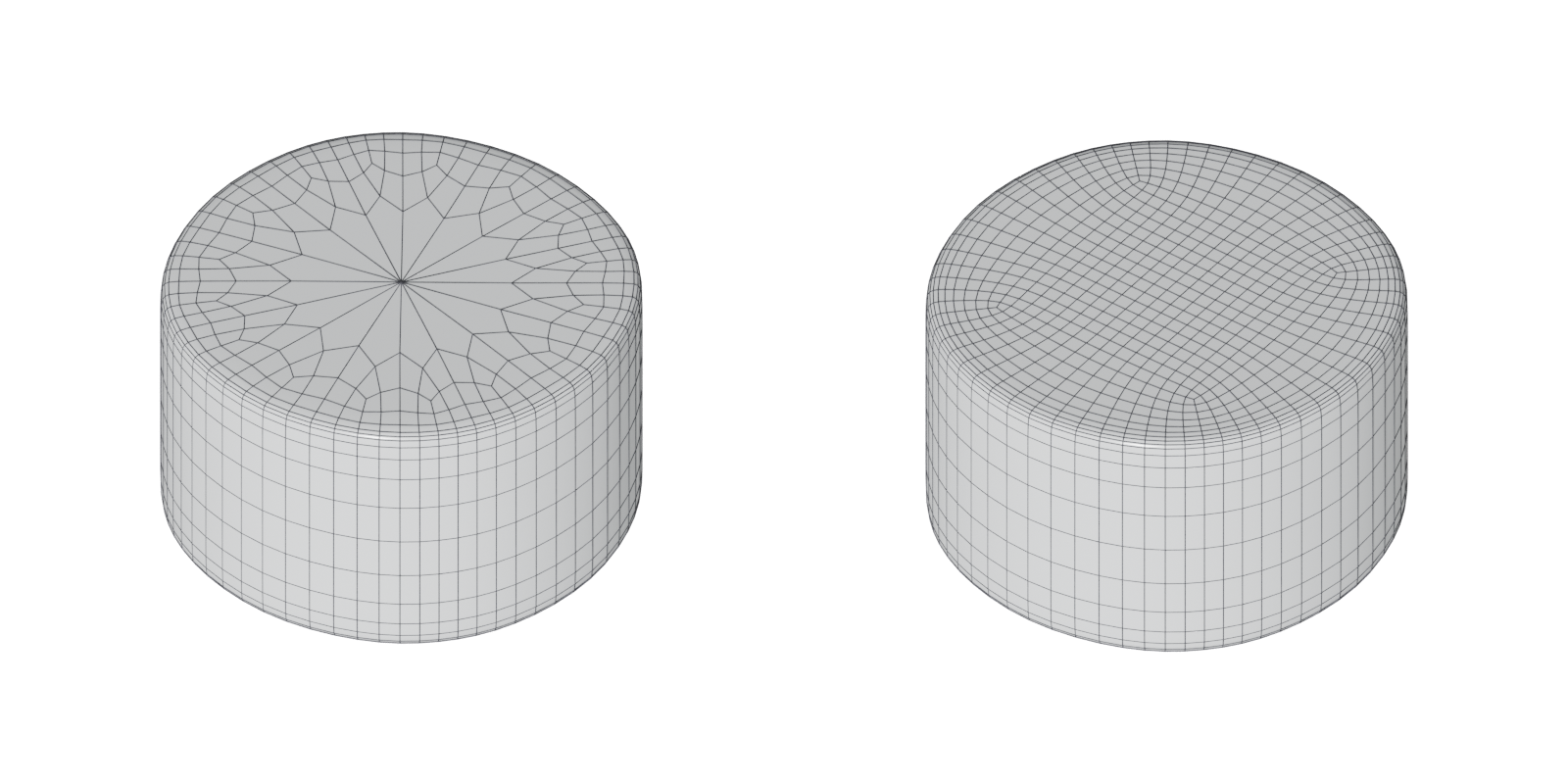
#Why n-gons matter
N-gons are convenient. Cutting a hole, deleting an edge loop or running a boolean often leaves one, and they keep a flat surface clean and easy to edit. Problems appear when another tool has to convert them.
Other tools choose the split. The GPU "only deals with triangles" (Unreal Engine Documentation: FBX Static Mesh Pipeline), so every n-gon is cut up by some tool along the way. Adobe's baking documentation states that "There are no standard solutions to convert Quad/N-Gons into triangles", so different programs produce different, equally valid results (Adobe Substance 3D Bakers documentation: Triangulating before baking). Kent Trammell wrote on the CG Cookie forum: "For n-gons its a total guess as to how it will be converted" (CG Cookie forums: Tris vs Quads for videogames).
Concave n-gons are harder. On a convex n-gon almost any split works. On a concave one, a careless split puts triangles outside the face. Tools use smarter methods to avoid that. Blender's Triangulate modifier offers Beauty or Clip for n-gons; Clip "splits n-gons using an ear-clipping algorithm", the same method Blender uses to display them in the viewport (Blender 4.0 Manual: Triangulate Modifier).

Subdivision and deformation. World of Level Design warns that "N-Gons create problems with deformations, when objects or characters have to be animated", and that the final model "Should NOT Contain Any N-Gons" (World of Level Design: Maya Beginner Tutorial Series 12/17…). In a CG Cookie thread, Martin Bergwerf notes that the Subdivision Surface modifier can cause issues with n-gons (CG Cookie forums: N-Gons).
#Common mistakes
- Non-planar n-gons. If an n-gon's corners do not lie on one plane, every possible split gives a different surface. Blender's 3D Print Toolbox flags quads and n-gons that are "Distorted" (folded out of flat) because they can triangulate unpredictably on export, and its clean-up can triangulate them for you (Blender 3.6 Manual: 3D Print Toolbox).
- N-gons with holes or concave shapes. Maya's Cleanup lists "faces with more than four sides, concave faces, faces with holes, and non-planar faces" as problems it can fix by tessellating (triangulating) them (Maya 2017 Help: Cleanup Options).
- Baking on n-gons and letting the engine split them later. The bake and the engine may not split them the same way (Adobe Substance 3D Bakers documentation: Triangulating before baking). See triangulation.
- Subdividing a mesh with n-gons. Expect pinching and uneven surfaces. See subdivision surface modeling.
#In different tools
- Blender. The Triangulate modifier has a Minimum Vertices setting; set it to 5 and it leaves quads alone and triangulates only n-gons (Blender 4.0 Manual: Triangulate Modifier). The Statistics overlay shows face and triangle counts (Blender 3.5 Manual: Viewport Overlays).
- Maya. Mesh > Cleanup can select or fix faces with more than four sides (Maya 2017 Help: Cleanup Options). The Poly Count HUD shows faces and triangles (Maya 2026 Help: Heads Up Display (HUD) Options).
- Unreal Engine. Triangulates on import, and Epic advises: "It will always be best to manually triangulate the mesh in the 3D application" (Unreal Engine Documentation: FBX Static Mesh Pipeline). The editor reports triangles only (Unreal Engine Documentation: Static Mesh Editor UI).
#Related terms
face · quad · triangle · triangulation · booleans · topology · subdivision surface modeling
#Further reading and watching
References
- · Mesh Structure · Blender 3.1 Manual, 2022 · docs · accessed 2026-10-20
- · FBX Static Mesh Pipeline · Unreal Engine Documentation · docs · accessed 2026-10-20
- · Triangulating before baking · Adobe Substance 3D Bakers documentation · docs · accessed 2026-10-20
- Tris vs Quads for videogames · CG Cookie forums, 2019 · forum · accessed 2026-10-20
- · Triangulate Modifier · Blender 4.0 Manual, 2023 · docs · accessed 2026-10-20
- · Maya Beginner Tutorial Series 12/17: Difference Between Triangles vs Quads vs NGons · World of Level Design, 2025 · article · accessed 2026-10-20
- N-Gons · CG Cookie forums, 2025 · forum · accessed 2026-10-20
- · 3D Print Toolbox · Blender 3.6 Manual, 2023 · docs · accessed 2026-10-20
- · Cleanup Options · Maya 2017 Help, 2016 · docs · accessed 2026-10-20
- · Viewport Overlays · Blender 3.5 Manual, 2023 · docs · accessed 2026-10-20
- · Heads Up Display (HUD) Options · Maya 2026 Help, 2025 · docs · accessed 2026-10-20
- · Static Mesh Editor UI · Unreal Engine Documentation · docs · accessed 2026-10-20
Pages that link here
- Anatomy of a polygon mesh Topic
- Face (polygon) Key term
- Triangle Key term
- Quad Key term
- Triangulation Key term
- glTF Key term
- Ways to build a 3D model Overview
- Box modeling Topic
- Extrude, inset and loop cut Key term
- Subdivision surface modeling Topic
- CAD and NURBS modeling for games Topic
- Topology Topic
- Edge loop Key term
- Edge ring Key term
- Face loop Key term
- Hard-surface modeling Topic
- Booleans Topic
- Polygon and triangle budgets Topic
- Baking Topic
Last updated 2026-10-22