Level of detail (LOD)
Swapping an asset for cheaper versions as it gets smaller on screen, from classic LOD chains and HLOD to impostors and Nanite.
Level of detail (LOD) means showing cheaper versions of an asset as it gets smaller on screen. Nearby, you see the full model; far away, a reduced mesh, a flat impostor or nothing at all. Unity describes its LOD Group as a component that "lets you manage level of detail", switching which renderers draw as the camera distance changes (Unity Documentation: LOD Group).
LOD is one of the main tools for staying inside a triangle budget and, with HLOD, a draw call budget.
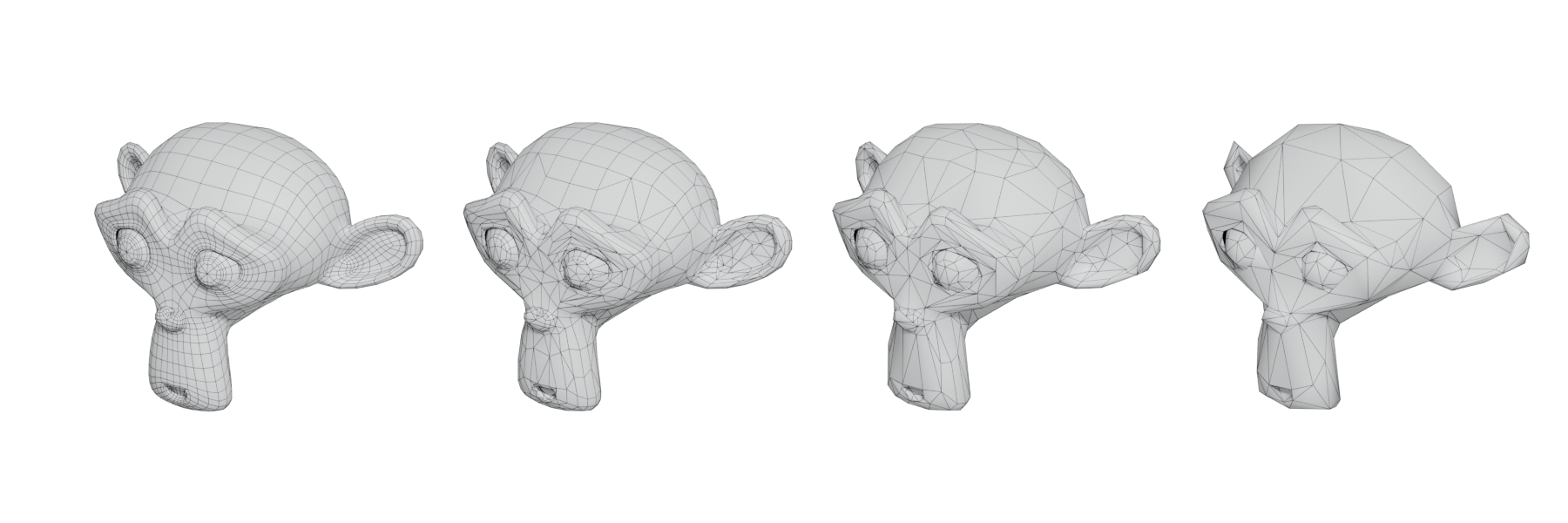
#The LOD chain
An asset's LODs form a chain: LOD0 is the full-quality mesh, LOD1 is lighter, and so on. Each step removes triangles that no longer change what the player sees.
How much to remove per step varies. Unreal's LOD Group presets for small props, large props and decoration use 4 LODs with LODPercentTriangles set to 50 (Unreal Engine Documentation: Static Mesh Automatic LOD Generation). Epic's own manual walkthrough in the same page uses a steeper chain: LOD1 at 75%, LOD2 at 25% and LOD3 at 12% of the original triangles (Unreal Engine Documentation: Static Mesh Automatic LOD Generation).

#Switching by screen size
Engines switch LODs by how big the object is on screen, not by raw distance. That way the switch happens at the same visual size whatever the field of view or resolution.
- Unity sets each LOD's Transition (% Screen Size) as the object's height "as a percentage of the screen height". At 50%, a LOD becomes active "when the object fills half the height of the camera view" (Unity Documentation: LOD Group).
- Unreal can work the thresholds out for you. Epic recommends keeping Auto Compute LOD Distances on: the algorithm uses the known visual error of each LOD to pick where it is acceptable. Setting screen sizes by hand "could lead to errors" (Unreal Engine Documentation: Static Mesh Automatic LOD Generation).
#Popping and LOD transitions
When one LOD replaces another in a single frame, players notice a pop. Three things reduce it:
- Better thresholds. Switch when the difference is below what the screen can show.
- Cross-fading. Unity's Cross Fade mode "applies a cross-fading effect to the model between the current and the next LOD" (Unity Documentation: LOD Group). In older Unity versions, cross-fade used a Transition Width to define a zone where both LODs render (Unity Documentation: LOD Group).
- Dithered transitions. Unreal supports dithered LOD transitions, which replace the hard switch with a gradual dithered one; the engine exposes a per-platform setting for "whether to allow dithered LOD transitions" (Unreal Engine API Reference: AllowDitheredLODTransition).
Cross-fading means both LODs render inside the transition zone (Unity Documentation: LOD Group), so the transition itself costs extra. Keep transition zones short.
#HLOD: LODs for groups of objects
A normal LOD reduces one mesh. Hierarchical LOD (HLOD) replaces many distant objects with one combined proxy. In Unreal's World Partition, HLOD layers group large numbers of Static Mesh Actors into a single "proxy mesh and Material", which keeps distant scenery such as mountains and cliffs visible after its cells unload (Unreal Engine Documentation: World Partition - Hierarchical Level of Detail). Epic uses HLODs "to reduce the number of draw calls per frame" (Unreal Engine Documentation: World Partition - Hierarchical Level of Detail).
Unreal offers three HLOD layer types (Unreal Engine Documentation: World Partition - Hierarchical Level of Detail):
- Instancing: meshes become Instanced Static Mesh components using their lowest LOD. Suited to trees and foliage impostors.
- Merged Mesh: meshes are merged into one proxy mesh.
- Simplified Mesh: meshes are merged and then simplified.
Simplygon's HLOD builder goes further, building "a much cheaper approximation (single mesh, single UV and single material)" from all static meshes in a cell (Simplygon Documentation: Hierarchical Level-Of-Detail). See draw calls.
#Impostors and billboards
At great distances, even a low-poly mesh is wasted effort. An impostor replaces it with a camera-facing card showing pre-rendered images of the object.
- Classic billboards are flat cards facing the camera. Ryan Brucks's Impostor Baker for UE4 includes a traditional billboard mode using 9 frames (8 side views and 1 top view) on a cross of cards with "72-81 verts" (80 Level: Impostor Baker for UE4).
- Octahedral impostors store views from many directions in one texture using "a layout based on octahedra" for "more optimal use of the available texture space" (80 Level: Impostor Baker for UE4). Alan Zucconi explains that blending the three closest views, a technique he credits to Brucks, hides the jumps between frames (alanzucconi.com: Shader Showcase Saturday #7: Billboard…).
- Tools: Houdini's SideFX Labs includes an Imposter Textures tool that "creates texture sheets to fake 3D objects in your game engine", with full octahedral, 3D, fixed-axis and animated variants (SideFX: Game Tools | Imposter Textures).

#Nanite and LODs
Unreal's Nanite replaces discrete LODs for static meshes: it uses "no discrete LODs", and the triangle count scales with screen resolution (Unreal Engine Documentation: Nanite Virtualized Geometry). Internally it still builds a hierarchy. Each level groups clusters and simplifies them to about half the triangles, and the engine picks the level whose error projected to the screen is small enough (SIGGRAPH 2021: Nanite: A Deep Dive).
Nanite does not replace every LOD technique. Karis notes that very distant content still needs merged proxies, because tiny instances still cost memory (SIGGRAPH 2021: Nanite: A Deep Dive). Foliage thins out as Nanite simplifies it; Epic's Preserve Area setting scales leaves up to compensate and "should be enabled on all foliage meshes and nothing else" (Unreal Engine Documentation: Nanite Technical Details). Fortnite's team, in contrast, advised enabling it only on foliage meshes "exhibiting this problem" (Unreal Engine tech blog: Bringing Nanite to Fortnite Battle Royale in…).
Since Unreal Engine 5.7, the Experimental Nanite Foliage system includes Nanite Voxels, which draw "millions of tiny, overlapping elements that read as a solid mass at distance", avoiding cross fades, pops and hand-made LODs (Unreal Engine news: Unreal Engine 5.7 is now available).
#Common mistakes
- Too few steps between LOD0 and the last LOD. A jump from 100% to 10% pops badly.
- Reducing silhouette first. Remove interior detail before silhouette edges; the outline is what reads at distance.
- Ignoring materials. A LOD with fewer triangles but the same five materials saves little on draw calls. Merge materials in lower LODs where you can.
- Different pivots or scale between LODs. Visible as a jump even when the shapes match. See pivot point.
- Forgetting shadows. A distant LOD that casts a detailed shadow wastes the saving.
#In different tools
- Unreal Engine: automatic LOD generation uses "quadratic mesh simplification", collapsing the edge with the least visual impact until the target is reached (Unreal Engine Documentation: Static Mesh Automatic LOD Generation). LOD Group presets live in the engine's configuration under
[StaticMeshLODSettings](Unreal Engine Documentation: Static Mesh Automatic LOD Generation). - Unity: the LOD Group component sets thresholds as a percentage of screen height, with None, Cross Fade and SpeedTree fade modes (Unity Documentation: LOD Group).
- Blender, Maya, 3ds Max: build LODs by hand or with decimation, then export them together for the engine to group.
- Simplygon: an optimisation toolkit with integrations for Blender, Houdini, Maya, 3ds Max, Unreal and Unity (Simplygon Documentation: Hierarchical Level-Of-Detail).
#Further reading and watching
References
- · LOD Group (Unity 6.4 Manual) · Unity Documentation, 2026 · docs · accessed 2026-10-20
- · Static Mesh Automatic LOD Generation · Unreal Engine Documentation, 2026 · docs · accessed 2026-10-20
- · LOD Group (Unity 5.6 Manual, legacy) · Unity Documentation, 2017 · docs · accessed 2026-10-20
- · AllowDitheredLODTransition · Unreal Engine API Reference, 2026 · docs · accessed 2026-10-20
- · World Partition - Hierarchical Level of Detail · Unreal Engine Documentation, 2026 · docs · accessed 2026-10-20
- · Hierarchical Level-Of-Detail (Simplygon 10.4) · Simplygon Documentation, 2026 · docs · accessed 2026-10-20
- · Impostor Baker for UE4 · 80 Level · article · accessed 2026-10-20
- · Shader Showcase Saturday #7: Billboard Impostors · alanzucconi.com, 2018 · article · accessed 2026-10-20
- · Game Tools | Imposter Textures · SideFX, 2017 · video · accessed 2026-10-20
- · Level of Detail (SpeedTree Runtime SDK Manual) · SpeedTree Documentation, 2026 · docs · accessed 2026-10-20
- · Terrain tree LOD (Unity 6.1 Manual) · Unity Documentation, 2025 · docs · accessed 2026-10-20
- · Nanite Virtualized Geometry · Unreal Engine Documentation, 2026 · docs · accessed 2026-10-20
- · Nanite: A Deep Dive · SIGGRAPH 2021, Advances in Real-Time Rendering in Games, 2021 · talk · accessed 2026-10-20
- · Nanite Technical Details · Unreal Engine Documentation, 2026 · docs · accessed 2026-10-20
- · Bringing Nanite to Fortnite Battle Royale in Chapter 4 · Unreal Engine tech blog · article · accessed 2026-10-20
- · Unreal Engine 5.7 is now available · Unreal Engine news, 2025 · article · accessed 2026-10-20
- · A first look at Unreal Engine 5 · Unreal Engine blog, 2020 · article · accessed 2026-10-20
Pages that link here
- Real-time vs. offline rendering Topic
- The game asset pipeline Topic
- Triangle Key term
- Export checklist Guide
- UV, retopology and baking tools Reference
- Cameras, lenses and field of view Topic
- Field of view Key term
- Procedural modeling Topic
- Topology Topic
- Smoothing, hard edges and smoothing groups Topic
- The mid-poly workflow Topic
- Modular kits Topic
- Hero assets, props and filler Topic
- Modeling rocks, trees and terrain pieces Topic
- Polygon and triangle budgets Topic
- Impostors and billboards Key term
- Hierarchical LOD (HLOD) Key term
- Instancing Key term
- Retopology Topic
- Decimation Key term
- Digital sculpting Topic
- Texel density Topic
- Height and displacement maps Key term
- Texture formats, compression and mipmaps Topic
- Opacity, masked and translucent materials Key term
- Specular aliasing Key term
- Mesh decals Topic
- Geodecals Key term
- Z-fighting Key term
- Light probes and reflection probes Key term
- Shadows and virtual shadow maps Key term
- Terrain and landscapes Topic
- Foliage and vegetation Topic
- Virtualised geometry (Nanite) Topic
- Level design and environment art Overview
- Set dressing and art passes Topic
- Frame budgets Key term
- Draw calls Key term
- Overdraw Key term
- Planning a portfolio piece Guide
- Exercise: your first game-ready prop Exercise
- A 12-month learning roadmap Guide
- Essential talks and videos Reference
- Game art breakdowns: a curated library Reference
- Books Reference
Last updated 2026-10-22