Floaters
Separate pieces of detail geometry, such as screws, vents or panels, that hover just above a high-poly surface instead of being welded into it; the bake records them anyway.
A floater is a piece of detail geometry on a high poly that is not connected to the surface beneath it. A screw head, vent or small panel simply hovers just above the main mesh. When you bake, the detail still ends up in the normal map, because the baker records whatever high-poly surface it finds above the low poly. The technique has been in use for a long time: a 2006 Polycount thread is already titled "Baking Normal maps in maya using floating geometry" (Polycount forum: Baking Normal maps in maya using floating…).
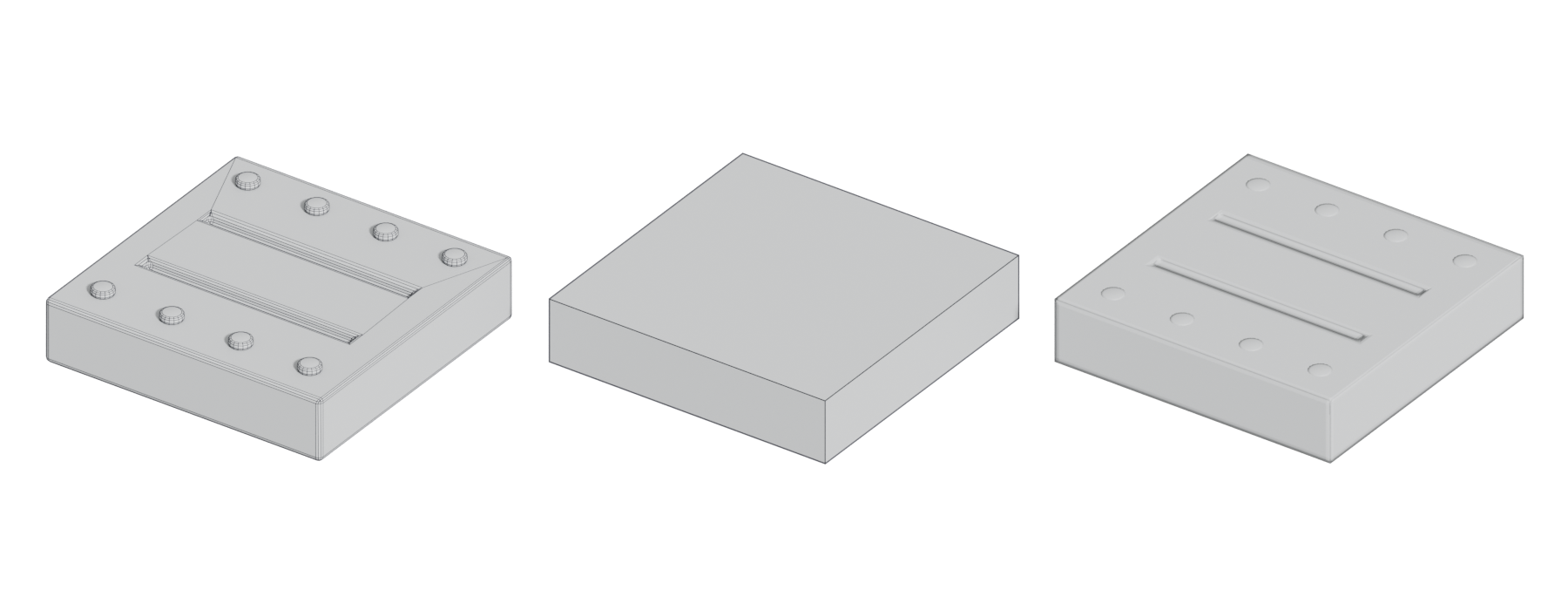
#How floaters are baked
In a typical bake, rays travel from the bake cage toward the low poly, and the baker records the high-poly surface each ray meets (see baking). A floating screw head sits in the path of those rays, so its normals are captured. It makes no difference to the baker whether the screw is welded on.
This saves a lot of modeling. Cutting a detailed vent into a curved, subdivided surface means rerouting support loops and reworking the topology. A floater is modeled once, on its own, then placed and duplicated. You can move it until the moment you bake.

#Example
#Limits
- Silhouette and grazing angles. A floater is texture detail only. Detail that affects the silhouette belongs in the low poly; detail that does not can go in the bake (Polycount forum: I need some advice). Seen edge-on, a floater disappears.
- Distortion from averaged normals. Floaters can bake with skewed, distorted edges because of the low poly's averaged normals: "if you use floaters they'll often get distortion because of averaged normals" (Polycount forum: No More Distortions With Floaters - Flattened…).
- Ambient occlusion and depth. A floater has real height, which shows up in the AO and other maps. Flattening floaters to remove distortion changes this: one artist reported "much different AO bakes" than floaters with real depth (Polycount forum: No More Distortions With Floaters - Flattened…).
- Jagged edges in some bakers. One artist found floaters baked with jagged edges in Marmoset Toolbag 3 but smooth in Handplane. Adding a lip around the floater and making it thicker helped (Polycount forum: Is there a specific way i should be baking…).
- Distance. Floaters placed far above the surface cause trouble; bring them close "so they're not quite touching the pieces below them" (Polycount forum: Baking Normal maps in maya using floating…).
#Related terms
baking · bake cage · the high-to-low workflow · normal map · fixing baking artefacts · mesh decals (the mid-poly equivalent: floating geometry in the game mesh, as used for Star Citizen's "floating decals for livery and numbering" (Polycount forum: Star Citizen...The Gladiator...ART DUMP)).
#Further reading
References
- · Baking Normal maps in maya using floating geometry · Polycount forum, 2006 · forum · accessed 2026-10-21
- · I need some advice · Polycount forum, 2023 · forum · accessed 2026-10-21
- · No More Distortions With Floaters - Flattened Floaters (3DS Max) · Polycount forum, 2017 · forum · accessed 2026-10-21
- · Is there a specific way i should be baking floaters in Marmoset? · Polycount forum, 2020 · forum · accessed 2026-10-21
- · Star Citizen...The Gladiator...ART DUMP · Polycount forum · forum · accessed 2026-10-21
Pages that link here
- Hard-surface modeling Topic
- Greebles Key term
- The high-to-low workflow Topic
- Ambient occlusion Key term
- Mesh decals Topic
- Geodecals Key term
Last updated 2026-10-22