Face loop
A continuous row of faces lying between two neighbouring edge loops; the strip you select to extrude bands, assign materials or add a loop cut.
A face loop is a continuous row of faces that runs between two neighbouring edge loops. Blender's manual calls face loops "a logical extension of edge loops in that they consist of the faces between two edge loops" (Blender Manual: Structure).
If an edge loop is a line drawn around a model, a face loop is the band between two such lines: a ring of quads around a cylinder, a strip of faces across a wall, the row of faces around a character's waist.

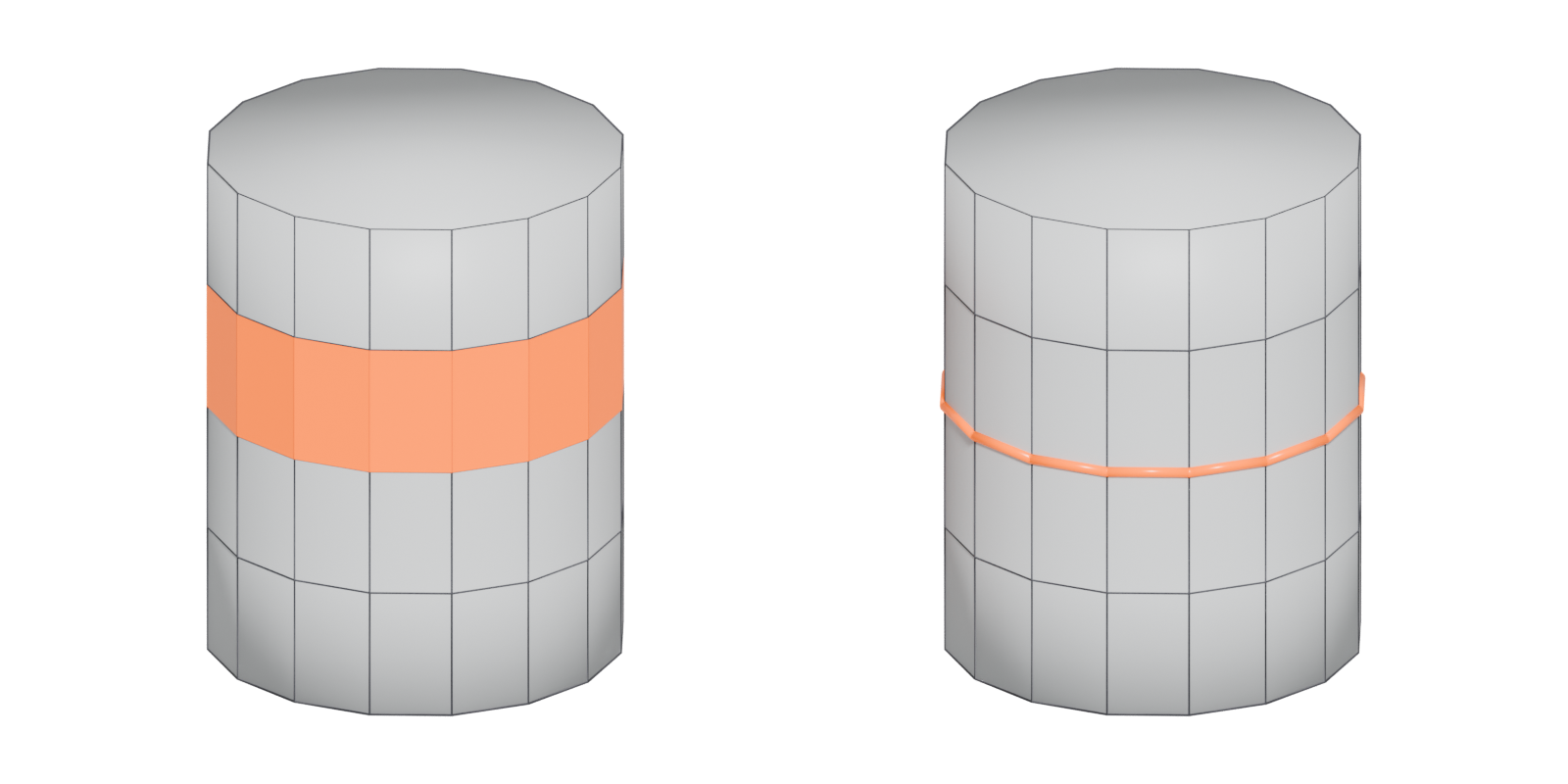
#Face loops, edge loops and edge rings
The three are tightly linked:
- An edge loop is a chain of edges connected "in a (topologically) straight line" (Blender Manual: Select Loops).
- An edge ring is the set of parallel edges that cross a row of faces (Blender Manual: Select Loops). See edge ring.
- A face loop is that row of faces itself. Blender even notes that selecting an edge ring in vertex mode "results in a face loop selection instead" (Blender Manual: Select Loops).
So when you make a loop cut, you are splitting a face loop by cutting across its edge ring: Loop Cut and Slide "splits a loop of faces" into parallel loops (Blender Manual: Loop Cut and Slide). See extrude, inset and loop cut.
#Where face loops stop
Like edge loops, face loops run until they meet a pole. On a closed band, such as around a cylinder, the loop closes on itself. On an open band it ends, and Blender notes that for non-circular loops "the faces containing the poles are not included in a face loop" (Blender Manual: Structure). If a face loop selection stops short, a pole, a triangle or an N-gon is in the way. Reading where face loops run is one of the quickest ways to understand a mesh's edge flow.
#Face loops and trim sheets
Face loops matter most in games when a mesh is textured with trim sheets. A trim strip is a long band of texture, and a face loop is a long band of faces, so an artist selects the loop, unwraps it as one straight strip and lays it on the trim. On The Last of Us Part I, Naughty Dog spent around a year of pre-production on a Houdini tool that unwraps models to the trim layout automatically (ArtStation: The Last of Us: Part I...Trim Pipeline). On Indiana Jones and the Great Circle, one tomb kit "was used to assemble all of the tombs" on the Gizeh map, and other artists extended it "using finalised trims and tilables" (ArtStation: Indiana Jones and the Great Circle - Tomb Kit).
#How to select a face loop
- Blender: in face select mode, Alt-click an edge to select "the row of faces that's perpendicular to that edge"; Shift-Alt-click adds another loop (Blender Manual: Select Loops).
- Other modelers use their own shortcuts for loop and ring selection; see modeling software.
#Related terms
edge loop · edge ring · pole · edge flow · extrude, inset and loop cut · topology
#Further reading and watching
References
- · Structure · Blender Manual (source file, main branch), 2026 · docs · accessed 2026-10-21
- · Select Loops · Blender Manual (source file, main branch), 2026 · docs · accessed 2026-10-21
- · Loop Cut and Slide · Blender Manual (source file, main branch), 2026 · docs · accessed 2026-10-21
- · The Last of Us: Part I...Trim Pipeline · ArtStation · web · accessed 2026-10-22
- · Indiana Jones and the Great Circle - Tomb Kit · ArtStation · web · accessed 2026-10-22
- Tris vs Quads for videogames · CG Cookie forums, 2019 · forum · accessed 2026-10-22
Pages that link here
- Extrude, inset and loop cut Key term
- Edge ring Key term
- UV seams and islands Key term
Last updated 2026-10-22