Edge ring
A set of parallel, unconnected edges that cross a strip of quads, each on the opposite side of the same face; the path a loop cut follows.
An edge ring is a set of edges that are not connected to each other but run in parallel across a strip of quads. Pepribal's Blender reference defines it as "a set of unconnected edges that follow a 'path' defined by the 2 opposite edges of every quad" (BlenderWiki: Mesh topology appendix).
If an edge loop is a rail, an edge ring is the set of rungs on a ladder.
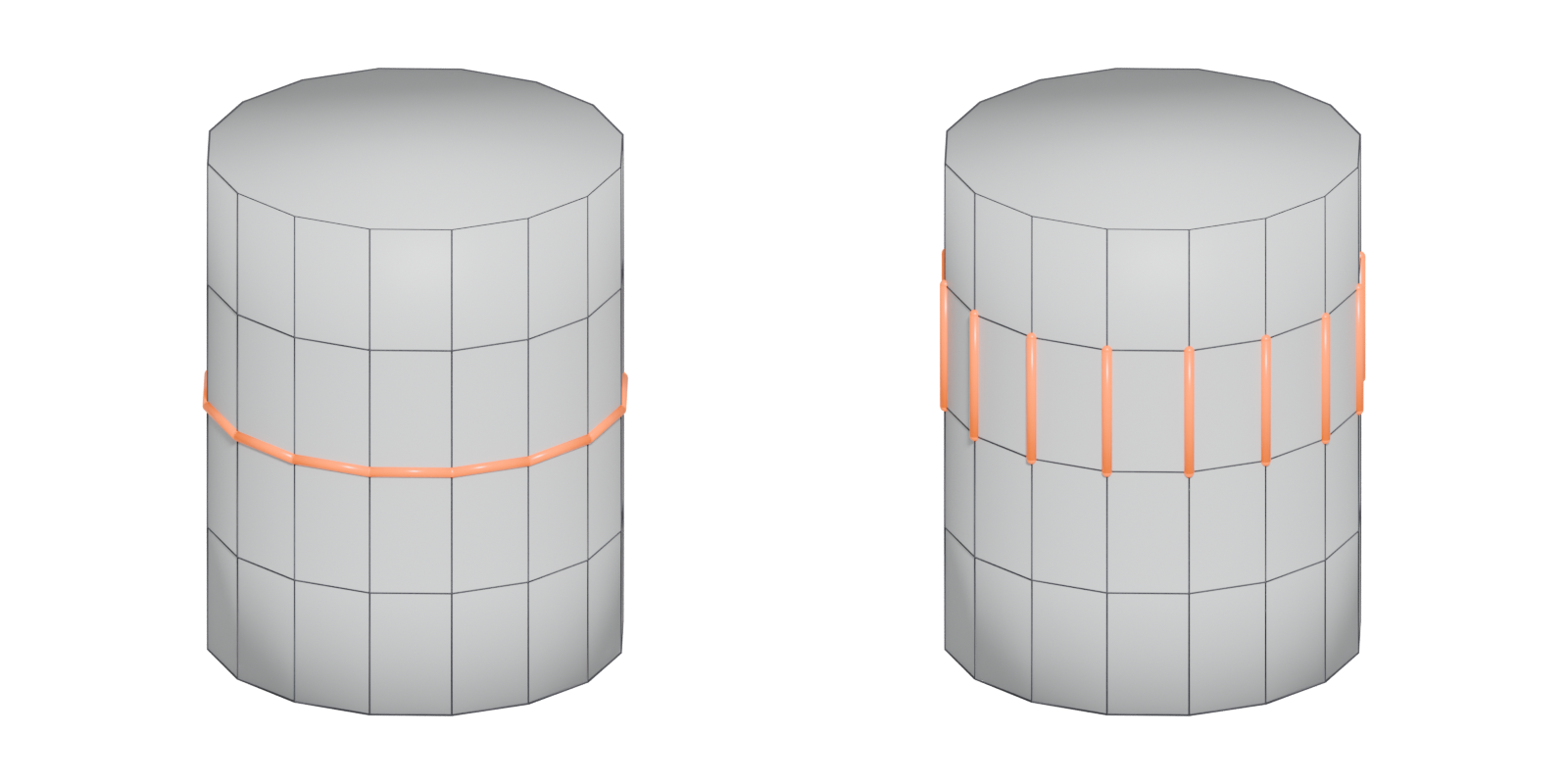
#Loops, rings and face loops
The three ideas fit together:
- An edge ring crosses a strip of quads, one edge per face boundary.
- The strip of faces between two neighbouring edge loops is a face loop (Blender Manual: Structure).
- A loop cut adds a new edge loop by splitting every edge in a ring.
So an edge ring is "the edges a loop cut would cut". Selecting a ring shows where a new loop will go.

#Why edge rings matter
- Adding loops. Splitting a ring adds a loop where you want resolution, without touching the rest of the mesh.
- Bevelling and sliding. Selecting a ring lets you scale or slide all its edges at once, for example to space out the segments of a pipe.
- Support loops. On a hard-surface model, a ring across an edge is where you add support loops to tighten it under subdivision.
- Diagnosing topology. Like loops, rings stop at poles, triangles and n-gons. A ring that ends unexpectedly points you to a topology problem.
#Rings in production work
The most common professional use of rings is adding support loops on subdivision high polys. Ohle Mathiebe, a weapon artist whose credits include Call of Duty: Black Ops 4, names "not having enough support loops when working with subdivisions" as a common problem: it causes long gradients across edges and curves (80 Level: Weapon Art Tips: High Poly, UVs, Texturing). He also warns that very rough bevels give uneven curve flow that can affect the bake (80 Level: Weapon Art Tips: High Poly, UVs, Texturing). Both are fixed by cutting or sliding the right rings.
#Selecting rings in different tools
- Blender: Select ‣ Select Loops ‣ Edge Rings, or Ctrl-Alt-click an edge. In edge select mode this "selects a sequence of edges that are not connected", running along opposite sides of faces. In vertex select mode the same click selects the corresponding face loop. A ring selected in edge mode can disappear when you switch to face mode, because no face has all four edges selected; switch to vertex mode first (Blender Manual: Select Loops).
- Maya and 3ds Max: both offer ring selection alongside loop selection. Check your version's help for the exact command and shortcut.
#Common mistakes
- Confusing ring and loop. If your loop cut appears at right angles to where you expected, you selected along the wrong direction.
- Losing a ring when changing select mode in Blender (see above) (Blender Manual: Select Loops).
- Expecting a ring to pass a pole. It stops there, just like a loop.
#Related terms
edge loop · support loop · pole · topology · box modeling
#Further reading and watching
References
- · Mesh topology appendix (User:Pepribal/Ref/Appendices/MeshTopo) · BlenderWiki (archived user pages) · web · accessed 2026-10-20
- · Structure · Blender Manual (2.93), 2021 · docs · accessed 2026-10-20
- · Weapon Art Tips: High Poly, UVs, Texturing · 80 Level, 2019 · article · accessed 2026-10-22
- · The Last of Us: Part I...Trim Pipeline · ArtStation · web · accessed 2026-10-22
- · Select Loops · Blender Manual (3.3, German edition), 2022 · docs · accessed 2026-10-20
Pages that link here
- Edge Key term
- Quad Key term
- Box modeling Topic
- Topology Topic
- Pole Key term
- Edge loop Key term
- Face loop Key term
- Support loop (holding edge) Key term
Last updated 2026-10-22