Decimation
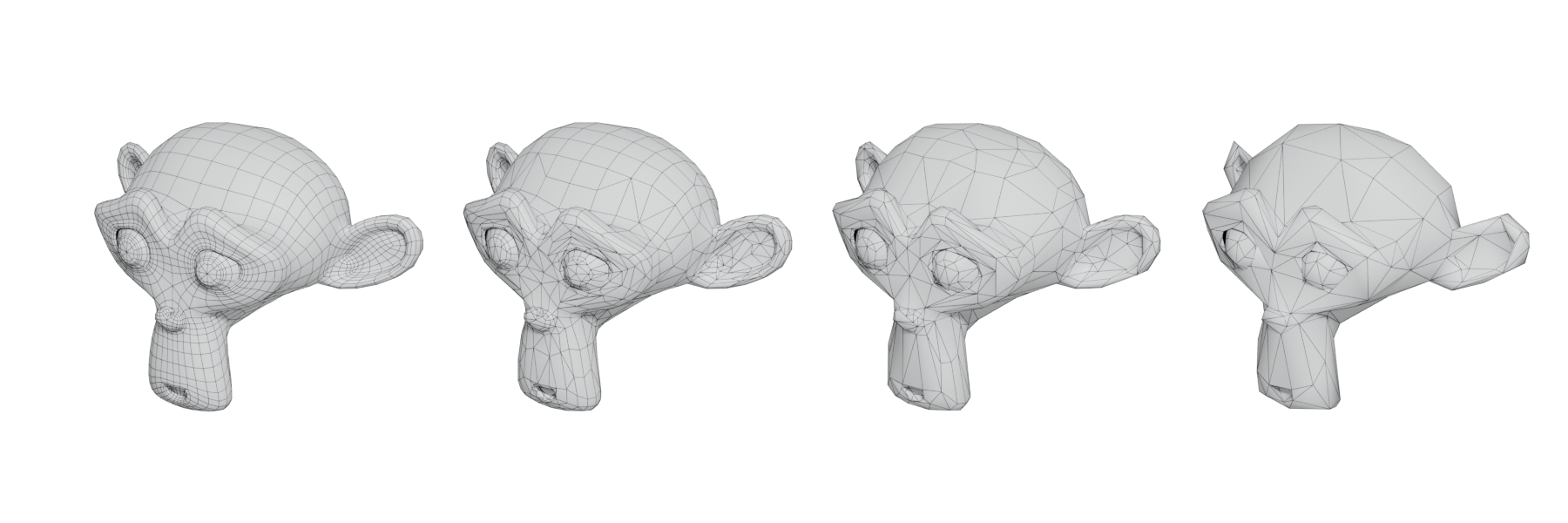
Automatically reducing a mesh's triangle count while keeping its shape, usually producing messy triangles rather than clean quads.
Decimation is automatic polygon reduction: an algorithm removes vertices and edges from a mesh while trying to keep its shape. Blender's Decimate modifier, for example, "merges vertices together progressively, taking the shape of the mesh into account" (Blender Manual: Decimate Modifier).
The result is usually a mesh of irregular triangles, not clean quads. That is fine for many static environment assets, and wrong for anything that must deform or be edited further.
#Why it matters
Environment artists use decimation constantly:
- to make LODs from a finished mesh;
- to turn a dense sculpt or scan into something an engine or baker can handle;
- to make proxies and distant versions of whole groups of objects.
Game engines themselves decimate. Unreal's automatic LOD generation uses "quadratic mesh simplification", collapsing the edge with the least visual impact until it reaches the target triangle count (Unreal Engine Documentation: Static Mesh Automatic LOD Generation). Nanite builds its hierarchy the same basic way, with edge collapses guided by the quadric error metric (SIGGRAPH 2021: Nanite: A Deep Dive).
#How common tools do it
Blender – Decimate modifier. Three modes (Blender Manual: Decimate Modifier):
- Collapse merges vertices progressively. Ratio is the fraction of faces to keep (1.0 keeps everything). It counts triangles, so a quad mesh can keep more faces than the ratio suggests. Options include Symmetry, Triangulate and a Vertex Group with a Factor to protect areas.
- Un-Subdivide is "the reverse of subdivide". It works best on grid-like topology; two iterations undo one level of subdivision.
- Planar "reduces details on forms comprised of mainly flat surfaces". It dissolves geometry below an Angle Limit, and Delimit protects edges at material, seam, sharp, UV or normal boundaries.
The modifier also displays the number of faces remaining (Blender Manual: Decimate Modifier).
ZBrush – Decimation Master. A plugin that can "reduce the polygon count of your models in a very efficient way while keeping all their sculpted details" (ZBrush User Guide: Decimation Master). Use it to bring a multi-million-polygon sculpt down to a size you can export as a high poly for baking, or use directly on a Nanite project.
Unreal Engine – built-in reduction. Set the number of LODs and a Percent Triangles value per LOD, or use LOD Group presets such as SmallProp, which reduce by 50% per step (Unreal Engine Documentation: Static Mesh Automatic LOD Generation).
Simplygon. An optimisation toolkit with integrations for Blender, Houdini, Maya, 3ds Max, Unreal and Unity, covering LOD creation, remeshing and HLOD proxies (Simplygon Documentation: Hierarchical Level-Of-Detail).
#Decimation or retopology?
Retopology builds a new, clean mesh over the old one, by hand or with an auto-quad tool. Decimation removes detail from the existing mesh. GarageFarm's guide describes manual retopology as the most controllable but time-consuming route, and automatic methods as fast but unpredictable where complex deformation is needed (GarageFarm.NET blog: Retopology: A Comprehensive Guide to 3D Model…).
| Use decimation when… | Use retopology when… |
|---|---|
| the asset is static (rocks, ruins, debris, statues) | it must deform (characters, cloth, foliage that bends) |
| you need LODs or distant proxies | you need clean edge loops to edit or UV comfortably |
| a Nanite mesh is too big on disk | you need a light, game-ready base for a hero asset |
| speed matters more than tidy topology | the topology will be shaded with large smooth surfaces |
#In different tools
- Blender: Decimate modifier (Collapse, Un-Subdivide, Planar) (Blender Manual: Decimate Modifier).
- ZBrush: Decimation Master (ZBrush User Guide: Decimation Master).
- Unreal Engine: Static Mesh editor reduction settings and LOD Group presets (Unreal Engine Documentation: Static Mesh Automatic LOD Generation).
- Simplygon: standalone and plugin-based reduction and proxies (Simplygon Documentation: Hierarchical Level-Of-Detail).
#Related terms
retopology, level of detail, polygon and triangle budgets, remeshing, triangulation, baking, virtualised geometry.
#Further reading and watching
References
- · Decimate Modifier (Blender 3.6 Manual) · Blender Manual, 2023 · docs · accessed 2026-10-20
- · Static Mesh Automatic LOD Generation · Unreal Engine Documentation, 2026 · docs · accessed 2026-10-20
- · Nanite: A Deep Dive · SIGGRAPH 2021, Advances in Real-Time Rendering in Games, 2021 · talk · accessed 2026-10-20
- · Decimation Master · ZBrush User Guide, 2026 · docs · accessed 2026-10-20
- · Hierarchical Level-Of-Detail (Simplygon 10.4) · Simplygon Documentation, 2026 · docs · accessed 2026-10-20
- · Retopology: A Comprehensive Guide to 3D Model Optimization · GarageFarm.NET blog · article · accessed 2026-10-20
- · Nanite Technical Details · Unreal Engine Documentation, 2026 · docs · accessed 2026-10-20
Pages that link here
- The game asset pipeline Topic
- Triangle Key term
- A free and open-source pipeline Guide
- Photogrammetry and scanning tools Reference
- AI-assisted 3D generation Topic
- Ways to build a 3D model Overview
- Convex decomposition Key term
- Polygon and triangle budgets Topic
- Level of detail (LOD) Topic
- Retopology Topic
- Digital sculpting Topic
- Sculpting rocks and cliffs Guide
- Remeshing (DynaMesh, voxel remesh) Key term
- Virtualised geometry (Nanite) Topic
- Photogrammetry Topic
Last updated 2026-10-22